

Hifihedgehog
-
Posts
119 -
Joined
Hifihedgehog's Achievements

32-Bit GPU (5/7)
38
Reputation
-
Thanks! Version 4 is rolling out in the next day and the UI is a massive step up from PadForge's WFP UI upgrade. It is dynamic, warm, and reactive. The UX/UI had special treatment this round. The codename "Ember" revamp aims for showroom quality. I hope you love the tweaks in the design as much as I do.

-
Hi folks, I have been spending the last few months working tirelessly to develop something that truly never has been done before in the virtual controller and remapping scene. The result is something I am proud of and is the culmination of a couple thousand hours and long nights between my day job getting this working... and I am still nowhere close to where I want this to be. I am happy to present PadForge and HIDMaestro. Both are FOSS. Link: PadForge: Turn Any Input Device into Any Virtual Controller Repo: https://github.com/hifihedgehog/PadForge PadForge is technically a modern FOSS fork of x360ce, but the reality is I threw away virtually all of the old code and created a streamlined system, now in modern .NET 10 and WPF UI. Initially, PadForge worked as a frontend controller remapper that drove ViGEmBus and vJoy, but I eventually hit serious walls when I wanted to emulate specific devices like DualSense or wheels. It has everything x360ce does and much, much more, with new features coming out by the day (literally; I am currently getting DualSense adaptive triggers wired as I write!). Under the hood, PadForge has been optimized to use the Windows high precision event timer to radically reduce CPU usage in the engine, and the controller pipeline is decoupled on both ends so devices and virtual controllers can be swapped in and out without skipping a beat. Further, it has a much more modern UI with 3D and 2D models for remapping. It also features things like deadzone shapes including scaled radial (so you are not limited to the axial shape that x360ce had, which snapped to the cardinal directions), sensitivity curves, center offset, anti-deadzone, and range adjustments. You can even create profiles and switch between them via globally mapped device macros, and each virtual controller can have its own set of as many macros as you can think of. Very cool too, PadForge has audio-based force feedback, so for games that lack force feedback you can use the low frequency effects to drive rumble, and I know of many older games that qualify with that distinction. Coming full circle, you can emulate any kind of Xbox, PlayStation, or any other controller, or even a custom controller, plus keyboard and mouse and even MIDI (yes, it connects to DAWs) for the musically inclined. Any game controller, you might ask? Link: HIDMaestro: Virtual Game Controllers That Look Like Real Hardware Repo: https://github.com/hifihedgehog/HIDMaestro Enter HIDMaestro. Completely FOSS and MIT-licensed, HIDMaestro is a drop-in .dll replacement for the likes of ViGEmBus and vJoy, and unlike either, it requires zero EV certificate and runs its driver in user mode at runtime for any number of controllers, so no install location and it just works, and fast. It was a one-month project that all started as a "what if?" shower thought-meets-rabbit hole concerning user mode driver spoofed virtual game controllers, which has now culminated in a feature-rich, world-class, platform-spawning virtual controller driver set capable of spoofing 100s of game controllers, or ANY franken-controller, or yet unlisted real controller you could possibly dream of (not listed? just extract its HID descriptor with the bundled tool or PadForge's built-in equivalent and you can use it!). Given its modular .dll design, HIDMaestro can drop into any .NET project. Heck, if @Jason Carr wanted to implement the ability to spoof as a specific controller with a given game, this could potentially be used seamlessly in that regard. I have battle tested it on both the highest of high-end and the lowest of low-end hardware (the two test systems I currently use for validation land on the polar opposites of the CPU performance spectrum). The beauty of it is you can spoof even controllers that are NOT in its database, or create your own "shape" of controller with VID and PID, name, and any number of sticks, triggers, POVs, and buttons. I am proud of where it stands and excited for what the future holds for it and all other products and projects that use or fork off of it. I could wax lyrical about how exciting development has been and what a difference it has made for my own LaunchBox setup. Suffice it to say, gone forever are the days of ever having to deal with vJoy, or ever being limited to just the two ViGEmBus controllers, or worse, paying money to reWASD or DSX and their own set of limitations. As I state on both projects, PadForge and HIDMaestro will always remain free of charge, and if you do ever feel compelled to donate to something, donate to make the world better and to the upstream projects that made this all possible. I apologize if I am not very responsive here as I am deep even now into development, but I will do my best to respond. I am most responsive on my repos presently, but I will check in on this thread from time to time as time permits.
-
 I had recently gone down a rabbit hole to upgrade Xidi (an XInput to DirectInput translation filter library) to detect and allow full unreined use of the Guide and Share buttons. Guide was relatively straightforward since it is a button mapping of XInput's extended library. However, Share, which you would logically expect to be in the next mapping bit slot, was not and required some more clever low level signal sniffing. The result is the below. Feel free to build and reference this code to your heart's content. Note that like with Guide, the Share button also needs the Game Bar nagware to be disabled to be of any use since Xidi of itself does not suppress the system command invocations that this button signal triggers. https://github.com/hifihedgehog/Xidi/releases/tag/v4.3.1.9-GuideAndShare On a related note, I have also upgraded x360ce version 4 to no longer try forcing the download of outdated Visual C++ libraries and also have built-in support for Guide and Share. (If you were wondering in me just talking about Xidi, yes, I drop in Xidi into the same folder as x360ce so you can use XInput and DirectInput controllers together!) On my roadmap is native XInput input support in x360ce, so you can combine native XInput and DirectInput sources together. Force feedback fixes also are on the roadmap. https://github.com/hifihedgehog/x360ce/releases/tag/4.18.7.0-REBIRTH-MARK1
 -
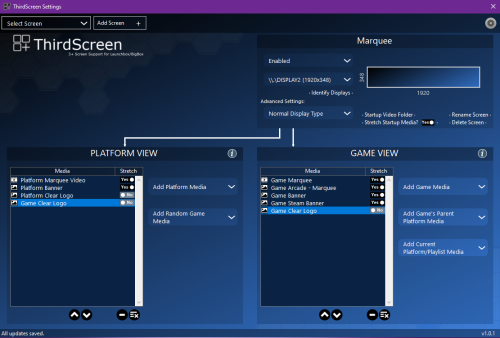 This easily beats the jerryrigged script I was having to run to change toggle DPI settings, reset my graphics card to get them to apply before and after running BigBox. Plus this does everything even better. I am searching desperately how to donate as this is handsdown the best LaunchBox plugin. If you are using even one marquee, this will instantly fix all of your issues and not require coding nonsense. By the way, below is the nasty PowerShell script I wrote years ago to fix my marquee woes. Hat's off to the developer! # VARIABLES # You can find the registry setting we are targetting in regedit under HKCU\Control Panel\Desktop\PerMonitorSettings # # - This is not in the registry until you have run it at least once already. # - It defines which monitor you are targeting if there is more than one. # - In versions of Windows prior to Windows 10, it appears that the DPI value is stored in HKCU:\Control Panel\Desktop with the value LogPixels. # - Versions of Windows prior to Windows 10 also require a restart. # - There is useful information here: https://www.reddit.com/r/Batch/comments/4665jq/how_to_change_windows_10_display_scaling_via/d03gt72/ # # To find the MonitorID for your primary display, go to Device Manager and under Monitors, right click the Monitor You Want to Change the DPI on. # Select "Properties" under the dropdown menu. Go the Details tab and under properties, select "Hardware Ids". Note the 7 digit alphanumeric code (e.g. # ROW00000). You will need this later on. # Now run regedit and go to HKEY_LOCAL_MACHINE\SYSTEM\CurrentControlSet\Control\GraphicsDrivers\ScaleFactors. Under this section, find the key/folder # that begins with the same 7-digit alphanumeric code you noted earlier. Copy that entire MonitorID and replace it with the one below. $MonitorIDA = "SGT02800_32_07E2_09^AD0D99D1376DEF62E0BBC3A8321C7737" $MonitorIDB = "ROW00000_19_07E0_E1^9AEC406B952C6F1BB1AD2DC261E55418" # Location on your computer of BigBox.exe $EXEPath = "C:\LaunchBox\Core\BigBox.exe" # Restart the video driver function Restart-VideoDriver { param ( [Parameter(Mandatory)][string]$GPUID ) # Enables then disables GPU driver. Get-PnpDevice -FriendlyName $GPUID | Disable-PnpDevice -Confirm:$False Get-PnpDevice -FriendlyName $GPUID | Enable-PnpDevice -Confirm:$False } # Set the DPI scaling function Set-DPIScaling { param ( [Parameter(Mandatory)][string]$MonitorID, [Parameter(Mandatory)][int]$ScalingLevel ) <# Scaling levels: These change dependent on the screen. My Surface Pro 7's built-in screen has its default or recommended scaling level as 200%. 0 is the default or recommended setting. Whole number increments correspond with 25% increases in scaling level. In the case of my Surface, this would be some of the scaling levels: -4 = 100% -3 = 125% -2 = 150% -1 = 175% 0 = 200% 1 = 225% 2 = 250% 3 = 275% 4 = 300% This article has interesting information on DPI: https://docs.microsoft.com/en-us/previous-versions/windows/it-pro/windows-8.1-and-8/dn528846(v=win.10)#Anchor_3 For a standard monitor with a default scaling factor of 100%, this would be some of the scaling levels: 0 = 100% 1 = 125% 2 = 150% 3 = 175% 4 = 200% #> Set-ItemProperty -Path "HKCU:Control Panel\Desktop\PerMonitorSettings\$MonitorID" -Name "DpiValue" -Value $ScalingLevel } function Get-VideoCard { $videoDevices = Get-PnpDevice -Class Display if ($videoDevices.Count -gt 1) { # From my testing, additional GPU's show up first in the object return $videoDevices[1].Name } else { return $videoDevices.Name } } function Main { $GPUID = Get-VideoCard # Set scaling to 100%. Set-DPIScaling -MonitorID $MonitorIDA -ScalingLevel -2 Set-DPIScaling -MonitorID $MonitorIDB -ScalingLevel 0 # Restart device driver. Restart-VideoDriver -GPUID $GPUID # Added wait # Start-Sleep -Seconds 1 # Start-Sleep -Seconds 4 sleep -seconds 5 # Set scaling back to 250% and 175%. Set-DPIScaling -MonitorID $MonitorIDA -ScalingLevel 4 Set-DPIScaling -MonitorID $MonitorIDB -ScalingLevel 1 # Restart device driver. Restart-VideoDriver -GPUID $GPUID # Added wait # Start-Sleep -Seconds 1 # Start-Sleep -Seconds 4 sleep -seconds 5 # Set scaling to 100%. Set-DPIScaling -MonitorID $MonitorIDA -ScalingLevel -2 Set-DPIScaling -MonitorID $MonitorIDB -ScalingLevel 0 # Restart device driver. Restart-VideoDriver -GPUID $GPUID # Added wait # Start-Sleep -Seconds 1 # Start-Sleep -Seconds 4 sleep -seconds 5 # Launch game. Start-Process -FilePath $EXEPath -ArgumentList "oldschool" -Wait # Wait for game to exit. while(Get-Process -Name "BigBox" -ErrorAction SilentlyContinue) { Start-Sleep -Seconds 1 } # Set scaling back to 250% and 175%. Set-DPIScaling -MonitorID $MonitorIDA -ScalingLevel 4 Set-DPIScaling -MonitorID $MonitorIDB -ScalingLevel 1 # Restart device driver. Restart-VideoDriver -GPUID $GPUID } Main
- 219 comments
-
- 1
-

-
- third screen
- platform marquee videos
- (and 3 more)
-
 Showroom professional grade. No other theme including these curated videos in any launcher to date comes close.
 -
Game on Launchbox Database Not Showing Up on Search
Hifihedgehog replied to Hifihedgehog's topic in Troubleshooting
Thanks! Rebuilding my newly reinstalled LaunchBox library has been a process (been out of the LB loop for a year-plus) and I have been having it cooking for the last couple days pulling down media. This is the magic solution! Thank you! -
I am attempting to link the game "Ride" for Xbox 360 to my game library from the database. https://gamesdb.launchbox-app.com/games/details/429916-ride However, when I search for it within Launchbox itself, I see no listing for it: I manually entered the information but there is everything but "Ride" listed in the results. This is probably the only case I've ever seen this kind of orphan record. Is there a way to force it to take or backdoor it in?
-
Unable to login to Emumovies with Launchbox
Hifihedgehog replied to midas's topic in Troubleshooting
Happening to me again today. I also tried resetting my password to just alphanumeric and that didn't fix the issue. -
Sorry for the necro but someone made a TV Guardian like filter for games recently. I use their other tool (Cinema Guard) and ran across it on their blog. I cannot speak to it since I do not play games with strong language. However, if you have a game with profanity that you want to make more presentable for your children, this tool sounds like it should do the trick. The way it works is it uses OCR on a game's subtitles to remove and mute the profanity in real-time. C# Software: Game Guard (csharpsoftwareza.blogspot.com)
-
Bigbox Freezing up when in goes in out and focus
Hifihedgehog replied to Hades's topic in Troubleshooting
I am noticing this behavior as well on the latest release on my arcade cabinet build and my ROG Ally *without* any ASUS bloatware installed. -
I just noticed today that there is some sort of hard limit in place preventing copying and pasting a list larger than about 1600 (messing with filters) or so of games. So if you are collector completionist like and want export an entire list of your 1000s of games to Excel, bear this in mind. @Jason Carr, is this something that I should submit in a bug report? I can confidently say that Windows at least can easily hold an export in the 10,000's in the clipboard as I copy and paste from SQL Server with tables much taller and wider in my day job.
-
Did you also make sure that you have the displays lined up so they are left to right and their top edges align like so? Outside of ensuring 100% scaling on both displays, this is another step that is also commonly missed.
-
This. The tool converts to the compression format that WUA uses. However, it does not know how to organize the files appropriately nor does it understand how to batch through the files either or most importantly identify one game from another for that matter. Ultimately, bulk support will need to be done upstream in Cemu since that is only what has the necessary bits for the archive file organization and metadata. ZArchive exists because they invented a new compression format that is insanely fast at finding and decompressing a single file at a moment's notice from a pool of tens of thousands of files (hence the billed support for "random-access reads"). It is able to instantaneously decompress a file without having to decompress the entire archive contents, making it much faster than traditional methods like .ZIP or .RAR given the high file counts of some games. Therefore, it is purpose built for The Legend of Zelda: Breath of the Wild that is a game with tens of thousands of files that can't easily live and run out of a slowly decompressed zip file.
-
I would insert the term: with all due respect, just no. Stop while you’re ahead of yourself in that train of thought. Besides the colossal amount of overhead of migrating and reimagining a codebase on Linux knowing that some things just won’t port over nicely or at all (for example, the Windows BigBox theming system), pure and simple economics is the driving factor here. Even if the Steam Deck is relatively popular in the eyes of some users here, perspective is helpful. Valve informs us that Linux accounts for just over 1% of Steam gamers compared with Windows’s over 96% and that closely reflects the status of Linux as a gaming platform. Further, EmuDeck, RetroDeck and other tools have fast become the go-to choices among Steam Deck users, meaning there is entrenchment and acceptance of these free offerings that make that market more resistive to purchasing a paid product. Conclusion? Maybe when Steam Deck 2 or 3 comes out and the Linux has miraculously cracked 10% of the PC gaming market will it then be worthwhile for them to explore a Linux version in more depth with a faster development that more closely mirrors the cadence of their Windows and Android products. As it is though, Linux is far less lucrative than Windows or Android and therefore will stay on the back burner for the foreseeable future. If I were to peg a price tag on this pipedream, provided you could prove they’re were enough people interested in purchasing at that point, I would wager a price of at least double if not triple for yearly and lifetime licenses would be the absolute minimum price given the Herculean amount of work involved and significantly smaller user base. So if the price paid for the time and effort and if waiting five years more until Steam Deck 2 or 3 when maybe, just maybe Linux becomes more mainstream, then I will believe that Linux is worth us developing for. But until then, it is simply not realistic to push so much for Linux support.
-
For what it is worth, I voted for this feature as well just now. It is surprising GIF support isn’t there yet when @Jason Carr himself expressed interest in it about seven years ago in conversation of this BitBucket issue/feature request. At this point, though, as @Lordmonkus rightly brought up, implementing this feature might require significant refactoring to accommodate it depending on how the codebase is currently structured. I do think it is quite doable though as .NET Core does have support for GIF rendering.




