

trueanimus
-
Posts
79 -
Joined
-
Last visited
Content Type
Profiles
Forums
Articles
Downloads
Gallery
Blogs
Everything posted by trueanimus
-

Trying to add Gakken Compact Vision TV Boy
trueanimus replied to trueanimus's topic in Troubleshooting
Nevermind... That worked... Found a typo i made in the line... had a , instead of a ; lolz Thank you so much 😃 -
Trying to add Gakken Compact Vision TV Boy
trueanimus replied to trueanimus's topic in Troubleshooting
Making progress i think... still doesnt work yet though however, it pops up a mame command window and says something about important files missing, the game cannot be run. i have the merged set (0.280 build) is there a ctvboy bios?? i have the bios files in the main roms folder and in the bios folder. -
Does anyone know what the proper settings are for the Gakken Compact Vision TV Boy in mame? i keep seeing – MAME ctvboy mrbomb But i cant figure out for the life of me how or where to put the commands in to get it to work since i have never used roms in the SL before. All 6 of the games are in my roms folder in their own ctvboy folder and came as part the 0.280 set that i downloaded... (merged set btw even though all i see is the one file inside the zip) i also noticed though that the importer doesnt seem to even see the SL roms... is this a bug or is this intentional?
-
After a few weeks of EmuMovies working and then not, i think i have just completely given up on them. When i import now, i just turn off emumovies downloads because of two reasons. 1. They almost NEVER have anything on any games and if they do... (see #2) 2. The download starts fine and after a file or two i start getting error after error about file not found. On an import of 670 games, i got 620 problem reports of "Image not found" from launchbox pointing to emumovies.com Anyone else having problems with it or is it just me?
-
Big Box Crashing in Version 13.23? Here’s What You Need to Know
trueanimus replied to AstroBob's topic in News and Updates
BTW Update for the Authors... Had another crash last night in windows 10 while loading a dosbox game from launchbox... got the BSoD and something about a corrupted kernal (may have been due to DosBox) but i thought i should mention it -
had a free moment... heres the post if you havent already seen it
-
Humm.. well you can always roll back to an earlier version of launchbox and wait for a fix i guess, just make sure you backup your data folder. You could also try backing up your data folder and doing a clean install on a different drive (leave your main install alone for safe keeping) and then just moving the data folder over (as you may have a corrupted a file) and see if that helps, you would just have to redownload all your images again basically.
-
is there any way to run gamewave disks/roms i see you have it listed but i didint think there was an emulator for those yet
-
yeah if you dropped everything into one folder... whew what a mess that would be. You can download the sets again (easy as crap to find anywhere on the internet*archive *cough* and leave them in thier respective folders and then just import into launchbox and tell launchbox to leave the roms where they are. It should import and download all the artwork for your games etc... The ONLY thing that is really a pain to setup are emulators that use bat files or a few that use /txt files.... and you have to do that outside of launchbox...but after that, most are just drag and drop though. be sure to check youtube for instructional videos which to me starting out, were an invaluable resource... especially for odd systems like Vtech and a lot of the computer setups. Everyone learns as they go along and sounds like you learned a good lesson in folder structure 😃
-
Its a known issue and there is a thread on here about it on here (somewhere) I too was having the issue where launchbox would work fine and i couldnt get bigbox to even load... freaked me out because i have worked for 2 years on getting things set up like i wanted and i thought i lost it all lol... Anyway... the problem seems to be coming the swap over from VLC player to windows media player... and is especially bad on RTX 30 series video cards (im running a RTX 3060 card) I actually hope they swap back to VLC as i was having no issues before that (like you said with the rollback) Installing the new beta 1 version fixed the launch problem for bigbox for me, but now my startup videos dont work and some of my game videos... Hoping for a fix very soon.
-
i LOVE LdPlayer 9 So much faster and more compatable than bluestacks or anything i have found.
-
Happened to me also because im running the RTX 3060 card... install beta version which fixes the bigbox launch, but for me startup videos and some game videos dont work now. Seems like the switch to Windows media player killed things for a lot of people, especially if your running an RTX 30 series video card. Anywho... its a known issue and lots of people are stuck on the beta 1 version waiting for a fix that will hopefully come soon... or a reversion back to vlc player
-
Big Box Crashing in Version 13.23? Here’s What You Need to Know
trueanimus replied to AstroBob's topic in News and Updates
same was happening to me but im running an RTX 3060 card and tried the new beta, fixed the issue of launching bigbox, but thestartup videos no longer play. -
look on this forum for the PS5 interface theme
-
tried a reinstall over the old one and same problem here is the log Debug 2025-08-26 06-41-34 AM.log
-
i also tried tp data restore from earlier... didnt work.
-
debug log here under message... Like titles says, i can load launchbox fine but bigbox wont load... just the logo and it sits there. Deleted themes and startup videos nothing worked.. ideas? Giving me something about no login token??(i think thats for steam but isnt the problem i dont think.... 2025-08-26 01:59:56 AM DataManager.SaveInternal started. 2025-08-26 01:59:56 AM Saving InputBindings.xml... 2025-08-26 01:59:56 AM Saving GameControllers.xml... 2025-08-26 01:59:56 AM Saving ListCache.xml... 2025-08-26 01:59:56 AM Saving Settings.xml... 2025-08-26 01:59:57 AM DataManager.SaveInternal completed successfully. 2025-08-26 02:00:00 AM FIRST CHANCE EXCEPTION: Cannot locate resource 'views/launchbox_theme_folder/fonts/redhatdisplay-black.ttf'. at MS.Internal.AppModel.ResourcePart.GetStreamCore(FileMode mode, FileAccess access) 2025-08-26 02:00:00 AM FIRST CHANCE EXCEPTION: Response status code does not indicate success: 403 (Forbidden). at System.Net.Http.HttpResponseMessage.EnsureSuccessStatusCode() 2025-08-26 02:00:00 AM FIRST CHANCE EXCEPTION: Response status code does not indicate success: 403 (Forbidden). at System.Net.Http.HttpResponseMessage.EnsureSuccessStatusCode() at System.Net.Http.HttpClient.GetStreamAsyncCore(HttpRequestMessage request, CancellationToken cancellationToken) 2025-08-26 02:00:00 AM FIRST CHANCE EXCEPTION: Response status code does not indicate success: 403 (Forbidden). at System.Net.Http.HttpResponseMessage.EnsureSuccessStatusCode() at System.Net.Http.HttpClient.GetStreamAsyncCore(HttpRequestMessage request, CancellationToken cancellationToken) at System.Runtime.ExceptionServices.ExceptionDispatchInfo.Throw() 2025-08-26 02:00:00 AM FIRST CHANCE EXCEPTION: Response status code does not indicate success: 403 (Forbidden). at System.Net.Http.HttpResponseMessage.EnsureSuccessStatusCode() at System.Net.Http.HttpClient.GetStreamAsyncCore(HttpRequestMessage request, CancellationToken cancellationToken) at System.Xml.XmlDownloadManager.GetNonFileStreamAsync(Uri uri, ICredentials credentials, IWebProxy proxy) at System.Runtime.ExceptionServices.ExceptionDispatchInfo.Throw() 2025-08-26 02:00:00 AM FIRST CHANCE EXCEPTION: Response status code does not indicate success: 403 (Forbidden). at System.Net.Http.HttpResponseMessage.EnsureSuccessStatusCode() at System.Net.Http.HttpClient.GetStreamAsyncCore(HttpRequestMessage request, CancellationToken cancellationToken) at System.Xml.XmlDownloadManager.GetNonFileStreamAsync(Uri uri, ICredentials credentials, IWebProxy proxy) at System.Xml.XmlDownloadManager.GetStream(Uri uri, ICredentials credentials, IWebProxy proxy) at System.Xml.XmlTextReaderImpl.OpenUrl() 2025-08-26 02:00:01 AM WARNING: Attempted to cloud sync but user doesn't have login token Debug 2025-08-26 01-59-45 AM.log
-
Jesus hippy hoola and i thought i was a little anal about trying to add stuff to my bigbox.... we are not worthy we are not worthy /bows all i can say is... wow dude.. amazing by the way man, how many games do you have and how large is your storage... im sitting at 12 drives, and around 60 TB storage with 93.5k games atm.... but still have a ton to add.
- 228 replies
-
- 1
-

-
- collections
- mcfly
- (and 24 more)
-
My wife had this made for me to put into my game room im making. My name is Gil incase your wondering lol.... I think this is one of the sweetest things ever!

-
Btw.... i LOVE This theme for Bigbox... Its so kick ass. Very well laid out and i love everything about it. the videos work great and remember, you can set a theme for each section so for some odd sections like Game Guides and my Jukebox section, i use this as main and then once inside, i have it set to look like a bookcase etc with wood panels =).
-
Your monitor is prob 4k and the PC is doing 1080P I have 2 4k televisions on my cabinet system and even though i have them set as 1080P on the PC, the video card i use (RTX 3070) they do this. What i had to do was set the Nvidia control panel to see them as 1080 (Not because i dont like 4k but because as 1080 it just looks better on my system and it also saves on CPU and GPU cycles). THEN even set at 1080p the card overscans so i have to resize them slightly so the screen arent off the edge of the screen. So.. basically set your monitor to 1080P 60hz in your control app, then also check to see if you have overscan. If so, resize slightly and it should fit perfect. Hope this helps. I found this the hard way because using this system as my cabinet i was forever trying to get Future pinball and VPX to fit correctly on 2 screens with an android tablet (motorola 10") as the DMD for scores. Even though you set the rez as 1080P in windows... your Nvidia control panel sees them as a 4k screen. So sometimes they will fit then the next time i would open the program things would be thrown all over the place lol. I included a few shots of my setup (which im still building) so you can see how it looks when you get it set even at 1080P
-
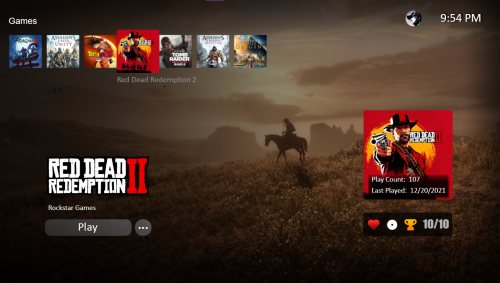 Great theme. Clean crisp and very well implemented. Love the resent lists and the transitions as well as the way the theme videos are incorporated into the main categories.
 -
Odd Problem with playlists and platforms
trueanimus replied to trueanimus's topic in Troubleshooting
I finally got it to work... i dont really know what i did but its finally working. I dont have onefile or any sync running on the arcade btw. i think it may have been that i was naming the arcade gun section arcade... and theres a platform named that .... maybe...? anyway.. i named the arcade light gun section arcade gun, and it worked and saved the playlists without deleting. I will report if it happens again or disappears again. -
Odd Problem with playlists and platforms
trueanimus replied to trueanimus's topic in Troubleshooting
Also i have restarted the pc and also restarted launchbox thinking that would solve it, but nope.







