

sundogak
-
Posts
1,442 -
Joined
-
Last visited
-
Days Won
8
Content Type
Profiles
Forums
Articles
Downloads
Gallery
Blogs
Posts posted by sundogak
-
-
Well, one item is you are using an old beta. Current version is 12.6. So would update at least to the 11.13 release.
-
13 hours ago, fyrenthenimar said:
Hello,
Could you make one logo for :
- Disgaea Collection
- Suikoden Collection
- Tales of Collection
Thanks .
Regards
Here you go:

-
If you are using it for that limited use case, then you might look at the smaller bay units (2 bay or 4 bay). Particularly if using in "JBOD" (just a bunch of disks) mode and not using RAID you will not lose any capacity due to RAID redundancy. I wouldn't recommend doing non-RAID on anything +4 disks and larger unless you REALLY don't care about your time and data. Even if you have data or access to replacement, there is typically the time factor of getting it into use form/tagging, etc as well as physical time to copy back/download.
If you have an 8-disk bay unit in non-RAID volume across all drives, and any of the 8 drives has corrupt data or dies, you lose data across entire volume. I have had hard drives die, but never any issues with RAID itself, particularly if using off the shelf RAID setup like QNAP or Synology. Now if you are keeping off NAS off most times then drive wear and tear will be less, so maybe for your use case not a big deal. Just something to consider.
Also, if intention is to use WAN access, make sure you got permissions/NAS firewall set correctly to avoid idiots who have nothing else better to do than mess with people's stuff.
-
 1
1
-
-
@Runadumb I just hit this recently since converting some iso's to CHD. The standard 7zip install doesn't include the standalone 7za.exe. However, if you installed 7zip through Windows installer you can simply just change the script to:
"C:\Program Files\7-Zip\7z.exe" x -y -o%new_dir% "%%f"
or you can copy the 7z.exe to local folder along with chdman.exe and batch and will work as well.
Also "rem" out this line if you don't want your zips to be deleted since in my case I wanted my source 7z files to remain.
rem del /q /s "%%f"
-
Correct, the 1821+ is the newer version of the 8-bay series (which is the DS18## designation) that came out this year. The 1821 has a faster CPU versus the 1819+. I would always go with as many bays as you can afford initially even if you don't plan on filling. The 8-bay seems to be sweet spot versus the pricier 12-bay.
The most common way to get files to other clients is you setup a shared folder that is then visible on your home network. Then you can map that folder to your clients (Apple, Linux, Microsoft). For client machines, you then see the NAS like another computer on the network and then under that you will see folders that are shared. To keep things consistent, I map all my shares on the NAS consistently across all clients. You can set permissions to the folders to however way you want (everyone, particular users or groups, read only, etc). For home setup, I keep simple and block all WAN access (i.e., outside home net).
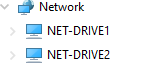
What Windows sees on home my network with the 1819 and 1817 units (you can name whatever want):
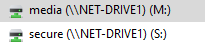
After you map a drive in Windows to folder on NAS (you can make any drive letter that is available):
You can also setup as an iSCSI drive to make the client think the folder/drive on the NAS is actually just like a connected physical drive, but I have never messed with all that so cannot share much info there. Shared folders like above work with any emulation I have dealt with as well as works okay with SYMLINKS on Windows. However, there are some modern PC game clients, namely BattleNet and EA/Origin, that will refuse to run on a shared NAS folder "because it causes issues" per those game publishers (which is baloney). That would be case where iSCSI might work, but again haven't tried (I just keep PC games local...plus modern games larger/need fast access).
Drive wise you should make sure to stick with actual NAS drives particularly if in the 8-bay realm or larger. These things will be running 24/7. Seagate IronWolf, Seagate EXOS (enterprise, cheaper but noisier), and WD Reds. I have used all at one point or another (can intermix) but mostly using Seagate since WD seems to be consistently pricier. The Reds seem to be the quietest with the Seagate's you will hear a lot of "drive heads moving around" if you have the NAS on your desk. Depends on your sensitivity to those things. Also, RAID can "feel" like a backup system, but it isn't. It is simply drive redundancy where if a drive dies the whole NAS doesn't lose data. The key is you have to swap out the faulty one with a new one and with a large multi-TB partition it can take DAYS to rebuild. While it is rebuilding if you lose another drive (or two depending on how setup if use SHR), then you lose all data. Having a spare HD of same size as your installed sets helps (they tend to die when everyone is out of stock...or high prices due to whatever supply chain issue). I am also religious about if the drive testing starts (does on schedule you set) showing any drive errors, I swap it out. Even if you have backups, just replacing everything can take a long time to replace TBs of data.
If go Synology, you will also need to decide on RAID type since you are fixed with that decision unless you nuke the whole storage pool (basically, wipe and reformat). You can use normal RAID, or Synology's "flavor" which has some advantages. I have mine all set to Synology Hybrid Raid (SHR) which is basically RAID 5 but allows swapping out larger drives and partition will be resized (over multiple days).
Anyway, all seems daunting at first but once you get the hang of it, they are cool tools and handy for storage as well as useful for various Apps including running Docker.
Edit: I should also mention you can "roll your own" NAS with things like UnRaid and FreeNAS. I looked into them way back (sure they have matured) and can get a cheaper/more flexible NAS versus QNAP or Synology. Although comfortable building that sort of stuff, I just wanted something that would "work" with minimal hassle. The tradeoff is pricier versus home brew relative to feature set and you are locked into the Synology and QNAP way of things which are modified Linux kernels.
-
Having the ROMs/Images on NAS is usually not an issue, particularly anything non-CD based. The time needed to pull a relatively small size ROM file for cart based systems isn't a big issue and the lag would be at the beginning of the game so once running wouldn't see any difference. The bottleneck will be images and media caching if that is not done locally. If you run LB locally then won't have issues there. One thing to think about is how to synchronize the local LB setups as well as emulators on the local setups (if at all). Something like FreeFileSync works well to sync media to the other local installs.
Also, for CD based emulation (or MAME CHDs), those files are much larger so if you have slow network or doing wireless that can lag on retrieving parts and pieces. So, a key piece is what your network speed is as well as what type of emulation you are wanting to do. There are a couple threads here with people's experience and for some it isn't a big deal with lag. For me, when first tried it, the lag was noticeable on a wireless setup (several years ago generation wise on wireless).
However, I haven't been running games off the Synology and use it strictly as a "master file backup". I then use FreeFileSync to sync the 3 different setups from the master: 1) kids - stripped down simple games 2)TV Room - subset of games good to play on large screen 3) main PC with full setup. For setups 1 and 2, rarely change them so those are pretty static and size wise the installs are small since not the whole rom set. I did this originally since the place we were living in at the time was all wireless to the clients and I just couldn't get good consistent speed to the NAS (upstairs..far side of house). So, I just did local installs inclusive of any games/ROMs. My main PC and the NAS have full sets of each because I had too much time invested to lose my setup (i.e., have a backup..Synology has a file sync tool to do this as well). This new place has wiring to each room and can mostly get 2.5 Gb speeds to clients as well as have 10 Gb cards on the Synology's. I did some test, and works well off the Synology only, but just haven't bothered messing with the all local setups since "they work".
As for the NAS type/brand, almost any of the major ones will work fine so really comes down to price/size of NAS you want. In past used ReadyNAS and currently use Synology 1819+ and an older 1817+. QNAP also makes reputable systems. The bottleneck on the NAS with 10 Gb network cards becomes the drives, even at 7200 rpm (unless $$ and use SSDs).
So with all that, any slowdowns you see will not be limited by the NAS but will be your home network speed to get to the NAS data. Flakey wireless? Then likely not going to be happy with anything CD based. Cart based should work well over most any setups assuming you locally install the media, emulators, and LB. Fast network/hard line at 2.5 Gb to 10 Gb range, then wouldn't be much different in performance to USB external drive.
-
1
-
-
Within LB, go to Tools, Options, Media...then set your Box Front Priorities to however you want as far as media order preference.
-
2 minutes ago, bufaton said:
Thanks @sundogak - somehow didnt run across this post during my google search quest.
You are right, way easier! I had it up and running within 5 minutes. One question, I noticed the provided txt file list of games was a collection of 70. It appears the full collection of Arcade Pinball is 100 tables. I remember reading somewhere that not all tables were able to be opened directly via script such as this. Do you know if thats the case for the remaining 30 that I have that are not included in your txt file zip? I attempted to make additional txt files to point to for the other 30 games but they would not launch via the same step process. Didn't know if these were left out intentionally or if maybe those were the additional tables added since you made the post.
Any insight into getting the other 30 tables working or if its even possible? Also, I'm adding Arcade Pinball on my main horizontal cab as well as on my vertical pinball cab. The orientation for my vertical pinball cab is horizontal, is there a way that you know of to flip the table orientation itself once launched (and not flip the acutal windows screen orientation)?
Yeah, I joined the TPA party after they had lost some of their licenses. So the 70 tables in that text file were the ones you could still currently get within Steam via purchase and all I had in my collection. The table names are the same between TPACamera and the other TPA launcher. Attached are a few more tables that had in my notes that are no longer available (like Williams tables). tpafreecammod_table_list.txt So would try those and see if works.
For the screen rotation, that you may be stuck using TPACameraMod since it has ability to rotate whereas there was never an official (free) cabinet setup for TPA. I am still on desktop with BG on second screen so haven't had to deal with that on TPA at this point so not much help there. That is the one disadvantage to the TPALauncher, it doesn't do anything else.
-
9 hours ago, Bigb_ch said:
I am trying to set up BigBox for the first time and decided to use this great theme. The playlist looks great, but as soon as I get into the platform or category overview, it looks like the screenshot attached.
I read that it might work with renaming files. But where do I see which name is the correct one?
Thanks.
Looks like you haven't switched the view from text view. Press the "1" key on keyboard (or go into BB Options and map keyboard to controller button to change view). Then should give you option to change views.
-
 1
1
-
-
On 12/6/2021 at 10:32 PM, bufaton said:
Not really finding much details to troubleshoot other than this post so following-up with some troubleshooting requests. Cant seem to get the tables to auto-load from Launchbox, it just goes straight into the Arcade Pinball application. I followed the steps in the PDF included with the TPA Free Cam MOD but I must be missing a step. I made sure that the ArcadePinball11.exe is targeted in the settings.ini file included in the TPA Free Cam MOD folder and have the Arcade Pinball Emulator within Launchbox pointed to the TPA exe and the default command line parameters set to -table. Remove extension file and folder path is also checked (literally mirrored the screen shots above). Anything else I can try to troubleshoot? I've went in and adjusted every setting I could think of, multiple times with no luck. One direct question, for the actual table ROM file path, does it matter what file I point to? I tried multiple files and even tried creating a .txt file to point to with the same name as the table (as mentioned above) with no luck.
Any tips or pointers would be great. This is going in my vertical pinball cab so would love to get it to go straight to the tables like the other pinball emulators. Thanks!
See this link and my August 3 post for alternative if just using TPA for launching into table versus needing the camera feature.
-
@vaderagEcho Headrush69's comments.
Future Pinball was what I setup first, mostly because at the time I just couldn't get my head wrapped around Visual Pinball complexity with separate backglass, DMD, and many needing PinMAME (most VP tables need roms). A "good" FP table has those things all built in. I also much prefer FP for desktop use with better camera view changing abilities and true "in-game" backglass view. Visual Pinball has a bunch more layers to get similar results, but if setting up a cabinet it gives a lot of flexibility. SlamT1Lts tables take FP to next level (great sound design, fun to play), but he only does things in FP (although can be mercurial on how/when he makes tables available to DL esp. the newer ones).
On the con side, FP development has been stopped for over 11 years. BAM magic offsets that to a degree but depends on skills of one coder. The VPX application has active open source development (10.7 in beta), including a new generation "Unity" based VPE engine in the works. There are more numerous active table authors for VP and just higher overall activity for VP platform. There is the ever present "this one has better physics" debate but for most casual pinball players, both platforms do the job. Ultimately, like Headrush69, I have both and each have their excellent table examples.
-
1
-
-
11 minutes ago, vaderag said:
Wow, thank you so much! I'll take a good look at this over the weekend (kids permitting) and see what I can get going!
I might have bitten more than I can chew as have a "full set" which I was going to try import, maybe I'll start small tho as you suggest!
No worries. Added a couple screen snaps of my FP main settings.
It actually isn't too bad to setup, but it is definitely not like an Atari 2600 rom set where you import, media all matches, if not download from LB. Done and dusted. It is mostly complicated because of the lack of consistent naming conventions and because you can have a zillion versions of the same table and by different authors.
I would definitely not recommend importing a table "pack" first off (or mentioning table packs at the PB sites). Most I have seen have 20 versions of same table (go with highest version number tend to see fixes for table code) or for FP the physics XMLs are not included. I would step into it first.
-
12 hours ago, vaderag said:
Hi All, I'm just getting into Future Pinball and wondering if anyone has a super n00bs setup guide explaining things?
It seems it's reasonably easy to add to Launchbox now, but is there a simple way/place to get images vids etc? When do I need to use FP Launcher vs Future Pinball.exe? What's a BAM?
I'm looking for a starter guide to everything Future Pinball as well as a how to get into Launchbox...
Thanks!
- Installer: Use this link to install FP and BAM together in one easy installer base. Click on the 2-in-1 button on right.
- BAM: adds additional features and capabilities to FP (FPLoader.exe). The base FP program is no longer supported/developed (closed sourced) so BAM is basically a patch to EXE to add features that cannot be added into main EXE. For any newer table, most require BAM features or table will not run. If you run a cabinet, it also has additional features you will need. BAM also adjusts the ball "physics" which go into later below. Note: if using BAM you will not be able to use LB Pause Screen Feature.
-
LB Emulator Settings: Once you ran the installer, then you can associate Future Pinball tables to the Emulator (FP) by the following commands in LB (ignore comments on "FPLauncher" that was old way to integrate in LB, below is simpler method):
/open %romfile% /play /exitThe emulator in LB should point to the FPLoader.exe if using BAM (not the Future Pinball.exe)
-
Import Tables: To import the FP tables you can use LB import feature and have it import *.fpt (extension for all FP tables, type that into LB window when pointing to root tables folder for import). Do not try to import the FPL and VBS stuff into LB. The FPT file is the main table.
Folders Can Be Used: Note contrary to the many guides (including below) you can place your FPT (tables), FPL (media), and VBS (scripts) into their own folder and it is MUCH easier to keep things organized. Every guide I have seen will tell you the world will stop revolving if you do this but out of the 800 FP tables I have, none have issues. The key is if going folder route that it is one table per folder (and all its parts). It is a confusing mess if you do "the right way" since updates to tables are pain to keep track of all the associated files (FPL particularly). -
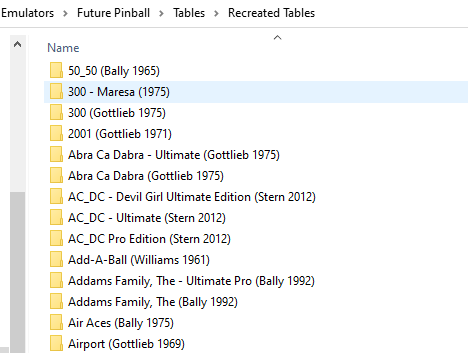
Example with my setup where tables and all associated files in separate folders:
- Guide: TerryRed has a comprehensive weblink video guide located here along with a PDF (link) on setup. It is VERY geared towards cabinets which is much more complex...so don't get overwhelmed (or skip) things from that perspective. I also wouldn't install his settings unless have cabinet (and even then, wouldn't personally until familiar with what it is doing). Most guides at Pinball sites will not even mention LB (Pinup Popper or PinballX are typical ones) so if questions specific to LB then best to ask here.
-
Media: This is a headache. Mostly because there is no standard naming convention for Pinball Media/Tables and for most part LB database is non-existent "use wise" for Pinball because it plunks all the major emulators (Visual Pinball, Future Pinball, FX3) into one big bucket). So, you have to do manually in most cases. You will find some media in LB DB but nothing consistent. In most cases, look for "media packs" such as those in the LB Download Forum or at larger Pinball sites such as Gameex, VPUniverse, and VPForum. Clear logos tend to be the easiest to find since there are numerous packs of logos out there.
This is where naming your table consistently will help immensely within LB. LB will pick up any media either by title or by the "ROM" title (in this case the FPT table file name). If your table name is: Black Knight (Williams 1980).fpt then LB will pick up any media with Black Knight (Williams 1980).png or Black Knight.png (LB ignores anything in brackets). The "mostly" consistent naming standard within Pinball is the table name then the company and year in brackets. But you will find there are NUMEROUS versions, mods, and different author versions of various tables. Media within LB is stored in LaunchBox\Images\Future Pinball folders. Anything you put in those folders such as clear logos that are named the same as your FPT will automatically pick up in LB. Se example below to which many of the non-LB media packs are named:
- Planning Ahead: For media, planning ahead on how you name things is key or you will wind up having to individually match media within LB through the edit game window. Something to be aware: LB renames media to its format if images are manipulated from within LB edit window so Black Knight (Williams 1980).png becomes Black Knight-01.png. Once image linked to table, not a big issue but is a pain if you are sharing your media pack.
-
Physics: BAM also adds key feature to adjust physics. The original FP didn't have great physics (versus Visual Pinball), so part of BAM was to fix this. Originally for FP you had to have different executables that were "hacked" to get different physics, a major pain. With BAM it uses an XML file with all the physics settings to tell Future Pinball how to run. On newer tables the XML code is built into tables (~2019 forward) so you don't have to worry about "physics". On older "simpler" tables (usually EM) they typically had default physics so no issues there. But for the more advanced tables pre-2019 (or so) physics were adjusted. If you get a table where the ball seems "weird" (floats, or heavy like a rock) or the plunger is heavy (ball doesn't shoot) then likely you have a table with specific set of physics and not the correct XML file. So for example this table below requires Physics 2.6 so I copy the 2.6 XML file from the ..\..\BAM\XML folder and rename it the same as the table. Now that table will run with Physics 2.6. I always put a note in my folder. I didn't do that originally but there is NO easy/consistent way to tell. Vpforums.org download info usually indicates the physics type...but it isn't 100% (but good start).
If all sounds too confusing, stick with newer FP tables over last few years since table authors take care of all the messy physics settings within the table. - Start Simple: Lastly, the key is start small. Don't worry about physics, or media just get the emulator up and running and LB happy. Install the 2-in-1 pack. Download one or two tables you think are interesting and within last several years to avoid initially dealing with "physics". Then get that running OUTSIDE LB first and make sure launches the way you want it to. Then try importing one or two tables in LB and see if everything runs correctly. After that, it is fairly straight forward to install new tables in FP and LB as well as getting comfortable with the more complex parts of BAM (e.g., physics, backglass, cabinets).
Edit: A few snaps of my screen settings.
The "Load Image Into Table Editor" needs to be turned off or get all sorts of weird errors.
I have two screens with backglass on second so uncheck that box if only one screen. Checking "Trilinear" will result in tables taking forever to open even on fast machine. Stick to Bilinear. Model Quality is High for most tables. A few oddballs have to be set at "Medium" or won't run.
-
4
-
 1
1
-
If you got an emulator that will run the quiz machines outside LB then LB can launch it if there is command line functionality within the emulator and setup the emulator properly within LB. Other than that, hard to say unless you provide more details on what quiz machines you are looking at (i.e., MAME?).
-
1 hour ago, SLUGIE79 said:
Hi Guys
Im having a similar issue on big box
I dont have the mame platform wheel so i got my hyperspin one which is png file and is called MAME but wont show up?
Also pinball FX 2 and game wheels are named correctly and in the right folder are not showing up on big box ?
any reason why please
Platform images go here if want to do manually:
....LaunchBox\Images\Platforms
or
within LB right-click on platform, select Edit. Then look at right and there is option to select clear logo, etc.
Or
If you want platform media specific to one theme but don't want it for everything you can load images here (these will override anything you do above for that theme):
....\LaunchBox\Themes\*NAME OF YOUR THEME*\Images\Platforms\Clear Logo
Make sure you select Options in BB and refresh platform images to refresh the image cache
-
On 11/25/2021 at 10:13 PM, midas said:
Hi there. Long time user, first time poster.

I'm incredibly thankful for the outstanding community that has submitted all the wonderful images, artwork, screenshots, boxes, etc to make our Launchbox libraries look fantastic!
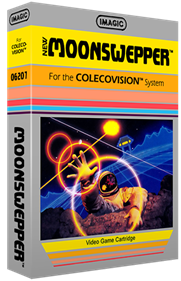
While rebuilding my setup I've noticed that the 3D box art for the Colecovision version of Moonsweeper is incorrectly spelled "Moonswepper." My Photoshop skills are pretty rudimentary, so I was wondering how to go about requesting an update/corrected image for this? It's obviously a minor thing but I thought I'd ask about it. I see this is the same art that's at EmuMovies so I'm unsure of the source (or where to ask a question like this). Thanks again!
The LB database is user updated with media so anyone has ability to submit modifications and updates to LB database if there is an error. The EmuMovies version is this one below and not misspelled but at different angle than the other:
I submitted this one to DB to fix the one that had issues (takes ~24 hours to show up in system assuming approved). For EmuMovies media pulled from their site during scrape, if an issue have to bring up to the EmuMovies mods at their website.
-
On 11/21/2021 at 12:48 PM, pofo14 said:
Do you have any tutorial / instructions you use to compile this version. I have no issue using this one - but was looking to just learn how to do it myself.
After a couple hurdles - I get to the point trying to apply the patch (suppression_0237u3.txt) - and get the following error from the patch command : Perhaps you used the wrong -p or --strip option?
I found the steps here worked when I need to compile a version. Link
-
22 hours ago, Mr. Belding said:
Can someone make, or has someone made a Dungeons & Dragons Collection logo?
Here are a couple of quick ones...
-
1
-
-
10 hours ago, faeran said:
Beta 2 is now out with the following fixes:
- Fixed: The checkboxes for Hide Games Marked Hidden and Hide Games Marked Broken were inverted
- Fixed: Rare occurances of a controller support record duplicating when importing a game or using the Download Metadata and Media Wizard.
@sundogak @CriticalCid Let us know if this solves the duplication issue you were seeing.
Beta 2: Seems to be fixed since not seeing any duplicates now on any of the platforms/controllers that were glitched in Beta 1 or prior.
-
3 minutes ago, gstratto said:
Hi Guys,
is the Epicfail scummvm launcher still available as a download? ( i cant find it)
I tried the dll put in my scummvm folder and i cant access it from anywhere.
seems like the exe program would have been easier.
or is there a tutorial on the dll ?
DLL just goes directly in the plugins folder.
-
-
The controller support bug where it keeps adding entries appears back in 12.3 release. If you select the game entries and go Tools, Download, Update Metadata and Media. Then with Search for Game information checked, no media checked, and then selecting "Yes, Download and replace all existing metadata and media". LB will add an entry into the Controller Support window each time for any selected games. If do again, it will add another.
-
15 hours ago, fyrenthenimar said:
Hello,
Could you make one logo for the
- Game Boy Color Hack
- Nintendo Wii Hack
- Sega 32X Hack
like this?
Thanks Regards.
@fyrenthenimar Here you go:
-
There is plug-in option
-
1
-
1
-








Wrong game found, not “Hell”
in Troubleshooting
Posted
The "Hell" Gottlieb table isn't in the LB DB so there is no metadata to import unless you add it in the DB (any user can add data). In this case, LB guesses incorrectly and picks the Frankenstein table since it has "hell" in the title (Shelley's). Pinball metadata for most part is relatively limited in LB DB versus other platforms for various reasons.