

Sbaby
-
Posts
615 -
Joined
-
Last visited
Content Type
Profiles
Forums
Articles
Downloads
Gallery
Blogs
Everything posted by Sbaby
-
ok when and if you want to share your work I will be happy to try it ☺️
-
Where do you implement it? in native launchbox? Rocket Launcher I find it very cumbersome Instead with my script you just need to remember to create a rom (text file) with the same number you see when you import with launchbox. If you want to implement the executable of each game it must be an automatic thing but otherwise too much trouble for those who have many games
-

Ds4Windows autoprofile doesn't work when used via launchbox
Sbaby replied to Sbaby's topic in Troubleshooting
I solved the problem by creating a new "APPLICATIONS" platform and putting DS4Windows in there as if it were a game. If you start Ds4Windows from BigBox, the automatic profiles start working again. Don't ask me why this happens but this is how it works -
i tweaked the wii script a bit, and de ps3 script, that @JoeViking245 and @Kiinkyfoxx had created very well here https://forums.launchbox-app.com/topic/39811-auto-hotkey-scripts/page/34 and I have created a new Steam launcher autohotkey emulator (SbabySteamLauncher.ahk) 😊 use these tick settings With the TcNo-Acc-Switcher software you have to enter your steam password only the first time, then it keeps them in memory and starts automatically without ever asking for them for each account. You can use this script even if you only have one account, just change it a little changes https://github.com/TcNobo/TcNo-Acc-Switcher This is the script of the emulator ahk file, you will have to enter the 3 data at the beginning, the folder where you installed TcNo-Acc-Switcher and the long numbers of the ids of your steam accounts instead of zeros You can change the buttons too, my buttons 1 and 2 correspond to joy3 and joy4, and for the keyboard they are V and B ;*************************Enter TcNo-Acc-Switcher Parameters************************* TcNoPath = M:\Games\Utility\TcNo-Acc-Switcher TcNoAccount1ID = 00000000000000000 TcNoAccount2ID = 00000000000000000 ;****************************************************************************************************** #NoEnv ; Recommended for performance and compatibility with future AutoHotkey releases. ; #Warn ; Enable warnings to assist with detecting common errors. SendMode Input ; Recommended for new scripts due to its superior speed and reliability. SetWorkingDir %A_ScriptDir% ; Ensures a consistent starting directory. StringSplit, ScriptNameArray, A_ScriptName,. #SingleInstance force Image = Themes\Image_start.png Image2 = Themes\Image_account1.png Image3 = Themes\Image_account2.png Image4 = Themes\Image_exit.png Emulator = "%TcNoPath%\TcNo-Acc-Switcher.exe" Options = Zw%A_ScreenWidth% Zh%A_ScreenHeight% ;Options = Zw1920 Zh1080 SplashImage,1:%Image%,b %Options%,,,MySplash WinMove, MySplash,,0,0, %A_ScreenWidth%, %A_ScreenHeight% WinMinimize, ahk_exe LaunchBox.exe, WinMinimize, ahk_exe LaunchBox.exe, WinMinimize, ahk_exe BigBox.exe, WinMinimize, ahk_exe BigBox.exe, MouseMove, 1920, 1080 #IfWinExist MySplash { 1Joy3:: 2Joy3:: $1:: $v:: { MouseMove, 1920, 1080 SplashImage,2:%Image2%,b %Options%,,,Splash2 WinMove, Splash2,,0,0, %A_ScreenWidth%, %A_ScreenHeight% WinWait, Splash2 SplashImage,1:off SetTimer, Image2, on, RunWait, %Emulator% +s:%TcNoAccount1ID% +open steam://rungameid/%1% Process, Wait, gameoverlayui.exe Process, WaitClose, gameoverlayui.exe Run, "C:\Program Files (x86)\Steam\steam.exe" -shutdown sleep 50 Gosub, Exit } 1Joy4:: 2Joy4:: $2:: $b:: { MouseMove, 1920, 1080 SplashImage,3:%Image3%,b %Options%,,,Splash3 WinMove, Splash3,,0,0, %A_ScreenWidth%, %A_ScreenHeight% WinWait, Splash3 SplashImage, 1:off SetTimer, Image3, on, RunWait, %Emulator% +s:%TcNoAccount2ID% +open steam://rungameid/%1% Process, Wait, gameoverlayui.exe Process, WaitClose, gameoverlayui.exe Run, "C:\Program Files (x86)\Steam\steam.exe" -shutdown sleep 50 Gosub, Exit } 1Joy2:: 2Joy2:: $Esc:: { SplashImage, 1:off Gosub, Exit } } Exit: SplashImage,4:%Image4%,b %Options%,,,Splash4 WinMove, Splash4,,0,0, %A_ScreenWidth%, %A_ScreenHeight% WinWait, Splash4 Process, Wait, steam.exe Process, WaitClose, steam.exe WinActivate, ahk_exe LaunchBox.exe, WinMaximize, ahk_exe LaunchBox.exe, WinActivate, ahk_exe BigBox.exe, WinMaximize, ahk_exe BigBox.exe, ExitApp Image2: Sleep, 9000 SplashImage, 2:off SetTimer, Image2, off, return Image3: Sleep, 9000 SplashImage, 3:off SetTimer, Image3, off, return Image4: Sleep, 5000 SplashImage, 4:off SetTimer, Image4, off, return ;************************************************************************ Inside the startup folder you need to create a Themes folder containing 4 images with the names that you find inside the code, these work as account choice and coverage of the loading and closing of Steam. I quickly created them with https://www.canva.com/ . you can create them as you like best I'm italian 😁 Roms files are simply txt empty files with the name of the steam game id number and without the extension Then create a ROMS folder, or whatever you like, and create many text files inside with the names of the games id. For example for Tekken 7 you will have 389730 (not 389730.txt) empty for each game steam starts at the start of the game and closes at the end by returning to launchbox. What do you think?

-
I use "TcNo-Acc-Switcher" for choosing the steam account to start and it works very fine. Only thing I'd like to quit steam regularly after the game is over. The gameoverlayui process is active for every steam game so I am using this pre boot. With this script steam quits fine when the game is closed this works, with an external ahk file 👇 --- Process, Close, Steam.exe Sleep, 1000 #SingleInstance, Force #Persistent Process, Wait, gameoverlayui.exe Process, WaitClose, gameoverlayui.exe Run, "C:\Program Files (x86)\Steam\steam.exe" -shutdown sleep 50 ExitApp --- My problem is that I don't want to use the bulk applications but I would like it to be the default for every windows game, I tried to insert it in the launchbox script of every windows game but it doesn't work, what am I wrong? this doesn't work, but I would like to insert it right here 👇 Can anyone help me?
-
How to disable Mame Bezel in Launchbox/BigBox?
Sbaby replied to dukey3784's topic in Troubleshooting
It's true ! You are definitely right. I had set 5 seconds for the test and didn't think I would set it to 60 seconds for me too. Now I always use it and it works great. Thanks and very good! Another question: do you think something similar can be done for the ReShadeManager.dll plugin as well? Or maybe I should ask the author? 🤔 -
Hi, i finally solved the problem 😁 There was a forgetfulness when I switched naomi games from using demul to using retroarch / flycast . Some games had custom configurations of launchbox pause resume, for example : ; Go back into fullscreen mode on resume; Demul requires it twice WinActivate, gpu Send! {Enter} Send! {Enter} I took them off and now everything works 🥳
-
How to disable Mame Bezel in Launchbox/BigBox?
Sbaby replied to dukey3784's topic in Troubleshooting
At this point the choice is obligatory for me: For me the options might be: Retroarch Pause via F1: Script pausing (Automatic) Return from pause Retroarch in all modes: Nothing (remains Script Off or pausing) so if one wants to take it back press F12 but at least there is no problem if one accidentally exits the retroarch menu in other ways What do you think ? -
How to disable Mame Bezel in Launchbox/BigBox?
Sbaby replied to dukey3784's topic in Troubleshooting
I had understood even earlier! But I repeat, I have to remember all my life to behave in a certain way with the menu and it cannot be sustainable over time, furthermore as soon as the game goes into the hands of a friend or family it will not work. If they enter, exit and then re-enter the menu in different ways to change a key when they have to select it there will be the script that will choose O Thanks anyway for the effort, I will use it alone as long as I remember -
How to disable Mame Bezel in Launchbox/BigBox?
Sbaby replied to dukey3784's topic in Troubleshooting
Hi 🤗, beautiful it works and these additions are great👍👍👍👏👏😍 However, the problem remains if I resume the game from the menu by pressing ENTER on RESUME GAME instead of pressing F1. This means that the change of bezel stops working, but the worst thing is that if I go back to the menu it starts pressing O inside the menu. You have already explained to me that it is a problem to fix it but I do not understand why if without pressing f1 I minimize retroarch and enter a text file, I script do not press O and it is correct, so somehow the script detects that Retroarch is not active. I ask you if it is not possible to apply the variable on the foreground of the bezel. In practice, if the bezel is in the foreground the scrip works otherwise if the bezel is in the background (so under the menu) the script pauses. I believe that somehow it can be done because it is already in this way, in fact by minimizing retroarch with the script running, it pauses correctly. Or I ask you if I simply have to insert in the script "RetroarchMenuHotkeyA" instead of "RetroarchMenuHotkeyB" ??? Give me an example -
Good idea ! I will keep both choices in mind every time I add arcade pc games 👍
-
I could configure a fake emulator with autohotkey but then how can I tell the exit to close all those ahk windows arcade games that I add to that emulator? maybe Send !{f4} would be enough ??? I have to try EDIT : I tried ! works ! I solved 🥳
-
Because I make children play and things must be simple and above all they must not be hidden Furthermore, children often make key combinations without realizing it and press the exit, while in this way there would be an extra step and it would be better I already have the key combination set up but I'd like that too because it's there for all the other games and I'm used to it now and every time the kids ask me "why doesn't it work?" "Why does the other game work instead?" 😁 And then too many things have to be remembered
-
thanks but if in a year I play that game again how do I remember that the reset corresponds to the exit? I don't understand why this feature is not enabled for windows games. I understand that 90% of them have the option to exit within the game but there should be the choice of being able to enter it
-
how can i do this with a windows game? to be exact it's Haunted Museum 2, it's a windows arcade game that doesn't have the EXIT option. I am aware that I can use a script that sends ALTF4 input but as I made a nice pause screen with the commands and it works, it makes me visualize the gun controls, I would like to use the EXIT pause option from launchbox pause screen. How to do? Single games do not have the lb EXIT section, I could insert some scripts in the lb PAUSE section of the game but which script should activate when pressing the last EXIT GAME option of launchbox?
-
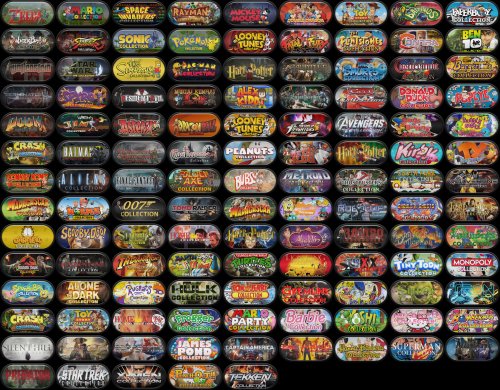 Hey ! they are beautiful, congratulations, I will definitely use them. Could you also do it with punchout and ghost'n goblins? I see you made Ghoul's n Ghost beautiful but I would like to have the name of the first title
 -
How to disable Mame Bezel in Launchbox/BigBox?
Sbaby replied to dukey3784's topic in Troubleshooting
Unfortunately the menu no longer works with this script. Also I think if you want to exit the menu by choosing the option and not by f1 it probably won't work well -
How to disable Mame Bezel in Launchbox/BigBox?
Sbaby replied to dukey3784's topic in Troubleshooting
great @skizzosjt It would be useful if it turned off during the retroarch menu. Is it possible to make it deactivate at the first press of f1 and reactivate at the second press of f1? -
Through your screenshots I understand 😊 I used FadeTitle ahk class obtained with ctrl-q instead I have to insert those contained in TeknoParrot (v1.0.0.361).ini Now I have tried with VT4 and it works Thank you EDIT : The problem is actually that it did not read the ini file because of the names, maybe because I use the launchbox plug in, I had to rename it like this [Virtua Tennis 4] GameProfile=VT4 FadeTitle=A SegaLib Application ahk_class SegaLib Application To [VT4] GameProfile=VT4 FadeTitle=A SegaLib Application ahk_class SegaLib Application anyway works now
-
hi, i just wanted to close this by saying i solved the problem thanks to @skizzosjt 👏 😋 see here:
-
How to disable Mame Bezel in Launchbox/BigBox?
Sbaby replied to dukey3784's topic in Troubleshooting
you are very smart! Thank you very much, it is really useful to me -
thank you very much for your tests. You gave me good directions. I'll keep you updated
-
hi, I tried this module but I still have problems loading, could you kindly tell me how you configure it?
-
How to disable Mame Bezel in Launchbox/BigBox?
Sbaby replied to dukey3784's topic in Troubleshooting
Fantastic ! It works ! 👍😊 it would be useful if it only worked when Retroarch is focus maximized! I would not like it to press "o" when I am in the bigbox pause or for some reason I momentarily minimized the retroarch window. How could this be done? -
Launchbox : 12.14 Retroarch : 1.10.3 Flycast : Core version 7457db8 Games : all those emulated by flycast, you can also try Virtua Tennis 1 and 2 if you want Pause theme : Game Controls FS (Full Screen - Beta) (with png image files) ---------------------------------------------------------------------------------------------------------- config\Flycast\Flycast.opt : reicast_allow_service_buttons = "disabled" reicast_alpha_sorting = "per-triangle (normal)" reicast_analog_stick_deadzone = "15%" reicast_anisotropic_filtering = "4" reicast_auto_skip_frame = "disabled" reicast_boot_to_bios = "disabled" reicast_broadcast = "NTSC" reicast_cable_type = "TV (Composite)" reicast_custom_textures = "disabled" reicast_delay_frame_swapping = "disabled" reicast_detect_vsync_swap_interval = "disabled" reicast_digital_triggers = "disabled" reicast_dump_textures = "disabled" reicast_enable_dsp = "enabled" reicast_enable_purupuru = "enabled" reicast_enable_rttb = "disabled" reicast_fog = "enabled" reicast_force_freeplay = "disabled" reicast_force_wince = "disabled" reicast_frame_skipping = "disabled" reicast_gdrom_fast_loading = "disabled" reicast_hle_bios = "disabled" reicast_internal_resolution = "640x480" reicast_language = "Italian" reicast_lightgun1_crosshair = "disabled" reicast_lightgun2_crosshair = "disabled" reicast_lightgun3_crosshair = "Green" reicast_lightgun4_crosshair = "Blue" reicast_mipmapping = "enabled" reicast_native_depth_interpolation = "disabled" reicast_oit_abuffer_size = "512MB" reicast_oit_layers = "32" reicast_per_content_vmus = "disabled" reicast_pvr2_filtering = "disabled" reicast_region = "Europe" reicast_screen_rotation = "horizontal" reicast_show_lightgun_settings = "disabled" reicast_show_vmu_screen_settings = "disabled" reicast_texture_filtering = "0" reicast_texupscale = "1" reicast_texupscale_max_filtered_texture_size = "256" reicast_threaded_rendering = "enabled" reicast_trigger_deadzone = "0%" reicast_vmu1_pixel_off_color = "DEFAULT_OFF 01" reicast_vmu1_pixel_on_color = "DEFAULT_ON 00" reicast_vmu1_screen_display = "disabled" reicast_vmu1_screen_opacity = "100%" reicast_vmu1_screen_position = "Upper Left" reicast_vmu1_screen_size_mult = "1x" reicast_vmu2_pixel_off_color = "DEFAULT_OFF 01" reicast_vmu2_pixel_on_color = "DEFAULT_ON 00" reicast_vmu2_screen_display = "disabled" reicast_vmu2_screen_opacity = "100%" reicast_vmu2_screen_position = "Upper Left" reicast_vmu2_screen_size_mult = "1x" reicast_vmu3_pixel_off_color = "DEFAULT_OFF 01" reicast_vmu3_pixel_on_color = "DEFAULT_ON 00" reicast_vmu3_screen_display = "disabled" reicast_vmu3_screen_opacity = "100%" reicast_vmu3_screen_position = "Upper Left" reicast_vmu3_screen_size_mult = "1x" reicast_vmu4_pixel_off_color = "DEFAULT_OFF 01" reicast_vmu4_pixel_on_color = "DEFAULT_ON 00" reicast_vmu4_screen_display = "disabled" reicast_vmu4_screen_opacity = "100%" reicast_vmu4_screen_position = "Upper Left" reicast_vmu4_screen_size_mult = "1x" reicast_volume_modifier_enable = "enabled" reicast_widescreen_cheats = "disabled" reicast_widescreen_hack = "disabled"



