
d66dle
-
Posts
66 -
Joined
-
Last visited
-
Days Won
3
Content Type
Profiles
Forums
Articles
Downloads
Gallery
Blogs
Everything posted by d66dle
-
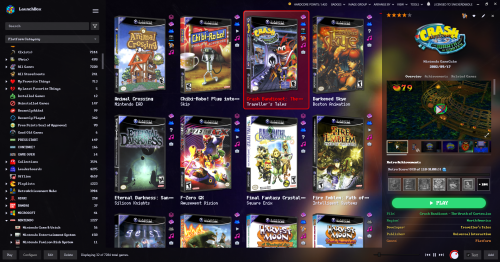
Better Old Default Plus View File TL;DR Notes on Installation - Extract the theme zip (whatever your version of choice) into LBThemes, as the theme folder should be in its own sub-folder. - Install the Windows Command Prompt font, included in the Fonts folder, since this is now embedded into the PLAY button. This is the only required font. Optionally - Install any fonts included or linked in the Fonts (Optional) folder. I'd also recommend any pixel-style fonts available on sites like DaFont and itch.io. - In LB Options, choose a custom background from the Backgrounds (Optional) folder to configure as your Launchbox default Background. (edited in GIMP and upscaled using ChaiNNer) - If using alternate/old files included separately (such as Box views - Alternate Alignments), be sure to rename files accordingly, if applicable, after extracting into the Views folder. ex. BoxContentView_Bottom.xaml >> rename to >> BoxContentView.xaml Description So, very similar to my other Better Old Default... With the following changes: Platform/Game Details: - less margins in details! - new clickable custom links! (Based on Retrofrogg's GameDetailsView with the manual button) - more simplistic subtitle format under clear logo titles - RetroAchievements have been moved above the play button for more convenient viewing. Box View: - now based faeran's Default Plus version with the toggleable text button... NOTE: it may or may not be slightly faster than the old (legacy) box view? And this way it doesn't require specific box spacing with the badges being further to the right. Previous box view is also included separately, if you prefer the old one without the text toggle. - added optional bottom aligned box view NOTE: this apparently only looks as intended with Dynamic Box Sizing turned OFF Changes from 1.0.1 Platform Details: - added last played / most played / random buttons from the default theme - added Default Emulator and Games Beaten/Mastered fields (checkable fields in LB Options) - colors and field order better mirror those of the game details Game Details: - play button now uses Windows Command Prompt font, a little easier to see the text/icons than the default (you may need to install the font to WIndows, included in the Fonts folder) - High Scores and Related Games tabs now use larger font size for easier reading (with the WCP font I use, it was ultra tiny by default) - added Playtime Commitment from the default theme Box View: - added a few more alt box alignment choices in downloads NOTE: Fast Box view is soon to be added to this theme, so box alignment change will be possible with "Configure Layout" Changes from 1.0.2 Box/List Views: - now with fast box/list views! Thanks to Rincewind's recent NeonArcade theme utilizing vertical badges (I simply cannot stand the tiny bottom-sitting horizontal badges, but to each their own), I finally managed to tweak the box and list views so they reasonably fit the oldie default look. I couldn't decide on the list view, whether to keep the background layer completely transparent or not, so I included both versions in a separate file. The "BG" version may be easier to see, depending on your choice of visuals in LB options (comparison images in screenshots). If the fast box view is not to your liking, simply remove or rename "FastBoxesContentView" in the Views folder, and the old "BoxContentView" will be used instead. Known Issues Thus Far: - there seems to be a limit of 6 badges viewable at a time, rather than all active badges being visible. Unsure if that's an LB quirk or something editable in the theme itself. CREDITS: Since this is more of an amalgamation of existing themes, credit is due to those creators, such as @Retrofrogg, @Mr. RetroLust, @Rincewind, and @faeran. ✺◟(•‿•)◞✺ Submitter d66dle Submitted 08/03/2026 Category Custom Themes
-
Version 1.0.3
139 downloads
TL;DR Notes on Installation - Extract the theme zip (whatever your version of choice) into LBThemes, as the theme folder should be in its own sub-folder. Optionally - Install any fonts included or linked in the Fonts (Optional) folder. I'd also recommend any pixel-style fonts available on sites like DaFont and itch.io. - In LB Options, choose a custom background from the Backgrounds (Optional) folder to configure as your Launchbox default Background. (edited in GIMP and upscaled using ChaiNNer) - If using alternate/old files included separately (such as Box views - Alternate Alignments), be sure to rename files accordingly, if applicable, after extracting into the Views folder. ex. BoxContentView_Bottom.xaml >> rename to >> BoxContentView.xaml Description So, very similar to my other Better Old Default... With the following changes: Platform/Game Details: - less margins in details! - new clickable custom links! (Based on Retrofrogg's GameDetailsView with the manual button) - more simplistic subtitle format under clear logo titles - RetroAchievements have been moved above the play button for more convenient viewing. Box View: - now based faeran's Default Plus version with the toggleable text button... NOTE: it may or may not be slightly faster than the old (legacy) box view? And this way it doesn't require specific box spacing with the badges being further to the right. Previous box view is also included separately, if you prefer the old one without the text toggle. - added optional bottom aligned box view NOTE: this apparently only looks as intended with Dynamic Box Sizing turned OFF Changes from 1.0.1 Platform Details: - added last played / most played / random buttons from the default theme - added Default Emulator and Games Beaten/Mastered fields (checkable fields in LB Options) - colors and field order better mirror those of the game details Game Details: - play button now uses whatever your Game Details Large Font is (configurable in LB Options) - High Scores and Related Games tabs now use larger font size for easier reading (with the WCP font I use, it was ultra tiny by default) - added Playtime Commitment from the default theme Box View: - added a few more alt box alignment choices in downloads NOTE: Fast Box view is soon to be added to this theme, so box alignment change will be possible with "Configure Layout" Changes from 1.0.2 Box/List Views: - now with fast box/list views! Thanks to Rincewind's recent NeonArcade theme utilizing vertical badges (I simply cannot stand the tiny bottom-sitting horizontal badges, but to each their own), I finally managed to tweak the box and list views so they reasonably fit the oldie default look. I couldn't decide on the list view, whether to keep the background layer completely transparent or not, so I included both versions in a separate file. The "BG" version may be easier to see, depending on your choice of visuals in LB options (comparison images in screenshots). If the fast box view is not to your liking, simply remove or rename "FastBoxesContentView" in the Views folder, and the old "BoxContentView" will be used instead. Known Issues Thus Far: - there seems to be a limit of 6 badges viewable at a time, rather than all active badges being visible. Unsure if that's an LB quirk or something editable in the theme itself. CREDITS: Since this is more of an amalgamation of existing themes, credit is due to those creators, such as @Retrofrogg, @Mr. RetroLust, @Rincewind, and @faeran. ✺◟(•‿•)◞✺- 1 comment
- 1 review
-
- 8
-

-

-
- lb theme
- launchbox theme
- (and 1 more)
-
Version 1.0.0
34 downloads
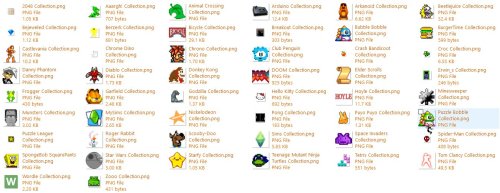
Just some filler collection icons I edited and/or yanked from various sources (mostly Google, sprite websites, and MAME icons). They are not equal in size, but they look similar enough in size in the sidebar... ¯\_(ツ)_/¯ They can be dropped into the Playlist folder of your Platform Icon Media Pack of choice. I put them in Images\Media Packs\Platform Icons\Legacy Conversion Icon Pack\Playlists\-
- 2
-
-
-
- sidebar
- sidebar icons
- (and 4 more)
-
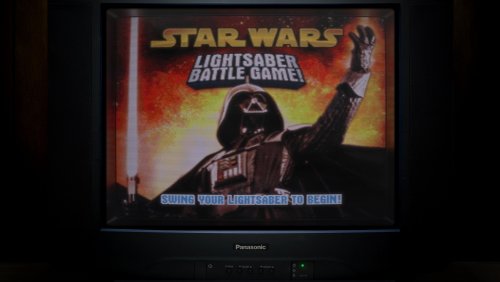
Lights Out! Generic TV Variations for Retroarch View File Some variations of Mr.RetroLust's Panasonic TV Bezel. Mostly some changed backgrounds, added screenless versions, and wider screen versions. I like to use "Bezel_90s_Panasonic_BGWood" for non-arcade MAME Plug n' Play TV Games, as well as other console platforms that I don't have a specific bezel for. CREDITS: Mr.RetroLust for their Retroarch Bezel Series ᐠ( ᐛ )ᐟ Submitter d66dle Submitted 07/30/2026 Category Platform Bezels/Overlays
-
Version 1.0.0
52 downloads
Some variations of Mr.RetroLust's Panasonic TV Bezel. Mostly some changed backgrounds, added screenless versions, and wider screen versions. I like to use "Bezel_90s_Panasonic_BGWood" for non-arcade MAME Plug n' Play TV Games, as well as other console platforms that I don't have a specific bezel for. CREDITS: Mr.RetroLust for their Retroarch Bezel Series ᐠ( ᐛ )ᐟ -
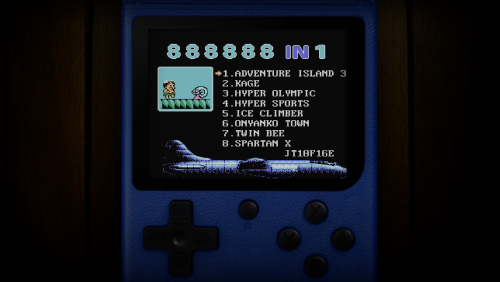
Lights Out! Generic Handheld Overlays for Retroarch View File A generic retro handheld in various colors, which I like to use for some non-arcade MAME games, but it can be used for other handheld platforms that don't have a specific bezel already. GIMP file is included as well. CREDITS: Mr. RetroLust for the Lights Out! aesthetic inspiration, and the dark wooden texture I used for the background. ヽ(⌐■_■)ノ♪♬ Submitter d66dle Submitted 07/30/2026 Category Platform Bezels/Overlays
-
Version 1.0.0
5 downloads
A generic retro handheld in various colors, which I like to use for some non-arcade MAME games, but it can be used for other handheld platforms that don't have a specific bezel already. GIMP file is included as well. CREDITS: Mr. RetroLust for the Lights Out! aesthetic inspiration, and the dark wooden texture I used for the background. ヽ(⌐■_■)ノ♪♬ -
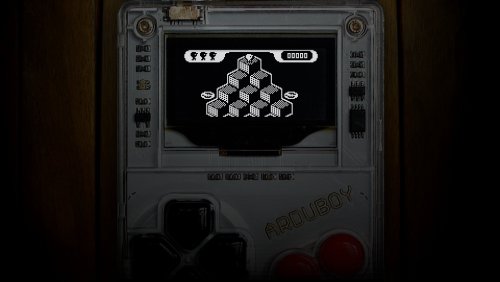
Lights Out! Arduboy Overlays for Retroarch View File Arduboy bezels for retroarch! The main one I use is the image named "Bezel_Arduboy" (size 1280x720) but I also included some alternatives that I experimented with. The extras are a little larger than the original (size 1920x1080). CREDITS: Mr.RetroLust for the Lights Out! aesthetic and the backgrounds I used in most of the images. ᕕ(⌐■_■)ᕗ ♪♬ Submitter d66dle Submitted 07/30/2026 Category Platform Bezels/Overlays
-
Version 1.0.0
2 downloads
Arduboy bezels for retroarch! The main one I use is the image named "Bezel_Arduboy" (size 1280x720) but I also included some alternatives that I experimented with. The extras are a little larger than the original (size 1920x1080). CREDITS: Mr.RetroLust for the Lights Out! aesthetic and the backgrounds I used in most of the images. ᕕ(⌐■_■)ᕗ ♪♬ -
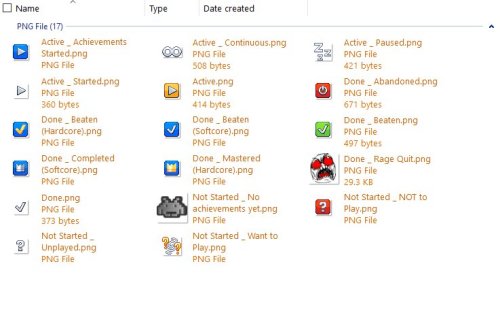
Custom Badge - Old 'Unplayed' + Alt Progress/Achievement Badges View File I made this custom 'Unplayed' badge, because the old one stopped working the way I would like it to after the progress system was added. The current 'Not Started / Unplayed' in the automation tab only allows as low as 1 minute to mark as unplayed. Ideally, I'd like to have 0 minutes as an option, so I can see at a glance what games I've played at least once, even if for less than a minute... So, this is my workaround! Additionally, I added my current progress badge icons, accompanied by the achievement badge icon to match + mame high score icon in the same style. I have customized the progress organization a little different from the default, so refer to the attached screenshots and rename the badge icons as desired, or ignore the extras. Extract and throw them into Images\Media Packs\Overrides\Badges\ to use them on top of your badge pack of choice. CREDITS: to the Generic Icons pack by Reffpixels, which I used/edited/recolored for my personal use. Also, to whoever the heck made these (shown below), as I've since long lost the source of them... 乁( ◔ ౪◔)ㄏ Submitter d66dle Submitted 06/25/2026 Category Custom Badges
-
Version 1.0.0
22 downloads
I made this custom 'Unplayed' badge, because the old one stopped working the way I would like it to after the progress system was added. The current 'Not Started / Unplayed' in the automation tab only allows as low as 1 minute to mark as unplayed. Ideally, I'd like to have 0 minutes as an option, so I can see at a glance what games I've played at least once, even if for less than a minute... So, this is my workaround! Additionally, I added my current progress badge icons, accompanied by the achievement badge icon to match + mame high score icon in the same style. I have customized the progress organization a little different from the default, so refer to the attached screenshots and rename the badge icons as desired, or ignore the extras. Extract and throw them into Images\Media Packs\Overrides\Badges\ to use them on top of your badge pack of choice. CREDITS: to the Generic Icons pack by Reffpixels, which I used/edited/recolored for my personal use. Also, to whoever the heck made these (shown below), as I've since long lost the source of them... 乁( ◔ ౪◔)ㄏ -
Version 1.0.0
30 downloads
Platform/Sidebar icons form my current LB Setup. Most of them I yanked off of various internet sources and/or edited myself to my liking. I tried to narrow these down to just the ones I haven't seen uploaded in the forums yet. Note: Sizes of images may vary... They should all look the same size in LB though. Throw them all in Images\Media Packs\Platform Icons\[PackName]\ OR pick and choose if you see some you like. ¯\_( ͡° ͜ʖ ͡°)_/¯ CREDITS: https://reffpixels.itch.io/ for a handful of the icons I downloaded/edited/recolored for my use in LB (ex. progress playlists)-
- 3
-
-
-
- platform icons
- sidebar
- (and 1 more)
-
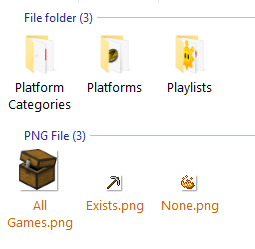
 Sure thing! If you mean how to use the specific icons I'm using, I could upload them as a media pack, because many of them I've edited to my liking. In any case, to use custom category icons, they would should go into Images\Media Packs\Platform Icons\[Pack Name]\Platform Categories From there you can choose the pack in Tools > Manage > LB Themes & Media I usually just overwrite the "Legacy Conversion Icon Pack" though when I want to add a new icon. I hope that helps...
 -
Custom Badge - Music View File A simple custom badge I made using LBCustomBadge. This one shows when a game has a music file attached to it. I also included my "Favorite Music" playlist with its platform icon, which is an ongoing list... Plugin .dll goes into Plugins folder. the playlist goes into Data\Playlists I put my custom badge image into Images\Media Packs\Overrides\Badges and the playlist icon into Images\Media Packs\Platform Icons\Legacy Conversion Icon Pack\Playlists (or whatever pack you're using from Tools > Manage > LB Themes & Media) this one is not so little ఠ_ఠ You can use whatever badge icon you like, though; just replace it in Overrides\Badges Submitter d66dle Submitted 06/20/2026 Category Custom Badges
-

Version 1.0.0
8 downloads
A simple custom badge I made using LBCustomBadge. This one shows when a game has a music file attached to it. I also included my "Favorite Music" playlist with its platform icon, which is an ongoing list... Plugin .dll goes into Plugins folder. the playlist goes into Data\Playlists I put my custom badge image into Images\Media Packs\Overrides\Badges and the playlist icon into Images\Media Packs\Platform Icons\Legacy Conversion Icon Pack\Playlists (or whatever pack you're using from Tools > Manage > LB Themes & Media) this one is not so little ఠ_ఠ You can use whatever badge icon you like, though; just replace it in Overrides\Badges -
Custom Badge - LBDb ID Exists View File A simple custom badge I made using LBCustomBadge. Makes it easier to view at a glance which games are linked to the database without sorting by ID. I've included the badge plugin, badge image, automated playlists, and platform icons for playlist use. Plugin .dll goes into Plugins folder. the 2 playlists go into Data\Playlists I put my custom badge image into Images\Media Packs\Overrides\Badges and the playlist images in Images\Media Packs\Platform Icons\Legacy Conversion Icon Pack (or whatever pack you're using from Tools > Manage > LB Themes & Media) and that's all... ┏(◐‿◑)┛ Submitter d66dle Submitted 06/20/2026 Category Custom Badges
-
Version 1.0.0
12 downloads
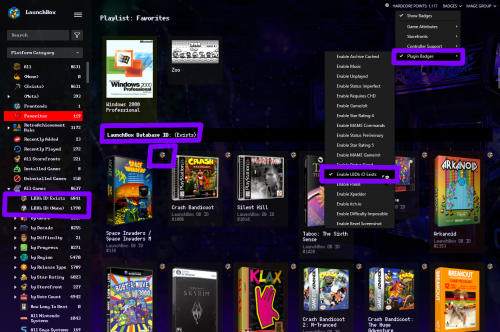
A simple custom badge I made using LBCustomBadge. Makes it easier to view at a glance which games are linked to the database without sorting by ID. I've included the badge plugin, badge image, automated playlists, and platform icons for playlist use. Plugin .dll goes into Plugins folder. the 2 playlists go into Data\Playlists I put my custom badge image into Images\Media Packs\Overrides\Badges and the playlist images in Images\Media Packs\Platform Icons\Legacy Conversion Icon Pack\Playlists (or whatever pack you're using from Tools > Manage > LB Themes & Media) and that's all... ┏(◐‿◑)┛- 1 comment
-
- 3
-
-
-
- database
- platform icons
- (and 2 more)
-
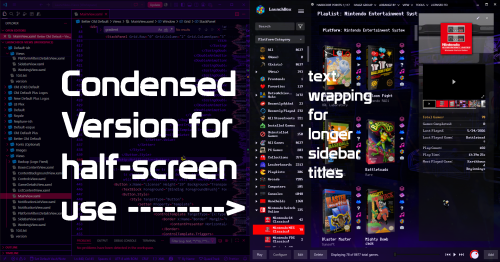
Slightly Better Old Default Theme View File An Old-Default-ish Launchbox theme, because I'm stubborn, and sometimes simpler is better. Not very fast on my 2020 laptop though. Regardless, I've enjoyed tweaking it to my needs over time, so I will call this theme "done" until further notice--or if there is something catastrophically wrong with the current file. If you try it out, perhaps let me know if it's as sluggish as I think it is on other folks' systems... I am curious if it's an old-theme problem or a my-laptop-is-getting-old problem (it might also just be that I'm not versed enough in code to put together a theme that isn't riddled with errors resulting in slowdown). In the theme folder Better Old Default I have also included optional font files (one of which is a URL to its itch.io page), as well as some backgrounds I edited and then upscaled based on Mr.RetroLust's Neon Deluxe Arcade background. The fonts can be chosen in Launchbox options after installing the font files to your system. THEME INSTALLATION: Better Old Default folder goes into LBThemes folder. Choose in LB Options or Themes & Media page. If applicable, rename MainView_Condensed.xaml to MainView.xaml to use the condensed version that will fit the top menu in one half of the screen (badge menu and notification bell are missing in this version to make room). Optionally, install the included fonts. (Note: "Launchbox" logo on the top left may or may not look a bit off kilter with some custom fonts. Also optionally, use one of the included wallpapers as your default LB background. CREDITS: Since this is more of an amalgamation of a few different themes, credit is due to those creators, such as Retrofrogg, Mr.RetroLust, and faeran. ...I'm sure I've forgotten something (゜д゜??) Submitter d66dle Submitted 06/19/2026 Category Custom Themes
-
Version 1.0.1
68 downloads
An Old-Default-ish Launchbox theme, because I'm stubborn, and sometimes simpler is better. Not very fast on my 2020 laptop though. Regardless, I've enjoyed tweaking it to my needs over time, so I will call this theme "done" until further notice--or if there is something catastrophically wrong with the current file. If you try it out, perhaps let me know if it's as sluggish as I think it is on other folks' systems... I am curious if it's an old-theme problem or a my-laptop-is-getting-old problem (it might also just be that I'm not versed enough in code to put together a theme that isn't riddled with errors resulting in slowdown). In the theme folder Better Old Default I have also included optional font files (one of which is a URL to its itch.io page), as well as some backgrounds I edited and then upscaled based on Mr.RetroLust's Neon Deluxe Arcade background. The fonts can be chosen in Launchbox options after installing the font files to your system. THEME INSTALLATION: Better Old Default folder goes into LBThemes folder. Choose in LB Options or Themes & Media page. If applicable, rename MainView_Condensed.xaml to MainView.xaml to use the condensed version that will fit the top menu in one half of the screen (badge menu and notification bell are missing in this version to make room). Optionally, install the included fonts. (Note: "Launchbox" logo on the top left may or may not look a bit off kilter with some custom fonts. Also optionally, use one of the included wallpapers as your default LB background. CREDITS: Since this is more of an amalgamation of a few different themes, credit is due to those creators, such as Retrofrogg, Mr.RetroLust, and faeran. ...I'm sure I've forgotten something (゜д゜??)- 3 comments
-
- 4
-
-
-
- default theme
- retrolust
- (and 3 more)
-
Mo' Colors for your Game Boy Color - Lights Out! Retroarch Bezels View File I have edited some alternate colors to go along with Mr. RetroLust's platform bezels for Retroarch (specifically the GBC ones), which you can find here: I liked the idea of having different colored GBC bezels per game, so I added a bunch of basic colors not present in the original variants. This includes new flat and transparent colors, de-saturated versions, and a simple black one... totaling to 27 new overlays. Because why not. You can use the save game override option in Retroarch to save the bezel per game, and/or you can pick one to use by default for your GBC core, using the save core override option. The files are in the folder structure: overlays/_MR.RETROLUST, so you can simply drop overlays into your Retroarch directory. GIMP .xcf file is also included separately for convenience. ┏(^0^)┛ CREDITS: Mr. RetroLust for the original overlays! Submitter d66dle Submitted 01/08/2026 Category Platform Bezels/Overlays
-
Version 1.0.0
85 downloads
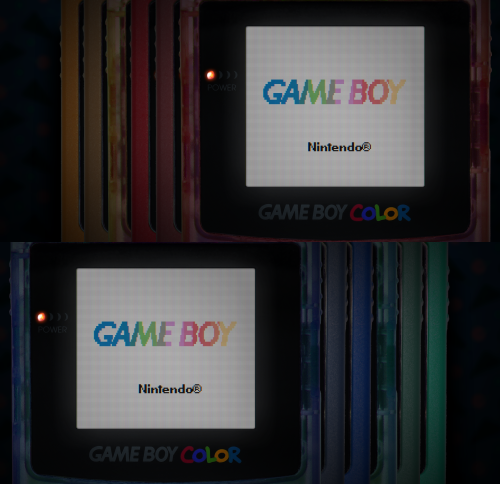
I have edited some alternate colors to go along with Mr. RetroLust's platform bezels for Retroarch (specifically the GBC ones), which you can find here: I liked the idea of having different colored GBC bezels per game, so I added a bunch of basic colors not present in the original variants. This includes new flat and transparent colors, de-saturated versions, and a simple black one... totaling to 27 new overlays. Because why not. You can use the save game override option in Retroarch to save the bezel per game, and/or you can pick one to use by default for your GBC core, using the save core override option. The files are in the folder structure: overlays/_MR.RETROLUST, so you can simply drop overlays into your Retroarch directory. GIMP .xcf file is also included separately for convenience. ┏(^0^)┛ CREDITS: Mr. RetroLust for the original overlays! -
Universal Default Boxes/3D Boxes + XCF Files
d66dle commented on d66dle's file in Platform Default Image Packs
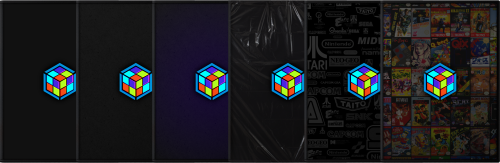 Super, no problem!
 -
Universal Default Boxes/3D Boxes + XCF Files
d66dle commented on d66dle's file in Platform Default Image Packs
The folders would be named 'Default Box' for front and 'Default 3D Box' for the 3d box, and theoretically yes that's the folder would go. As far as I can tell the name of the image file doesn't matter as long as its in the correct folder. After this you can select one or a few of your games under Consoles and see if that does anything. Maybe restart LB for good measure... If not, I would try putting the 'Default Box' folders in the individual platform folders instead of the category, so Launchbox\Images\Platforms\PlatformName You can also add the default images through the UI by selecting the desired platform/category in the sidebar. It'll create the Default folder automatically. I thought it would work with categories, because there's Default image types in the editing dropdown...but maybe they don't work as I thought! I'll just strike out the category path in my description if that's the case, to avoid confusion 😅 -
Version 1.0.0
98 downloads
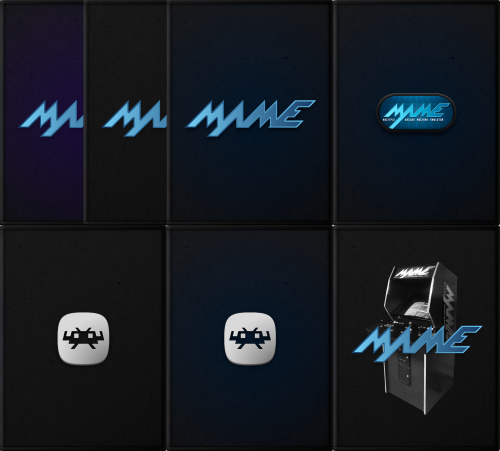
Very simple default boxes with MAME/Retroarch logos, similar to the Launchbox ones I posted earlier. I didn't make so many variants this time, but the included GIMP files now have some more stuff in there to work with, if anyone wants to make their own boxes with them (ex. use the plastic wrap layer, recoloring). It's not the cleanest 'template' in the world... but one can play around with it if they wish ^^; You can see a preview of what those look like in the screenshots. So far I'm content using the 'Default Boxes - [Name]' version of the files rather than the alternates just for my own use, but if get bored with them I may add more alt variants, more platforms, cart images, etc... For now, I'll just leave this here as is. Default 3D Box and Default Box folders go into Launchbox\Images\Platforms\PlatformName\ Alternatively, you can add the default image by selecting the desired platform in the left sidebar, and clicking Edit. This will create the folder automatically and copy the selected image into it. Credits: MrRetrolust for the base box images, and to the creators of the MAME/Retroarch logos 👾└(^o^)┐-
- 5
-
-
-

-
- default box
- default image
- (and 4 more)
-
Simple Default Boxes for MAME/Retroarch + XCF Files (Updated) View File Very simple default boxes with MAME/Retroarch logos, similar to the Launchbox ones I posted earlier. I didn't make so many variants this time, but the included GIMP files now have some more stuff in there to work with, if anyone wants to make their own boxes with them (ex. use the plastic wrap layer, recoloring). It's not the cleanest 'template' in the world... but one can play around with it if they wish ^^; You can see a preview of what those look like in the screenshots. So far I'm content using the 'Default Boxes - [Name]' version of the files rather than the alternates just for my own use, but if get bored with them I may add more alt variants, more platforms, cart images, etc... For now, I'll just leave this here as is. Default 3D Box and Default Box folders go into Launchbox\Images\Platforms\PlatformName\ AND/OR Platform Categories\CategoryName\ Credits: MrRetrolust for the base box images, and to the creators of the MAME/Retroarch logos 👾└(^o^)┐ Submitter d66dle Submitted 08/21/2025 Category Platform Default Image Packs
