

salofan
-
Posts
38 -
Joined
-
Last visited
Content Type
Profiles
Forums
Articles
Downloads
Gallery
Blogs
Everything posted by salofan
-
Love it! Daphne/Singe/Hypesus has always been kind of a pain to set up and get working with LB ... love how straightforward and simple this is. Cheers.
-
Vantage Master Portable (has a new RA set, but no clear logo). Thanks!

-
Beta 5 is working great for both LB and BB for me as well. Especially love the new arrange by scrollbar in LB - have been hoping for a feature like that for years. Cheers!
-
Will play around more with LB and BB today, but first impression is that beta-3 is running much better and snappier without any of the issues I ran into in beta-2. Much appreciated!
-
Can confirm this helps slightly on my end as well but LB still moving extremely slowly and I'm still getting that "Not enough quota is available to process this command" error.
-
Update: was able to change to the default theme. Running a tiny bit better but still seeing the same issues: image grid not populating with thumbnails (or taking a long time to pop up), game details take forever to load - up to 30 seconds. Even browsing the options menu is sluggish.
-
Unfortunately, have to add that I'm also seeing major, major slowdown with the new beta, to the point where LB is barely usable. Image grid takes forever to pop in, game details take a long time to show up after clicking on a game. LB on the whole seems to struggling to work at all. Ryzen 9 9950XD/RTX 5059, W11. 64GB of RAM. Using a modified version of the Omni theme. Have not been even able to get into the menu to switch to the default theme or to test out any of the new features; LB hangs and freezes when I try to open the options menu. Getting this error: Not enough quota is available to process this command. App: LaunchBox Version: 13.28-beta-2 Theme: Omni Type: System.ComponentModel.Win32Exception Site: Void UpdateWindowSettings(Boolean, System.Nullable`1[System.Windows.Media.Composition.DUCE+ChannelSet]) Source: PresentationCore at System.Windows.Interop.HwndTarget.UpdateWindowSettings(Boolean enableRenderTarget, Nullable`1 channelSet) at System.Windows.Interop.HwndTarget.UpdateWindowPos(IntPtr lParam) at System.Windows.Interop.HwndTarget.HandleMessage(WindowMessage msg, IntPtr wparam, IntPtr lparam) at System.Windows.Interop.HwndSource.HwndTargetFilterMessage(IntPtr hwnd, Int32 msg, IntPtr wParam, IntPtr lParam, Boolean& handled) at MS.Win32.HwndSubclass.DispatcherCallbackOperation(Object o) at System.Windows.Threading.ExceptionWrapper.InternalRealCall(Delegate callback, Object args, Int32 numArgs) at System.Windows.Threading.ExceptionWrapper.TryCatchWhen(Object source, Delegate callback, Object args, Int32 numArgs, Delegate catchHandler) Recent Log: 10:32:53 AM Exception Looks like I'm rolling back to Beta 1.
-
Pyst
-
PPSSPP does work fine (for CHD format) - logged in, achievements are showing up for the game. Achievements don't show up in Retroarch (throws a hash generation error) and not in LB.
-
Chiming in two years later, but was anyone able to get this working? PSP games in CHD format also don't show up with achievements for me, even after another scan. ISO games do show achievements.
-
Hozonban Lode Runner (PC-98). Thank you!
-
Jurassic Park III: Dino Defender Thanks so much!
-
FIFA Soccer (PS Vita) Thanks!
-
Sengoku Musou Chronicle 2nd (Samurai Warriors Chronicles 2)
-
Magical Pachinko Cotton: Pachinko Juuki Simulation Thanks!
-
I ran into this issue recently - you need to install and play the game at least once for LB to pick it up in the import. It may take a bit of time for it show up in the import, as well, but it should show up.
-
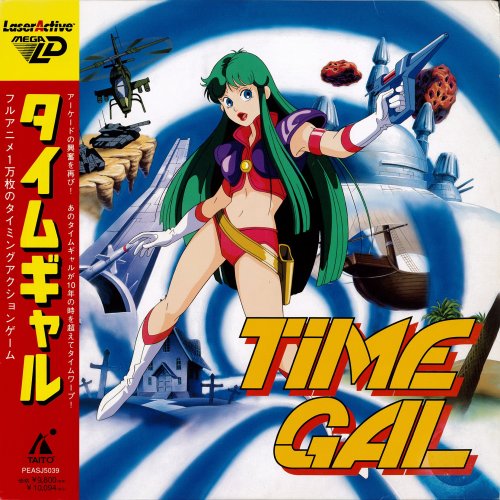 Fantastic set! Been wanting to add the LaserActive to LB but was holding off until we got some good metadata to go with it. Hopefully it gets added to the GamesDB soon.
 -
Can confirm both games were successfully imported into LB once I started them up for the first time. Thanks!
-
It actually looks like this is an issue with one of my SSDs where I keep my Steam games. So bigger issue for me, but not Launchbox. So disregard.
-
Unfortunately, as of this morning, LB will not start at all. Getting this weird error on startup: Was working fine until this morning. Not sure if this is a beta issue related to Steam or something else - I've never had LB log an error message like this on startup before.
-
Love the new features - especially the next/previous button in the edit window. Second skizzosjt that the Steam Trailers are still not working 100 percent. They do not download automatically through the Steam import, and I get an error message. Though I can manually go into the games after they are imported and download the trailers one at a time. It also appears some Steam screenshots and Steam Posters are not downloading all of the time. I have also noticed that free to play games from Steam are not being found through the Steam import. This appears to be a new issue - maybe introduced with the other Steam issues? These are games that you "add to library" through Steam without a purchase. Where Winds Meet and Sonic Rumble are two FTP games in my library that LB cannot find through the Steam import wizard. Anyone else having this issue? I'd delete some older FTP games from library and try to re-import, but I'd rather not lose the games if I can't put them back. Anyway, great new features, and am glad the Steam issues are being fixed. Thanks again for the great work.
-
Any word on this getting fixed in the next beta? Have some game pass games I'd sure like to be able to add to my LB.
-

COLORFUL Theme Playlists "hardware set" image pack
salofan commented on JoffreyV's file in Playlist Clear Logos
 These look great! I see that some of them should work with my video set. Thanks for making them!
 -
Displaying Additional app in Game Details View
salofan replied to Floatzel's topic in Custom Theme Tutorials
Don't know if you ever figured this out but I really like the look of this modified Omni theme. Would love to play around with it if you're willing to share. -
 Thanks! All of those are on my list, and am working on a few. There actually is an Elder Scrolls video already uploaded.




