

Hanz
-
Posts
42 -
Joined
-
Last visited
Content Type
Profiles
Forums
Articles
Downloads
Gallery
Blogs
Everything posted by Hanz
-
Will do!
-
Debug 2026-10-09 08-09-07 PM.log I think this is the right one. I also noticed that every time I open Launchbox it increments up approximately 22 hours, which is the actual time I have in the game. Only a handful of other games seem to affected. Looks like Donkey Kong Country, Bloodstained and Vampire Survivors are the others so not much commonality there.
-
Something seems to be up with the Play Time syncing. I switched the account over on the cloud menu and a few games now have wildly inflated play time and play counts. Per dolphin I should be at 23 hours and I've only been playing a week so 773 is very off. I manually changed it back to what it should be but when I relaunched the game and came back it had jumped even higher than before. The sync status at the top is saying out of sync and could not connect to the launchbox games database.

-
 You already know you have my upvote!
 -
It is locked from being deleted for some reason. An admin will have to take care of it.
-
I'm gonna be honest, I don't think there is any point in increasing image resolution so high that the file sizes get that big. Eventually it just becomes a pointless bigger is better arms race and we all end up with oversized builds when something a fraction of the size is perfectly acceptable.
-
I would say Game & Watch is both distinct enough and historically relevant enough to be its own category. The others maybe not so much.
-
I had the same happen on 14 last night. Exited the game and LB was completely locked up. Had to force close it..
-
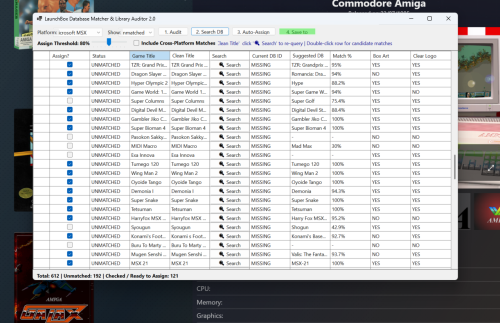 Works perfectly! Thanks!
 -
Thanks! That will definitely work for now. I have 439 auto assigned items under NES and I really want to easily double check them all before I commit.
-
Works perfectly now. I was able to uncheck all the ones I didn't want and it didn't assign others. If I had one more suggestion it would be to allow sorting in the checkbox column. I went through a large platform and wanted to easily see what was checked before I went through with it but clicking that header didn't seem to do anything.
-
Great! Ill give it a look after i get the kids to bed tonight. This sort of thing is a must have for anyone who has been curating a collection for years. You are bound to have unmatched stuff lying around you would normally overlook.
-
I just noticed that after running a search for database matches and going through the list to uncheck the ones I don't want, it still seems to assign those after I click Auto-Assign. Currently it says Checked/Ready to Assign 4, I unchecked 2 of them and when I hit Auto-Assign it still says 4 were assigned.
-
This is incredibly useful for all the homebrew and romhacks I added forever ago that have since been added to the database. Just found a ton of Game Boy stuff that has been unmatched for years at this point.
-
Yes, so you have to add them manually the first time. The exe name won't change so running updates from the launcher is safe.
-
What is going on with AI upscaled images in the database?
Hanz replied to Cookie's topic in Collections and Builds
I've been trying to reject it any time I see it, but it is difficult. In my opinion, if we are going to have a database it needs to preset accurate information and upscales are in no way accurate. I made this feature request forever ago to get people to at least label it properly: https://feedback.launchbox-app.com/p/separate-image-category-for-ai-generated-fanart -
Logging in via the new Retroachievements option in the menu it constantly enables encore mode, even if I disable it and resave my config file. If I remove my credentials from there and log in through retroarch itself this doesn't happen.
-
Wonderful! Thanks for taking my suggestion. Updating to beta 3 now.
-
This has been a bit of an annoyance of mine for a while. These need to be separated out. Having them all filed under Game & Watch is incredibly misleading.
-
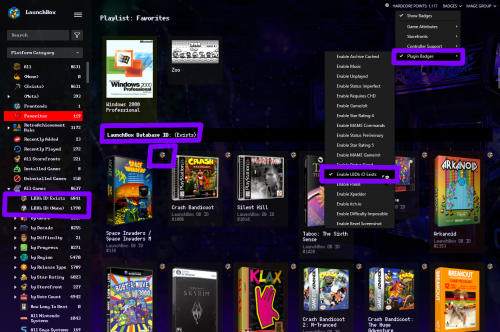 This is incredibly handy for me to figure out which games at a glance I need to research to add them to the database.
 -
I really like the new Image Grid options. If I could make one suggestion however it would be to allow modification of the corner radius from that menu. I gets annoying having to make a default-copy theme every time it updates to modify them myself.
-
Yeah, I'm not super happy with how my windows platform is organized right now myself. The launcher makes it pretty much idiot proof, just need to add a copy of the required ROM in each folder.
-
I ended up using the launcher separately just to make sure I get the updated files, and then adding the individual recompilations as windows games. If anything updates, the file paths won't change with version numbers or anything so it works pretty smoothly. Just need to check in on the launcher every now and then to make sure I'm up to date.
-
In my case, I would use something like this when adjusting additional apps. I added a bunch of translation patches recently and have been making my way through my library to set them as the primary version. It can get a little annoying having an extra click in between each edit.
-
Holidays + Major rebuild of a feature means the next version is taking longer than expected.




