

SilverFrankie01
-
Posts
21 -
Joined
-
Last visited
SilverFrankie01's Achievements

8-Bit Processor (3/7)
0
Reputation
-
Here is another issue on my end I have noticed with the new Launchbox/Big Box updates. Pause screens no longer work! Doesn't matter what theme I use, Launchbox or Big Box, or whatever... no pause screens anymore! Startup themes still work fine. Is this a common issue? Anyone have any fixes?
-
Hi, I am a premium user who has been carefully what media does and does not get included for each of my games. After this newest update, I have noticed a lot of media (particularly FANART BACKGROUND media that I had added in the past for previous games was now gone!!!). I could not believe it. In addition, fan art background and game screenshots that I did not have in my collection for each game were now showing. This is a ridiculous bug, is there any way to undo this????? Kind of panicking seeing so much of my artwork curation disappearing. Thankfully, none of the manually added banners I've made have disappeared.
-
 Would love to see some more variants of the Street Fighter 6 marquee with different characters/colors/costumes
 -
.thumb.png.ddcd363a706ec2f31a466aac4540e393.png) I hope you create more of these!
I hope you create more of these! -
Music Not Playing Consistently in BigBox
SilverFrankie01 replied to SilverFrankie01's topic in Troubleshooting
No one has any input on this. Issue still occurring. It seems even when left hovering on the same game on BigBox, my background music playlist will eventually stop/fail to loop. -
I've been using universal background using in BigBox for years. As of recent updates, it is very inconsistent when it decides to play. Even mapping buttons on my controller to make it play no longer consistently works. Sometimes I notice exactly when it stops playing, after backing out of a game, but my only guess is it maybe has something to do with it per game music interfering with it. I deleted all other music files to try to fix this but it did not. Any ideas?
-
 I love it, but the video border seems to be too big for Unified themes.
 -
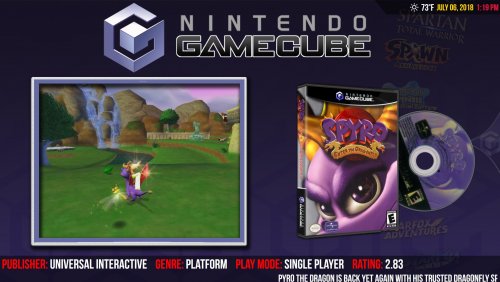 Whatever I do in the files, I cannot get custom playlists to show that are added myself. Even if i take an existing playlist, like say the Donkey Kong Collection, and replace the background image (including deleting the old one), BigBox still shows the old background. I even reloaded the image cache and deleted the previous image i didn't want. Any ideas??
 -
video set COLORFUL platform video set
SilverFrankie01 commented on viking's file in Platform Theme Videos
 Is there a chance of a colorful Flash Games video, like with the nostalgia video? I saw this one posted, but the video no longer seems to work.
 -
 Great job. Is there any chance of these getting versions for other taller marquee sizes?
 -
Hey all, Apologies if this has been asked before, but I am trying to determine the best method to upgrade to an entirely new better PC for my LaunchBox build WHILE keeping my existing PC still intact also running LaunchBox. My existing PC has a 500 gb SSD (C: drive) that is just program files and a 12 tb internal HDD (D: Drive) that is entirely dedicated to my Launchbox build. I want to somehow clone all of my LaunchBox build to a new PC's new HDD drive. The catch is not the majority of my LaunchBox games/roms and emulators are not in the LaunchBox folder itself, just in other folders on the same drive. A couple reasons I want to clone the drives instead of just stick them in the new PC: 1. I want to keep my existing 12 tb with my existing PC as a backup of my LaunchBox stuff. 2. Since I'm running out of room for my build, I am planning to have a much bigger hard drive in my new PC (likely 20-24 tbs). Could anyone advise me on the best way to do this without messing up directories or running into any LaunchBox and/or operating system issues?
-
I love this plugin. Is there any way to get ThirdScreen to only use a certain amount of a display for showing marquees? I have a marquee screen that has the top 2 inches or so out of sight due to how my cabinet was built.
-
Hi, bit of a weird question but essentially my pre-built arcade machine has quite a large second monitor for a marquee (2560x1080) and the way it was built actually has a small amount of that screen covered up at the top to where it is not visible (a little less than an inch from what I can tell). When I use marquees in BigBox (as well as LaunchBox using the amazing thirdscreen plugin), it attempts to use the entire screen space of the marquee to display the image, meaning that usually the top of the image is cut out of view. I was wondering if there was a way to change the marquee settings in BigBox/LaunchBox to be able to not use that top inch of the screen in displaying the image. I know its not a big deal and I've left it as is for a few years but the more marquees I make the more it bothers me. If its any help, I tried setting a custom resolution in Windows and found that setting the display to 2560x950 pretty much perfectly adjusted the top of the screen. Though of course this is not a permanent solution because it also cuts off space on the bottom of the screen, which I do not need as I can see the full bottom of the display.
-
I’ve been having the exact same problem with the exact same setup for a while.. any fixes?
-
New discovery. I did a fresh install of LaunchBox onto another part of the same drive. Added a singular emulator to test it out and it works perfectly in BigBox. So something really weird is going on with the settings of the original install. Is there an easy way to transfer all my platforms and images from the original install to the working fresh install so I don’t have to re add all my games manually?
.thumb.png.ddcd363a706ec2f31a466aac4540e393.png)
