

Jason Carr
-
Posts
13,723 -
Joined
-
Last visited
-
Days Won
388
Content Type
Profiles
Forums
Articles
Downloads
Gallery
Blogs
Everything posted by Jason Carr
-
In your example above, NES USA, NES Japan, and NES Europe should all be playlists and not platforms. All the NES games should remain under the Nintendo Entertainment System platform. That should work as expected. As far as I know, there shouldn't ever be a reason why you should have to create platforms inside of platforms. You should be able to modify the Platforms.xml file and look for that Test <PlatformCategory> element. I'm not sure how it got messed up like that though. Can you zip up and PM me your LaunchBox\Data folder?
-
Thank you guys; I have the de-DE and pt-BR translations updated for the next beta (should be out today I think). Currently planning on putting out a bugfix release on Wednesday. @Cauptain Sometimes I miss that last "li" tag apparently, though it doesn't really make much difference as long as it looks correct on the Welcome screen. Sorry for the confusion there though.
-
Certainly. Whatever you can do would be appreciated. Thanks much.
-
I see, sure. Unfortunately there are a lot of variables there (the several different controllers, Controller Companion, AutoHotkey) so in order to figure out, the first thing we should do is try simplifying things to see if we can narrow down what in particular is causing it. I know it's not going to be easy to figure out, but unfortunately I definitely need your help in order to fix it, as I'm not going to be able to replicate your environment over here. So what I would recommend (if you're willing) is turning everything non-standard off and unplugging all but one controller to see if you can replicate with that, and then slowly adding things back in to try and pinpoint what's causing it. Then I might be able to fix it if I have a lead as to what the issue is related to.
-
Ah, good point; I hadn't thought of that. I'll add that to my list (sending playlist names over to Rocket Launcher). Thanks @Agent47. Currently there's no way to automatically change them all, though it should be relatively easy to use copy paste (I do know that we need a better solution there though). Find and replace in the Platforms.xml file also works (but you'll need to make a backup to be safe). I'll take a look at your data and see if I can figure out those issues.
-
Alright, one thing to note here is that Platforms should always match up to physical platforms (consoles, handhelds, etc.) and should always contain games, yes, or they won't show up in the list. If you want something that only holds playlists, it should be a category. I've been trying to figure out a way to make sure that people don't misuse platforms, categories, and playlists, but that has been a challenge. I am going to make some tweaks to ensure that categories and playlists always show up in the platform categories list, even if they have zero games. Did you use the betas at all? The reason why I ask is that the Test platform category issue may have been a relic from the beta releases.
-
It would probably be best if it was requested by the community.
-
I'm guessing you just don't have any images for those games, or your image priority settings are messed up, or something of that nature. Open up LaunchBox if you can and check what images you have for those games, and then check your image priority settings for the various image groups.
-
That's the point of the shortcut key; the view can use any of the image groups available in LaunchBox. You press the key to switch between them.
-
Okay, this looks to be a different issue than what you described above, so now I'm confused. This is what I was trying to figure out here first. However, I do have an idea as to what might be going on. It's possible that those games are marked as hidden or broken, and you have hidden or broken games hidden in the LaunchBox View menu. Or maybe you have some of the hide games missing media options checked. Regardless, we need to take these issues one at a time so I don't go crazy. If you go to Tools > Manage Platforms you can change the folder paths (including video paths) for each platform. I'm guessing your folder paths are still set to the old paths there.
-
You probably don't have any images for the selected image type for those games. Go into keyboard bindings in the options and make sure you have a key or a button mapped to "Switch Image Type". Then you can press that key or button to switch between the image types to see what you might have images for.
-
Does the issue remain even after a restart? If so, if you can zip up and PM me your data folder, I'll investigate.
-
Currently, if a playlist does not have any games, it doesn't show up in the platform categories view. I may change that because of the confusion of it though. But playlists should always show up in the Playlist view, whether they have games or not, so you should be able to manage empty playlists from there. There is a known issue where playlists do not always update when game metadata is changed, until a restart of LaunchBox. I have plans to look into that as well.
-

LaunchBox for MS-DOS Special Edition
Jason Carr commented on Jason Carr's file in LaunchBox/Big Box Media
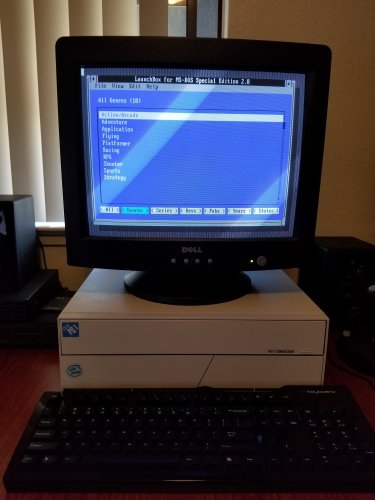 LGR is one of my absolute favorite YouTubers. Yes, I don't think it would really be feasible to put a collection the size of eXoDOS onto a physical DOS machine, but it would be a fun project. The most I've gotten onto DOS machines successfully is 8 GB (spread across 4 different partitions). The other issue is that the eXoDOS collection is fairly heavily tweaked for DOSBox, so there may be some issues with some of the games on physical machines. I'd love to have that all put together though.
 -
@Chris Kant @Charco I plan on adding additional features to automate playlist creation and stuff, yes. One thought I had was an option to automatically create genre playlists for a platform, for example. Adding copy functionality also sounds like a good idea, as well as the drop down.
-
Okay, so it doesn't look like it's a focus issue after all. That DirectX exception in the logs is interesting, though it doesn't really explain why the keyboard fails as well. My best guess is that maybe it's some kind of really strange controller conflict or something of that nature. What controller(s) are you using?
-
I'd still love to resolve this if we can, but I understand. Is anyone else from this thread still having controller performance issues with the 8.8 release?
-
That is correct; I did not write that plugin. I'm not exactly sure of a way to do it with a priority from that plugin. You're saying prioritizing Big Box to high made a significant difference for you?
-
@Mile Panic Hmm, it seems to be happening in the CoverFlow views (I doubt the wheels would slow down if CoverFlow wasn't being used). One thing that's curious is that you don't have any images in CoverFlow. I wonder if we have a performance degradation problem if you use CoverFlow with no images. Since it doesn't really make any sense to use CoverFlow without any images, I wouldn't be surprised if that's just something we've never run into before. So I guess we have two things to test for: Does the performance degradation happen in the wheel views if you never use the CoverFlow views? If you populate images for those games, does the issue still exist in CoverFlow? Hopefully that will help us to narrow it down. Thanks @Mile Panic.
-
Thank you very much.
-
So strange; I can't seem to replicate any performance issues with that theme. That said, I don't have any media in my test install so that could be why. I'll do some more testing with it to see if I can come up with anything. @Mile Panic If you have any way to record a quick video, that would be awesome because then I'll know exactly what to look for. But I know that's not always easy so no worries if not.
-
Ah, okay. Well that's interesting. I will test with that theme to see if I can figure out what might be causing it.
-
@Mile Panic I've tested with your data and I don't see any performance issues on my system, so I guess it's not data-related. You've got me beat specs-wise, so that's certainly not the issue. Can you explain where it's being slow? Is it between views, in CoverFlow, or where exactly?
-
That system is bangin, of course, so any slowness you're running into is either a glitch that is specific to your system that we haven't found yet, or some kind of misconfiguration. If you can zip up and PM me your LaunchBox\Data folder, I'll take a look to see if it happens to be data-related. You shouldn't have to turn stuff off every time you run Big Box, of course, but I dare say that some anti-virus programs are absolute crap and can make even amazing systems crawl (especially if you happen to be running three of them). Regardless, I'm more than happy to offer you a refund if you'd rather not try and figure it out, but I don't think it's possible for a system that fast to have performance issues in Big Box unless there's an anomaly going on.
-
@CliveBarker @AFaustini @Wattoo @Opak @dukeemu @cyanjiang @Bardock @MajKSA @gamehacker @Cauptain @Kondorito


