
rockohoward
-
Posts
83 -
Joined
-
Last visited
Content Type
Profiles
Forums
Articles
Downloads
Gallery
Blogs
Everything posted by rockohoward
-
I just uploaded the Attract Demo plugin and a video to go along with it. This shows some of the NesicaxLive theme I am working on as well, as well as the launch startup and closing screen. I am still fine tuning the theme before uploading but you can try out the Attract Demo today.
-
BigBox Attract Demo View File Turn Big Box Attract Mode into a playable arcade-style demo loop. BigBox Attract Demo works alongside Big Box's native Attract Mode. When Big Box highlights a game, the plugin can automatically launch it as a timed demo. When the timer ends, the game closes and Big Box continues browsing your collection. See something you want to play? Just pick up the controller. Player input cancels the timer and lets you keep playing normally. Features 🎮 Automatically launches games during Attract Mode 🕹️ Player Takeover — start playing and the demo becomes yours ⏱️ Configurable demo length with optional random durations 🎡 Uses native Big Box navigation — no custom platform rotation 🟦 Steam support with safe game-process tracking 🔄 Support for many standalone emulators and process handoffs 🖼️ Support for standard and Hybrid Big Box views 🚫 Skip hidden, broken, favorite, or unsupported games 🗂️ Enable/disable individual platforms 🛠️ Missing game and failed-launch recovery 📝 Detailed troubleshooting log Installation Extract the BigBoxAttractDemo folder to: LaunchBox\Plugins\ Restart Big Box, then open the System Menu → Attract Demo Settings. Big Box's normal Attract Mode should already be enabled and configured. Beta Notice This is the first public beta. It has been extensively manually tested across multiple emulators, Steam games, standalone launchers, standard views, Hybrid views, failed launches, and extended Attract sessions. LaunchBox setups can vary considerably, so please report any issues and include: LaunchBox\Logs\AttractDemo.log 🤖 AI Disclosure AI Disclosure: This plugin was vibe coded with AI assistance, but manually QA'd, tested, debugged, and refined through extensive real-world use. AI helped build the code; the functionality and release were validated by a human. Submitter rockohoward Submitted 09/28/2026 Category Third-party Apps and Plugins
-

Version 0.5.37 Beta 1
0 downloads
Turn Big Box Attract Mode into a playable arcade-style demo loop. BigBox Attract Demo works alongside Big Box's native Attract Mode. When Big Box highlights a game, the plugin can automatically launch it as a timed demo. When the timer ends, the game closes and Big Box continues browsing your collection. See something you want to play? Just pick up the controller. Player input cancels the timer and lets you keep playing normally. Features 🎮 Automatically launches games during Attract Mode 🕹️ Player Takeover — start playing and the demo becomes yours ⏱️ Configurable demo length with optional random durations 🎡 Uses native Big Box navigation — no custom platform rotation 🟦 Steam support with safe game-process tracking 🔄 Support for many standalone emulators and process handoffs 🖼️ Support for standard and Hybrid Big Box views 🚫 Skip hidden, broken, favorite, or unsupported games 🗂️ Enable/disable individual platforms 🛠️ Missing game and failed-launch recovery 📝 Detailed troubleshooting log Installation Extract the BigBoxAttractDemo folder to: LaunchBox\Plugins\ Restart Big Box, then open the System Menu → Attract Demo Settings. Big Box's normal Attract Mode should already be enabled and configured. Beta Notice This is the first public beta. It has been extensively manually tested across multiple emulators, Steam games, standalone launchers, standard views, Hybrid views, failed launches, and extended Attract sessions. LaunchBox setups can vary considerably, so please report any issues and include: LaunchBox\Logs\AttractDemo.log 🤖 AI Disclosure AI Disclosure: This plugin was vibe coded with AI assistance, but manually QA'd, tested, debugged, and refined through extensive real-world use. AI helped build the code; the functionality and release were validated by a human. -
I am fine tuning a plugin to do this from the game menu. I've got it to work without the game details view.

-
So I've been working on a few things with AI (I know not everyone will like that). Hybrid View now works, you can wall scroll the platforms and games. I still have some fine tuning to do but will nail it down soon. I've also been working on some plugins. I have a Game Version selector that will look for additional versions and bypass the game details. If a game has no additional versions it will load the game directly or Game Details based on your settings: And finally a real working Attract Mode, this utilizes Big Box's Attract Mode, sends that selected game into a demo which you can choose the length, exits and then cycles again until user input is detected. Meaning if its in demo mode and you think that game is cool you can take control to cancel the plugin and play the game.
-
I was able to get this working on a wall view by setting an Open Index key
-
LaunchBox Big Box 2026-05-20 12-06-07.mp4 I made some progress design wise and view wise. I ended up getting everything to work on a wall view for games but for Platform I ran into issues of selected plaform images not appearing. I got that issue resolved by reviewing the Hybrid View Article. However, my biggest issue since I am trying to transform an old theme based on limited knowledge to a HybridView is that when a platform is selected, it does not transition into the game view. I attached the xaml in the case anyone can spot what I cannot, but this is basically the last piece holding me back. @faeranAny advice on how to get the Hybrid View to transition into a wall view once a platform is selected? PlatformHybrid1View.xaml
-
Issue with search by letter widget on Big Box
rockohoward replied to Vader's topic in Troubleshooting
Oh damn. Thanks for responding and helping out over the years. -
Issue with search by letter widget on Big Box
rockohoward replied to Vader's topic in Troubleshooting
@faeran @C-Beats Is there a way to get the widget to work on a wall theme? -
Thanks! I'm doing the best I can with what minimal knowledge I have. Is there a way to change the alphabetical search key?
-
I tried to change it to a hybrid view and unfortunately none of the wheel appears. I am doing this with very limited knowledge so its all trial and error
-
Alright, got the layout working for platforms, however, I am running into an issue where I can only move left and right. When using the wall view for games I can move in all directions. I assume it may have something with the Platform Wheel but I am not 100% sure. @C-Beats Any advice? PlatformWheel4FiltersView.xaml
-
I was hoping to find something like this as well. I like the option of a quick version/region select.
-
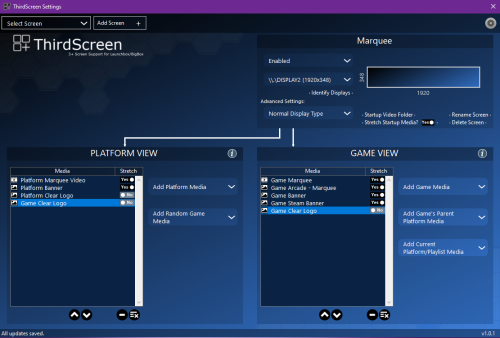 Was there ever an update on getting transparency implemented or a layer system to stack images to create a marquee?
 -
I was just trying to figure out the wall view for myself and shared my updates. I am not working on the theme itself. I would see if @shro2016 or anyone else is working on a fork or update to the them. My next area for myself is to figure out a platform wall view.
-
I was running into this issue and this step fixed it. Thank you
-
You're the best! Sorry for the repost, I just thought it got lost in the volume of things.
-
Does anyone have a better logo/clear logo for this?
-
Here's one for Beastorizer/Bloody Roar: Hyper Beast Duel
-
Hype Arcade.rarHere's a WIP. Would love for someone to fine tune the areas such as the missing cursor in the wall view (Cough, cough @shro2016). Ignore my personalization. This is still the Nesica theme at its core
-
I've made progress.
-
Provided the wrong file earlier. But here's the screenshot Wall2GamesView.xaml
-
I may be doing something wrong. Wall2GamesView.xaml
-
I did. However the spacing between rows is off.
-
Both. I've been having issues trying to pull that format off








