

itsmeblake
-
Posts
52 -
Joined
-
Last visited
Content Type
Profiles
Forums
Articles
Downloads
Gallery
Blogs
Everything posted by itsmeblake
-
If I make a playlist, it will automatically appear under its parent in Launchbox without the need for any additional steps. Why doesn't BigBox do the exact same thing? Am I misunderstanding this? Is there some way to set a hot-key that will "jump" you to a specific playlist?
-
Anyone want to help me out? Object reference not set to an instance of an object. App: LaunchBox Version: 13.18 Theme: Default Type: System.NullReferenceException Site: Void btn_update_Click(System.Object, System.EventArgs) Source: TeknoparrotSimpleImport at TeknoparrotSimpleImport.Form1.btn_update_Click(Object sender, EventArgs e) at System.Windows.Forms.Control.OnClick(EventArgs e) at System.Windows.Forms.Button.OnClick(EventArgs e) at System.Windows.Forms.Button.OnMouseUp(MouseEventArgs mevent) at System.Windows.Forms.Control.WmMouseUp(Message& m, MouseButtons button, Int32 clicks) at System.Windows.Forms.Control.WndProc(Message& m) at System.Windows.Forms.ButtonBase.WndProc(Message& m) at System.Windows.Forms.Control.ControlNativeWindow.WndProc(Message& m) at System.Windows.Forms.NativeWindow.Callback(IntPtr hWnd, WM msg, IntPtr wparam, IntPtr lparam) Recent Log: 1:24:39 PM Exception
-
 amazing! I was in the process of making a photoshop macro that automates the process of applying a blur to fan art, then overlaying the clear logo. I could generate the images this way, but I like your "dynamic" marquee much better. I will hold off and just use the "back background" for now. Let me know when you have something. I will drop some funds into the donation bin.
 -
 I ended up using the "secondscreen" plugin. It handles marquee management independent of the them you are using. It fixed the problem.
 -
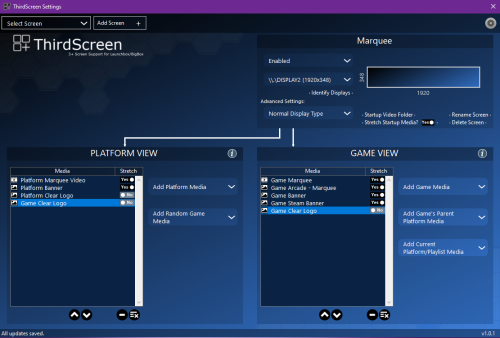
I love this plugin, it make a big difference in my build. There is only 1 thing the built-in marquee does better. It places the clear logo on top of blurred fan art (NOT stretched or fit to screen). The result looks like every game in your library has a custom marquee. It looks amazing! The thirdscreen plugin has 2 layers (when blur option is enabled). The clear logo on top and a blurry clear-logo on bottom. The top layer dosent display as clear and the overall presentation is not as good as having fan art on the bottom layer (see above). Is there any way to configure the thirdscreen plugin to use anything other than a clear logo as blurred background? This is the only missing piece to my build. I will happily donate to anyone willing to help me figure this out.
-
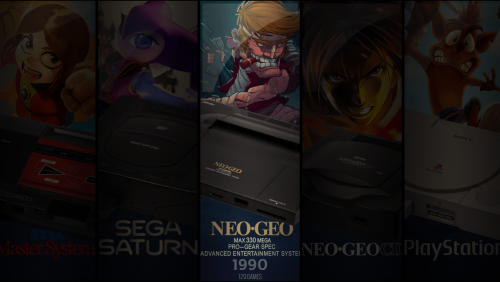
I LOVE this theme, but is there some way to change the platform marquee image? I have designed quite a few platform marquee's that I would like to use. This is what is displayed on the "platform" view The idea is that I would design marquee's that match Banner Image. Here is an example of a marquee that I would like to use with bannerbox: I want the image to fill the 2nd screen (marquee)
-
XBLA Shortcut Generator
itsmeblake replied to Press Start Button's topic in Third-Party Applications and Plugins (Released)
I would like to start by saying this tool works great! I was able to generate the shortcuts and import them WITHOUT assigning an emulator per the video. However, I was prompted to assign an emulator upon launching any of these games. As a work-around, I added the command line (aka cmd) to launchbox as an emulator. Here is how I did it: go to "Tools > manage > emulators" now select "add" in the new window, give the emulator the name "cmd" (or whatever you like), then add the command-line to the "Application path" in my case its "C:\windows\system32\cmd.exe" add the command-line parameter "/c" without quotes. this tells the computer to close out the command-line window after the launch executes. also, check the box to "hide" the console/cmd window. Finally add the "Microsoft Xbox Live Arcade" platform and set "cmd" as the default emulator that's it! now you can launch shortcuts without using an emulator. EXTRA STUFF: if the game you are importing has a patch, you have to include it in the shortcut. Browse to the shortcut, right click and view properties. the "target" contains the ENTIRE launch command responsible for executing the game (launchbox is not doing it). it looks like this: "Z:\PATH-TO-EMULATOR\Xenia Canary\xenia_canary.exe" "Z:\Emulation\Microsoft Xbox 360\Xbox Live Arcade\3 on 3 NHL Arcade\58410975\000D0000\B33BCD40B743939135673278470A8DD80BC64587" You will have to manually add the patch to the command: "Z:\PATH-TO-EMULATOR\Xenia Canary\xenia_canary.exe" "Z:\Emulation\Microsoft Xbox 360\Xbox Live Arcade\3 on 3 NHL Arcade\58410975\000D0000\B33BCD40B743939135673278470A8DD80BC64587" --config "Z:\PATH-TO-EMULATOR\Xenia Canary\patches\PATCH-NAME-HERE.toml"
-
XBLA Shortcut Generator
itsmeblake commented on Press Start Button's file in Third-party Apps and Plugins
 Brilliant! It works exactly as described. I was going to use PowerShell to rename the files, but this is far better. Can be used for more than XBLA.
 -
Launchbox has everything BigBox missing games. Why?
itsmeblake replied to itsmeblake's topic in Noobs
I cannot find the "sort order" feature. Where is it located? -
Some of the games that show up in Launchbox simply do not show up in Bigbox. None of the "hide" options are enabled in settings. I cannot figure out why? What am I doing wrong? As an example, you can see "gears of war 5" listed in the "windows" platform on launchbox (top left corner) In Bigbox mode Gears 1 and 4 are listed, but Gears 5 is missing. This theme is "The POC". I tried switching to others, but the problem is the same.
-
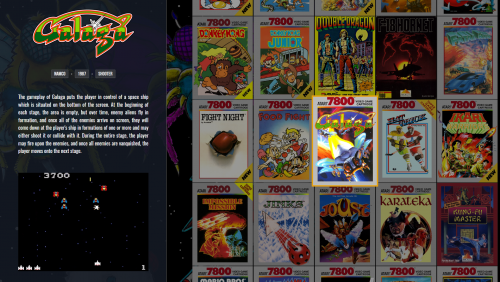 I copied the Nintendo Switch "wallgamesview" file in "..\The POC\Views\WallGamesView" and renamed it "Microsoft Xbox 360". It is the closest to a 360 cover. Then I relaunched big box hoping to see a change and... nope... I am familiar with powershell and xml, but I am a bit lost here. Seems like most of what I want can be achieved by editing this file, but I dont know what each tag is for in there nor have I ever used XAML.
 -
Any way to change the configuration file of Xenia per game?
itsmeblake replied to Nocta's topic in Emulation
This was my answer. Go to "edit game > emulation", check the "use custom command line params" box then use --config "\path\title.config.toml" All of the actual config can be done in notepad and/or xenia manager. Unfortunately you will have to do this for every game. I hope this helps the next person.
-
Any way to change the configuration file of Xenia per game?
itsmeblake replied to Nocta's topic in Emulation
Has anyone found a solution to this? Launchbox default method works, but fails to use the custom config file unique to the game = \path\emulator.exe "\path\game.iso" Setting Xenia Manager as the emulator works and launches the game with the proper config file but LB/BB doesn't support this = "\path\xenia manager.exe" "Game title" The problem is launchbox wants a rom in the path and the "application command-line params" cannot be used unless a rom is specified. The shortcut fix described above does not work and making an emulator for each game crazy. No way I am the only one with this problem. I may end up writing a powershell script to launch 360 games if nobody has any ideas. -
I would like to start by saying this is my fav theme. Thank you so much for making this! I have a few requests. 1. Is it possible to do a full screen wall without showing any meta data like Aeon in Kodi? If not is it possible to "hide" the metadata and center the cover art? 2. Is it possible to get a alphabetical jump/skip that pops up on the far right like you get with the Aeon theme in Kodi?
-
I need BOTH "full wall view" (no info shown, only titles) and "wall view" (seem image posted by Mermsky) . I am running the launchbox plugin for Kodi and would like the interfaces to match as much as possible. it would also be nice to have a view that resembles STEAM. Would it be possible to control the size of the covers shown?
-
LaunchBoxPCSX2, an in-between launcher for LaunchBox and PCSX2
itsmeblake replied to XoRRoX's topic in Features
Sounds like it will work for me -
LaunchBoxPCSX2, an in-between launcher for LaunchBox and PCSX2
itsmeblake replied to XoRRoX's topic in Features
I have over 600 PS2 titles and never come across the need for this. I'm not trying to be a jerk, just want to know if this can help to improve my experience. What I do have need for is the ability to save video settings for certain games. I've yet to find a need to change button mapping for a single game. -
LaunchBoxPCSX2, an in-between launcher for LaunchBox and PCSX2
itsmeblake replied to XoRRoX's topic in Features
I still don't understand. If I have the buttons mapped to a controller, why would I ever need to change them for a specific game/title? Why not simply change them within the game itself? Can someone maybe provide an example? -
LaunchBoxPCSX2, an in-between launcher for LaunchBox and PCSX2
itsmeblake replied to XoRRoX's topic in Features
I have everything mapped to Xbox One Controllers. I don't understand the need for this tool. What game is this useful for? -
Your right about the custom filtering. In fact the filtering makes the process of adding games in bulk to a custom section faster. I think that #Tagging is better if for a person that wants to add 1 game easily without having to switch from big box to desktop mode. It could have other applications as well. For example: the 10 games with the highest play count numbers automatically get the #Top10 tag and are displayed in a custom section/wheel. Ease of use is what separates Launchbox from Hyperspin and other front ends. I think a tagging system would bring Launchbox more users.
-
I was thinking about making custom sections/wheels... So I went ahead and created a new unknown platform and added all my favorite games to it. Each game has a batch file that takes care of proper launching. I always found creating a multi-emulator wheel cumbersome in Hyperspin.... But what if - we could create a new "custom" section/platform - give it a name - give it a #HashTag Now when scrolling through your list of games you can simply add the #HashTags associated to the "custom" section(s) of your choice. Now that game will "appear there" until the tag is removed. It would be nice to have a section called "broken games" - any game marked as "broken" automatically gets the #Broken tag would also be nice to have a "no art" section - any game with no art automatically gets the #NoArt tag Is this sort of thing possible? Am I thinking too hard about this?
-
I never heard of vjoy or tankstick... I'm out of touch on a lot of things... lol NO - the xpadder commands will only work for xpadder If you are able to map the AH buttons using the config tool that comes with the ROM, there is no need for xpadder or any other button mapper. It sounds like you just need to make a universal exit button (like the one described above).
-
I am in the process of making a youtube video that will help you out a lot! It covers using xpadder with plex and launchbox. I also show some of the batch files used to execute various tasks. 1. to make a batch file open notepad 2. save the file as "FileName.bat" (putting .bat at the end is key) you can specify within the batch file the same commands typically used in the windows CMD. Sample 1 (here is my Arcana Harts launcher) - I use 4 wireless Xbox One controllers for EVERYTHING. Some of my games do not support them, so I use xpadder to map them to keyboard buttons. Line 1 - launches xpadder and sets "XInput0 (aka player 1)" and "XInput1 (aka player 2)" to the Arcana P1 and P2 profiles "C:\Folder\Xpadder\Xpadder.exe" "Arcana P1.xpadderprofile" "Arcana P2.xpadderprofile" Line 2 - launches the actual game "C:\GamePath\GameLauncher.exe" Line 3 - After I close the game using my exit button (press select for 10 sec - esc+alt+f4), set all for controllers back to the "launchbox" xpadder profile "C:\Folder\Xpadder\Xpadder.exe" "Launchbox.xpadderprofile" "Launchbox.xpadderprofile" "Launchbox.xpadderprofile" "Launchbox.xpadderprofile" Sample 2 (Launchbox launcher) - My Plex xpadder profile allows me to use the analog sticks to move the mouse and triggers to right/left click. I also have all of the plex media controls mapped to the other buttons. My player 1 controller has a "chatpad" attached, I use this as a keyboard. On my HTPC, Plex or Launchbox is ALWAYS on. So it is assumed that if Launchbox is closing, plex will be opening! In the batch file below If launchbox is closed, the plex profile is auto launched... thus allowing me to browse windows/internet or control XBMC/Plex all from my Player 1 controller. Line 1 - launches xpadder and sets all 4 wireless Xbox one controllers to the launchbox profile "C:\Folder\Xpadder\Xpadder.exe" "launchbox.xpadderprofile" "launchbox.xpadderprofile" "launchbox.xpadderprofile" "launchbox.xpadderprofile" Line 2 - actually opens Launchbox "C:\path\bigbox.exe" (launchbox must be set to use all controllers for navigation) Line 3 - After closing launchbox change "XInput0 aka player 1" xpadder profile "Plex". Notice that only Player 1 gets the plex profile. "C:\Folder\Xpadder\Xpadder.exe" "Plex.xpadderprofile" "launchbox.xpadderprofile" "launchbox.xpadderprofile" "launchbox.xpadderprofile"
-
Use the MultiMonitorTool from nirsoft to correct your resolution issue. You need to download it. http://www.nirsoft.net/utils/multi_monitor_tool.html Most Tiato games are launched from a batch file, you need to put this as the LAST line of that batch file. C:\path\MultiMonitorTool.exe /setmax \\.\DISPLAY1 \\.\DISPLAY2 This will set the resolution to the MAX. If you use this in conjunction with the "esc alt f4", the screen resolution will go back to max when you exit the game. I have the same problem with quite a few of the Tiato games. The same tool can be used to rotate the screen for the Virtual games.
-
esc+alt+f4 I have this set has a hold state for xpadder. When I hold down the "select" button on my xbox one for 10 sec, the above is executed. esc - exits most emulators that have been started from the command line alt+f4 - the windows command to exit the current program/window Another option that I tried uses windows 10's "Hey Cortana" 1. make a batch file using the "KeyPress" command that executes "esc+alt+f4". I used powershell. 2. Name the batch file "Exit Game.bat" 3. Create a new folder in the programs menu and put the batch file these (Cortana can only execute programs from here) The next time you want to stop a game say, "Hey Cortana - Exit Game".





