
.png.cbe54652cdf6c0b44ccbd69f0b259def.png)
TrailerVert
-
Posts
49 -
Joined
-
Last visited
-
Days Won
1
Content Type
Profiles
Forums
Articles
Downloads
Gallery
Blogs
Everything posted by TrailerVert
-
.thumb.png.f238d0c9587f24b7c504a0ad449f515b.png)
Launchbox Second Screen Companion
TrailerVert commented on spiritedusual's file in Third-party Apps and Plugins
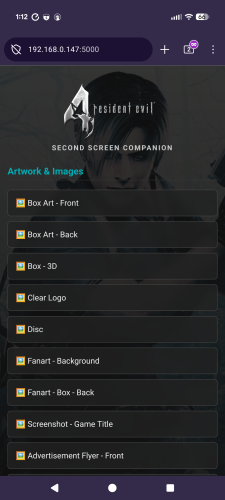 This is pretty cool. Tested with iPhone and second windows Chrome browser. Both worked great. The only issue I had (which was not really an issue) is the "test" QR code went to 192.168.56.1 instead of my address. Maybe I missed a setting. It worked GREAT with my IP in the browser. I also used a different port and that worked as well. Nice Job!
 -
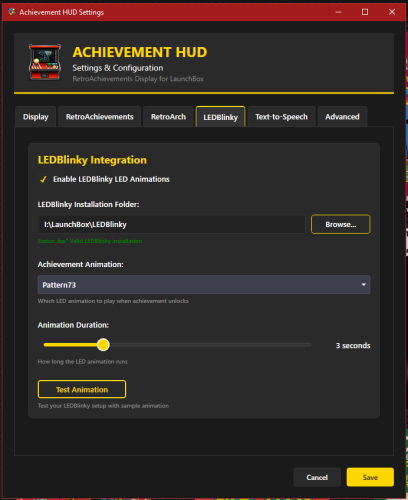 AzgoRAth. I am looking into the multiset now. I have not used that feature but it looks really cool. I will see how that might be added. I believe we will be able to see if it is a softcore or hardcore and add a way to tell which it is. This is great feedback and this is my first plugin. I am not a programmer, I mow grass for a living. LOL I do love playing Achievements so I would like to make this a cool tool. I got tired of having RA always open. I will post back as soon as get this multiset working in Retroarch. Then we can see about adding it.
- 6 comments
-
- 1
-

-
- retroachivements
- retroarch
- (and 1 more)
-
Thanks. I honestly have not used it much with BB so any feedback on that is appreciated. I am not sure I know what Multiset is. You are correct with the mouse settings, Those have to set in BB. I will look to see if I can make it show when moved to that screen,
- 6 comments
-
- 1
-
-
- retroachivements
- retroarch
- (and 1 more)
-
Retro Achievements HUD
TrailerVert replied to TrailerVert's topic in Third-Party Applications and Plugins (Released)
This is what it looks like when running. invaders.mp4- 2 replies
-
- 1
-
-
- retroachivements
- retroarch
- (and 1 more)
-
Retro Achievements HUD
TrailerVert replied to TrailerVert's topic in Third-Party Applications and Plugins (Released)
Here is a video on how to get the plugin set up. You do not have to use all the features. You can use only what you want and leave the rest disabled. ReadMe.mp4- 2 replies
-
- 1
-
-
- retroachivements
- retroarch
- (and 1 more)
-
If you have a second monitor, I uploaded the Achievements plugin that I am working on. It is a WIP but works pretty good with LEDBlinky. Here is the Link
-
Retro Achievements HUD
TrailerVert posted a topic in Third-Party Applications and Plugins (Released)
Retro Achievements HUD View File # AchievementHUD_V6.6 Display Plugin ### Core Features **Live Achievement Tracking** - Shows all achievements for the current game with unlock status - Displays achievement icons, descriptions, and point values - Shows how rare each achievement is (percentage of players who've unlocked it) - Instant detection when you unlock achievements (<100ms via RetroArch log monitoring) **Dynamic Achievement Celebrations** - Full-screen gold celebrations when you unlock achievements - Text-to-speech announcements (optional, fully configurable) - LEDBlinky integration for RGB button/joystick animations (optional) - Audio ducking - game audio drops during announcements so you don't miss anything **Profile Display** - Your RetroAchievements profile with avatar, username, and rank - Total points and "true points" (weighted by difficulty) - Currently playing status - Recently played games with completion percentages **Smart Features** - Configurable sort modes - sort achievements by popularity, points, or alphabetically - Auto-scroll - smoothly scrolls through long achievement lists during gameplay - "Next achievement" suggestion - shows you the most common locked achievement - Multi-monitor support with DPI awareness - Home screen when no game is running --- ## Why a Second Monitor? Checking achievements mid-game means pausing, opening menus, breaking immersion. With a second screen, you always know: - What you just unlocked - What achievements are available - How close you are to completion - Which achievement to go for next It's like having the RetroAchievements website open next to you, but live-updated and game-aware. --- ## Technical Highlights **Instant Detection** - Monitors RetroArch logs for achievement unlocks in real-time - No polling delays - detections happen the moment RetroArch records them - Falls back to API polling for non-RetroArch emulators **LaunchBox Integration** - Fully integrated with LaunchBox's game launch/exit lifecycle - Uses LaunchBox's RetroAchievements configuration (no duplicate setup) - Pulls game metadata directly from LaunchBox's database - Supports Clear Logos via LaunchBox's image system (handles MAME ROM name mismatches automatically) **Customizable Display** - Choose your target monitor - Adjust celebration duration - Configure TTS voice, speed, and volume - Enable/disable individual features (LEDBlinky, TTS, audio ducking) - Sort achievements your way - Auto-scroll for hands-free browsing --- ## Requirements - LaunchBox (tested with latest versions) - RetroAchievements account configured in LaunchBox (Tools > Options > RetroAchievements) - RetroArch for instant achievement detection (optional - API polling works with any emulator) - .NET 9.0 runtime - Second monitor recommended (works on single monitor but best experience is dual-screen) **Optional Integrations:** - LEDBlinky for RGB lighting effects - Text-to-Speech (built into Windows) --- ## How It Works 1. **Launch a game** through LaunchBox 2. **Display appears** on your configured second monitor showing: - Game's Clear Logo or title - Your achievement progress - Full achievement list with icons and descriptions 3. **Unlock achievements** - instant celebration on screen 4. **Track your progress** without ever pausing the game 5. **Game exits** - display returns to home screen showing your profile and recent games --- ## Installation 1. Download the plugin 2. Extract to `LaunchBox\Plugins\AchievementHUD\` 3. Restart LaunchBox 4. Configure in Tools > Options > Achievement HUD 5. Set your target monitor and preferences 6. Launch a game and enjoy! --- ## Credits by: TrailerVert Built with love for the LaunchBox and RetroAchievements communities. Special thanks to the LaunchBox plugin API and RetroAchievements for making this possible. --- **Current Version:** 6.6 **Status:** Beta **License:** Free to use --- Submitter TrailerVert Submitted 02/22/2026 Category Third-party Apps and Plugins- 2 replies
-
- 1
-
-
- retroachivements
- retroarch
- (and 1 more)
-
Version 6.6
72 downloads
# AchievementHUD_V6.6.1 Display Plugin ### Core Features **Live Achievement Tracking** - Shows all achievements for the current game with unlock status - Displays achievement icons, descriptions, and point values - Shows how rare each achievement is (percentage of players who've unlocked it) - Instant detection when you unlock achievements (<100ms via RetroArch log monitoring) **Dynamic Achievement Celebrations** - Full-screen gold celebrations when you unlock achievements - Text-to-speech announcements (optional, fully configurable) - LEDBlinky integration for RGB button/joystick animations (optional) - Audio ducking - game audio drops during announcements so you don't miss anything **Profile Display** - Your RetroAchievements profile with avatar, username, and rank - Total points and "true points" (weighted by difficulty) - Currently playing status - Recently played games with completion percentages **Smart Features** - Configurable sort modes - sort achievements by popularity, points, or alphabetically - Auto-scroll - smoothly scrolls through long achievement lists during gameplay - "Next achievement" suggestion - shows you the most common locked achievement - Multi-monitor support with DPI awareness - Home screen when no game is running --- ## Why a Second Monitor? Checking achievements mid-game means pausing, opening menus, breaking immersion. With a second screen, you always know: - What you just unlocked - What achievements are available - How close you are to completion - Which achievement to go for next It's like having the RetroAchievements website open next to you, but live-updated and game-aware. --- ## Technical Highlights **Instant Detection** - Monitors RetroArch logs for achievement unlocks in real-time - No polling delays - detections happen the moment RetroArch records them - Falls back to API polling for non-RetroArch emulators **LaunchBox Integration** - Fully integrated with LaunchBox's game launch/exit lifecycle - Uses LaunchBox's RetroAchievements configuration (no duplicate setup) - Pulls game metadata directly from LaunchBox's database - Supports Clear Logos via LaunchBox's image system (handles MAME ROM name mismatches automatically) **Customizable Display** - Choose your target monitor - Adjust celebration duration - Configure TTS voice, speed, and volume - Enable/disable individual features (LEDBlinky, TTS, audio ducking) - Sort achievements your way - Auto-scroll for hands-free browsing --- ## Requirements - LaunchBox (tested with latest versions) - RetroAchievements account configured in LaunchBox (Tools > Options > RetroAchievements) - RetroArch for instant achievement detection (optional - API polling works with any emulator) - .NET 9.0 runtime - Second monitor recommended (works on single monitor but best experience is dual-screen) **Optional Integrations:** - LEDBlinky for RGB lighting effects - Text-to-Speech (built into Windows) --- ## How It Works 1. **Launch a game** through LaunchBox 2. **Display appears** on your configured second monitor showing: - Game's Clear Logo or title - Your achievement progress - Full achievement list with icons and descriptions 3. **Unlock achievements** - instant celebration on screen 4. **Track your progress** without ever pausing the game 5. **Game exits** - display returns to home screen showing your profile and recent games --- ## Installation 1. Download the plugin 2. Extract to `LaunchBox\Plugins\AchievementHUD\` 3. Restart LaunchBox 4. Configure in Tools > Options > Achievement HUD 5. Set your target monitor and preferences 6. Launch a game and enjoy! --- ## Credits by: TrailerVert Built with love for the LaunchBox and RetroAchievements communities. Special thanks to the LaunchBox plugin API and RetroAchievements for making this possible. --- **Current Version:** 6.6.1 **Status:** Beta **License:** Free to use ---- 6 comments
- 1 review
-
- 2
-
-

-
- retroachivements
- retroarch
- (and 1 more)
-
THANK YOU! I appreciate all your help, and thank you for all you do for the community. I will post back if I discover anything. 👍
-
You are correct. Definitely something with the ipac or the way windows is seeing it. It does say it’s in keyboard mode, I believe. Here is what I see, if I can get a pic to upload. Let me know if this is what you are talking about.

-
Getting closer. Here is what I found out. Not spinning when, I have a Bluetooth controller hooked up and powered on. in BB controller settings, have Device set to Bluetooth XINPUT device. I am then able to move the 3d model around with the right analog stick like normal. Once the Bluetooth controller is turned off. The 3D model will start to spin again. In BB controller settings the Device setting will switch to Ipac4 instead of blank or Bluetooth XINPUT device. Ipac4 is set to keyboard mod. Have uninstalled Ipac4 from windows and reinstalled. I have a second setup with a Ipac2 and it does not ever list the Ipac2 as a controller. anyone else ever see this issue.
-
Ok thanks. Currently only have a keyboard hooked up to it but will try a different keyboard and check controller mapping.
-
78355256216__574D2489-A87C-4198-B394-956D049AD6D4.MOV In game view the box front image keeps flipping vertical. I can’t seem to find the setting to stop it. Any ideas. Not every image flips but it does do it on all tested themes.
-
How to change PlayTime from seconds to minutes?
TrailerVert replied to TrailerVert's topic in Startup Themes
Thanks JoeViking! it didn't seem to like ActiveGame but just adding the "Hms" fixed it. Like this.... Text="{Binding SelectedGame.PlayTimeHms} THANK YOU -
Hey guys, trying to add a ply time field to my startup theme. I currently have this in the xml, Is there a way to get it to show, Hours Minutes Seconds like in Launchbox? Text="{Binding SelectedGame.PlayTime}"
-
Music Collection Inside of LaunchBox/Big Box
TrailerVert replied to Whatscheiser's topic in Collections and Builds
Now that is sexy! I like having it all on one frontend as well. I think I'm just an old bastard that still longs for the feel of a 2004 edition of XBMC on OG Xbox. Nice work, I will for sure give it a go.- 1 reply
-
- 1
-
-
thank you. i will check it out. Will post back on the progress.
-
Adding some fruits to the setup. Just looking to see if anyone else out there knows if any artwork has been done for any for these. If there is interest I can help build some and upload it.
-
that thing looks awesome! Just now getting around to adding MFME to my build. It has been a lot of fun so far. Did you ever find any art or video files for you set? I looked and didn't see much out there. Started doing videos but didn't want to spend a TON of time recording if someone already made them. Hope to hear from you.
-
 Did you use Custom Theme Creator to build this? I'm trying to change resolution down to 1080 for my other machine. -Thanks
 -
installed last night and loved it! This will be my new default theme now. Thank you
-
Missing Games Checker Plugin
TrailerVert commented on AgentJohnnyP's file in Third-party Apps and Plugins
 Same error. xmlReadCompleted: False
 -
Thank you. I will take a look at the Lichtnarre program. Finally got a couple working.
-
Did you ever get touchmote to work with your setup or say screw it go buy a Sinden or Ultimarc? Getting close to just buying a gun........... lol
.thumb.png.f238d0c9587f24b7c504a0ad449f515b.png)




