
Rlad
-
Posts
508 -
Joined
-
Last visited
Content Type
Profiles
Forums
Articles
Downloads
Gallery
Blogs
Everything posted by Rlad
-
Solved this, it was the custom startup themes i'd made with CTC that have stopped working, default and Big Logo are working.
-
Beta 3 Win11 No games launch in Bigbox, the game startup window is opened but nothing else happens. Games launch fine from LB.
-
All of the badges, platform icons, platform clear logos outside of media packs are now redundant, you have to add your single png to the folder inside media packs. Launchbox/images/media packs
-
If it's just the joystick that isnt working there's a mode switch that switches between i think x and d input, hook a button up to it and see if that helps.

-
All of the badges, platform icons, platform clear logos outside of media packs are now redundant, you have to add your single png to the folder inside media packs like kobaturtle said.
-
The platforms arent always updating now in Beta 2 2025-05-29 21-41-41-1-{quality}.mp4
-
I just tested it again (default Theme), it's pressing left or right on any controller in the new platform hybrid view (platform category, platform, games list) that causes the crash.
-
@EJS83616 You can use this
-
Get this error navigating Bigbox Win 11 Also not getting any RetroAchievements info for Turbografx-16 and Sega Genesis after scanning (it's signed me into Retroarch and achievements pop ups are there). Not sure if this is a current Beta issue or was already present as i haven't signed into RA before on my test build.
-
You can have custom images. I have per platform images i don't remember if you can use a single image, maybe named 'Default' ?
-
That should be the name of the window. Copy whatever it says on the bar at the top.
-
Is the Clear Logo (overide) supposed to be functional yet? Because it's not saving the image.
-
Because they removed VLC and I remember from a previous thread that WMP doesn't work for you.
-
When you upgrade to 13.21 it puts all of your current logos into the legacy pack and the individual ones become redundant, at least thats how i understand it. You can then manage them from there. Joe already said it-
-
Maybe require the packs to have the main five category logos so you dont have this oddness. i now we can change them ourselves im just thinking from a noob friendly POV.
-

LaunchBox Games Database Update - February 27, 2025
Rlad replied to faeran's topic in News and Updates
Looks good, thanks. -
LaunchBox Games Database Update - February 27, 2025
Rlad replied to faeran's topic in News and Updates
There's a bug in the database moderation where the same image is being shown for changing images. This is the image on the game page with the spine at the top. The moderation page, same image. Again low quality image on the game page Same images on the moderation page.
-
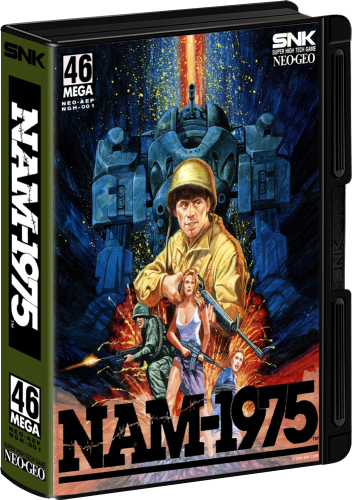
Version 1.0.0
199 downloads
Around 1/3 of this set is from the database, i've made the rest of the OFFICIAL AES releases to finish it off (and redone a few existing spines), quality varies based on available artwork but is better than what's available currently on the database. Let me know if you made the existing images so i can give credit.- 1 review
-
- 8
-

-

-

-

-
I noticed this a couple of times recently, not sure which cores but the startup screens shows then it goes back to bigbox as if it failed to launch but 3-4 seconds later the game pops up.
-
Same on Vision and my own themes just completley blank.
-
+1 on the remember zoom and window size. Or at least zoom as there is a full screen button.
-
LaunchBox Games Database Image Viewer-Plus
Rlad commented on JoeViking245's file in Third-party Apps and Plugins
 Thanks for the update Joe , working great now.
 -
LaunchBox Games Database Image Viewer-Plus
Rlad commented on JoeViking245's file in Third-party Apps and Plugins
I've noticed that removing the fanart background from gekirinden makes it work, the same with other saturn games removing FABG and box front reconstructed (added from a forum pack not in the database) also fixes things. -
LaunchBox Games Database Image Viewer-Plus
Rlad commented on JoeViking245's file in Third-party Apps and Plugins
I just made the log, im guessing it's no use now but it's here anyway. Debug 2025-02-15 11-37-07 PM.log -
LaunchBox Games Database Image Viewer-Plus
Rlad commented on JoeViking245's file in Third-party Apps and Plugins
Will only work on some of my games even though they all have ID's set


