

launchretrogirl2562
-
Posts
2,207 -
Joined
-
Last visited
-
Days Won
136
Content Type
Profiles
Forums
Articles
Downloads
Gallery
Blogs
Everything posted by launchretrogirl2562
-

Using MAME (MESS) Retroarch to emulate various systems
launchretrogirl2562 replied to SiriusVI's topic in Emulation
Had to re-open older conversation cause I am experiencing exactly the same with emulating the Texas Instruments TI99_4A DOESNT WORK : retroarch.exe -f -L "cores\mame_libretro.dll" "ti99_4a" -cart "D:\LaunchBox\Games\Texas Instruments TI 99-4A\ti99_cart\anteater.zip" WORKS : retroarch.exe -f -L "cores\mame_libretro.dll" -cart "D:\LaunchBox\Games\Texas Instruments TI 99-4A\ti99_4a\anteater.zip" retroarch.exe -f -L "cores\mame_libretro.dll" "ti99_4a" -cart "D:\LaunchBox\Games\Texas Instruments TI 99-4A\ti99_4a\anteater.zip" retroarch.exe -f -L "cores\mame_libretro.dll" "D:\LaunchBox\Games\Texas Instruments TI 99-4A\ti99_4a\anteater.zip" What this tells me is that Retroarch expects the system name in the path. It doesn't need the specifics of the system name cause last option works. And yes...I also only experience this weird issue for cart games. For mame, I tend to keep my games in this structure d:\Texas Instruments TI 99-4A\ TI99_flop TI99_cart TI99_cass For Retroarch...this would thus cause problems cause for carts it looks like it expects the system name...and not the folders u have in a MAME SL set. I have no idea why it is like that. Just that it is very confusing. -
Restoring and Preserving Historical Video Game Box Art
launchretrogirl2562 replied to Jonny Severn's topic in Game Media
Your work is impeccable Jonny. But that original logo of Parodius has even on the actual box a washed out look. I won't upload this to the gamesDB, but if any user wants an alternate version of this, they can grab it here.
-
Platform SplashScreen - LoadingScreen 4-3
launchretrogirl2562 commented on retrospace's file in Platform Media Packs
 How do I use this in Unified & Ultrawide? Is there some xaml file I can add or edit to enable these loading screens? thanks for your answer
 -
Platform SplashScreen - LoadingScreen 4-3
launchretrogirl2562 commented on retrospace's file in Platform Media Packs
I'm using Unified ultrawide...these come in handy! Thanks for creating them. Since I don't see the 16:9 version I guess I will try to convert these myself to 16:9. -
Can confirm uploads working again. Also the one I uploaded and was showing wrong, is now fixed. All the others I have uploaded and are as of speaking accepted. So anyone I did logo's for, they are added to the gamesDB so if u pull in artwork from launchbox it should grab the new better versions.
-
Nintendo Satellaview Custom Box Front and Clear Logos
launchretrogirl2562 commented on retrospace's file in Nintendo Satellaview
(TranslatedEn).thumb.jpg.d9484369b921247c987f5af6d5038d14.thumb.jpg.1410da96f4099fc6cd3631768fe29d51.jpg) Thank u for your work. They are great and I was missing a couple of these. So thanks for completing my platform artwork for this system
Thank u for your work. They are great and I was missing a couple of these. So thanks for completing my platform artwork for this system -
- 1 reply
-
- 1
-

-
😉 just happy to help. and these were so easy I couldn't resist
-
Sony
-
Microsoft
-
Those are the ones I can fill in for you.
-
Problem adding new images to existing entries.
launchretrogirl2562 replied to MarkRMWalker's topic in Website/Forum Support
@AstroBob : I cannot check my earlier adds https://gamesdb.launchbox-app.com/games/details/16172 gives an error loading the page. also opening random other game details page gives an error in loading. So, I don't think everything is fixed. -
mame.exe sorcerer -autoboot_script "autobootscripts\sorcerer_cass.lua" -autoboot_delay 1 -cass1 galx Use the sorcerer_cass.lua and autoboot_common.lua from https://github.com/dsync89/mess-curated-autoboot-scripts
-
Exidy Sorcerer Fan Cart Images (w/ Tape Template PSD)
launchretrogirl2562 commented on JustSomeRetroGamer's file in Exidy Sorcerer
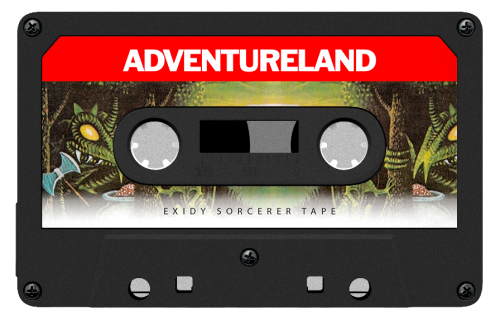 Very nicely done! Thanks for these
 -
Problem adding new images to existing entries.
launchretrogirl2562 replied to MarkRMWalker's topic in Website/Forum Support
@faeran -
The logo I added for magic carpet now shows just the correct image size. https://gamesdb.launchbox-app.com/games/details/16172 But the logo is still the old one. Also changing logo's does a delete as pending change...but it does not show the new image which is uploaded. I've stopped submitting till this gets fixed. Don't want to redo all my work.
-
Menu Configuration Method: Open RetroArch Menu (usually Select + X or F1 on keyboard) Navigate to Settings → Input → Port 1 Controls Look for Analog to Digital Type and change it to: Left Analog - makes left stick act as D-pad Right Analog - makes right stick act as D-pad None - keeps them separate (default)
-
sure. shouldn't be too hard. One with outline, one without
-
Gekirindan
-
U have to see if u want to add the bulls-eye or scope or not. Included it so u can decide yourself.
-
I will have a look at it spycat. See if I can improve upon it.
- 7 replies
-
- 1
-

-
- autoboot scripts
- mame
- (and 3 more)



(TranslatedEn).thumb.jpg.d9484369b921247c987f5af6d5038d14.thumb.jpg.1410da96f4099fc6cd3631768fe29d51.jpg)




(1).png.e5b66c9544ad794add03772424ac98b9.png)

.png.b6767629c2786d721ec979e5b0748ed1.png)