

Jason Carr
-
Posts
13,723 -
Joined
-
Last visited
-
Days Won
388
Content Type
Profiles
Forums
Articles
Downloads
Gallery
Blogs
Everything posted by Jason Carr
-
 @Izegod I somehow missed this thread but just stumbled on your video here: This is exactly what I was looking to do to integrate Retroarch Netplay, awesome job! The only pain point I can foresee is that supposedly Retroarch requires the ROM files to be scanned in for it to work. Is that your observation as well? Also, would you be willing to share your source code with me to help me get it integrated faster? I would be looking to basically implement it exactly as you have done it, but with an interface that is more integrated into LaunchBox and Big Box. I'll certainly credit you for that code.
 -
@GreenGriffon @wallmachine @NJDave71 Can you guys PM me a zip of your Data folder? Hopefully I can reproduce it that way.
-
@t17fenics @wirtual82 @Wutex @audunv @PattersonCZ @Izzy Just following up with you guys to see if you're still planning on wrapping up the translations. No worries at all if not; I'd just like to change the status of those translations if we need to. Thank you all so much!
-
@gamehacker While I was putting together that translation package for @sxetikos I realized that I still have the package you sent for Traditional Chinese. We haven't heard back from you since you sent it though; are you still around?
-
Alright, I've added the translation package to the beginning of this thread. Please read through the first few posts of this thread for instructions @sxetikos. There are a couple of gotchas so make sure you give it a good read. Thank you very much!
-
Yes, absolutely! I'll get you a translation package soon so you can get started.
-
Indeed, that would be amazing. It is something I would love to do at some point, assuming the actual netplay features work out.
-
Agreed. It does have the Twitter feed on it, but we could certainly do something more prominent. Though, yes, I don't want to force the welcome screen to show up on every startup.
-
If you could just please help them update to the beta releases, that's the best option. If someone wants to create a forum post on how to update to beta release step-by-step, that might make the transition a bit smoother. There's a video tutorial on YouTube on how to do it, but it's outdated since we added background updates.
-
I am very aware of that.
-
Beta 4 is out now guys with a revamped Welcome screen that uses CEF and is more integrated with our website. On top of that, the startup performance has once again been significantly improved, especially for people using non-standard platform names. In most cases, the "Populating platforms..." part of the startup process should now be instantaneous.
-
It's fixed in the betas; I'm between a rock and a hard place because I wanted to put some significant work into 8.0 before releasing it, but I know I need to get a release out to fix the Steam imports. So I'm pushing to get a release out as soon as I can.
-
I'm still researching all this stuff but there are certainly a number of issues. Not sure at this point if we will be actually tackling RA Netplay or not, considering the issues, as I still have to come up with a solution for a number of them, and it may or may not be feasible. I currently do not plan on creating our own lobby system.
-
Remember that there are settings available to adjust how many community ratings are required before a game is considered rated. That is the reason why they're displayed under Not Rated.
-
The details panel is supposed to save its position, but I have heard that it's an issue in some cases (I've been hearing that for a long time and just haven't addressed it yet). In my simple testing, it seems to work, but something must be resetting it or something strange. Oh wait...I just figured it out lol. So if you close it out and restart, it's not saved. Hey, I get it! I'll add that to my short list.
-
Woah...that browser must be way out of date. What version of Internet Explorer is it @VersatileLord?
-
LaunchBox for MS-DOS Special Edition 1.0 Discussion
Jason Carr replied to Jason Carr's topic in Features
Ha...sweet @harryoke! -
LaunchBox for MS-DOS Special Edition 1.0 Discussion
Jason Carr replied to Jason Carr's topic in Features
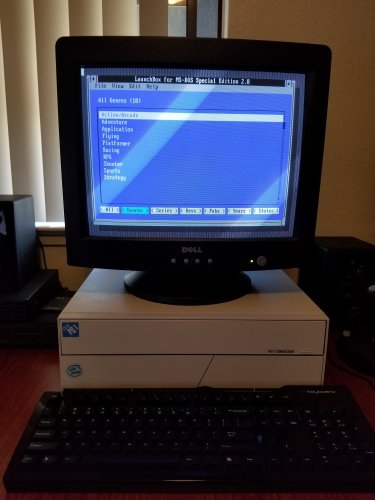
Just released LaunchBox for MS-DOS 2.0 guys. -
Version 2.0
12,570 downloads
Native Launcher for MS-DOS LaunchBox for MS-DOS 2.0 is here! If you run MS-DOS (or the DOS console in Windows 95/98), this should be very much enjoyed. It allows you to easily sort through and manage your games/apps within DOS, without taking any extra memory from your apps or introducing any compatibility issues at all. This is done via a simple batch file that starts up and shuts down the launcher as needed. LaunchBox for MS-DOS also works very well with DOSBox if you'd like to use a menu system inside of DOSBox. System Requirements MS-DOS 3.30 or higher 286 or higher CPU (uses 286 CPU instructions) Installation Unzip the zip file and place the contents onto a floppy disk or other media. Copy the four files into a folder on your hard disk (or just keep it on the floppy, it runs from the floppy as well). Navigate to the folder with the files and run LAUNCH.BAT. LAUNCH.BAT can also be called from your AUTOEXEC.BAT file if you'd like LaunchBox to start on boot. You can then add Windows 3.1 or 95/98 to LaunchBox in order to optionally start up Windows by just browsing for WIN.COM. Change Log Version 2.0 - Released Sunday, January 29, 2018 - Many new fields are available for each item: Genre, Series, Developer, Publisher, Release Year, Status, and Favorite - Can now sort items by Title, Favorite, Release Date, and Status - Can now filter items by Genre, Series, Developer, Publisher, Release Year, or Status - LaunchBox now remembers your last selection - List titles and counts have been added Version 1.1 - Released Tuesday, January 17, 2017 - New "Move to Top" and "Move to Bottom" options are available under the Edit menu - New "Insert Separator" option available under the Edit menu - Each application can now have a separate set of commands for configuring the application - New explicit "Run Selected" and "Configure Selected" options are available under the File menu - New "Browse and Run" option is available under the File menu - New "Lock" option is available under the File menu to help prevent accidental changes - Changed the batch file process to better support DOSBox and older versions of MS-DOS Version 1.0 - Released Friday, January 13, 2017 - Initial Release Easter Eggs There are several incredibly stupid easter eggs in the program. Hint: What is the second most popular cheat code ever? Version 1.0 Announcement Video Screenshots- 57 comments
-
- 19
-

-

-

-

-
Either uncheck the box for background updates, or just wait for the update to download in the background. You'll be prompted when the update is ready.
-
Correct.
-
By the way, I found yet another glitch with the star ratings, so now would be a good time to update them (though you do need to make sure that LaunchBox downloads an updated metadata package from the games database). Edit: If you don't want to wait until tomorrow and you've already downloaded an updated package today, one trick is to open up your Settings.xml file in a text editor and delete the <LastMetadataUpdate> line.
-
Beta 3 is out now guys with the following: - New Feature: A new "Download Updated Community Star Ratings" option is available under the Tools menu in LaunchBox; this makes it much easier and faster to update star ratings, rather than having to run the Download Metadata and Media wizard. - Improvement: The included version of ScummVM has been updated to the latest version! The ScummVM games list has also been updated. - Improvement: The Big Box star rating popup has been changed to jump only to half-star and whole-star values; in addition, pressing the Back button/key will no longer save the changed star rating. Pressing the select/enter key/button will, of course, save the value. - Fixed: Valve/Steam decided to kill our API Key for no apparent reason (or at least none that we received any communication about), which broke the Steam import wizard. This has been fixed with a new API key. Hopefully they don't kill this one... In addition, I added an option to disable the built-in PDF reader under the Big Box General options.
-
@dillabon I can't replicate any of the above, so I assume it must all be only happening when using a plugin? I'm not fully following everything there, but let me know what plugin is causing it so I can test it. @MeanGreene13 That makes sense. I'll look into it soon.
-
Launchbox for Linux - Preliminary Discussion
Jason Carr replied to Lordmonkus's topic in News and Updates
@wallmachine Please create a new topic for that...
