
KRI$85
-
Posts
124 -
Joined
-
Last visited
Content Type
Profiles
Forums
Articles
Downloads
Gallery
Blogs
Everything posted by KRI$85
-

MAME Hi-Score Display - A plugin for BigBox
KRI$85 commented on JoeViking245's file in Third-party Apps and Plugins
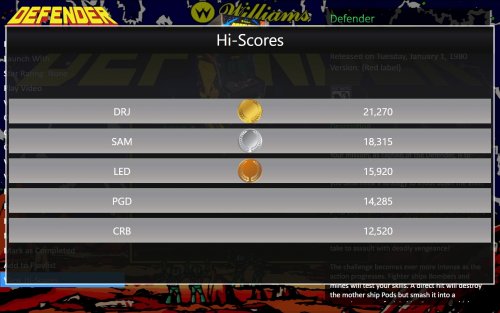 WoW, I didn't know it was possible, I was planning to add a touch monitor to the tablet and now I'll definitely come up with something. Thanks. It's a pity that they don't want to develop even a paid application or plug-in. Ma OMG hehe I'm new to LB it probably only works with mom's games and not all of them but it's better than nothing I dream of 2 applications: Hi-score for all, most games, not necessarily online And most of all, an application with moves for fighting games, etc., something like the Mk Moves apk https://encrypted-tbn0.gstatic.com/images?q=tbn:ANd9GcR0qJRqIp0c4Fo5egDqRpZwF-GmERj_JjoLkQ&s https://imag.malavida.com/mvimgbig/download-fs/mortal-kombat-moves-12795-2.jpg https://img.utdstc.com/screen/166/5dc/1665dcae4b37298527ab71b1ccc0f9419e6ce05c9d238c69cbd7f64ce051245f:600 only you can't add anything there and change anything, and when I asked how much it costs to create such an application, it's a good thing I was sitting there, otherwise I would have fallen over hehe I understand that it's not easy (probably) but don't exaggerate
 -
MAME Hi-Score Display - A plugin for BigBox
KRI$85 commented on JoeViking245's file in Third-party Apps and Plugins
Very nice plugin. Thank you. It would be nice if they added an agreement with iScored, or someone even made a paid connection with BB on a separate screen, that would be great🥰 -
 Not working in 13.14v sad plis update this awesome plugin
 -
Current Weather Control for BigBox
KRI$85 replied to Grila's topic in Third-Party Applications and Plugins (Released)
Hello, I wonder if it still works because I don't know whether to continue fighting, nothing shows up for me ;( whether it is possible to change the language ? -
 Thank you for this program, but I have a question. Is it possible to add other websites, APIs, e.g. from my country in my language, or only the ones you added?? Edit: I would like to make sure, should I put it in the plugin folder or run it separately, e.g. the utilitis folder? In the Plugin Folder it crashes when loading like on SS
 -
Exactly. I've been playing with a few frontends, most recently HS Attraction, and it's just the smoothness of almost a million games, hundreds of wheels and still smooth, not to mention the openness to various add-ons and greater customization of everything, such as: Adding a different Theme to each game separately Sound Fade etc etc can be replaced and I'm missing a few options in LB What irritates the most about the BB operation is layoffs, which is a pity, I was so excited about this frontend that finally the final frontend will have even more things and unfortunately I was a bit disappointed
-
YYY Rly I thought that RL was no longer supported, especially by Launchbox aka big box. I understand that after adding RL to LB, all RL functions such as Fade etc. will work, and I will be able to make settings and add systems via RL and LB or only RL? Sadly, I thought that LB would have even more to offer than RL (of course it has a LOT) but it turns out that not entirely, I guess😥 LB has a lot of interesting solutions that were not available in RL, but it is also a bit lacking, probably for most people these things are unnecessary and we will never see them 😕 Terribly hermetic frontend + resource-hungry average performance, the more systems etc. are added, the slower BB becomes, which is strange compared to HSA (yes, I know, there is no point in comparing it), but the fluidity is maintained there despite the huge library of systems, games and other add-ons, but ok, it turns out that LB is aimed at more efficient units. 😭
-
It's great that there is such an option, could you write how you did it, where you added the audio file. Do you know if it is possible to extend the time, 5 sec is much too little for me, iIt's a pity that they didn't add the option of choosing, and it's a pity that they didn't add options for a given game ;(
-
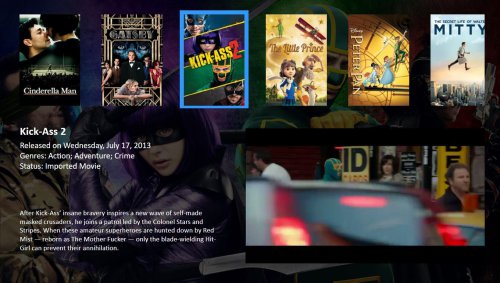
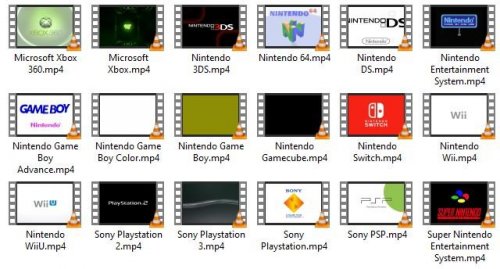 Great, finally what I was looking for. Thank you 😍 Unfortunately, there is always something unsatisfied, so I wonder if someone could explain to me if it is possible to add a simple layout, an overlay to the video, e.g.: With Information - how long I played - how many times the game was launched, etc - Windows with an age game photo also in the corner, something like in HS in the fade in the corners of the screen ? - Adding wav, mp3 sound when exiting Game over, etc., because I understand that you can't add a video when exiting unless I'm wrong? From what the author of the project writes, the theme video is limited to certain emu, otherwise a black screen appears. Can it be enlarged, add other emus and how to do it to achieve perfection?
 -
Hello, I would like to make sure, I made Favorite as @neil9000 and Retro808 wrote Thank you very much🤩 I use the Platform Category option and I probably won't change this option to another one hmm (yes I know, never say never ) hehe I was thinking about 4 solutions, but I don't know how to do them properly: 1. I was thinking about making one Favorite Circle on the main page in Platforms, but I noticed that after adding a large number of games it becomes quite a mess and a long search :( I understand that can't sort them somehow and mark them for a given platform? 2. I also thought that it might be better to do in each wheel, e.g. Wii, gamecube, etc., the smallest mess and search, but after doing this and entering a given wheel, only the favorite icon is displayed without other games (what am I doing wrong) ? 3. As in Pt 2, except Favorite only on a given Platform, i.e.: Arcade,Favorite Console Favorite etc., i.e. they save favorites only from given platforms, but the downside is the mess and the search takes longer, but less than in Pt:1 :D 4. The most probably absurd idea to do is to combine as in Pt: 1-2 That is: - In the main Favorite platform circle with all the games I have added and in a given circle, the question is whether this is possible, and if so, will the added games add well and there will be no other problems?
-
Hmm, so I understand, I download the theme and edit it ?
-
Hello, I have a 2 Question: 1. Where to upload a video file and where to turn on the video option so that the fade in out in Launchbox, Big Box, when starting the game, instead of a photo etc., a short video would be played? 2. Is it possible to set subtitles in Fade in to show how many times there have been activations, game time, etc. + how add a short sound in fade in out, e.g.: Loading, Game Over, etc.? just like it was in RL ?
