

Akasha
-
Posts
16 -
Joined
-
Last visited
Akasha's Achievements

8-Bit Processor (3/7)
5
Reputation
-
It's true; I reverted back to 13.16 and am staying there.
-
Arcade Classics HiRes custom Systems/Playlist front-box
Akasha commented on kobaturtle's file in Arcade
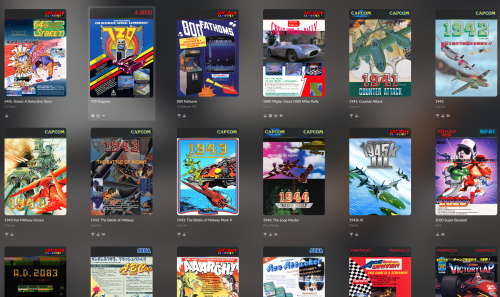 Wow! That is some exceptional work, Zugswang. I only wish I had those kind of graphic design skills. Have you done this for all of your games? I ended up using the templates the OP provided to make a simple one for myself that was in line with the style of the rest of the others in their pack. Here it is in case anyone wants it. I also made one for Strider 2 since that one was also missing.
- 4 comments
-
- 1
-

-
- arcade classics
- header
- (and 2 more)
-
Arcade Classics HiRes custom Systems/Playlist front-box
Akasha commented on kobaturtle's file in Arcade
@ zugswang: That's a very cool image. Never heard of this one by Make/Kaneko for the Neo Geo!?? The one I'm referring to is by Mitchell. -
Arcade Classics HiRes custom Systems/Playlist front-box
Akasha commented on kobaturtle's file in Arcade
These are simply incredible! A huge thank-you. Would it be possible to add Gamshara, plz? -
Thanks for the reply. You are correct about the name; it was simply a typo when I wrote the post. I was finally able to add the game through a brute force method and adding all the game details manually as I wasn't able to get the database to recognize the rom when scraping.
-
I've successfully imported all my Neo Geo games into the AES platform save one: Samurai Showdown V Perfect. I'm using Arcade64 and it natively supports this game. I've tried everything and it simply will not recognize or import the game. Help please?
-
 Thanks for your help! That worked. And thanks for this nifty plug-in also.
 -
Appreciate the help, but I think I'm just about to give up after trying for the last 4 hours or so to get it working properly. I've done two fresh installs of LB and checked that no scripts are running. And of course, made sure --fullscreen in the command-line parameters was removed. I'm now getting a bordered window inside my bezel but it doesn't fit the bezel. Using pseudo-fullscreen hides the window somewhat, but it's still not behaving properly and using a fullscreen hotkey instantly hides the bezel altogether. Here's my log for the last attempt: LaunchBox version: 13.26.0.0 Plugin version: v2.2.1 _BLSetup.xml version: 2.2.1 BLSetup.xml loaded Total emluated platforms: 1 Total enabled Platforms: 1 ****************** 2026-04-20 9:14:22 PM Checking game: ActRaiser 2 Platform: Super Nintendo Entertainment System Default ROM: ActRaiser 2 (USA).sfc No Additional Apps Platform game subfolders: Default game was lanched. Checking for bezel.. Looking for folder: "Bezels\Super Nintendo Entertainment System\ActRaiser 2 (USA)" The games bezel Folder was not found or was empty and the game bezel did not exist in the Platform folder. Bezel image being used: Bezels\Super Nintendo Entertainment System\Super Nintendo Entertainment System.png Bezel ini file used: Bezels\Super Nintendo Entertainment System\Super Nintendo Entertainment System.ini 14:23:754 Setting up Bezel Window 14:23:787 Shader not is enabled. UseShaders = False Setting up to load bezel Emulator: bsnes Parameters: Lx:240 Ly:0 W:1440 H:1080 14:24:763 OnAfterGameLaunched... 14:24:833 startup HWND: 0 00.067 14:25:599 waited for bsnes: 00.764 14:25:601 EmulatorHwnd: 1901720 14:25:602 Emulator exec: bsnes.exe 14:25:604 Showing Bezel 14:25:634 BezelWindowHWND: 788278 14:25:660 Remove the caption, thick frame... 14:25:661 Remove extended border styles 14:26:157 Removed menu bar 14:26:163 Moved/Resized the emulator window 14:26:177 startupSleeper: 0 14:26:179 Waitng for game window..... 14:26:430 Game window is ready (1 seconds) 14:26:452 Closed Background Window (h): 0 14:34:549 Set Emulator as foreground window after Pause 14:34:669 Set Emulator as foreground window after Pause 14:34:690 Game exited 14:34:794 Closing BezelWindow
-
I was able to get this working with Snes9x, but not Bsnes - which I prefer to use due to it's accuracy and options. I have the --f command off, but it isn't working. The bezel comes on during the load up and then disappears when the game starts.
-
 That setting works for me dragon57; thank-you! @RetroWolfe: Did you click "apply" after changing the setting to 1?
 -
Thank-you! Been looking for this for a while now; very much appreciated.
-
mame Mame 0.228 No-Nag
Akasha replied to MadK9's topic in Third-Party Applications and Plugins (Released)
OMG. Ok.... so I FINALLY figured out the problem. As a long-time user of MAME (about 20 years), I've been using mostly older versions that were no-nag and dinput patched. I'd gotten so used to using those versions for so many years (which automatically have dpad configured), that I completely forgot I can simply ADD the dpad controls in the tab menu! D'OH! I'm a stupid. It's working fine now - yay! Hopefully this will help anyone who might get stuck on the same issue. On another note however, I keep getting an error popup when I launch the version given here that says "Error opening translation file English". Never ever seen this before in MAME. How do I resolve this? -
mame Mame 0.228 No-Nag
Akasha replied to MadK9's topic in Third-Party Applications and Plugins (Released)
The dpad isn't working - but the sticks do. I haven't been able to get the dpad working with any newer versions of mame for quite some time now. I also have an older version (0.161) which is dinput patched and the dpad works no problem with this patched one. -
mame Mame 0.228 No-Nag
Akasha replied to MadK9's topic in Third-Party Applications and Plugins (Released)
THANK-YOU!! Much appreciated. By chance, do you know how to patch this to enable dinput too? I use an xbox one controller, and for fighting games, the dpad is much better in terms of accuracy over the thumbsticks (for me). -
 Just what I was looking for! Thanks. :)

