

bundangdon
-
Posts
1,234 -
Joined
-
Last visited
-
Days Won
2
Content Type
Profiles
Forums
Articles
Downloads
Gallery
Blogs
Everything posted by bundangdon
-
Yep. That's exactly where I found it. Thanks for the reply!
-
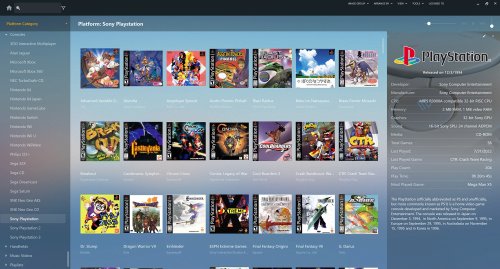
LBPlex 2023 View File Greetings to everyone around the world! Just wanted to share this updated version of the fantastic "LBPlex" theme. "LBPlex 2023" includes most of the latest additions from the past year or so to LaunchBox, such as filters (top left corner), badges (boxes view) MAME High Scores Leaderboards, Related Games (embedded in the right side panel) along with the new screenshot/media views (right side panel) and platform icons (left side panel). This was edited and put together with some guidance and help from other's wonderful words of wisdom; while keeping everything from the original LBPlex theme exactly as it was, along with those newly added features added in there. Important note: this includes only the "Normal" version (not the "Condensed" one). I have zero programming knowledge and take absolutely no credit for this, and certainly all credit and recognition goes to the very talented (original) programmer/creator @Grila and @faeran with all of the recently updated theme-code to LaunchBox. Updated (8/27/22) Version 1.2 Updated to include the new “Platform Details View” feature (added in LaunchBox version 12.15) black bars on side of images/videos for Platforms and Games (sidebar-details) have been removed Version 2.0 (02/07/23) - name changed (2023) - platform/category icons (left panel) added. (LaunchBox 13.2 or higher) Submitter bundangdon Submitted 03/29/2022 Category Custom Themes
-
Version 2.1
1,109 downloads
Greetings to everyone around the world! Just wanted to share this updated version of the fantastic "LBPlex" theme. "LBPlex 2023" includes most of the latest additions from the past year or so to LaunchBox, such as filters (top left corner), badges (boxes view) MAME High Scores Leaderboards, Related Games (embedded in the right side panel) along with the new screenshot/media views (right side panel) and platform icons (left side panel). This was edited and put together with some guidance and help from other's wonderful words of wisdom; while keeping everything from the original LBPlex theme exactly as it was, along with those newly added features added in there. Important note: this includes only the "Normal" version (not the "Condensed" one). I have zero programming knowledge and take absolutely no credit for this, and certainly all credit and recognition goes to the very talented (original) programmer/creator @Grila and @faeran with all of the recently updated theme-code to LaunchBox. Updated (8/27/22) Version 1.2 Updated to include the new “Platform Details View” feature (added in LaunchBox version 12.15) black bars on side of images/videos for Platforms and Games (sidebar-details) have been removed Version 2.0 (02/07/23) - name changed (2023) - platform/category icons (left panel) added. (LaunchBox 13.2 or higher) -

LBPlex LaunchBox custom theme badges update
bundangdon replied to Mister Slimm's topic in LaunchBox for Windows Custom Themes
A little late to answer your original message but I'll post something a little more detailed later related to this. You can simply copy the "GameDetails" from the default theme into the LBPlex theme and it should work. -
@faeran Once again, great news and this is a very welcome addition to LaunchBox! Just wondering, will you make the code of this available (copy and paste) so that we can incorporate this feature into one of the LB themes? I'm asking because the one (theme) I've been using primarily for the past few years hasn't been updated by its author for quite a long time, and I've had to rely on these methods to get the latest LB features in there. Update: Never mind. I figured it out
-
As I mentioned before, you should use Retroarch with the "neocd" core. It seems to give the best results from my testing. If you'd rather use MAME, import the games with another emulator and then after that's finished, do a bulk-edit and change the emulator to MAME
-
Okay, that's good to know. However, I wasn't using the fullset importer, and I was just importing games ("Import Rom Files...") by dragging and dropping them in.
-
No, it's just one of the Neo Geo CD games. I think there's an issue while importing MAME games when they happen to be non-arcade systems. I just tried some other non-arcade systems now with MAME as the emulator, and they won't import. The only workaround (for the moment) is to specify a different emulator while importing, and then use the bulk wizard to change the emulator to MAME after they've been imported.
-
Update: Just now I did a test with this, and I've noticed a weird issue as well while importing SNK Neo Geo CD Games. I may be doing something wrong, but for some reason when I select MAME as the emulator, it only wants to import 1 game instead of multiple games. However, when I select a different emulator such as Retroarch (and the "neocd" core) it was able to import all of the games. Basically, you can use Retroarch with the "neocd" core and it will play the games fine, or you can import the games like I mentioned and then just switch the emulator to MAME. Using MAME does require some more work, including the need to edit the "neocdz" .ini file (in the "ini" directory) for MAME pointing to the right directory where your games are stored. Another update: I just noticed that Retroarch's neocd core loads the games a lot faster than MAME too. So, that may be another reason to stick with Retroarch as well.
-
Did you use that same tutorial (you mentioned before) from YouTube? It should work pretty much the same way with the same parameters and command line, but just use MAME instead of MESS as the program to run games. If you're not able to get it to work, I'll provide some more specific information you need when I'm back at my computer later today.
-
A while back, MESS had been migrated/combined into MAME. So, you should use MAME and it runs Neo Geo CD with the exact same parameters and configuration as MESS once did.
-
Wow, that looks really good! Looking forward to the next update
-
Retroarch Current Mame-core - where to put bios-files?
bundangdon replied to Pineappleking's topic in Emulation
As Lordmonkus mentioned, it's definitely better to use the stand-alone version of Mame than the Retroarch one. However, if you plan to use the Retroarch core, I believe that the bios files need to be in the same folder where your roms-games are located in order for it to run properly. Update: A few minutes ago, I just tried that (above) and it didn't work for me. There are certainly ways to get other systems like Astrocade and several others to work within the Retroarch Mame core, but it's a somewhat tricky process that requires "Software" files. Not impossible by any means, but not really worth the effort unless you're really stuck with using Retroarch. The stand-alone version of Mame is a lot more simple to use -
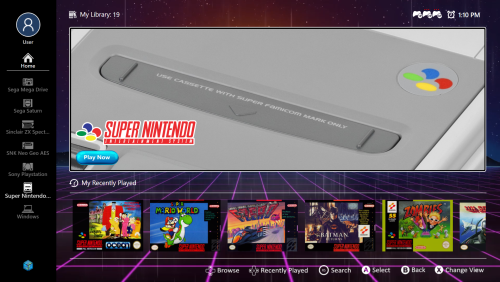 Wow, that would be really appreciated. I'm not so good with XML, and the only thing I wanted to do is add the videos/screenshots in with the textlist view and not much else beyond that. Anyways, thanks again and congrats on another great theme!
 -
Having the same issue that was mentioned above. However, this is a really beautiful and well designed theme with only a few minor issues. By any chance was this made with CTC? If so, can you provide the CTC files?
-
Rather than using a fairly outdated emulator like ePSXe, why not use one of the Retroarch cores or use the DuckStation (stand-alone) emulator? Those are much better emulators and if you have a decent CPU, will give you a much more satisfying experience with Playstation games.
-
Okay, sorry to hear that. I think that the xiso format may be more reliable/stable which is probably why the Xemu team decided to support them exclusively. It's a bit frustrating when you consider this along with the fact that CXBX only supports folders with .xbe files. However, I'm certainly thankful that Xbox emulation has come this far and am grateful for anything at all at this point. There are two tools that I've tried in the past which may help: C-Xbox Tool or XDVDMulleter. I'm not sure of their homepage-address but they can be easily found with Google
-
No worries! Hope that it works for you and let me know how it goes after you try that tutorial
-
Actually, if you're using Xemu, it does support .iso files, as far as I can remember anyways. Have you tried using this in the default command line parameters? -full-screen -dvd_path Also, there's a tutorial on how to set up xemu here, in case you might need it
-
Do you mean the wheel? If so, then you need to change the view. You'll have to set a key to change the views on the fly. Go into options - keyboard mappings, like the image shown below. In my setup, I use the 'tab' key to change views

-
LaunchBox for Android New Version - Beta Testing
bundangdon replied to Jason Carr's topic in Android
Yep, that looks like the same error. I'm using a Galaxy S10e with Android 9 installed. And I tried the latest beta that was just released (now) and it seems to be working fine again. Thanks a lot! -
LaunchBox for Android New Version - Beta Testing
bundangdon replied to Jason Carr's topic in Android
@Jason Carr I'm having a problem getting this latest beta to start. I've tried uninstalling and re-installing, but it always crashes at startup. On a strange note, the file in my downloads folder indicates that it's "beta-4". And when I revert back to version 1.0 there's no issues. -
No worries! Glad to hear you got it working! Yep, PS3 games require a little more effort and while that plugin I recommended before works great, its only disadvantage is that it doesn't scrape data and media. But it's a whole lot easier than having to import each game separately. Anyways, have fun!
-
Have you tried using this tool? It's a plugin for LaunchBox which will probably help.
-
No worries! Glad you got it working


