

faeran
-
Posts
3044 -
Joined
-
Last visited
-
Days Won
143
Content Type
Profiles
Forums
Articles
Downloads
Gallery
Blogs
Everything posted by faeran
-
Hi Everyone, Beta 4 is out now with the final changes to the Game Discovery Center, including more dynamic lists and the last edits to the theme files (including video support). The theme files are now ready for any curious theme dev to explore. We also turned back on RetroAchievements and so far things look good with it. It would be beneficial for any RetroAchievement enthusiast to test this beta and make sure things are working well on their end. Changelog: Improvement: A myriad of changes to the Game Discovery Center to make it even better, including video support Fixed: RetroAchievements API is back up and the existing functionality has been re-enabled within LaunchBox and Big Box Fixed: (No-SubGenre) Genre Sidebar filter now shows the correct counts in LaunchBox Fixed: Added more logic to help with those pesky Xbox auto-import errors Fixed: In the Big Box Default theme, the "View Game Details" text binding will no longer show if already in the Game Details menu
-
Thanks. I tried to recreate your issue with Watara Supervision, but in my tests they imported and played just fine. I'm also glad scrapping was better for you, however, that's interesting since we haven't changed anything with that in this beta. Love the requests, but if you don't want them getting lost in a beta feedback thread, you may want to open up an official request, top menu here under HELP & SUPPORT > REQUEST A FEATURE Nothing was adjusted in this beta with regards to importing or scraping games. You may want to open a separate thread where you can get proper support with more information about your device and circumstances. We were unable to recreate this internally. What device are you using? This beta hasn't changed any of this code, so that's a curious thing. You'll want to open a separate thread where proper troubleshooting can take place. Don't forget to list your device, Android version, and anything else about LaunchBox that may be useful. I'll try and reply in that thread when I get some time. Thanks for reaching out to the Redream team. It's true that Scoped Storage complicates matters. It requires a Frontend to use a very specific file manager by Google that's not really controller friendly (the emulator itself also has to use it). Since scoped storage became a thing, a lot of emulators have built in frontend support into their emulators, essentially bypassing all those complicated steps for Frontends to go through to make launching into the emulators a possibility. Some emulators haven't yet done that. I'm guessing Redream is one of them, although I haven't tested it in a while. It's not out of the realm of possibility that we go through the process and get that file manager working inside of LaunchBox. It wouldn't be the most ideal solution for the user with the navigation challenges inherent with it, but unless the emulators themselves introduce specific frontend support, it may be our only option. We will have internal discussions about it, but it may take some time before a decision is made on this. The best I can do here with more transparency is explain what we do. Whenever there's a report of a bug, we go through a lot of testing across our many devices to see if anything can be recreated. If not, there's little we can do to move forward. There's nothing that has been reported that we haven't internally tested ourselves. The issue comes with the amount of different devices and flavors of Android that could potentially make things difficult to solve. At this stage, there's no global bugs that need to be reported (bugs that affect everyone), but there could be many device specific bugs that few people experience or user specific issues. If a user has a specific bug, we ask that they click on the HELP & SUPPORT > REPORT A BUG menu items at the top of this page, and open up a ticket for that particular crash. This allows us to keep track of them all more easily, and keeps things organized for our small team. We will also be expanding our internal crash reporting tools in the next update, which should help things a lot, especially for device specific issues that users may come across. Something to keep in mind, just because we don't answer everyone's messages, we are always reading them, testing everything we can, pushing forward everything we can, along with everything else we do behind the scenes. We are sorry if we can't get to a particular thread or message in a good amount of time, or if a particular message looks to be ignored. They are most definitely not. In general though, this beta thread should mostly be used for beta specific feedback on features and changes that get introduced based on our changelog. Sometimes, it's hard to know the difference, so if you don't know, it's better to post. However, hopefully this post helps provide some better places for things like feature requests and user specific issues. Thanks to everyone who has provided feedback up to this point. We are hoping to have a beta 2 out, but an ETA on that is still undetermined as there's a lot of work left to do on it.
-
 The only thing I see mentioned is that the RetroAchievement's full API was brought back online recently and CBeats will now need to do a review of any API changes before any decisions will be made for LaunchBox.
 -
It depends on the type of set you have, but overall some are required and some aren't.
-
Error when trying to import from shared drive.
faeran replied to Slag-O-Matic's topic in Troubleshooting
I'm not really saying this is your specific issue, and yeah, it's been a long time since I took my computer networking 101 class. I'm just trying to provide you with some basic knowledge of how Windows works in the hopes that it may point you in the right direction. It could be something entirely different that you are running into but it may be worth a few tests. One way you could test this (based on your scenario), is by sharing the folders to UserX and seeing if that solves your issue. If it doesn't, then you may very well be running into another issue. -
Error when trying to import from shared drive.
faeran replied to Slag-O-Matic's topic in Troubleshooting
So, again. LaunchBox doesn't require any permissions, Windows does. You just happened to open LaunchBox using a specific user and in Windows that user comes with it's own permissions. To highlight that point, if you hold down SHIFT and right click any application, you'll notice a new option that allows you to "Run as a different user", which allows you to open that application using another user and take on that user's permissions within that application. -
Error when trying to import from shared drive.
faeran replied to Slag-O-Matic's topic in Troubleshooting
LaunchBox doesn't make any file requests, it's Windows that does. I'm not really sure that this is your specific issue, but imagine this scenario: You are logged into Windows with User1. Within a file explorer you authenticate to your network drive using User2 who is the only account that has permission to access those files. You open LaunchBox and you drag and drop files from your network drive into LaunchBox. LaunchBox tries to gain access to those files based on User1's permission access (since that is the user who opened LaunchBox), and Windows denies it because User1 is not authenticated to access those files, only User2 is. -
Online database update to local database broken/disabled?
faeran replied to kurzih's topic in Troubleshooting
Going to lock this thread since this thread is referring to an old issue that was resolved over a year and a half ago, and I see you already opened up a separate topic with your current user issue, which is a better place to continue the discussion. -
Yes, it's because you unchecked the skip unplayable games filter during import. I would keep that checked so you don't import files that are unplayable.
-
Online database update to local database broken/disabled?
faeran replied to kurzih's topic in Troubleshooting
Just to let you know the issue in this thread is not the same as what is reported by you here. This was an issue where new uploads to the database weren't being reflected in the app due to a failed scheduled process on the server, which was then quickly fixed shortly after. -
It's hard to say, but it sounds like you may have imported your MAME ROMs incorrectly. If you are seeing bios files and other non-games in LaunchBox, then something definitely went wrong with your import. What were the steps that you used for your arcade import?
-
Error when trying to import from shared drive.
faeran replied to Slag-O-Matic's topic in Troubleshooting
I've been running ROMs from a network location for about 5 years and haven't run run into the issues you've talked about. It does read more like some kind of permissions mismatch. Like the user you used to open LaunchBox doesn't have the necessary read/write permissions to those files on the network drive. -
Hi Everyone, Beta 3 has been released that fixes the changes made by Microsoft with their Xbox / Microsoft Store authentication. At this point, Xbox / Microsoft Store integration should be fixed. We've also progressed with the Game Discovery Center, but it should be noted that it's still heavily a work in progress. The main change to this view is that the placeholder lists have now been replaced with a dynamically generated one that will refresh upon each load of this view. New lists will keep generating as you scroll down. We still have some ways to go here, and there's still a lot of placeholders in the view that will be worked on. We are still exploring adding videos, more list types, and we've got a number of other fixes and theme related items that we have to get to. Here's the full changelog: Improvement: Adjusted download timeout windows to help reduce download errors when grabbing media Improvement: The Fullset MAME Import Wizard is now more performant on lower end hardware Fixed: Rare dictionary error when using an Arrange By setting in LaunchBox's Grid View Fixed: Sidebar counts for genres with subgenres weren't being displayed correctly until clicked within LaunchBox (introduced in 13.8) Fixed: Various errors related to the automated import process Fixed: Corrected changes to the Additional App selection in Big Box (introduced in beta 2)
-
There would be nothing in the code that rotates images in this theme, so I could only guess that you may want to look at the images you are using and see if you can fix them up.
-
One issue I see right there is that the core is not pointing to the mame 2003 core. You can select it from the core list. You'll also want to make sure Extract ROM Archives is turned off.
-
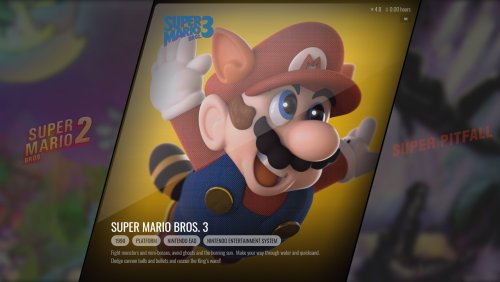 Actually, one of the horizontal views does have video support. I'll also be releasing an update with videos on the text games view.
 -
Can you go into your Arcade platform's Emulator Settings and post a screenshot of them here.
-
Used to see this with certain intel integrated graphics drivers that needed an update or a settings change. What kind of hardware are you working with?
-
Like CBeats mentioned, one of the main reasons you'd be seeing this is if you accidentally already imported those ROMs into the wrong Platform, or somewhere you didn't expect to import them to. The system is designed to not import the same file twice. One way you can test this is to try and import one of the ROMs that won't import, and when you get to the second to last page giving you some options, check off to "force importing duplicate games", and then press next. If you see the game on the next page with this option checked, it means you've already imported that game and it's somewhere in your library.
-
We made some educated guesses and we should have this fixed in the next beta. Thanks for the report. Unless we run into some kind of unpassable stop block, videos will come in the next beta. The clear logo thing is a little strange since it's using the default fallback where the system generates an image with the text on it, but I'll take a look. @uchuskies921 Yes, a lot of what you say will be possible for theme devs. If you do want to learn more about the system send me a PM.
-
It's hard to say. It would be nice to get some specific file names so we can recreate it on our side, but it is what it is.
-
It would be important to get some files names that are disappearing so we can figure out what's going on.
-
In this screenshot, can you list the file names of all the files here that they are pointing to.
-
Thanks. This is a known issue that's been around for a long while. It's on our long term list to take care of, but most likely will not make it in this next version. Thanks for the confirmation. This would happen if your list contains only a handful of items. It will be fixed in the next version.
-
Hi Everyone, Beta 2 is out with the start of a new feature inside of Big Box called the Game Discovery Center. This feature is still a work in progress, but can be accessed in its current form from the System Menu. The idea of this feature is to be a dynamically changing list of lists that provides users new ways to explore their own library of games. The view is fully themeable, but we recommend that theme developers hold off for now as the XAML code contains a lot of placeholders. The next beta should contain new types of lists while making the lists more random and dynamic (instead of the static ones we have in place for now). Here's the complete changelog for beta 2: New Feature: Big Box has a new view called Game Discovery Center, which allows you to discover your games in new ways. Access it through the system menu, or optionally make it your startup view Improvement: Added a View Additional Documents menu option to Game Details in Big Box Improvement: LaunchBox will now scroll the selected item into view when a side panel is hidden/unhidden Fixed: Epic Game Store re-authentication time-out period has been increased for slower internet connections Fixed: Issues with the Theme-specific Background Music (introduced in beta 1)



