
Mr. RetroLust
-
Posts
5,971 -
Joined
-
Last visited
-
Days Won
647
Content Type
Profiles
Forums
Articles
Downloads
Gallery
Blogs
Everything posted by Mr. RetroLust
-
Ah okay, thanks like always bro
-
I'm really sorry if this has been explained somewhere else before, I can't seem to find the solution using the search bar. Quite some time ago - pre-launchbox.next I believe - I succesfully moved/separated quite some roms (pinball, casino, slots, mechanical) plus their images to another folder, for the live of me I can't figure out now how I did that now (could have been some manual trick with screenshot images next to the rom files, I have done this before but not sure for this matter), I do see the option "Change ROMs Folder Path for Selected Games" but the warning message pop up says it will change the paths but not move the rom files. Was there an option before that could do this or did I use a trick somehow? Basically what I want to do is move Naomi, Model 2 & 3 and systems that don't run on mame to different folders. I see some different batch script solutions on google but I really don't want to screw anything up and am hesitant to do so without information of people with experience on this matter. My Mame set is 0.198 non-merged in case this is important.
-

A legend that deserves some recognition
Mr. RetroLust replied to Mr. RetroLust's topic in Platform Media
An interesting read about the man and his work: https://en.m.wikipedia.org/wiki/Evan_Amos- 1 reply
-
- 1
-

-
I just saw this video by MJR and after watching it I feel we should consider giving this man (the legend Evan Amos) a bit more recognition and credits seeing his beautiful work. Thought i'd share this seeing his contribution to the width of the retro gaming community:
- 1 reply
-
- 2
-
-
I'm experiencing a weird issue with games database moderating, when I accept or reject an entry it will load but instead of a new entry it shows the same entry over and over again, the queue entry number also will stick on the same number, which shows it won't 'refresh'. I already deleted all browsing data including cookies but it won't resolve the issue.
-
Thanks man The final pack will have a long delay as I'm working on another project (arcade cabinets 2.0) for months to come. All dual layout marquees can be downloaded through the launchbox scraper, the full marquees are whats left to do.
-
American Laser Games Platform Video
Mr. RetroLust commented on mcfilmmakers's file in Platform Theme Videos
 @mcfilmmakers There was a problem with shortage of space on the server I saw in another thread, causing the latest uploads to display an error "file not found", you'll have to reupload the file. Thought I mention it to you.
 -
Smart playlist for "Recommended/Must play..."? (SOLVED)
Mr. RetroLust replied to Kondorito's topic in Noobs
Yeah it should be in game details, if you dont see it you might have turned it off in the options menu -
Smart playlist for "Recommended/Must play..."? (SOLVED)
Mr. RetroLust replied to Kondorito's topic in Noobs
Lets say you have already rated all of your games then it'll be a bit difficult but if you haven't you could pick a number, lets say 3 stars or 1 star, if you only rate those games you want to play later with these and then make a smart playlist for just 1 or 3 stars you'll get them together. But for that matter you can add games to a playlist within BigBox as well if i'm not mistaken, wouldnt be a smart playlist then but a manual one. -
Smart playlist for "Recommended/Must play..."? (SOLVED)
Mr. RetroLust replied to Kondorito's topic in Noobs
The way I do it as a workaround is by giving them a specific star rating to later add them to a playlist. Edit: smart playlist can work directly with star rating. -
I second this, kinda like in iTunes.
-
@Hoshizuku no Kaiyou Do you speak Japanese? Reason I ask is that i'm translating and reconstructing japanese instruction cards from time to time, mostly I can translate them if there are low quality english versions but sometimes they haven't been made, it would be great if I could ask someone that could read it.
-
Awesome! I have quite a few high res photographs of arcade cabinets when you stand before them but a lot of these games dont run well in mame, this way they can finally be put to good use in the future.
-
 Awesome work, thank you!
-
- 1
-

-
Default marquee for ROMS that dont have an image?
Mr. RetroLust replied to Super_Paulie's topic in Noobs
Looking really great man, my compliments! To unravel the mysteries a bit, the clear logo displays if there aint no marquee because of the image priority settings youve succesfully changed. The 'doubling' of the marquee/clear logo is something I came across as well when I created the magic marquee filler trick. For some reason any image file you add/link to the marquee xaml will keep on changing back to the marquee placeholder, this is probably because of the way the pre-coded environment is created. Maybe @Jason Carr can shed some light on this. -
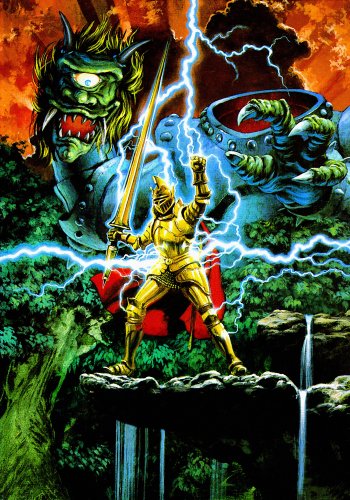 Poster in action:
 -
Mr. RetroLust's new man/game cave
Mr. RetroLust replied to Mr. RetroLust's topic in Collections and Builds
The new Ghouls 'n Ghosts poster in action, finally another long standing wish fullfilled, I had it print in matt so the light reflection would be better in black-light, I didn't expect it to behave that well, look at that lightning coming out! ?? If you want to print something for yourself as well you can find the file here:
-
Default marquee for ROMS that dont have an image?
Mr. RetroLust replied to Super_Paulie's topic in Noobs
See here for more info and examples of stretch and stretchdirection: https://docs.microsoft.com/en-us/dotnet/api/system.windows.controls.mediaelement.stretch?view=netframework-4.7.2 Edit: Should be 'uniformtofill' if an overflow is wanted. -
Default marquee for ROMS that dont have an image?
Mr. RetroLust replied to Super_Paulie's topic in Noobs
Oh and probably this as well: HorizontalAlignment="Center" VerticalAlignment="Center" -
Default marquee for ROMS that dont have an image?
Mr. RetroLust replied to Super_Paulie's topic in Noobs
Lol the: you know what you want when you see it, principle I think (bare with me as I mostly just change code around till it works instead of the right theory right out of my head) all it needs then is the stretch property of the blurred layer to be set at downonly or uponly, youll have to test out what changes it brings. Stretch="Uniform" StretchDirection="DownOnly" -
Default marquee for ROMS that dont have an image?
Mr. RetroLust replied to Super_Paulie's topic in Noobs
Ah ok so basically you need to scale the blurred layer in the same dimensions as the layer that is in front; the marquee/clear logo. Have you tried (I havent looked at the code that RetroHumanoid posted) copying the same scaling/positioning code for the marquee/clear logo? I made something simular before which is quite simplistic but maybe you can use it to learn/experiment/mix in with the code from RetroHumanoid. -
Default marquee for ROMS that dont have an image?
Mr. RetroLust replied to Super_Paulie's topic in Noobs
You mean with the clear; - clear logo, right? Is there empty space at the top of each clear logo? If not it could be empty space within some of the png files in need of cropping blank space first. Otherwise all thats left is messing around with the positioning of the logo code. -
Default marquee for ROMS that dont have an image?
Mr. RetroLust replied to Super_Paulie's topic in Noobs
Glad it worked out with the logo (I'm going to try this out for my own setup as well) I'll tag some people that may be able to help you further on the technical questions: @Jason Carr @RetroHumanoid Edit: oops you already posted Retrohumanoid lol -
Default marquee for ROMS that dont have an image?
Mr. RetroLust replied to Super_Paulie's topic in Noobs
If i'm not mistaken you can go to options within launchbox and change the image priorities for I think box front (could be another image category) if you check clear logo in here and push it further up in priority it should work, mightvtake you some experimenting with this by putting clear logo to the far top to test it out. -
You lucky bastard! ? Congrats man :)


