

Daliant
-
Posts
160 -
Joined
-
Last visited
Content Type
Profiles
Forums
Articles
Downloads
Gallery
Blogs
Everything posted by Daliant
-

Find the Games your Collection is Missing
Daliant commented on christhed's file in Third-party Apps and Plugins
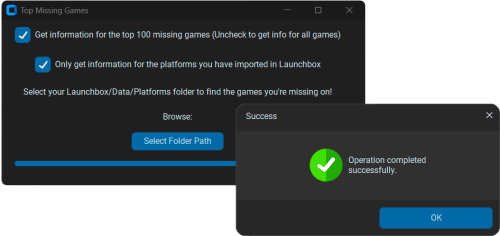 The program does not work. When I start I select all the options correctly but the program stays forever searching for the games and generating the results. The task manager does not show activity.
 -
Hello @C-Beats, thanks for your reply. Couldn't people who want to search the entire content (including notes) be given the ability to do so? In the same way that you can deactivate the advanced search, there should be the possibility of searching for a keyword in any field of the database. In this way everyone could use the search to their best convenience. What is the point of having an immense database with countless fields if we cannot later use them to filter, sort, clean, etc... our collections? If you can do this with a simple Excel, why use Launchbox then? On occasion I have said in these forums that my passion for video games goes far beyond playing them. I personally spend a lot more time going through my collection, looking at the manuals, learning the history of each game than I do playing the game itself. I know that there are many other people who, like me, appreciate Launchbox not for being a video game launcher, but for having all its arts and accessories in an organized way. There are plenty of frontends out there that are designed to just click a button and play without worrying about anything else. I think Launchbox is a step up in this regard and in its nature aims to be more than just a game launcher. These kinds of things are what I miss about the little-remembered GameEx. Tom Speirs was a genius at implementing this type of resources in databases and he did wonders with a program that was surely much inferior to Launchbox, but that made those of us who appreciated the exploration of our collections a dream. Some of these options have been implemented in Launchbox over time, such as the view of similar games or ports, but in my opinion (which is surely worthless) it is still far from what GameEx could do in this regard. The truth is, I still use Launchbox because I have not yet discovered another frontend that gives me everything I need in terms of exploring my collection. Most frontends focus on simply launching games. For now, it's time to continue dreaming about the definitive frontend. All the best.
-
I have several hundred magazines added to a playlist in Launchbox. They are magazines related to video games. I would very much like it if when using the search engine with the word "Sonic" in addition to all the installed versions of the game in my collection appearing, those magazines that talk about the game or that have some type of report would also appear. All the magazines in my collection have a summary of each of them added in the notes section. Can I have any hope that this will become a reality or is it extremely difficult and complex to make the current search engine not focus only on the game title and search in all available sections (company, publisher, year, notes)? The truth is that I cannot understand how today this frontend does not allow you to perform advanced searches, when other frontends with less community and less support do it perfectly. I don't think it's such a crazy idea that it isn't implemented today, honestly. I am convinced that many users have the same need as I do with their magazines and manuals.
-
Problem accessing retroachievements details from Bigbox
Daliant replied to Daliant's topic in Troubleshooting
No solution? -
Since the retroachievements option was activated again in Bigbox, it is impossible for me to access the details of the achievements since the cloudflare captcha appears and I cannot accept it in any way, since the mouse does not work within Bigbox. How can I accept the Retroachivements captcha from within Bigbox?

-
Some of us are also hoping for something as simple as making some game lists not appear in attraction mode. I have had to deactivate attraction mode so that games that I don't want to appear or lists of magazines that don't even have videos don't appear. I hope that one day you can choose the list of games you want to appear in this attraction mode.
-
Unfortunately this is a problem that I believe will never be solved. It seems that BigBox is designed to self-destruct itself little by little. It doesn't matter what theme you use, when you spend more than 15 minutes browsing the menus or entering and exiting a game, BigBox navigation becomes slow and stutters. The only solution is to exit completely and re-enter, but it doesn't take long for the problem to recur. I am clear that it is not a problem with my computer or the drivers, the BigBox system simply has a design flaw in this regard. I use other rom managers on my SteamDeck or Nintendo Switch and none of them have this usability problem. You can spend an entire afternoon browsing the menus and the system continues to work without problems. This is unfortunately impossible with BigBox. Years ago I thought it was a theme problem, but this also happens with the default theme so it is a design problem of the program itself.
-
Updated Translation for Spanish Language-es.zip
-
Hello, would it be possible to translate the texts "View related games" and "View 3D model" into Spanish? These texts have not been translated for a long time. I offer to translate them "View related games" = "Ver Juegos Relacionados" "View 3D model" = "Ver Modelo 3D" Thank you.
-
Is it ever possible to have a theme without slowdowns?
Daliant replied to Daliant's topic in Big Box Custom Themes
I have also noticed the same thing as you, the default theme does not suffer from this lag and I also thought that it would be possible because of the CTC. I guess there must be some reason for this. It is a pity that the experience in Big Box is not smooth. I guess for most people it's more important to start the game than to be able to scroll smoothly through the game list. -
Is it ever possible to have a theme without slowdowns?
Daliant replied to Daliant's topic in Big Box Custom Themes
Here I show you a short video comparing two BigBox themes and their fluidity when navigating the games. I hope you can see the difference clearly since it is much easier to notice when you are the one who controls the game controller to move the list. -
Hi everyone, over the years I've been using Launchbox and BigBox I've tried dozens of themes trying to get the best gaming experience while still being nice to look at. Every time I've had the same problem, I've found a fantastic theme that suited my needs, clean, pretty, but it always ended with slowdowns navigating the game menus. I see that it is a common problem in 99% of the themes that can be downloaded today for BigBox and what I would like to know is if you think that one day this aspect will be improved to allow a completely fluid experience in exploring our collection of games. I don't have the best PC in the world, my features are AMD Ryzen 5 2600X Six-Core Processor 3.60 GHz, 16GB RAM and Nvidia Gforce 1660 Super. I know it's a simple PC, but I understand that it should be more than enough to run a frontend with images and some low-resolution video. My problem mainly is in games list type views. When I go through the different games I notice a lag when going from one game to the next. Sometimes even the sounds it makes when going through the list from one game to another stop listening or even make small jumps if you decide to go between games quickly. I'm sure many of you know what I'm talking about. I want to say that recently I found a theme that (at the moment) is the only one that navigates through the list of games in a totally fluid way, without slowdowns and being able to scroll through the list as fast as you want without problems. The theme in question is called "Stark" and is from the creator @donkeywaffles. As I said, of the dozens of themes I've tried, it's the only one that doesn't slow down in its game list view and allows for totally fluid navigation. The rest of the themes I've tried end up slowing down somehow, especially in game list views with details. My question right now is does this theme have something special that the others don't? and Why can't I have the same smooth experience with the other available themes? I love being able to review the list of my games much more than playing them. For me, Launchbox and BigBox are the way to see my collection, see information about the games, their images, videos and other available media... But the browsing experience is not the best possible right now and I would like to be able to improve it. Do you think I can do something to improve my BigBox browsing experience? Sorry for my long speech, but I needed to tell this for a long time. All the best.
-
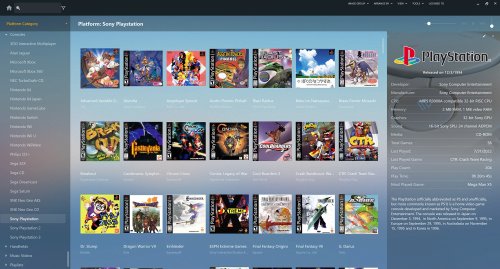 Here is the modified file, in case it helps. BoxesContentView.xaml
 -
@bundangdon I've made a few small changes to the "BoxesContentView.xml" view to prevent game titles from being cut off and look a bit better. Here are the changes: <!-- TITLE REGULAR TEXT --> <TextBlock Text="{Binding Title}" Foreground="{Binding ForegroundBrush}" TextWrapping="Wrap" TextTrimming="None" Margin="{Binding TextMargin}" Grid.Row="1" TextAlignment="{Binding TextAlignment} " MaxHeight="{Binding MaxTextHeight}" /> <!-- SUBLINE REGULAR TEXT --> <TextBlock Visibility="{Binding SublineVisibility}" Text="{Binding Description}" Foreground="{Binding FadedForegroundBrush}" FontSize="12" TextWrapping="NoWrap" TextTrimming="CharacterEllipsis" Margin="0,0,0, 0" Grid.Row="2" TextAlignment="{Binding TextAlignment}" /> Could you consider adding these small changes for future revisions? I think it looks much better this way, really. I'm waiting for your opinion
-
Thank You!!!!
-
Hi @bundangdon!!! Are you going to update this theme to include the latest changes in Launchbox version 13.3? Thank you so much.
-
My favourite theme since years. Thanks for keeping it updated @bundangdon!!!
-
Thanks for keeping this theme updated!!!!
-
Thanks I solved it !!!
-
Hello, I want to move the roms from one of my platforms to another location. The problem is that on this platform the roms are not in ZIP format. Each rom is located in a subfolder with its name and inside this folder is the .cue and .bin file. The problem is that if I use the wizard to change the path of my roms I can only choose the top level and when importing the path is not correct, since the files are inside subfolders. What can I do to move this platform to another location without having to re-import the games one by one? Thank you.
-
Hi @viking, congratulations on this wonderful theme. Would it be possible to disable the animation of the game details that appears on the right every time you change the game in the list? For me it would be much better if the right part with the game details was always visible and that only the game details themselves changed each time you go to the next one in the list. The game box image appears immediately when you switch from one game to the next, but the details take time to appear due to the entrance animation. I think it would be better to leave the details always visible. Is it possible to do this? Thanks a lot.
-
Totally agree with your comment. I don't understand why those of us who speak a language other than English are excluded from having the possibility of integrating other languages in the Launchbox database. It would be as simple as enabling complementary languages and the community itself contributing its translations. So simple and so far from reality.
-
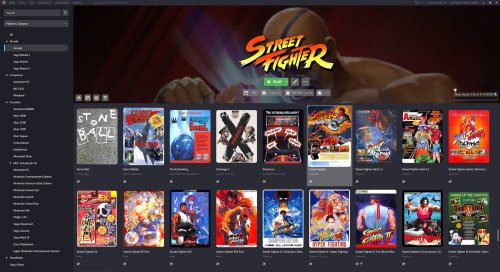 Thank you very much for your answer @faeran. For me it is very important to be able to see the largest number of covers when I am making changes or modifying the ones that are not downloaded correctly. With my previous theme it was easy to open the side panel when I needed it and be able to see if it contained the images, videos and other extra elements that can only be seen by accessing these options. Anyway Faeran, I see that this theme is not very comfortable for all those like me who use Launchbox to organize their game library. The fact that the images or video do not appear directly in the top menu makes it very difficult to update or modify the games in the library. This theme is really wonderful if your library is 100% configured and you don't need to touch many things, but if I'm honest I spend much more time in Launchbox than in BigBox because I try to make each of my games have all their art up to date and for that I need a comfortable interface to work with. Finally, I would like to tell you that on many occasions when I try to play a video of one of my games, when I press the play button, it does not play. The only solution I find is to click on one of the images in that game and then press play again on the video. This way it does reproduce. This doesn't happen 100% of the time but it does fail 30-40% of the time you try to play the video the first time. Thank you again for your great contribution to this community. A hug from Spain.
 -
Hi @faeran, I have written this myself in the download file for this theme but I think this is the place to talk about theme suggestions. Could you consider adding a small button at the top to be able to hide or show the game information? I see that the possibility of showing the icons when hovering over the games has disappeared and sometimes I would like to be able to see a greater number of games at the same time by hiding the game information at the top. Apart from this, another thing that I think would be positive is the possibility of displaying long game titles on 2 lines. This is something that I have seen that implements the Steamy theme allowing to fully read the name of the games with a long title and not cutting with (...) I think that with these two improvements it would definitely be the best theme ever created for LaunchBox in my opinion. Thank you very much for your great work and everything you contribute to this community. A hug.
-
Hello @faeran, first of all my congratulations for this great work. I only have two questions that I would like to be able to solve: 1 - Would it be possible not to shorten long titles by adding a second line of text if necessary? Long titles are now cut off with (...) 2 - I know that your theme is designed to always have the game information visible at the top, but sometimes it is better to hide the game information to be able to see more games on the screen. Would it be possible that when hovering over the game cover the information icon would appear so that pressing it would activate the game information at the top? I have activated the option to show icons when hovering over games, but it seems that in this theme this function does not work or is deactivated. The only way to hide game information is through the Launchbox settings menu which makes it very inconvenient. Thank you very much and congratulations for this great work. Edit: Would it be possible to activate the details of the game by pressing the middle mouse button? I think it would be a good option to be able to activate or deactivate the details of the game and to be able to have a broader view of the games when necessary. Launchbox has the option to show / hide game details with the key combination ctrl + T. Could this key combination be assigned to the middle mouse button? Another solution would be to add a game details toggle button to the bottom bar. Thank you @faeran.





