

dukdukgoos
-
Posts
38 -
Joined
-
Last visited
-
Days Won
1
Content Type
Profiles
Forums
Articles
Downloads
Gallery
Blogs
Everything posted by dukdukgoos
-
Startup/Shutdown speed is remarkably improved. Quick filter feature is much appreciated. ...and no more tiny cursor!
-
Tiny mouse pointer here as well. Wasn't sure what was causing it, but see now others have the same thing. It happens right after closing LB. The cursor disappears for a split second, then reappears tiny. Reboot Windows will fix it. Then after reboot, launching LB again it will be fine... until you close LB again. Then tiny cursor comes back and stays until reboot.
-
The feedback issue I made is now public and can be voted/commented on: https://feedback.launchbox-app.com/p/handheld-electronic-games-platform
-
Could you explain a bit about the "Installed/Not Installed/Automatic" select box change from the previous checkbox (in the Edit Game dialog)?
-
This should probably be put in "Nintendo Game & Watch" as it's currently the place all the dedicated handheld electronic games go. I've been arguing we need to reform this and have a properly named "Dedicated Handheld" platform as it's really difficult and confusing to know where to put devices like this, and completely unintuitive to choose "Nintendo Game & Watch" Here's one of the many threads discussing it: https://forums.launchbox-app.com/topic/93971-nintendo-game-watch-database-need-to-be-fixed-by-separating-games-that-are-not-nintendo-to-their-own-category-platform/
-
Missing Platform in the Game Database: Mega LD / Pioneer LaserActive
dukdukgoos replied to totoro's topic in Contributions
Isn't this what you want? https://gamesdb.launchbox-app.com/platforms/games/229-pioneer-laseractive -
I have made an issue for it, but it's not public yet. I'll repeat it here: I think it boils down to: We need a "Platform" for misc Handheld Electronic games We need to decide if things like Nintendo Game & Watch, Tiger LCD games, Konami LCD games, etc are actually "platforms" or if they're just a brand name for similarly styled games
-
I'm finding that LB isn't shutting down cleanly quite often. When I shut down there's frequently a zombie process that remains active, and then when I try to restart I get a error and have to manually kill the zombie process before restarting. This has always been an infrequent problem in the past with LB, but seems to be happening more with the latest beta.
-
With Beta 6 when renaming a game it will rename the corresponding image files (as expected) but then if you rename it a second time it won't rename the images. This worked on previous versions.
-
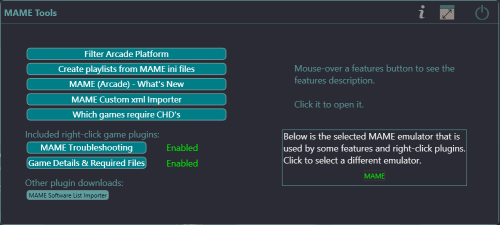 I actually tried that plugin, but couldn't figure out a way to multi-select the thousands of entries to delete them. Clicking each checkbox one at a time wouldn't be fun
 -
I'd like to request an enhancement to "Bulk Add ADB Additional App"... the ability to bulk remove the ADB links as well.
- 16 comments
-
- 1
-

-
- mame
- troubleshooting
- (and 6 more)
-
Noticed a problem with the VLC video player option. With certain videos it displays the aspect ratio incorrectly in LaunchBox, but when playing the video directly with the VLC app it's correct. Switching to the ffmpeg player in LaunchBox plays the video correctly. A couple of example videos from MAME: Alien Crush and Amidar. You can download them here: https://adb.arcadeitalia.net/download_file.php?tipo=mame_current&codice=aliencr&entity=shortplay&oper=streaming&filler=aliencr.mp4 https://adb.arcadeitalia.net/download_file.php?tipo=mame_current&codice=amidar&entity=shortplay&oper=streaming&filler=amidar.mp4
-
Great, looking forward to Beta 3. On a positive note, in my build I've not seen any performance problems with Beta 2. Scrolling speed of image grid is very snappy.
-
MAME (Arcade) - What's New
dukdukgoos replied to JoeViking245's topic in Third-Party Applications and Plugins (Released)
Cool, so it's just that ADB hasn't set them up completely yet (Not Classified). Just wanted to make sure. I'm using the MAME Tools version of the plugin but just commented here because of the previous history. Thanks again! -
MAME (Arcade) - What's New
dukdukgoos replied to JoeViking245's topic in Third-Party Applications and Plugins (Released)
FYI, the .288 MAME update is doing the same thing as before where it doesn't show any of the latest updates. I deleted ADBcategories.json and recreated as discussed before. It shows as ADBcategories (0.288).json but still doesn't have the latest updates (there should be 200+ with this release). Perhaps a bug on the ADB side? Is it working for you? -
What an absolute Tour-de-Force plugin! Kudos and big thanks!
- 16 comments
-
- 1
-
-
- mame
- troubleshooting
- (and 6 more)
-
MAME (Arcade) - What's New
dukdukgoos replied to JoeViking245's topic in Third-Party Applications and Plugins (Released)
Yes, that fixed it. The file was dated April 8 before I deleted it. Got cached perhaps and didn't update when the data was available? In any case now I know I can delete that file if I run into this again. Thanks! -
MAME (Arcade) - What's New
dukdukgoos replied to JoeViking245's topic in Third-Party Applications and Plugins (Released)
If I edit it to .286 I get some values:
-
MAME (Arcade) - What's New
dukdukgoos replied to JoeViking245's topic in Third-Party Applications and Plugins (Released)
I'm on 1.01. Here's a screenshot:
-
MAME (Arcade) - What's New
dukdukgoos replied to JoeViking245's topic in Third-Party Applications and Plugins (Released)
Sorry I mean it doesn't show any new files for .287 yet. It recognizes .287 as the latest version. It shows updated files for .286/.286, etc if I change to that version, so it's working, but nothing for .287. I assume there's some kind of delay before the files for the new version show up -
MAME (Arcade) - What's New
dukdukgoos replied to JoeViking245's topic in Third-Party Applications and Plugins (Released)
How long does it usually take for a new version to be available in the plugin, and where is it updating from? .287 still isn't available and it's almost time for .288 to release -
Is /ThirdParty/VLC going to be removed from the install in the next version? Since VLC was completely deprecated in 13.24 seems like it shouldn't be included in the install going forward.
-
Really like the Next/Previous buttons in the Edit dialog, but it would be even better if it stayed on the same page when moving, rather than always revert to the main page. That way if you're editing the same thing that's not on the first page (Notes, Custom Fields, Media, etc) you can without having to switch the page each time.
-
Dungeons & Dragons Manuals & Modules Platform
dukdukgoos commented on malarrya's file in Platform Media
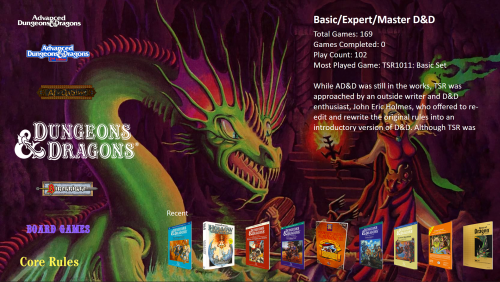 @malarrya How do you recommend handling Box Set entries where there are multiple books in the set and therefore multiple PDFs? Currently it seems like there's an assumption that the PDFs have been merged into one file so the game entry can open it directly. Another example would be the CD box sets that include PDF books and multiple audio files. Is using "Additional Apps" to link the multiple files the best option?
 -
Dungeons & Dragons Manuals & Modules Platform
dukdukgoos commented on malarrya's file in Platform Media
@malarrya I should have clarified it's the "Series" options in the drop-down directly *below* Search that don't appear to work. This is probably related to what you are showing above with the "filter" menu to the right of Search. Another suggestion would be to utilize your custom fields to dynamically create the playlists (or at least most of them, a few may still need to be manual). That way, when you make additions or changes the playlists will automatically update. Thanks for your effort on this great project. Looking forward to the next version!




