

Jason Carr
-
Posts
13,723 -
Joined
-
Last visited
-
Days Won
388
Content Type
Profiles
Forums
Articles
Downloads
Gallery
Blogs
Everything posted by Jason Carr
-
Sorry for the late reply here. I have everything working in those scenarios on my Shield device, so I really don't know why it wouldn't be working on yours. What version of Retroarch are you using? Are you using a sideloaded version or the version from Google Play? What's the version number?
-
I've previously reviewed viking's theme, and haven't found any performance issues that can really be addressed, so I'm not sure that there's much he can do. Not sure why you would be seeing a delay in that situation, but I've confirmed that I am not seeing any delays on my systems when switching platforms for the first time.
-

Severe Performance Issues with BigBox RESOLVED
Jason Carr replied to johnsanc's topic in Troubleshooting
It happens any time a full size image is read (for example, a large box image). -
@LuskPhoto There was one other user who was reporting issues with a Sprint phone as well. What step of the process is it getting stuck on?
-
Videos are not cached at all. If it's happening the first time videos are loaded, it could be due to loading up the video engine. Other than that, I'm not sure what could be causing a slowdown.
-
Severe Performance Issues with BigBox RESOLVED
Jason Carr replied to johnsanc's topic in Troubleshooting
The image cache folders are used constantly, and they're currently always inside of the LaunchBox\Images folder. Just because images are cached, does not mean that they won't be read from disk. They're still read every time they're needed. There's absolutely no way we could store all of the images in RAM. -
Will review this as well when I review the above. It's ultimately a relic from the data from thegamesdb.net. There's both an old ID for thegamesdb.net and a new ID.
-
Will look into this. We're working on it now. Will still be a bit, as it's a major undertaking. Yup, full editing is coming soon.
-
Blank Screen when selecting Export to Android from Tools
Jason Carr replied to flacogordo's topic in Android
Odd. You're still missing all of the WPF elements from that screen. Only the old-school Windows Forms elements are showing up. So that confirms that there's something strange going on with your machine, as WPF elements are not rendering. I would try uninstalling/reinstalling the .NET Framework, and perhaps checking for video driver updates. Also make sure you're 100% up to date with Windows Update. -
Did you happen to close out LaunchBox via Task Manager at all? That's the most likely cause of something like this. We haven't changed any saving or related code in these betas, so if there is an actual issue, it's not likely to be a new one (and I'm pretty sure that we don't have an issue there). We have an item on our list to improve the sorting for decimal points.
-
Are you using a network share for the videos as well?
-
Severe Performance Issues with BigBox RESOLVED
Jason Carr replied to johnsanc's topic in Troubleshooting
That's no surprise. Even though the VM is on the same machine, it's using all the whole network stack for all file IO, which is naturally a whole lot slower than local. I would imagine that VM network shares to the same machine probably have other performance issues as well. The image cache is (of course) the most taxing part of disk read and write operations in Big Box, which only makes sense. It has to read a ton of images. This isn't an issue with Big Box lol. -
LaunchBox for MS-DOS Special Edition
Jason Carr commented on Jason Carr's file in LaunchBox/Big Box Media
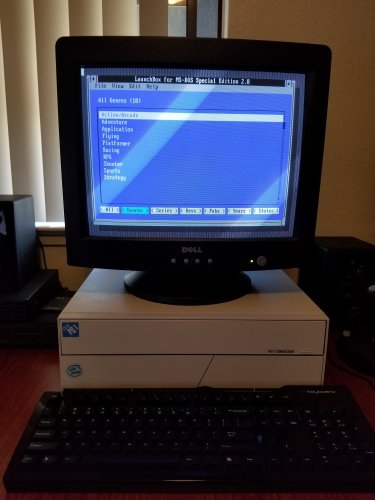 Yes, the data structure is not changing.
 -
The website should update automatically once the change is approved (the delay is only for the app). I will review to see if I can replicate.
-
Oh, interesting. I thought it was pure Android. There is a known issue with Chrome OS that I haven't figured out yet. I do plan to get a hold of a cheap Chrome OS device here at some point for testing.
-
Blank Screen when selecting Export to Android from Tools
Jason Carr replied to flacogordo's topic in Android
@flacogordo Sorry to hear about the issue. From what I can tell, it appears to be an issue with the .NET Framework or video drivers somehow. Are you able to open the LaunchBox Options screen? -
@Shade Let us know where you're at on this and if you've tried @C-Beats suggestions.
-
That's odd; sorry to hear about the issue there. I don't have a Pixel Slate to test with, but I'm wondering if something else might be going on. Do you have anything non-standard installed on or attached to the device? Is it rooted or anything?
-
LaunchBox for MS-DOS Special Edition
Jason Carr commented on Jason Carr's file in LaunchBox/Big Box Media
Development is in progress, but it's currently a hobby app for me to develop, so it may still be a very long time before it comes out. I can't devote significant time to it, and since it's being developed in x86 assembly, it's also a learning experience for me. It will come out eventually, but it may be a year out yet. -
@neil9000 is correct. I have not experimented with what the settings need to be, but it should be fairly obvious if you start with the default settings and decrease the spacing until your happy. Theme developers will indeed need to add the new code to the custom themes before they will work in the custom themes.
-
MAME.xml metadata file does not appear to be grabbing all data.
Jason Carr replied to FoxyMonty's topic in Troubleshooting
Also, did you use the full MAME set importer, or the standard ROM importer? -
MAME.xml metadata file does not appear to be grabbing all data.
Jason Carr replied to FoxyMonty's topic in Troubleshooting
Hmm, I see. It might be worth doing some more research on this. I'm guessing that by default they are excluded because they aren't arcade games (excluded by the Skip Non-Arcade check box). If we can clarify exactly what's going on, I can look into it. -
MAME.xml metadata file does not appear to be grabbing all data.
Jason Carr replied to FoxyMonty's topic in Troubleshooting
To be honest, we haven't done much testing or put in much development for non-arcade MAME romsets. Believe it or not, it hasn't been a very common request. How well does it work if you uncheck the box to use MAME metadata? -
Sounds awesome guru, I wish I could join up on this. Unfortunately I'm traveling on Sunday. Would encourage theme developers to join up on this if they can though.
-
We may come back to this in the future, depending on feedback.

