
faeran
-
Posts
3,042 -
Joined
-
Last visited
-
Days Won
143
Content Type
Profiles
Forums
Articles
Downloads
Gallery
Blogs
Everything posted by faeran
-
Neptune View File The newest version of this theme requires version 13.3, or higher. A LaunchBox Custom Theme I developed to help me understand the code behind themes. Because of this, most items within the XAML files are commented, which were added in order to help me keep track of what was going on. Sources of inspiration include the Lambda theme and GOG Galaxy. The notable item this theme accomplishes is the tab approach to the Game Details Page. Please feel free to use parts of this theme in your own creations. Installation Extract the Neptune folder into LaunchBox\LBThemes In LaunchBox, open Options, under Visuals > Main Window Theme and select Neptune from the dropdown. Submitter faeran Submitted 09/28/2021 Category Custom Themes
-
Hi @Ble3azy. This doesn't appear to be a wide spread issue with LaunchBox itself, so I would check some of your security/firewall settings that you may have set up, local or remote, to determine if you have anything that may be blocking LaunchBox from connecting to the internet.
-
 Hi @Mainiack, You can try to enable the "Show Hidden Games" option, under View. Hide all your games, and then turn that option off when you are done.
 -
Game Details screen hard to read - want black backgrounds
faeran replied to fettsvett201's topic in Troubleshooting
Hi Steve, Are you referring to LaunchBox or Big Box here? Also, if you could provide a screenshot that could definitely help with providing you a good solution to this. -
If I'm reading the question correctly, you should be able to select all the affected games and use the "Change ROMs Folder Path for Selected Games" option, under Tools.
-
questions about theme - night at the arcade
faeran replied to huffyX0's topic in Big Box Custom Themes
Yes, the theme was created as part of the old theme stream live streams. I do believe in the video it's shown how to generate your own images based on the marquee and screenshot images you have in your LaunchBox library. -
RetroMags - [Theme Workshop] View File RetroMags was built during a Theme Workshop live stream. If you are interested in creating themes, subscribe to the Unbroken Software YouTube channel. RetroMags A Big Box theme designed to look like the Retro Magazine's of old. The theme was designed using the COMMUNITY Theme Creator, along with some manual code changes in order to utilize the new wheel CoverFlow features not yet currently in the Theme Creator. This theme relies on 1 System Hardware graphic and 3 platform specific game graphics for each platform/playlist/category. I did not include a graphic for every platform out there. If people would like to help contribute platform specific graphics, PM me, or post in this thread and I'll add them to the main theme in a future update. Graphic locations: System Hardware: LaunchBox\Themes\RetroMags\Media\Console Images Graphic 1: LaunchBox\Themes\RetroMags\Media\Platform Image 1 Graphic 2: LaunchBox\Themes\RetroMags\Media\Platform Image 2 Graphic 3: LaunchBox\Themes\RetroMags\Media\Platform Image 3 Please note: The COMMUNITY Theme Creator Project Files are provided for you to learn. If you would like to publish the theme, it will be missing the Platform Wheel and the 2 Wall View wheels. These would have to be added back manually to the theme. They can be found in the theme files within their respective xaml files. Watch this theme being built: Watch on YouTube: Part 1: https://www.youtube.com/watch?v=4Qe96FXHd3c Part 2: https://www.youtube.com/watch?v=BYm7dVuDCIM Credits COMMUNITY Theme Creator by @y2guru. Find it here: https://forums.launchbox-app.com/files/file/2115-community-theme-creator-for-bigbox/ Rincewind's awesome character graphic's pack is included (at a much reduced resolution) Subscribe to catch future live stream: https://www.youtube.com/channel/UCSIht6UXIEXIgz4eXAEShxA Submitter faeran Submitted 09/27/2021 Category Big Box Custom Themes
-
![More information about "RetroMags - [Theme Workshop]"](//forums.cdn.launchbox.gg/monthly_2021_09/Title.thumb.jpg.3c2c6b7da0bd1ae032b5006da5e6c666.jpg)
Version 1.3
840 downloads
RetroMags was built during a Theme Workshop live stream. If you are interested in creating themes, subscribe to the Unbroken Software YouTube channel. RetroMags A Big Box theme designed to look like the Retro Magazine's of old. The theme was designed using the COMMUNITY Theme Creator, along with some manual code changes in order to utilize the new wheel CoverFlow features not yet currently in the Theme Creator. This theme relies on 1 System Hardware graphic and 3 platform specific game graphics for each platform/playlist/category. I did not include a graphic for every platform out there. If people would like to help contribute platform specific graphics, PM me, or post in this thread and I'll add them to the main theme in a future update. Graphic locations: System Hardware: LaunchBox\Themes\RetroMags\Media\Console Images Graphic 1: LaunchBox\Themes\RetroMags\Media\Platform Image 1 Graphic 2: LaunchBox\Themes\RetroMags\Media\Platform Image 2 Graphic 3: LaunchBox\Themes\RetroMags\Media\Platform Image 3 Please note: The COMMUNITY Theme Creator Project Files are provided for you to learn. If you would like to publish the theme, it will be missing the Platform Wheel and the 2 Wall View wheels. These would have to be added back manually to the theme. They can be found in the theme files within their respective xaml files. Watch this theme being built: Watch on YouTube: Part 1: https://www.youtube.com/watch?v=4Qe96FXHd3c Part 2: https://www.youtube.com/watch?v=BYm7dVuDCIM Credits COMMUNITY Theme Creator by @y2guru. Find it here: https://forums.launchbox-app.com/files/file/2115-community-theme-creator-for-bigbox/ Rincewind's awesome character graphic's pack is included (at a much reduced resolution) Subscribe to catch future live stream: https://www.youtube.com/channel/UCSIht6UXIEXIgz4eXAEShxA- 24 comments
-
- 21
-

-

-

-
Thanks for the report! I'm a bit curious about the video image fallback you are seeing, as that's not controlled by the theme at all. The platform textlist oddities will be fixed before the theme gets officially released.
-
questions about theme - night at the arcade
faeran replied to huffyX0's topic in Big Box Custom Themes
Hi @huffyX0, Looks like you managed to solve most of your issues there. Yes, that LaunchBox image in your last screenshot is showing that you are missing artwork for that game. If I remember correctly, you should be able to download the COMMUNITY Theme Creator files and load them up into the CTC to generate your own images. -
I've also seen Nahimic causing visual bugs like this in Big Box. You may want to check your system and see if you have Nahimic installed and the service running. If you do, google how you can remove it from your system.
-
Something you can try. Navigate to: \\LaunchBox\Images\Playlists Depending on how you created your Favorites playlist you'll either see a folder called Favorites or Arcade Favorites Inside of there, you'll see a Clear Logo folder. Replace the image in there with the one you want to use. Try Big Box again, you may need to refresh your image cache.
-
3d Boxart No Longer Showing Since Recent Update
faeran replied to zombieromero's topic in Troubleshooting
Hi @zombieromero. Just tested with the default theme and 3D Boxes are displaying as intended. Which theme are you using? Sometimes these can be a theme specific issue. You can also check to make sure that in Big Box your Game Image Type is set to 3D Boxes. This can be found in Options > Images > Game Image Type (changing this setting may require a clearing of the Image Cache and a potential Big Box restart) -
Hi Everyone, Beta 4 has now been released with the following: New Feature: LaunchBox's game-specific background image can now be disabled (Found in LaunchBox Options > Visuals > Backgrounds) New Feature: You can now use the Clean Up Media tool for a single platform (Community Poll feature) Improvement: LaunchBox should more accurately determine a ROM's region based on its filename Improvement: EmuMovies downloads are now downloaded last to allow them to continuously download and avoid session timeout errors Fixed: Rare errors while downloading Steam media Fixed: Importing arcade games with the ROM Import Wizard was not always obeying the "Force Use MAME Metadata" option (introduced in 11.9) Fixed: On some systems, starting Big Box into a platforms or filters view was not properly playing background videos on first load Fixed: Rare error when editing the RetroArch emulator in LaunchBox if no cores were missing Fixed: On rare occasions, changing the selected game too quickly in LaunchBox would cause the game details loading to hang Fixed: The prompt upon completion of media downloads was sometimes appearing more than once Fixed: Steam games rated 17+ were causing errors with the import As always, thanks for the help with testing the betas.
-
This is entirely possible. You can take any theme (other than the defaults) and edit their xaml files. If you have a very specific example, I can try to help you out more.
-
Hi @heitorcr, There's 2 ways I can think of doing this: You can use the filter button, located the alphanumeric index to filter by Installed > Is True. This will temporarily filter your games and only show you the installed ones. In LaunchBox, you can create an auto-populate playlist that will automatically include every game that has the Installed field set to Is True. You can call the playlist anything you'd like and place it anywhere within your Platform Category hiearchy.
-
Hi @vince16, While I've never seen this issue before when using standalone dophin with LaunchBox, some google searching seemed to bring about a lot of info of different people getting the same error message. Since you seem to only be getting it from launching a game into dolphin from within LaunchBox (definitely confirm this, just in case), most may not be relevant, but worth a look: Make sure you are not running LaunchBox (or Big Box) as admin, this can cause a lot of issues, one of which is folder/file permissions issues. Some people seemed to indicate that it was their anti-virus program blocking their version of dolphin. Some people say it was their location of the Wii nand folder causing the error. Changing its location solved their issue. Could be related to a general folder/file permissions issue to where Dolphin places your user config files (usually in Documents inside of a folder called Dolphin Emulator). You could have file corruption issues within your Dolphin Emulator folder.
-
This is all planned. While we may take time to get there, we will eventually make it.
-
You shouldn't lose anything. You can simply place the images within their respective image type folders, then refresh the images in LaunchBox and they will show up. Since LaunchBox allows you to have multiple images per game, if you scrap again, it will probably try and add additional images on top of the ones you already have. I would use the Audit tool, or Games Missing Media area to help fill in the gaps. While it's all personal preference, I like to scrap using the LaunchBox DB, and then have Emumovies fill in the gaps.
-
Hi @GiSWiG. The issue stems from the api that is provided by EmuMovies, there are certain situations where it cannot handle the amount of media thrown at it. While we continue to improve the implementation of their api, we unfortunately have reached a point where a change would have to come from their end to improve the situation. Luckily, they are in the process of creating a more robust api that will hopefully solve the slow down and disconnection errors caused by their api. While that doesn't help in the meantime, you can always use their own syncing program, like you mentioned. You do not need to rename the files as LaunchBox will read them natively, just make sure you place them in the correct LaunchBox folders.
-
Hi @tazboi. While there's definitely a lot more people here more familiar with MAME, you could start by checking your mame.ini file and seeing if you have set up MAME to dispay on multiple monitors. Check a section called # OSD PER-WINDOW VIDEO OPTIONS It's also possible that MAME could be changing your monitors resolution, and potentially causing Windows to mirror both monitors.
-
Hi @DeadVoivod, sorry to hear about your missing media. @sevenalive is right, normally media would not just disappear, so definitely make sure that there's nothing wrong with your disk. Another thing to check would be to make sure you don't have any extra files within your Data\Platforms folder. Sometimes when using external scrapers, extra files that conflict with LaunchBox may be added there without a user's knowledge. You should only have 1 file per platform.
-
While I won't be solving this for the current version of Colorful, I've worked out a solution for the CTC version that's currently in beta. It will be able to differentiate between category and platform names. I'll try and release a new beta in the next day. I just have one more thing to work out.
-
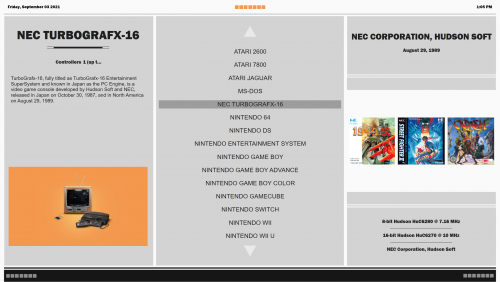 Looks great, thanks for sharing!
 -
Since it's not officially out yet, the COMMUNITY Theme Creator files aren't quite live. If you have any particular color codes that need to be added, let me know and I'll add them directly into the creator. Then when I get the next test version out, it will be in there.

![More information about "RetroMags - [Theme Workshop]"](http://forums.cdn.launchbox.gg/monthly_2021_09/Title.thumb.jpg.3c2c6b7da0bd1ae032b5006da5e6c666.jpg)
