Custom Themes
29 files
-
Better Old Default Cinematic
By d66dle
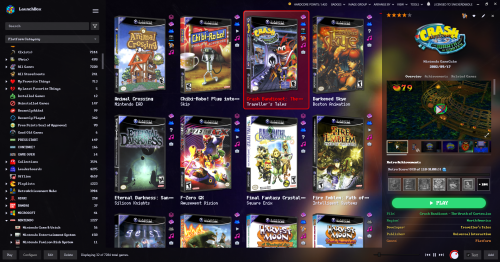
Yet another Better Old Default, but even more cinematic, because the black rectangles are GONE, and the Background View has been further tweaked to emphasize the use of game fanarts and fancy wallpapers (mostly adjusted the vignette effect). This theme also exclusively utilizes fast box and list views.
I figured it would be less confusing to go ahead and give this its own theme entry, rather than adding another version of Better Old Default Plus. I hope this is an aesthetic improvement, but it may not be for everyone, depending on your setup and visual settings. Text may also be harder to read at times, so take this into account.
I've included screenshots of some of my settings to get the desired effect, such as setting background blur to 5 (10 also works, just less details visible). The blurring can help to obfuscate lower quality images. Additionally, the 'Dark Background' is meant to give a purple-ish hue to the background images, provided you have 'Colorize Background Fade' turned ON in LB Options > Features. You can also just use black to darken all backgrounds that way.
TL;DR Notes on Installation
- Extract the theme zip into LBThemes, as the theme folder should be in its own sub-folder.
Optionally
- Install any fonts included or linked in the Fonts (Optional) folder. I'd also recommend any pixel-style fonts available on sites like DaFont and itch.io.
- In LB Options, choose a custom background from the Images\Backgrounds (Optional) folder to configure as your 'Custom Image' Background. (these were edited in GIMP and upscaled using ChaiNNer).
CREDITS: Many elements from different themes have been sort of mashed together and tweaked over time in order to make this theme. Some of those theme creators include @Retrofrogg, @Mr. RetroLust, @Rincewind, and @faeran.
┬┴┤•_•)ノ├┬┴┬
4 downloads
- lb theme
- launchbox theme
- (and 1 more)
(0 reviews)0 comments
Submitted
-
Better Old Default Plus
By d66dle
TL;DR Notes on Installation
- Extract the theme zip (whatever your version of choice) into LBThemes, as the theme folder should be in its own sub-folder.
Optionally
- Install any fonts included or linked in the Fonts (Optional) folder. I'd also recommend any pixel-style fonts available on sites like DaFont and itch.io.
- In LB Options, choose a custom background from the Backgrounds (Optional) folder to configure as your Launchbox default Background. (edited in GIMP and upscaled using ChaiNNer)
- If using alternate/old files included separately (such as Box views - Alternate Alignments), be sure to rename files accordingly, if applicable, after extracting into the Views folder.
ex. BoxContentView_Bottom.xaml >> rename to >> BoxContentView.xaml
Description
So, very similar to my other Better Old Default... With the following changes:
Platform/Game Details:
- less margins in details!
- new clickable custom links! (Based on Retrofrogg's GameDetailsView with the manual button)
- more simplistic subtitle format under clear logo titles
- RetroAchievements have been moved above the play button for more convenient viewing.
Box View:
- now based faeran's Default Plus version with the toggleable text button...
NOTE: it may or may not be slightly faster than the old (legacy) box view? And this way it doesn't require specific box spacing with the badges being further to the right. Previous box view is also included separately, if you prefer the old one without the text toggle.
- added optional bottom aligned box view
NOTE: this apparently only looks as intended with Dynamic Box Sizing turned OFF
Changes from 1.0.1
Platform Details:
- added last played / most played / random buttons from the default theme
- added Default Emulator and Games Beaten/Mastered fields (checkable fields in LB Options)
- colors and field order better mirror those of the game details
Game Details:
- play button now uses whatever your Game Details Large Font is (configurable in LB Options)
- High Scores and Related Games tabs now use larger font size for easier reading (with the WCP font I use, it was ultra tiny by default)
- added Playtime Commitment from the default theme
Box View:
- added a few more alt box alignment choices in downloads
NOTE: Fast Box view is soon to be added to this theme, so box alignment change will be possible with "Configure Layout"
Changes from 1.0.2
Box/List Views:
- now with fast box/list views!
Thanks to Rincewind's recent NeonArcade theme utilizing vertical badges (I simply cannot stand the tiny bottom-sitting horizontal badges, but to each their own), I finally managed to tweak the box and list views so they reasonably fit the oldie default look.
I couldn't decide on the list view, whether to keep the background layer completely transparent or not, so I included both versions in a separate file. The "BG" version may be easier to see, depending on your choice of visuals in LB options (comparison images in screenshots).
If the fast box view is not to your liking, simply remove or rename "FastBoxesContentView" in the Views folder, and the old "BoxContentView" will be used instead.
Known Issues Thus Far:
- there seems to be a limit of 6 badges viewable at a time, rather than all active badges being visible. Unsure if that's an LB quirk or something editable in the theme itself.
CREDITS:
Since this is more of an amalgamation of existing themes, credit is due to those creators, such as @Retrofrogg, @Mr. RetroLust, @Rincewind, and @faeran.
✺◟(•‿•)◞✺
114 downloads
- lb theme
- launchbox theme
- (and 1 more)
-
NeonArcade
By Rincewind
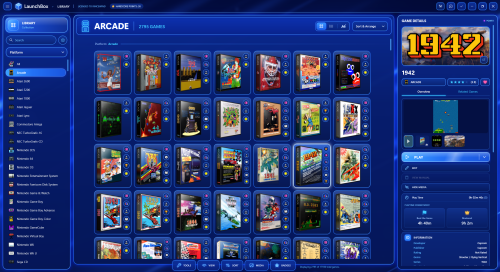
NeonArcade — a bright electric-blue neon theme for LaunchBox. Glowing glass panels, framed game tiles and an arcade-style. Based from the default theme so it has the most up to date features. I have tried to make sure every part of the theme has been styled or changed so it feels like a completely new version of LaunchBox.
77 downloads
-
-
Slightly Better Old Default Theme
By d66dle
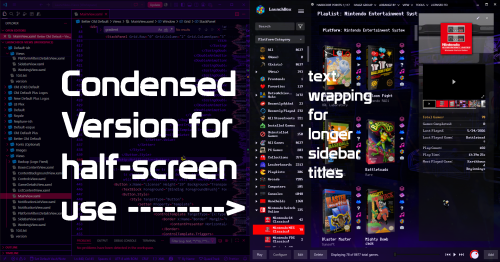
An Old-Default-ish Launchbox theme, because I'm stubborn, and sometimes simpler is better. Not very fast on my 2020 laptop though. Regardless, I've enjoyed tweaking it to my needs over time, so I will call this theme "done" until further notice--or if there is something catastrophically wrong with the current file.
If you try it out, perhaps let me know if it's as sluggish as I think it is on other folks' systems... I am curious if it's an old-theme problem or a my-laptop-is-getting-old problem (it might also just be that I'm not versed enough in code to put together a theme that isn't riddled with errors resulting in slowdown).
In the theme folder Better Old Default I have also included optional font files (one of which is a URL to its itch.io page), as well as some backgrounds I edited and then upscaled based on Mr.RetroLust's Neon Deluxe Arcade background. The fonts can be chosen in Launchbox options after installing the font files to your system.
THEME INSTALLATION:
Better Old Default folder goes into LBThemes folder. Choose in LB Options or Themes & Media page.
If applicable, rename MainView_Condensed.xaml to MainView.xaml to use the condensed version that will fit the top menu in one half of the screen (badge menu and notification bell are missing in this version to make room).
Optionally, install the included fonts. (Note: "Launchbox" logo on the top left may or may not look a bit off kilter with some custom fonts.
Also optionally, use one of the included wallpapers as your default LB background.
CREDITS:
Since this is more of an amalgamation of a few different themes, credit is due to those creators, such as Retrofrogg, Mr.RetroLust, and faeran.
...I'm sure I've forgotten something (゜д゜??)
61 downloads
- default theme
- retrolust
- (and 3 more)
-
Sleek - A Launchbox Desktop Theme
By Fredsthebest
Sleek
Sleek is a modern dark-mode theme for LaunchBox Desktop, built around a Midnight Glass / dark navy style.
It replaces the default Desktop layout with a cleaner horizontal top rail, a redesigned Game Details view, smoother navigation for large libraries, and improved responsive layouts across the main sections.
Installation
Download and extract the zip. Place the Sleek folder here: LaunchBox\LBThemes\Sleek In LaunchBox, go to: Tools > Options > Visuals > Theme Select Sleek. If Windows blocks the included plugin DLL, right-click the DLL, open Properties, and choose Unblock.
Recommended Dialog Theme colors
For best results, set LaunchBox’s Dialog Theme colors under:
Tools > Options > Visuals > Dialog Theme Accent: #4EA3FF Highlight: #123A6A Background: #071425 Border: #1D3A5F Foreground: #E8EEF7 Contrast: 0.37 Notes
This theme is for LaunchBox Desktop, not Big Box.
Credits
Sleek is based on the Big Details theme, with extensive redesign work.
240 downloads
-
-

Frogg theme
By Retrofrogg
Here is my Launchbox theme, imaginatively titled "Frogg".
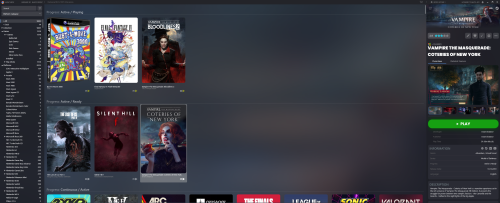
This is a rework of the default theme, as there were a number of things I wanted to change. See the second screenshot for a list of the changes made. Most of the changes were to the game details pane. I also removed the rounded edges from the boxes in the main grid view. The platform tree is the same.
Overall I wanted to maximise the use of available screen area and show as much metadata as possible, minimising the necessity to scroll. Some scrolling is still required to view the retroachievements and related games, but for general game browsing often no scrolling is required to see the banner, images, metadata and notes. The very latest default them has returned to having the related game in a separate tab; I might update this theme at some point to incorporate that (now done with version 2 of this theme).
I have an ultrawide monitor and this theme makes good use of the extra screen real estate. If your monitor isn't quite as wide you can resize the game details pane to your satisfaction. Also, I have a separate marquee screen on which the banner is displayed. That's why I kept the scratched arcade marquee aesthetic with the clear logo in the game details pane. It probably fits the theme better than the marquee anyway.
A few things I'd like to change with updated versions (any help with these would be appreciated):
- the height of the image preview area; videos fill the space well, though for the images it only uses around 80% of the available height. It looks OK but it's something I want to improve
- I'd like to have Retroachievements in a separate tab, like "related games" has; same for MAME high scores
Edit: Please update to the latest version (2.2) - some dependencies might have been missing in the previous versions
491 downloads
-

Royale
By lordcritish
Hi this is my first theme for LaunchBox, a theme based on the Airy theme but with several modifications:
Fully dynamic background that seamlessly spans the whole window, using a games images (make sure to set background image priorities in the options, as hinted at on the screenshot above). Custom default background image (needs to be set manually in options, see screenshot). The game logo is displayed on it's own without any background image. I like the sharp and clear display of the logo. The game details have been extended to show more info and the game description text has been moved below. A nice, large PLAY button, similar like the one from the default theme. UI fade-in/out animations have been made faster. And a couple other fine-tunings. Hope you like it!
Enjoy!
135 downloads
-
Default - Featherweight
By faeran
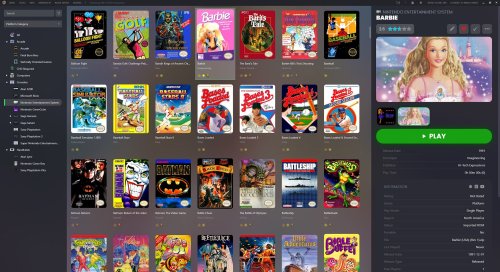
For users that wanted to play their games with no "fluff". This theme removes a lot of the "extras" that a game could have, while keeping as close to the look of the default theme that you can get.
This theme was built during an official live stream. Come join in the next one: https://www.twitch.tv/launchboxofficial
What is removed/changed?
The Platform View Game Details View Top banner Full screen mode Badges All dynamic elements that react to different width sizes All load delay animations Achievements MAME High Score Leaderboards Box View Change alignment to Left (instead of Stretched)359 downloads
-
Big Details
By faeran
The newest version of this theme requires version 13.4, or higher.
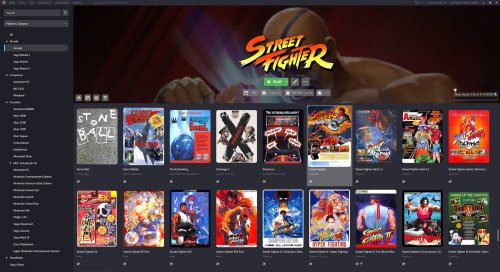
Big Details is a new theme that reimagines what the LaunchBox interface can be. Every piece of the interface has been tweaked and adjusted to provide a smooth and modern experience with subtle animations across the theme. The main highlight is the transition to a banner-type horizontal Game Details view.
There's a lot to unbundle in this one, and any potential theme developers are welcome to take a peak into the code to get inspiration.
Some features of this theme include:
Banner style game details view with Uniform Image Grid View with rounded corners and vertically aligned images New controls pop-up that houses the music controls, and image and volume sliders Redesigned top menu bar Dynamic Play button with multiple version support, and states for: Play, Install, Unavailable
7,197 downloads
-
Snappy
By Light Sock
This theme is a simplified version of the default LaunchBox theme, designed for instant responsiveness and stability. I created it to address issues such as memory leaks and crashes that often occur when managing large game libraries over extended periods. To achieve these improvements, certain elements like videos in the game view have been removed. While not intended for everyday use, this theme prioritizes performance for situations where stability is more important than additional features.
Please feel free to suggest any features. I will gladly consider adding them as long as they can be implemented without reintroducing previous issues.
230 downloads
-
Neptune
By faeran
The newest version of this theme requires version 13.3, or higher.
A LaunchBox Custom Theme I developed to help me understand the code behind themes. Because of this, most items within the XAML files are commented, which were added in order to help me keep track of what was going on. Sources of inspiration include the Lambda theme and GOG Galaxy.
The notable item this theme accomplishes is the tab approach to the Game Details Page.
Please feel free to use parts of this theme in your own creations.
Installation
Extract the Neptune folder into LaunchBox\LBThemes In LaunchBox, open Options, under Visuals > Main Window Theme and select Neptune from the dropdown.1,699 downloads
-
Default Plus
By faeran
The newest version of this theme requires version 13.3, or higher.
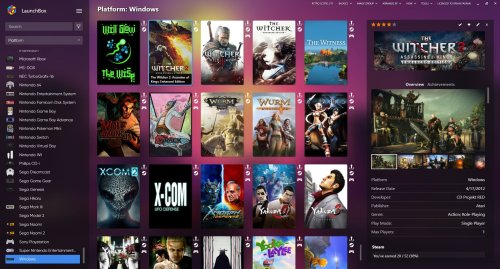
An alternative to the LaunchBox Default theme. This theme's main difference is the Game Details. Providing an alternative layout, with an image border at the top, and smooth animations upon load.
The theme also has icon support on the side bar. Around 90 controller images have been added to the theme to showcase how it works, but the images can be changed out to anything you'd like (icons must be in png format).
The icons can be replaced in the following location (restart of LaunchBox is required).
LAUNCHBOX\LBThemes\Default Plus\Images\Icons
Installation
Extract the Default Plus folder into LaunchBox\LBThemes In LaunchBox, open Options, under Visuals > Main Window Theme and select Default Plus from the dropdown.2,193 downloads
-

Neon Deluxe Arcade - Launchbox Theme
Neon Deluxe Arcade - LaunchBox Theme
Note: This thread will not be pushed to the front in the "whats new" section, if you want notifications for future updates to this file be sure to follow this page by using the follow button in the upper right corner.
INTRO:
In a dark alley lit by black light and neon, an arcade resides; Neon Deluxe Arcade.
Neon Deluxe Arcade is a series of themes, if you like you can download these to accompany the complete theme:
Neon Deluxe Arcade - Badges
Neon Deluxe Arcade - Big Box Theme
Neon Deluxe Arcade - Launchbox Theme
Neon Deluxe Arcade - Startup Theme (Street)
Neon Deluxe Arcade - Startup Theme (Inside)
Mr. RetroLust's Realistic Retroarch Bezels (Same style > Dimmed lit retro gaming)
Mr. RetroLust's - Mame 4K - Lights Out - Realistic Bezels (Same style > Dimmed lit retro gaming)
CREDITS:
Huge Thanks to @Grila for the inspiration and his permission and kindness to use his codes for especially the left sidebar and more from his LBPlex Launchbox Theme. Also huge thanks to @Rincewind for the inspiration and his permission and kindness to use his code of the Rincewind Launchbox Theme for full screen background images. I couldn't have made it as it is without you guys! Thanks to @C-Beats for adding the steam achievements to the theme, and the code for clear logos! Thanks to @faeran for the tip about video background transparency and the coding for the play time tracker. @Retro808 for the filters code, thanks man!
FEATURES:
More than I can mention, you just have to see it in action, one thing I can mention is that it features a bright green and slightly larger cache progress bar so you can't miss it when it's working to make a smooth experience
INSTALLATION:
Extract folder "Neon Deluxe Arcade LB" to Launchbox/LBThemes. Open Launchbox, go to Tools/Options/(Leftside bar) Visuals/Choose the theme in the dropdown bar.
Tip: Tools/Options/Theme/Colors > Choose "Midnight Blue" for anything that was not possible to color change in Launchbox theming.
Important: This theme does not use fanart or platform backgrounds but a static 4K quality background, there are 7 backgrounds to choose from in the separate download, the image you want to display should be named "Background-01.jpg" and overwritten in \LBThemes\Neon Deluxe Arcade LB\Images. In order to get it working as you see in the screenshots please set your background settings to:
Hope you enjoy, have fun brothers!
17,916 downloads
-
Rincewind
By Rincewind
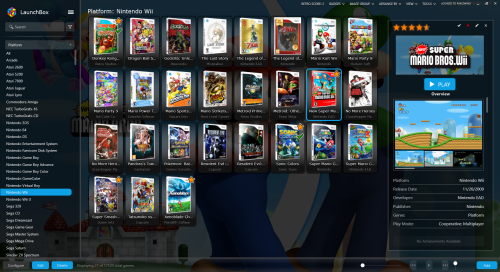
This started out as all I wanted to do is make the background image, when selecting a game fill the whole space. So after looking at the default theme and the great LBPlex theme (credit to @Grila) I managed to get all the bits I preferred and made a theme to my liking. Hopefully your like it too .
And now with updates from the Default Plus theme (credit to @faeran).
**NEW** Now you can have any colour you wish by simply changing the "selected Item background" colour. (see below screenshot)
5,097 downloads
-
Default with Logos
By Gill Figno
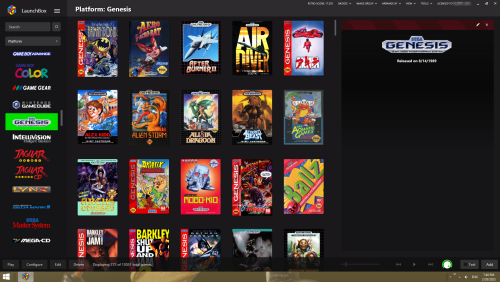
This is simply the default Launchbox Theme, but with console logos in place of the Side Bar Icons. Requires LaunchBox 13.2 or newer. Made for 1920x1080 (Not sure how it will look on anything else.)
1,093 downloads
-
LBPlex 2023
By bundangdon
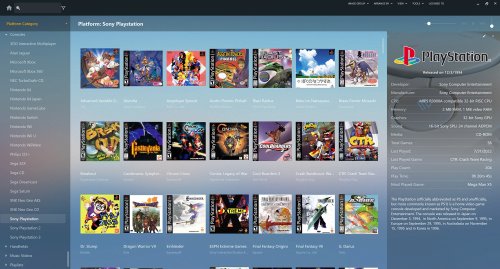
Greetings to everyone around the world! Just wanted to share this updated version of the fantastic "LBPlex" theme. "LBPlex 2023" includes most of the latest additions from the past year or so to LaunchBox, such as filters (top left corner), badges (boxes view) MAME High Scores Leaderboards, Related Games (embedded in the right side panel) along with the new screenshot/media views (right side panel) and platform icons (left side panel). This was edited and put together with some guidance and help from other's wonderful words of wisdom; while keeping everything from the original LBPlex theme exactly as it was, along with those newly added features added in there. Important note: this includes only the "Normal" version (not the "Condensed" one). I have zero programming knowledge and take absolutely no credit for this, and certainly all credit and recognition goes to the very talented (original) programmer/creator @Grila and @faeran with all of the recently updated theme-code to LaunchBox.
Updated (8/27/22)
Version 1.2 Updated to include the new “Platform Details View” feature (added in LaunchBox version 12.15) black bars on side of images/videos for Platforms and Games (sidebar-details) have been removed Version 2.0 (02/07/23)
- name changed (2023)
- platform/category icons (left panel) added. (LaunchBox 13.2 or higher)
1,163 downloads
-
Retrofrogg modified game details view
By Retrofrogg
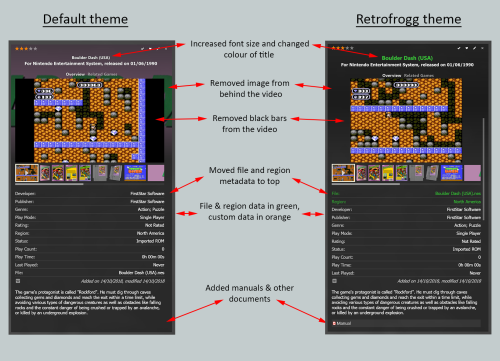
I've modified the default game details view with a few changes as summarised in the picture above.
359 downloads
-
All @nce
By Benuno
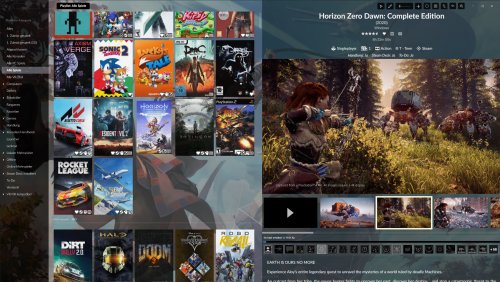
Modification of the nice LB Galaxy Theme by @raviol.
Added new carousel view and additional informations into the game details view to make most visible at once.
Also removed some effects to improve the theme performance.
Disable background blur/color settings for intended experience.
1,140 downloads
-
LB Galaxy
By raviol
Hi everyone! I'm excited to submit my first theme for LaunchBox.
Theme Features
This theme is an intent to mimic GOG Galaxy design. So I worked in an overhaul of almost every aspect of LB design, to adapt (as far as possible) to that look. Everything from SideBar, to Boxes and List Views, Game Details and menus were modified to mimic that aspect.
SideBar
New icons for Menu, Search, and Platforms. New visual style for count item. SideBar is now fixed to the left.
Main Window
Box covers are now "UniformToFIll" by default (but I included an optional file in the "Optionals" folder inside the theme to display them as normal (not stretch or cut)). Sub line is always displayed below the title, no matter what amount of lines does the title have. New icons in the main top part of the screen for Play/Edit Game, add new game, visuals, etc. New visuals on mouse over and selected boxes. Badges are displayed inside the image, I recommend using the "Simple White Badges" from JesseBlue (link). No more status bar at the bottom.
Game Details
Now GameDetails can be expanded to fill all the window. Fanart is now taking all the vertical space. Top section is now displaying the rating and the Source. There are two columns to show Game Details: The Left column will show the achievements The right column will show all information about the game
Other Features
ViewList: There are now more space between lines. ViewList: There are no separators between columns There are some other minor tweaks to mimic GOG Galaxy Design, such as the arrows in the main window (just visual).
Installation
Unzip into LaunchBox\LBThemes directory In LaunchBox go to Options > Visuals > Theme and select LB Galaxy 1.0 Required: Windows 7/8 user: Microsoft's “Segoe MDL2 Assets” font ( SegMDL2.ttf ) is required for the buttons and icons to rendered properly. (If you have it it will work but it’s not included here because of licensing reasons.) Optional: Lato Font is recommended for the theme to be displayed correctly. It is a free web font from Google and it is included in the theme "Optionals" folder. I included a modified version of the BoxesContentView to do not show the boxes as UniformToFill, just replace the file in "Views" folder of the theme. Settings guide
VISUALS > BACKGROUNDS Background Blur Amount = 36 Background Fade Amount = 121 VISUALS > BACKGROUNDS > DEFAULT I recommend using the Custom Image = LBThemes\LB Galaxy 1.0\Images\background-01.png VISUALS > BOXES Background Opacity = 127 Uncheck "Colorize Background to Match Images" Text Outline Opacity = 128 Text Outline Thickness = 2 Uncheck "Align Text Vertically" Uncheck "Center Text Horizontally" Check "Show Subline" Check "Dynamic Box Sizing" VISUALS > BOXES > SPACING Aspect Ratio = 0.63 Horizontal Spacing = 17 Vertical Spacing = 18 Horizontal Padding = 0 Vertical Padding = 0 Text Spacing = 5 Text Lines to Show = 3 VISUAL > FILTERS SIDE BAR I recommend checking "Show All Item", "Show Counts" and "Align Counts to the Right" VISUAL > GAME DETAILS You can check anything you want, but I recommend checking "Show Fanart" to see the background and "Achievements" to fill the left column, all the other items will be displayed in the top or right column. VISUALS > THEME > COLORS I don't think this could have impact in the theme, but here is how I have it configured: Light Background = 45,45,48 Dark Background = 27,27,28 Selected Item Background = Black (0,0,0) Highlighted Item Background = Black (0,0,0) Highlighted Item Border = Black (0,0,0) Window Border = 100,100,100 Menu Border = 71,71,77 Foreground (text) = White (255,255,255) VISUALS > THEME > FEATURES Uncheck everything VISUALS > THEME > FONTS Don't have an impact in the theme. I included the "Lato" font in the Optionals folder inside the theme. If you don't want to use that font, the theme will use the system font instead. Note: I didn't test the theme with retro stuff, I don't have any retro games, so I please comment if you find issues showing MAME achievements or any retro related stuff. Also, not sure if it is just me, but videos doesn't seem to work in the game details, however I was able to see them by double-clicking the video container. If someone knows how to reproduce the videos in the same window I will be glad to know so I can fix it. Also music feature is not available by default, since it is taking a huge part of the top bar. It can be enabled by tweaking the ControlsView xaml file. I will work on a solution for v1.1
Thanks to Shadowfire for allowing me to use his Lambda Beta theme code. Also to Grila, since Lambda is a fork of LBPlex theme.
LB Galaxy theme CC BY-NC-SA 4.0 Raviol 2021
2,049 downloads
- gog galaxy
- launchbox theme
- (and 3 more)
-

Lambda beta
By shadowfire
This theme attempt to be minimal and modern and maximise screen estate.
Note: this is a beta release and features may change in future releases.
Installation
Unzip into LaunchBox\LBThemes directory In LaunchBox go to: Options -> Visuals -> Theme: Lambda beta Windows 7/8 user: Microsoft's “Segoe MDL2 Assets” font ( SegMDL2.ttf ) is required for the buttons and icons to rendered properly. (If you have it it will work but it’s not included here because of licensing reasons.)
Settings guide
tl;dr:
You may have to tweak your Boxes aspect ratio and spacing. The top Details image is only visible when Fanart is available. Button bar can't be hidden because of the licensing info. Font and colour settings have no effect (font is based on system font). Settings used in screenshots are:
Options -> Visuals -> Boxes -> Spacing:
Aspect Ratio: 0.6 *
Horizontal Spacing: 2
Vertical Spacing: 2
Horizontal Padding: 8
Vertical Padding: 2
Text Spacing: 4
Text Lines to Show: 2
*) For horizontal box art you may need to use a higher value.
Options -> Visuals -> Boxes:
Align Text Vertically : enabled
Align Text Horizontally : enabled
Show Subline : enabled (for platform info)
Other recommended settings:
Options -> Legacy -> General -> Game Details:
Show Fanart: enabled
other options at your own preference
Options -> Legacy -> Images -> Background Priorities :
Fanart : enabled
other options disabled
Options -> Visuals -> Backgrounds:
Background Blur Amount : 100
Background Fade Amount : 0
(Imo. the theme looks best when blurred background Fanart and Details Fanart are the same image.)
Settings that don't have any effect:
Button bar can't be hidden because the license has to stay visible. Colours are hard coded. Font (including size and scaling) is based on your Windows system settings.
Thanks to Grila for allowing me to use his LBPlex theme code, Retro808, neil9000, C-Beats and Jason Carr for testing and everyone who supported this release on the forum.
Lambda beta theme CC BY-NC-SA 4.0 Shadowfire 2020
3,030 downloads
-
ScreenshotMover
By Natouse
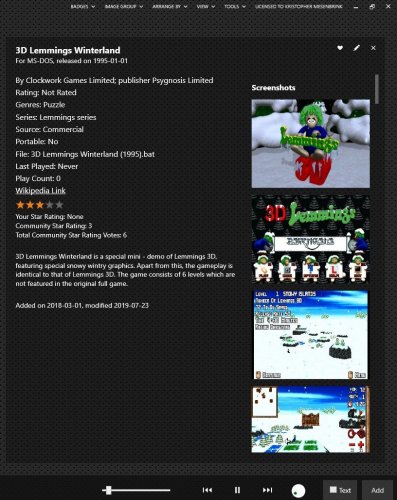
This theme brings the screenshots to the top of the game details panel. Intended for newer hobbyist/players looking to browse through library via screenshots.
249 downloads
(0 reviews)0 comments
Updated
-
Cranky Ape
By Lordmonkus
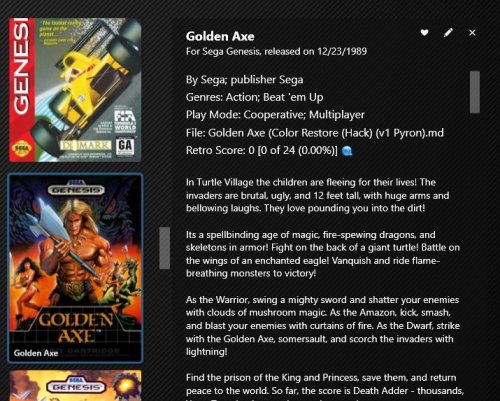
This theme is a modified version of Jasons New Default No Shadows or Blurred Backgrounds theme.
The changes were made to function best on a 27" 2560 x 1440 display so your results may vary based on your display size and resolution.
I will no longer be updating this theme, I have no desire to try and keep up with changes Jason makes or new features added. So if anyone wishes to take this theme and release they are free to do so.
*Requires Launchbox 10.9 or newer
Things I changed:
Reduced vertical space between platform names. Increased the vertical scroll bar width in the Box Images View. Increased the vertical scroll bar width in the List View. Increased the vertical scroll var width in the Details panel. Shifted the vertical scroll bar of Box and List view over to line up with the Details panel. Adjusted the "Platforms" panel dropdown menu so that it shows all entries without having to scroll (unless you have an obscene amount). Extract and copy the Cranky Ape folder into your \LaunchBox\LBThemes folder.
In Launchbox Options > Visuals choose the Cranky Ape theme from the dropdown menu and restart Launchbox.
487 downloads
-
Bad Old Monkey
By Lordmonkus
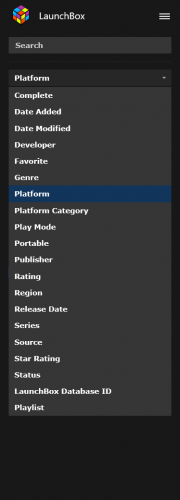
This theme is not a drastic change from the default but I did change some things about Jasons default theme that did not suit my personal preference.
I will no longer be updating this theme, I have no desire to try and keep up with changes Jason makes or new features added. So if anyone wishes to take this theme and release they are free to do so.
*Requires 8.6 Beta 1 or newer
Things I changed:
Reduced vertical space between platform names. Shifted platforms text slightly left. Removed gap at the bottom of the Game Details panel. Removed gap on the right hand side of the Game Details panel. Shifted scroll bar in the main game window closer to the Game Details panel. Reduced font size of "Platform Name" at the top of Launchbox. Reduced the space between the top of box art to the top of the Launchbox window. Adjusted the "Platforms" panel dropdown menu so that it shows all entries without having to scroll. Enlarged the vertical and horizontal scrollbars in List View. Reduced the vertical space between the games in List View. Reduced the height of the column headers in List View. Install instructions:
Copy the Bad Old Monkey folder into your \LaunchBox\LBThemes folder.
In Launchbox Options > Visuals choose the Bad Old Monkey theme from the dropdown menu and restart Launchbox.
If anyone applies the theme and it does not seem to work, try this:
In LB, change theme to Default. Exit app.
Delete the current Bad Old Monkey theme folder entirely.
Download the latest zip from the theme download page.
Extract the new Bad Old Monkey folder into the LBthemes folder.
Open LB again and change theme to bad old monkey.
After relaunching app, it should work correctly.
Spacing settings I use in Launchbox:
Horizontal Spacing 5 Vertical Spacing 5 Horizontal Padding 5 Vertical Padding 5 Text Spacing 2 Text Lines to Show 2 Aspect Ratio 0.651,887 downloads