

Retrofrogg
-
Posts
1392 -
Joined
-
Last visited
-
Days Won
8
Content Type
Profiles
Forums
Articles
Downloads
Gallery
Blogs
Everything posted by Retrofrogg
-
 As the title suggests, this is an intermittent but frutratingly regular problem - when selecting a game in Launchbox, the game video will auto-play but the video area itself is just black (I can hear the video audio). If I select something else on the carousel, then select the video again, I can see the video fine. Any help appreciated!
 -
The full set exists....it's by @ci2own
-
 The spine and text kind of looks at a weird angle?
 -
Yeah those ones above are better!
-
Here is my current list of feature requests and fixes for Launchbox (not BigBox). Just getting the list straight and sharing some ideas. Most are relatively small tweaks or additions, but some are bigger features. Many of these are on the Launchbox BitBucket feature request page, so go vote for what you would like! The first few are the bigger features: 1. ROM manager support - add rom manager functionality to allow Launchbox to read a DAT for a platform and compare it to the roms you have (teaming up with RomVault would be a way to go) 2. Expand the platform tree functionality with the ability to show more data - e.g. year of release 3. Some kind of theme creation app for Launchbox, like there exists for BigBox, or an easier way to edit Launchbox themes 4. Better multi-monitor support Then some relating to the 3D model box feature: 5. Add more 3D models, e.g. cassette for C64, CPC etc 6. Add support for all 4 spine images 7. Add a horizontal rotation lock option when rotating the 3D box 8. Fix the 3D box rotation stutter problem 9. Ability to add a background to the 3D box when viewing full screen 10. Ability to disable the 3D box on a per-platform basis (e.g. for MAME) Some relating to artwork and views 11. Ability to generate the static 3D box image from the 3D model 12. Allow more image types for platforms - e.g. controller, box (front), box (back), etc 13. Allow documents to be added to platforms - e.g. manuals 14. Ability to choose images shown in carousel without having to edit the general image priorities - with ability to set per platform 15. When viewing images fullscreen, have the option to show the thumbnails along the bottom Finally some general improvements 16. Ability to add custom metadata fields for platforms, like you can for games 17. Have categories for platform videos - e.g. video snap, advert, etc 18. Allow HTML editing of the text in the game notes section 19. Allow metadata fields with hyperlinks 20. Add AND/OR qualifiers for the auto-playlist rules 21. Ability to save different view settings per platform (e.g. different image sizes etc) 22. When scraping from the Launchbox database or Emumoves, show thumbnails of the image options 23. For the music player, show available tracks and have a transport bar Added 01.01.24 24. Keep the music playing when a 3D box is maximised 25. Some kind of visual representation of the root of the currently selected item in the platform tree. For example, when a bunch of platforms & playlists are open in the platform tree (e.g. whilst in platform category view), it's not immediately clear which category you are in without visually tracing back up the tree. A box or similar around the currently selected item and its parents would do it.
-
Thanks! Do you have to apply these to each playlist manually, or is there some way to set them as defaults for region playlists? By the way, your Japan icon isn't quite correct - it looks stretched. The red in the centre should be a circle, not an oval.
-
Nice....could do with a "world" icon also.
-
Tiger Handhelds artwork (units)
Retrofrogg commented on Retrofrogg's file in Tiger Electronics Handheld
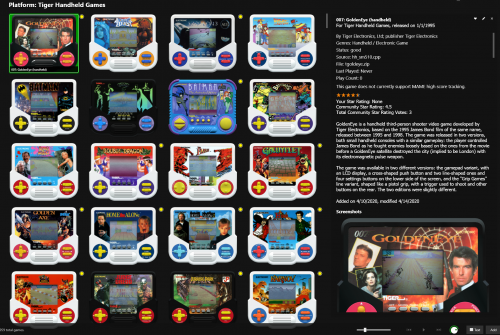 Thanks @djweevil666. I've not looked at this project in a while but plan to come back to it soon!
- 6 comments
-
- 1
-

-
- tiger handheld electronics
- tiger lcd games
- (and 4 more)
-
.thumb.png.8864a0211f97bd0caeee915b4b27c8ab.png) Does this have Bakuretsu Hunter?
Does this have Bakuretsu Hunter? -
This isn't really within the remit of Launchbox. You could make a mock platform, but I think you'd have to do that for each platform you wanted to use a wishlist for. Much easier to just keep a separate text file somewhere. Alternatively, you could add the wishlist under the platform details, but I prefer the above option.
- 1 reply
-
- 1
-

-
Ah I see, ok. I guess doing that for all games would involve running some kind of "find and replace" rule on the platform xml. Then it would have to be redone every time a new game is imported. It's a workaround - but the ability for Launchbox to recognise blocks of text within the "version" field (that are not separated by semi-colons) would a very helpful feature.
-
You mean I'd need to alter the filenames of the roms to include semicolons? Or use semicolons in the auto-playlist rule? The latter doesn't seem to work. Obviously messing with filenames is not the most desireable option! Some kind of rule as you mention would probably do it? Yes the phrasing would have to be clear!
-
So for example, here are the N64 "1080 Snowboarding" roms from the No-Intro set: And here is the "version" field in Launchbox for one of them: You can see that "version" in this case contains three bracketed entries. As it stands, I don't think it is possible to make an auto-playlist that looks to exclude more than one of these entries. So in this example, say I wanted a playlist without "Proto" and without "LodgeNet" in the version field, this would not be possible. Am I correct in this? If so, it would be an extremely useful feature to have, in order to create a playlist that excludes these duplicates. Given that most No-Intro sets are like this, I'm surprised that it's not possible already. Unless I'm missing something? I know you can combine roms with the same title but that's not the path I'm on.

-
The "has none of the values" doesn't seem to work for version?
-
The safest option is probably to run the setup before merging, then copy across the relevant files and folders.
-
@C-Beats So I opened Razer Synapse and noticed that my mouse didn't seem to be listed under devices - only the mouse dock was (it's a Razer Viper Ultimate). So I had to uninstall and then reinstall the app & drivers. Now the mouse appears. No change to the problem in Launchbox though. So next I went to adjust polling. It was set at 1000Hz. Funny thing I noticed is that when I changed polling, the mouse sensitivity/DPI seemed to change (high polling = less mouse cursor movement for the same mouse movement). I adjusted it to 500Hz and then 125Hz. Unfortunately, this didn't fix the problem. I think that changing it to 125Hz reduced the frequency of the stutters just a little bit (going at the same rate, I was able to make 4 rotations of the box rather than 2 or 3 before it stuttered). But the stutter remained. I also tried unchecking "enhance pointer precision" in the windows settings, again with no change. So I remain pretty unclear as to whether it's a mouse-related problem or not. Keen for your further thoughts. Do you think it's worth trying a standard wired mouse to see if that affects things?
-
Thanks @C-Beats. I'll see if I can turn down the polling rate when I get home. I had looked at the advice from Corsair which says that the average gaming mouse is at 1000Hz with some as high as 8000Hz. They say all Corsair mice have a minimum of 2000Hz. The Razer site talks about hyperpolling at 8000Hz to allow less latency and smoother tracking. So I didn't think that my 1000Hz should be an issue. Also it suggests that higher polling rates should allow smoother movement, not the stutters we are experiencing here. But I will run the test later today and let you know.
-
I don't think I had checked it. I found a website that seems to check the poll rate, and got the below: I don't know how to interpret this though - would be grateful for your further thoughts. A quick bit of reading around suggests that these rates are average.
-
Display boxes on the bottom
Retrofrogg replied to Qbertzelious's topic in LaunchBox for Windows Custom Themes
It would seem aesthetically more pleasing to have them align on the bottom - as if they are sitting on a shelf. -
I can also confirm that the rotation is fine in BigBox. The main difference there however is that the box is rotated at a uniform rate and using the keyboard (or presumably a controller). In Launchbox it is rotated using the mouse and it can be rotated at any speed you like. Hope this helps @Jason Carr
-
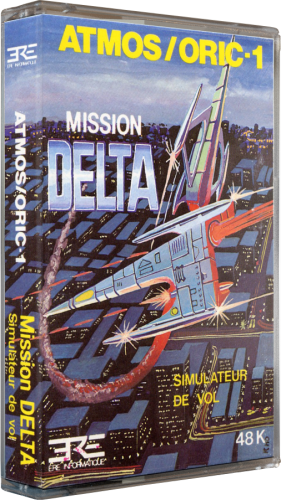 Quality looks noice.
 -
 Wow, looks impressive.
 -
Adding rotating box to old custom theme
Retrofrogg replied to thewhite's topic in LaunchBox for Windows Custom Themes
This is something I've been looking for for a while (for Launchbox). Currently, rotating the 3D box in Launchbox is very difficult as the box flips about too much. There's a feature request open on Bitbucket for it - please add your vote! -
You're going to have to....for a long time lol
-
@Mock, just linking to the larger thread for this problem: https://forums.launchbox-app.com/topic/71077-3d-box-model-stutterring-rotation/#comment-427875

.thumb.png.8864a0211f97bd0caeee915b4b27c8ab.png)


