
.png.eeb5dc762b10005c6f48b30a33840e91.png)
Warped Polygon
-
Posts
280 -
Joined
-
Last visited
-
Days Won
24
Content Type
Profiles
Forums
Articles
Downloads
Gallery
Blogs
Everything posted by Warped Polygon
-
.thumb.png.9332e12cab6cec0213b9ffd456a9a968.png)
Help Us Expand the LaunchBox Games Database!
Warped Polygon replied to AstroBob's topic in News and Updates
This is awesome stuff!! More platforms natively supported is excellent. Are there any plans to tidy up or overhaul existing platforms? There's quite a lot of junk and duplicate entries, along with titles that are combined that should be separate, and vice versa. As redump and no intro have changed some titles over the years the DB doesn't catch all games in newer sets, as they've not been updated with the new possible title. Updating the images to be unified would also be awesome. Do you guys have a dedicated guy with OCD on the database? Nudge wink! -
Japanese exclusive games are always interesting. To non Japanese speakers it's an entirely unexplored library of games waiting to be discovered. However, the obvious barrier is the language. We of course get fan translations to overcome this obstacle, and with their rising popularity it's awesome to play these games frustration free. But, we also have games that don't have a translation but are still totally enjoyable. Sometimes Japanese only releases are entirely in English, or have a mix of Japanese & English with enough English to be able to play. Other times the Language barrier is there but the game itself has minimal text, menus and/or story, making it pretty easy to play. Of course there are some games that are just unplayable unless you are fluent with Japanese text, mainly RPG story based games or 'menu bashing' games. I tested the games without a translation to see if the language barrier was an issue, then take note of the ones that are totally playable for me as an English only speaker & reader (with a low tolerance for frustration). So, below is the FULL list of ALL 85 Japanese Exclusive N64 Games. Categorised into Translated, Untranslated: Still Playable & straight up unplayable. There are 21 Games Translated - 11 Untranslated: Still Playable - 53 Untranslated: Unplayable Hopefully this list will help you to get the most out of the N64 library while not wasting space with unplayable games. Translated Games Japanese Name Translated Name (if any) Notes AI Shogi 3 AI Shougi 3 Dōbutsu no Mori Animal Forest Bomberman 64 The Japanese version is a completely different game to the Western release of the same name. Choro Q 64 2: Hacha Mecha Grand Prix Race Custom Robo Densha de Go! 64 Eikō no Saint Andrews St. Andrews Old Course Fushigi no Dungeon: Fūrai no Shiren 2: Oni Shūrai! Shiren-jō! Shiren the Wanderer 2: Oni Invasion! Shiren Castle! Getter Love!!: Chō Renai Party Game Tanjō Getter Love!!: Panda Love Unit Heiwa Pachinko World 64 J.League Dynamite Soccer 64 J.League Live 64 Last Legion UX Mario no Photopi Mario's Photo Studio Masters '98: Harukanaru Augusta Masters '98: Augusta National Golf Club Nintama Rantarō 64 Game Gallery Ninja Boy Rantarou 64 Game Gallery Puyo Puyo Sun Tsumi to Batsu - Hoshi no Keishousha Sin and Punishment Virtual Pro Wrestling 2: Ōdō Keishō Virtual Pro Wrestling 64 Wonder Project J2: Koruro no Mori no Josette Tetris 64 Already in English. Untranslated: Still Playable Ucchannanchan no Honō no Challenger: Denryū Iraira Bō Bakuretsu Muteki Bangaiō Dance Dance Revolution Disney Dancing Museum Dezaemon 3D Neon Genesis Evangelion Puyo Puyo ~n SD Hiryu no Ken Densetsu Shin Nippon Pro Wrestling: Tōkon Road — Brave Spirits Shin Nippon Pro Wrestling: Tōkon Road 2 — The Next Generation Super B-Daman: Battle Phoenix 64 Super Robot Spirits Untranslated: Unplayable Custom Robo V2 64 Hanafuda: Tenshi no Yakusoku 64 Ōzumō 64 Ōzumō 2 64 Trump Collection: Alice no Waku Waku Trump World Bakushō Jinsei 64: Mezase! Resort Ō Bass Rush: ECOGEAR PowerWorm Championship Chōkūkan Night: Pro Yakyū King Chōkūkan Night: Pro Yakyū King 2 Derby Stallion 64 Doraemon 2: Nobita to Hikari no Shinden Doraemon 3: Nobita no Machi SOS! Doraemon: Nobita to Mittsu no Seireiseki Famista 64 Goemon Mononoke Sugoroku Hamster Monogatari 64 Itoi Shigesato no Bass Tsuri No. 1 J.League Eleven Beat 1997 J.League Tactics Soccer Jangō Simulation Mahjong-dō 64 Jikkyō GI Stable Jikkyō J.League: Perfect Striker Jikkyō Powerful Pro Yakyū 2000 Jikkyō Powerful Pro Yakyū 2001 Jikkyō Powerful Pro Yakyū 4 Jikkyō Powerful Pro Yakyū 5 Jikkyō Powerful Pro Yakyū 6 Jinsei Game 64 Kira tto Kaiketsu! 64 Tanteidan Mahjong 64 Mahjong Hourouki Classic Mahjong Master Morita Shogi 64 Nushi Tsuri 64 Nushi Tsuri 64: Shiokaze Ninotte Onegai Monsters Pachinko 365 Nichi Parlor! Pro 64: Pachinko Jikki Simulation PD Ultraman Battle Collection 64 Pocket Monsters Stadium Power League 64 Pro Mahjong Kiwame 64 Pro Shinan Mahjong Tsuwamono 64: Jansō Battle ni Chōsen Robot Ponkottsu 64: Nanatsu no Umi no Caramel Saikyō Habu Shōgi SimCity 2000 Super Robot Wars 64 Susume! Taisen Puzzle Dama: Tōkon! Marutama Chō Tamagotchi 64: Minna de Tamagotchi World Yakōchū II: Satsujin Kōro Yōsuke Ide no Mahjong Juku Zool: Majū Tsukai Densetsu
-
(USA).thumb.png.85e7171723946ab36c131a2eed56c286.png) Awesome! The best artwork for 2600 by a mile!
Awesome! The best artwork for 2600 by a mile! -
Sega Model 3 | Supermodel Git - EVERYTHING Pre Configured inc Controls. For PC, Controller, Mouse & Light Guns. Test Menu's Configured. Free Play. All Games in English. 2 Player Mouse Support. Audio Adjusted. Layout Images...The Whole 9 Yards
Warped Polygon commented on Warped Polygon's file in Sega Model 3
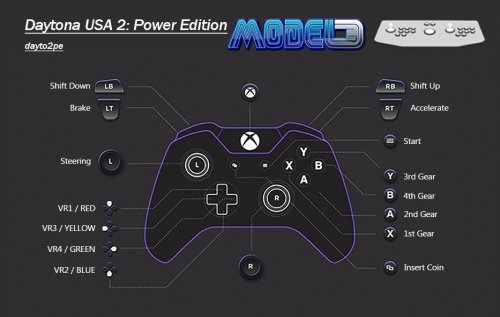 @crusadeRGP You cant do that with this emulator. You need to set a resolution smaller than your screen and make sure windowed is selected, to get a window at that resolution.
 -
Sega Model 3 | Supermodel Git - EVERYTHING Pre Configured inc Controls. For PC, Controller, Mouse & Light Guns. Test Menu's Configured. Free Play. All Games in English. 2 Player Mouse Support. Audio Adjusted. Layout Images...The Whole 9 Yards
Warped Polygon commented on Warped Polygon's file in Sega Model 3
@StanTheManDarsh You were doing the pizza when you wanna French fry. That issue happens when ya mouse and controller are clashing inputs. You did the correct thing instinctively, by removing rawinput you are removing the mouse as an issue. If you have no intention of using mice or lightguns, remove rawinput from all the light gun games and ya golden. You can still use a mouse if ya want, but only one as rawinput is off. -
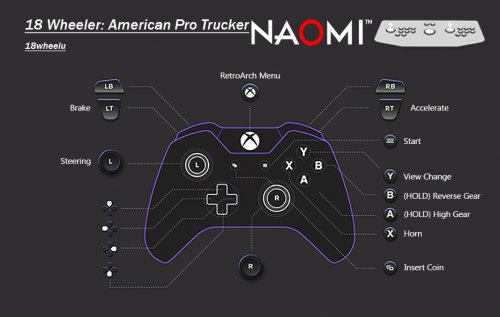 @retrospace hi mate, there aren't xmls for the retroarch version of this config. I fully recommend the standalone version you posted for everything. RA cant run a few games so standalone is now KING! Takes a bit more to setup but totally worth it
 -
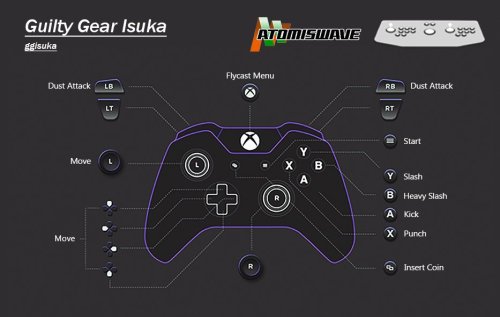 Maaate, I'm so sorry for missing this. Again, you have done a massive service for the cause. I'm gonna include in the downloads and update the install guide as this streamlines the process loads. One question tho, does it require AHK to be installed or is it portable?
 -
.thumb.png.6a18d515ba77a2b975dad438905f08b5.png) Awesome, thank you for including the cardboard box and jewel box variants for the same game. You have an eye for detail and keeping things as they were, over artistic liberty. OG all the way.
Awesome, thank you for including the cardboard box and jewel box variants for the same game. You have an eye for detail and keeping things as they were, over artistic liberty. OG all the way. -
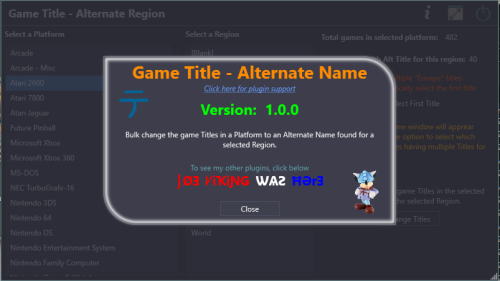 Great stuff again!
 -
Hell yeah, for the win! Another massive time saver from Joe.
-
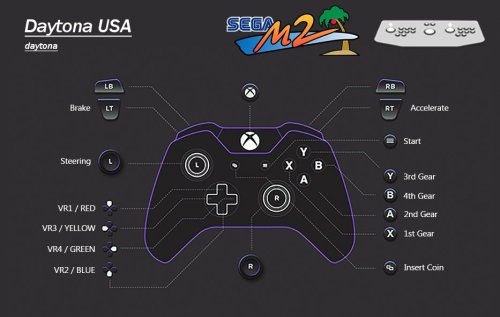 @grimbola dude your work is amazing. thanks for the kind words. I'm gonna try out your pause stuff now.
- 57 comments
-
- 1
-

-
- sega
- sega model 2
- (and 1 more)
-
Sorry to leave you hanging. The emulator doesn't allow you to use controllers with the light gun games. Joy2key is the only way to get around this. Which I see you have figured out, glad you got it sorted.
-
Thanks mate. Damn I have no idea to be honest. There are wayy too many variables to hone in on what could be happening. It could be an emulator issue or a system issue. Sorry to be useless here.
-
lemme investigate this one
-
it's an old emulator so you will need to find the ones specific to the emulator. Not for all of em, but some have been updated over the years making them not work with the Model 2 emulator from 2014.
- 57 comments
-
- 1
-

-
- sega
- sega model 2
- (and 1 more)
-
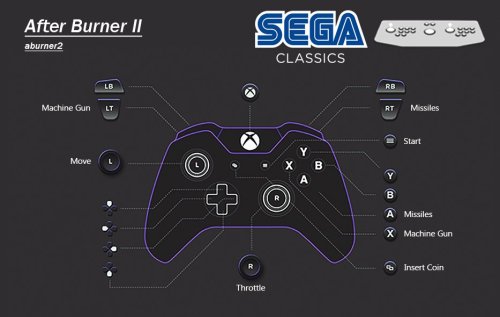 @Tom DrakeAfter looking at the other bits you sent, yes some are due to my shoddy 3am work and some are meant to be that way for various reasons. The problem is identifying which is which. My documentation will show most of em but not all, I can test if you can identify...
 -
@Tom DrakeAwesome. But hold ya horses.... A bunch of stuff listed has had funky controls set due to the controls themselves being funky. For e.g. Robocop is a 1 player, 8 way joystick game, but the diagonal input's for the 1 player are on the player 2 stick. Up, down, left & right are on the 1st player, all the diagonals are on player 2 stick, despite there only being one stick on the cab. At least I think it's like that. If you play it you'll see it's how it's meant to be. Batshit...but that's how soooo much stuff is like in MAME. Hence the pre config, There's tons of this kinda crap and I have made a note in my documentation for a bunch of em. I would play test everything like that, it's not about how the config file looks, it's about how it plays. Really we should team up and I can give you the documentation and some other useful bits. Including a list of roms that are gonna look weird in the ini but are meant to be that way. I can DM you the documentation if you wish? It's in excel/sheets you'll be glad to hear. Would be great to get you input on this side of things.
-
@Tom Drake You're doing sterling work with these. You've managed to spot a bunch of stuff that isn't needed in the files, and in the case of the JOYCODE12 thing, some typos. Thanks so much for double checking everything, saved me a task. The games you provided examples of are all lightgun games. I went against the default settings with keyboard inputs with lightgun games. I want all my pre configs to have the same keyboard inputs for start & coin across all emulators/projects specifically for lightgun games. MAME's defaults aren't the same as I have set for my other projects, so I changed them. You are free to change these if you want, as I want to overhaul the lightgun stuff anyway. If you are up to it I would fully appreciate if you wanted to fix these various issues across 2 sets, with and without keyboard inputs. No need to provide the entire set, just the ones that needed sorting out. Actually, if you are cleaning the entire set I will need the entire set. Is this everything you could find? If so I'm stoked Thanks sooo much again, what you have provided already has saved me a job I did not want to do tbh.
-
@Tom Drake Thanks for the breakdown of this. Looks like you've been diving in. So, to address your questions.... Can you give me some examples of the 90 files that have KEYCODEs paired with start and select? Generally everything has been done for a reason, unless I missed something. If I can get some examples I can figure out what you mean. quartet.cfg as you noticed is incorrect, a mistake and a random press of D. Did you find any other mistakes like this? Let me know so I can fix them. truckk I need to take a look at and figure out some stuff. Think it's had some updates since I config'ed it, does it work as intended? The KEYCODE service mappings are leftovers from configuring, for those games you can remove from the game config and let the default do it's thing. swa, trophyh, shngmst, I'll need to take a look at. Some stuff may not look like it makes sense in the configs but actually do when playing the game. You will find a few that wont look right in the config but will play correctly. I'm in the 'process' updating this, however it's taking longer than expected due to commitment changes. It will be done, just in my own time.
-
3d box NINTENDO NES PAL 3D BOXES
Warped Polygon commented on HADES81's file in Nintendo Entertainment System
.thumb.png.c2cd7309dae88c375dd7e23ebe1228d0.png) Yess, thanks for these. I can't wait till they're all done, PAL boxes aren't really represented.
Yess, thanks for these. I can't wait till they're all done, PAL boxes aren't really represented. -
.thumb.png.86e46c66f381fb7fd571fa4631e76d8b.png) I commend you for this one. I may even just use the discs without the UMD case
I commend you for this one. I may even just use the discs without the UMD case -
@Baggio Yes, the PSD is a bit messy. Gimme a min to sort it out and put all assets in one place.
-
PSD I made. Set everything up for speed
-
Possibly, maybe. This is a difficult one to tackle. For e.g. if you remove the overscan/pop in crap out of SM3 you're not left with a lot of image. It's like 1000 or so games. Lemme get this project in order first
-
@Baggio Dude what you've done with the images looks awesome. So sorry I've not seen it till now. If you need any info or original resources let me know
.thumb.png.9332e12cab6cec0213b9ffd456a9a968.png)
(USA).thumb.png.85e7171723946ab36c131a2eed56c286.png)
.thumb.png.6a18d515ba77a2b975dad438905f08b5.png)
.thumb.png.c2cd7309dae88c375dd7e23ebe1228d0.png)
.thumb.png.86e46c66f381fb7fd571fa4631e76d8b.png)