

JoeHd1031
-
Posts
27 -
Joined
-
Last visited
Content Type
Profiles
Forums
Articles
Downloads
Gallery
Blogs
Everything posted by JoeHd1031
-
Turns out it was the third screen plugin. I didn't know BB could do marquee videos on a second screen so I used third screen to do it and it was causing focus loss.
-

Working on My first DIY Arcade and Need Advice
JoeHd1031 replied to Legendizzy's topic in Collections and Builds
ESC is NECESSARY. Pause works well in either BigBox or in mame itself. I had considered using Tab as one key is a GREAT idea, but I have a usb dongle permanently installed on the pc motherboard so my Logitech is stored in the cab so I can get to mames menu quickly. Thanks for the compliment man! I really like your full cab! I want to make one once k have a dedicated game/theater room when we buy a new house. One thing I’d suggest for your build… the ultimarc flight stick. It is RIDICULOUSLY fun to use on standard shooters in mame but man, Star Wars battle pod and Mach storm on Teknoparrot are AMAZING! -
Just setup BigBox on a wall cab and integrated about 10 Steam games. Half of them trip out BigBox and it goes back to its menu while the game stays in foreground. I changed the load delay to 25 seconds which helped but there are still a bunch that cause all kinds of lost focus issues. Any workarounds?

-
Working on My first DIY Arcade and Need Advice
JoeHd1031 replied to Legendizzy's topic in Collections and Builds
It depends on what you’re going to play. I just finished up a wall cab and it has 4 admin buttons. Pause in BigBox, also mapped in mame. ESC to next all games, the other two, I mapped for mame only as quick Save and quick load
-
Is this available as a plugin? I need under 20 bezels installed across Dreamcast, Naomi and atomiswave all in flycast
-
LaunchBox Ambient Music Player
JoeHd1031 commented on JoeViking245's file in Third-party Apps and Plugins
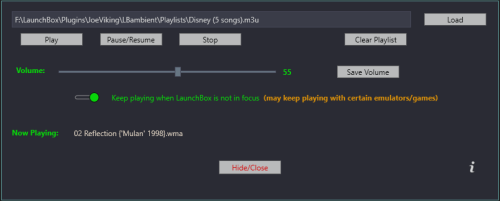 Is this only for launchbox or bigbox as well? Is it better than what is available in the bigbox settings for background music? Thanks
 -
 Very nice, clean playlist vids thanks!!
 -
I haven’t put my standard pc games through steam. 🤦🏻♂️ seems like that would make it easier with controllers like you have 👍🏼👍🏼
-
looks nice an clean! You have that pc game TMNT set up with the joysticks? As X input right?
-
I’m going to copy my build for a friend of mine and I’ve removed my license key, but I don’t know where to remove the Steam info or all storefront information so he won’t have my info on his pc. Any ideas?
-
 Nice and Clean!
 -
 Very nice work! When you make your logos, do you save as an uncompressed png in photoshop? I tried your psd but the logo comes out much smaller than your png. Thanks!
 -

Version 1.7
495 downloads
Adding new video as I make them, if anyone's interested... I'll be using movie clips, game clips, and a good music choice for each one. Please leave me feedback and a review if you have suggestions for improvement. I’d like to know if these are worth sharing VIDEOS AVAILABLE: *2D Platformer Games (Castlevania Netflix ) *SHMUPS Games (Rick & Morty Video)* *Racing Games (Ken Block Hoonicorn)* *Run & Gun Games (John Wick 4 video)* *Adventure Games (God of War video)** Flying Games (Top Gun/Game video) Fighting Games (Mortal Kombat Reptile fight/Game video) I downloaded AlabasterSlim's Top Gun Flying Games intro a while back, loved it, and decidedmade my own version. Same intro movie and music choice, changed everything else. His video was 100% my inspiration. I just wanted my own games on it along with higher volume. Now I’m doing my own vids in the same style His page is here: https://forums.launchbox-app.com/profile/181256-alabasterslim/ His LightGun video is PERFECT! Check it out -
JoeHD's Custom Playlist Videos View File Adding new video as I make them, if anyone's interested... I'll be using movie clips, game clips, and a good music choice for each one. Please leave me feedback and a review if you have suggestions for improvement. I’d like to know if these are worth sharing VIDEOS AVAILABLE: *2D Platformer Games (Castlevania Netflix ) *SHMUPS Games (Rick & Morty Video)* *Racing Games (Ken Block Hoonicorn)* *Run & Gun Games (John Wick 4 video)* *Adventure Games (God of War video)** Flying Games (Top Gun/Game video) Fighting Games (Mortal Kombat Reptile fight/Game video) I downloaded AlabasterSlim's Top Gun Flying Games intro a while back, loved it, and decidedmade my own version. Same intro movie and music choice, changed everything else. His video was 100% my inspiration. I just wanted my own games on it along with higher volume. Now I’m doing my own vids in the same style His page is here: https://forums.launchbox-app.com/profile/181256-alabasterslim/ His LightGun video is PERFECT! Check it out Submitter JoeHd1031 Submitted 10/10/2023 Category Playlist Theme Videos
-
Playlist Clear Logos (Adventure & Flying) View File Making a few Clear Playlist logos.. Submitter JoeHd1031 Submitted 10/10/2023 Category Playlist Clear Logos
-
Clear logos for Flying, Fighting, and Adventure Playlists
JoeHd1031 posted a topic in Platform Media
Clear logos for Flying, Fighting, and Adventure Playlists View File Made some logos for playlists I'm setting up for my BigBox setup. Submitter JoeHd1031 Submitted 10/09/2023 Category Playlist Clear Logos -
-
I only have about 360 games but these are ones we actually play. https://youtu.be/9QFTqpyCBPU
-
- 1
-

-
just an fyi, I used a mame 250 link on the old archive and used Link Grabber, http downloader and Deluge to download everything FINALLY! Funny that out of the 2000+ games, I only kept about 190. Games I consider to be classics. I don't need to have every game ever, just stuff I actually play. NFL Blitz was my top priority and all 3 work perfectly
-
Not sure on how to make a full video from scratch but I took one from the batocera site and added my logo video at the end of it pretty seamlessly in a trial of adobe premier. I wish I could just buy the software and not be forced into a monthly subscription to use it.
-
Use that plugin. It works amazingly well for both disc and psn ps3 games. After it imports you may need to go into the games metadata and make sure it shows rpcs3 as the emulator.
-
It worked! Only now Dreamcast won’t play unless I recheck extract roms. I’m going to run through settings on retroarch to see if I can get each system to have separate settings
-
I added all the bios to the DC folder and the games play fine off retroarch, but not launch box. Clicking an atomiswave game in LB kicks up a Dreamcast splash screen and then the Dreamcast Home Screen. It seems to play the atomiswave as Dreamcast for some reason only in LB. What am I doing wrong
-
I’ll try that. Thanks!
-
I'm able to use dolphin mostly with no problem but there are some issues. one, how do i make it go auto fullscreen? It places the gamescreen at random on the monitor. second, one game in particular, Godilla Melee (my 6 yo son likes it) will play a match or so, and then kick out an error box about GPU unsyncing... gives me the option of OK or Ignore session. I choose ignore and it'll play for the next match then freeze up and stay on a black screen. So far its been just this game... specs are i7 3770 4 core 3.4ghz 12GB ddrs ram SSD Nvidia 1030 GPU... I have a MSI 1050ti coming in thursday to replace this cheesy 1030 Corsair 550w PSU


