
Rincewind
-
Posts
963 -
Joined
-
Last visited
-
Days Won
4
Content Type
Profiles
Forums
Articles
Downloads
Gallery
Blogs
Everything posted by Rincewind
-
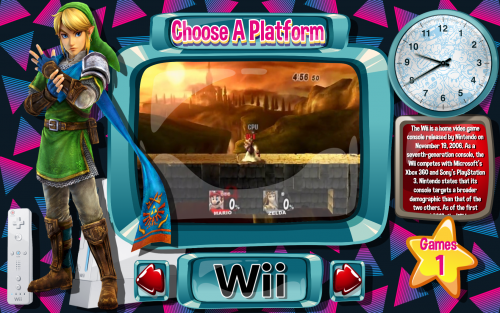 I've had to update early because I missed something beforehand. The glass overlay was over the top of the character image which made it look incorrect so sorry about that. Now there shouldn't be another update for awhile. Good news is, that with the update it also includes a video background from @harryoke for a new view option.
 -
Pyramids View File Massive thanks goes to @y2guru for his amazing COMMUNITY Theme Creator for BigBox, without his work in creating this simple to use theme design program I couldn't have made this theme. _______________________________________________________________________________ INTRODUCTION As you can see from the screenshots its a very colourful and sort of cartoon-ish looking theme, I wanted you to get the feeling that your already in a game before you start to play a game!! _______________________________________________________________________________ INSTALLATION Download the zip file and unblock it (right click the zip file, goto "Properties" then at the bottom put a tick in the "Unblock" box, and hit ok when done) then extract the folder too -- \Launchbox\Themes\ __________________________________________________________________________________________ AFTERCARE Although the theme is using fallback images for the Characters or Devices, you can still add your own artwork for systems I've not got round to finding artwork for and add them here -- \LaunchBox\Themes\Pyramids\Media\Characters -- \LaunchBox\Themes\Pyramids\Media\Devices Also you will need to check that the naming of a system Character / Device / Platform Clear Logo is the same exact spelling as your system. Submitter Rincewind Submitted 09/09/2019 Category Big Box Custom Themes
- 1 reply
-
- 2
-

-
Version 1.4
546 downloads
Massive thanks goes to @y2guru for his amazing COMMUNITY Theme Creator for BigBox, without his work in creating this simple to use theme design program I couldn't have made this theme. _______________________________________________________________________________ INTRODUCTION As you can see from the screenshots its a very colourful and sort of cartoon-ish looking theme, I wanted you to get the feeling that your already in a game before you start to play a game!! _______________________________________________________________________________ INSTALLATION Download the zip file and unblock it (right click the zip file, goto "Properties" then at the bottom put a tick in the "Unblock" box, and hit ok when done) then extract the folder too -- \Launchbox\Themes\ __________________________________________________________________________________________ AFTERCARE Although the theme is using fallback images for the Characters or Devices, you can still add your own artwork for systems I've not got round to finding artwork for and add them here -- \LaunchBox\Themes\Pyramids\Media\Characters -- \LaunchBox\Themes\Pyramids\Media\Devices Also you will need to check that the naming of a system Character / Device / Platform Clear Logo is the same exact spelling as your system. -
That's really well done I cant even see any Clone Tool marks
-
Awesome work , so glad that the spectrum is getting an uplift and thanks for all your hard work it's really appreciated. Please keep us updated with the progress
-

Who Missed Me?
Rincewind replied to slipsystem's topic in Third-Party Applications and Plugins (Released)
Welcome back and you come bearing a poll of goodness -
STAINLESS Mortal Kombat 11 Arcade Build
Rincewind replied to STAiNLESS's topic in Collections and Builds
HAHA same here that's what I ended up doing..... but the idea always remains in your head -
STAINLESS Mortal Kombat 11 Arcade Build
Rincewind replied to STAiNLESS's topic in Collections and Builds
Looks fantastic, almost there by the looks of it. Are you going for an illuminated perspex graphic for the marquee or full on LCD monitor? -
Have you tried This Ultrawide Theme @Jason Carr ported over from @CriticalCid unified theme. I've not got a Ultrawide monitor but going by the description it should work
-
 Amazing work on these, the dark binding looks great on all themes too.
 -
Drag and Drop images WOW why is it when someone comes up with an idea like that you think to yourself BANG that's so obvious why is this not a thing already.
-
I agree with the wall view being worked on and would even go as far as saying that even adding a more 3D effect to the wall view would make it more immersive.... Like the selected game could if clicked on would enlarge in the centre of the screen and then flip over to the rear, then minimise back.... Just a thought ?
-
That's dedication and a great end result, thanks for sharing the video and sparking off a few light blubs in my head
-
 @srxz Sorry it was working perfectly ok I just never realised. I did exactly what @CriticalCid said and after a few minutes I had more videos. Thanks for all your work on this plugin
 -
Ok thanks @CriticalCid it was the videos I was hoping to scrap so I'll check that folder.
-
Oh ok so it is working but in the background.
-
@srxz @neil9000 It only works on all the platforms apart from windows. I have not tried selecting more then one game at a time but will try that later. The windows platform was created from just dragging in shortcut for PC games and then the steam importer in launchbox added the steam games in the window platform so all I can think of doing is deleting the windows platform and try it again.
-
ok I was trying it on the steam games I just imported which ended up in my "Windows" platform and not its own "Steam" platform which I thought it might of. So I tested it on all the other platforms and it works on them but not the "Windows" platform @srxz
-
For some reason I can't get the Plugin to work. I've downloaded and unblocked the zip file then extracted it to a folder inside the Plugins folder in LaunchBox and it shows up in the menu when I right click a game but after the timer wheel spins for a second but nothing comes up. I know its going to be something my end but I dont know what, heres where the file is currently
-
Bartop Arcade Build - Street Fighter IV
Rincewind replied to griffinballs's topic in Collections and Builds
Looks great nice set up you have there. Are the side buttons for Pinball? there the one thing I left off mine but as time goes on I think I'll add the buttons and some Pinball tables too -
Possible to make coverflow selected item be first?
Rincewind replied to MaDmiX's topic in Big Box Custom Themes
CamaraZPosition should bring the images closer or further away which will do it normally, trial and error I'm afraid until you get the look you need -
Possible to make coverflow selected item be first?
Rincewind replied to MaDmiX's topic in Big Box Custom Themes
Unfortunately that can't be done with the Coverflow as it stands @Jason Carr would need to make changes. The only way around it would be to cover up one side with a graphic and put it in front. -
I would first start out by reading the issues others have had and see what helped them, here's a link Troubleshooting Also can you upload a video so we can visualize what issue your having please.
-
Creating themes, where to get started?
Rincewind replied to MaDmiX's topic in Custom Theme Tutorials
I would also recommend using Notepad++ to edit your themes, That way your start to understand how the code works and what changes what. I like you wanted to use visual studio because I wanted to see the changes I made on screen but I never managed to get it work work properly. The good news is @y2guru is currently programming a theme editor which will help too make designing themes a lot easier -
@y2guru is the dev behind it, at the moment it's in beta testing so you should tap him up