

skizzosjt
-
Posts
741 -
Joined
-
Last visited
-
Days Won
1
Content Type
Profiles
Forums
Articles
Downloads
Gallery
Blogs
Everything posted by skizzosjt
-
Big Box Crashing After Around 2 Minutes of scrolling....
skizzosjt replied to DonellHD's topic in Troubleshooting
I've started getting hangs/freezing in Big Box too. Always manually scrolling. Seems completely random. Literally has never happened before after many years of use. Produces no error, Big Box just instantly hangs up and must be process killed in order to be closed. -
you're right about hex, it is universal. but that isn't the issue. if media player A "color manages" a particular file type or any file at that, different than media player B, it's gonna be different. if you only ever used one chances are you would never notice the difference. also chances are you notice the difference because of the theme you use, having colors match solid colors in videos. other themes may not really highlight this ordeal. you can see this difference by playing the videos in VLC and WMP in Windows. it's like why colors look different across different displays, except this due to software rather than hardware.
-
it is possible to have arcade CATEGORY and arcade PLATFORM use their intended videos (light blue with set of cabs "A" for category, and purple with set of cabs "B" for platform) along with their proper hardware device image. I certainly made it work at least. you're gonna have to make some edits whether that is renaming files and/or changing names or conditions in LaunchBox or the theme.
-
as far as I know the difference you notice is to be expected across a VLC vs WMP comparison. I've noticed the same thing. it's video player A handles colors different than video player B. if you want to bore yourself to death then read up on how different media players impact colors.
-
that little guy? I wouldn't worry about that little guy I think the check marks are to indicate if said emulator is on the most recent version. looks like v273 is latest now so....there ya go. no reason to update unless you need to. honestly, not even sure if this feature works for MAME? I just download v273 and pop it into my emulator list and status cell is still blank. idk, regardless, nothing to worry about. who knows where you went wrong. not enough info to help make sure games run ok in the emulator when not launching them through the frontend. if it works ok there, then start showing pics of your emulator window in launchbox since you might have something wrong there. settings I use for ex

-
exactly!
-
yes you can combine literally anything. highlight the games, right click, combine selected games.
-
yes.....partly. and because you use same {{{StartupEXE}}} variable. Consider what is the startup exe.....is it the emulator.....or the batch file? Based on what you communicate it's the batch file. if you used the intended process you want to close in the running script it would work Esc::WinClose ahk_exe xemu.exe
-
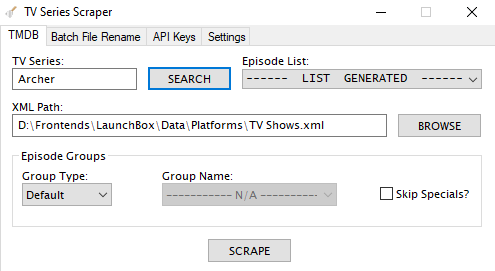 Based on how you want to format your library this script is not for you. It's for individual episodes rather than whole seasons or series as a single entry. There is a slim chance I'll do any rewrites. I suppose never say never is applicable here, but, please do not hold your breath.
 -
Ryujinx - How to update games and install DLC?
skizzosjt replied to Cloudster's topic in Troubleshooting
Manually. You'll need to configure all that update and DLC business in the emulator itself. You launch the games the same way through LaunchBox regardless if you have updates or DLC for them so nothing is really needed to be done in LB, only in the emulator's UI -
anyone find a texture pack yet? I bet fans likely need some time to actually create and debug them. All I've stumbled across is an issue report someone states their custom textures have created issues with anything with a scrolling property. Said textures will no longer scroll. Looks pretty funny lol, but in a bad way. So at least someone is working on something, when they will release them, who knows. Did indicate they are planning on it, calling them "yet to be released". I've played this game so....so....SOOOOOOO many times since its release. I'm pretty sure my most recently play through on this PC port was the first time I beat the boss on the train stage by shooting all the flag polls and makes the train and said boss smash into a building and die instantly. Hell of a lot easier than beating the boss by brute force shooting him the traditional way I've always done! This "secret" almost feels like cheating lol. Takes you to another stage path which again, I don't think I ever figured out how to get to that stage until now. Just goes to show you, you can always find something new returning to a classic you have played countless times!
-
I wanted to pass along some things I noticed since I started using 13.18 The save management badges feature doesn't seem to work if a game/entry has a custom command line enabled. If this is disabled, the frontend will detect a saved game or save state accordingly. As I go into my next note, I am led to believe this has to do with the same thing. It's using the first core found associated with that system in the emulator's associated platform list but I assume if custom command lines are used the games saves are not detected due to not knowing which core to look up saves under and therefore no badge will display. Still on the save management feature. It cannot detect saves across multiple cores. For N64 I utilize both Mupen and Parallel cores so it's only going to find saves for one of those cores. (To clarify this is referring to multiple N64 cores being in the same emulator's associated platform list) The save management feature seems to only consider whatever core comes up first in a users emulator list if multiple exist for the same system. So if I had Parallel above Mupen, it's only going to consider the Parallel saves and games that only have a saved game or save state via Mupen will not have a badge. If I were to flip flop their position in the associated platform list, the saved game and save state badges will adjust accordingly, now only considering Mupen. I don't think it considers whether or not a particular core is labeled as default, but not sure that would be a good thing either way. In a best case scenario it would be optimal for the badges to consider the various cores for a single system, should a user have more than one in the emulator's associated platform list. On the dependency files list feature. Right now it can only detect things properly if the emulator is exactly called "Retroarch" in a users emulator list. For ex, I have more than one instance of Retroarch in my emulator list so the others need to be named something different. These other ones don't detect anything regarding the dependency files. The frontend doesn't think any are required even for cores that do in that situation. It may be worth while to consider a different way to detect this. Much like how users can create a unique platform name but are capable of choosing which platform to scrape it against, this might be a good idea here. Someone has a "Retroarch #2" emulator, but can select "check dependencies against Retroarch" for ex.
-
https://github.com/HarbourMasters/Starship Runs well for me so far! Here's to hoping there will be some dedicated fans creating texture packs like they did with the Super Mario 64 PC port and the Zelda ones too
-
What happens when you re-enable it? Does stuff still work or does a new or the same error return? Just because you use LEDBlinky doesn't mean you should be forced to enable auto imports. They shouldn't be dependent on one another like what has been described by your most recent post. Just seems off either way. auto imports should work for you when enabled and not throw an error. and LEDBlinky should work regardless of auto imports being enabled or not.
-
use the help and support button at top of the webpage. they should be able to sort it out with you.
-
Game save not working - file location problem?
skizzosjt replied to kmancali's topic in Troubleshooting
save and loading of states work for me even if running in Admin. kmancali has something else buggered up. I tried recreating the issue. I made the game I test with, also 1941, (it's always my test game too lol) to have its save states as read only. Here I made some headway. This was the only way I got the same error. So, in conclusion, you def has something blocking write access. I did it myself on purpose. But you will need to dig further yourself to figure out what is blocking write access for you! Do you use Google Drive or Dropbox or some other cloud syncing service? -
 I'm in mostly the same boat. I too cannot use my custom Startup or Shutdown, as well as Pause Screen I created in CTC in LAUNCHBOX However, these same exact Startup, Shutdown, and Pause screens work fine in Big Box. It took me a min to figure out what was going on. When I would launch a game within LaunchBox and my custom Startup/Shutdown theme is being used, it sat there indefinitely like I didn't click anything. The game wouldn't launch, and the Startup Screen would never pop up. I made a separate LB install piecing it back up to end up discovering it was triggered by adding a CTC made Startup/Shutdown theme. The Pause screen is an empty black screen when I try to use the CTC made Pause screen in LB. So, I use the default theme in LB for Startup/Shutdown and Pause screens. But like your situation they all work in BB. I would def appreciate it if the issue was addressed so they could work in LB too.
- 834 comments
-
- 2
-

-

-
- bigbox
- custom bigbox themes
- (and 1 more)
-
really no changes needed in LB. if you for example bought some DLC for a game you already owned on Steam you wouldn't need to change anything. LB is going to launch the game the same way. if it's an emulator game, my experience is you need to configure that within the emulator. as in the emulator needs to know when game X is launched there is DLC A, B, and C "installed". emulator will likely have some "Install DLC" option or some set of instructions to follow regarding where to place the DLC files. but launching it is still going to be same syntax for any emulator I'm familiar with.
-
yup
-
use the native feature within the emulator. RPCS3 already can do game specific configs and will load them automatically. all it takes is right clicking on a game in the game list and then saving the type of custom config you want
-
edit the game, go the Additional Apps tab, highlight which version you want to make default, then click the Make Default button.
- 1 reply
-
- 1
-
-
it's under Options > General
-
use the audit feature to see which games don't have a video file associated with them. renaming files or entries would still be part of the process though to fix ones that have no video file associated. that or assigning the video file to the entry within LB, it will automatically rename it to the standardized naming scheme if needed.
-
Pic1 = Big Box. Pic2 = LaunchBox They cannot be different versions, they always match. So easy to check which version you are on by looking in the About window. I think 13.7 is latest LaunchBox is the management side of things, but can certainly be used as the primary launcher if you prefer But if you paid for premium it's likely because you wanted features within Big Box. which is what most people would use if they have some sort of cabinet or HTPC setup. Custom themes can be applied to both programs. You have one enabled for Big Box. LaunchBox looks default though. Marquees Should be under Options > General which is where you can set primary display and marquee display. you mention a third screen? if so, go download a plugin called something like "third screen" because three screens is not supported OOTB.
-
i'm sitting here wondering why a virtualized disk is even being talked about. this is not how I would imagine these services to operate. mind blown 💥 I would bet the problem is using anything virtualized. you wouldn't have that specific issue if you are were launching files from a real local directory. with that said you should try changing your Google Drive for Desktop settings to have files stored locally too using mirrored setting. surprised this wouldn't be the default. frontend needs access to these files even if you're not online your posts give me the impression you're running the frontend from the cloud? if this is the case, it offers an explanation. makes total sense why LB immediately crashes if the service is shutdown. it's no different than ripping a SATA disk out of your PC case, if said program was on that disk it's going to crash.


