

Boomerps2
-
Posts
162 -
Joined
-
Last visited
Content Type
Profiles
Forums
Articles
Downloads
Gallery
Blogs
Everything posted by Boomerps2
-
Retro Console - BB Theme, added animations and more!
Boomerps2 commented on cemfundog's file in Custom Themes
 This will be perfect as this will open up are choices by being able to use just about all videos available.
- 93 comments
-
- 1
-

-
- pause theme
- controllers
- (and 6 more)
-
Retro Console - BB Theme, added animations and more!
Boomerps2 commented on cemfundog's file in Custom Themes
No, the videos no matter the resolution is playing behind the panel. This view was meant for the nostalgia video set where everything is played on the right of the screen -
Retro Console - BB Theme, added animations and more!
Boomerps2 commented on cemfundog's file in Custom Themes
This is my favorite view on this theme and was wondering is it possible to have the videos be centered in the video viewing area. There is a chunk of video playing behind the platform selection panel that way we aren't stuck with just the nostalgia video theme? -
I requested a couple years back an option I enjoyed in Hyperspin with custom mp3 sound bytes when entering and exiting your selected platform. So I figured out a way to at least get custom sound bytes for the "Loading Start" & "Loading Complete" mp3's from within RocketLaunchers _Default files in the Fade folder. This can also be done on a per game basis as you can see I switched it up with Mario 64. This is just an FYI if this interest anybody: N64.mp4 Sega Genesis.mp4 Mario 64.mp4
-
So adding a second 16x9 monitor to your LaunchBox setup is easier than adding a marquee LCD monitor plus you can pickup a 1920x1080 monitor used at Good Will for $20. Setting up marquees on a 16x9 monitor leaves much of the screen unused and thought it would be easier to use wallpapers on the second monitor. So I downloaded 1920x1080 wallpapers for my platform marquees and Windows games. Tried throwing title screens in the marquee folder which fills more of the screen. Is there artwork out there that I can download in bulk that is 1920x1080? I will be mounting this secondary monitor of the 65" TV. The seconday monitor is also used for Future Pinball and CEMU emulator for tablet controller view. 20200625_104126.mp4 20200625_101409.mp4 20200625_110338 (1).mp4 20200625_110313.mp4 20200625_105917.mp4

-
That worked. Thanks for the help guys. I was in a panic and pressed for time getting ready to show a pedestal to a friend looking to take one of these projects on for himself. Frustrating when something updates and throws everything off.
-
Everything launches great, used the ESC::send !{F4} script and it goes from fullscreen to windowed. Something in my LaunchBox emulator settings? I've tried a dozen scipts and nothing works. Does the same thing in RocketLauncher.
-
With the new rpcs3 update, my exiting script no longer works. Is there a universal Alt + F4 script out there?
-
Doesn't work. How do we send an Alt + f4 to close?
-
What is the script for sending Alt + F4 to exit? As of now with the new build, the above script just takes it out of fullscreen into windowed.
-
Retro Console - BB Theme - Startup Theme - Pause Theme and more
Boomerps2 commented on cemfundog's file in Custom Themes
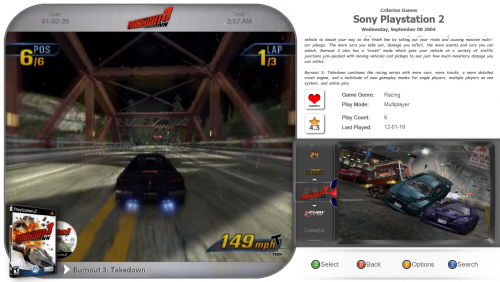 Loving this theme and using it on a pedestal and bartop setup. Is there anyway to center all videos in this screen? A chunk of the video is being played behind the description panel. I understand this view is set for the nostalgia video collection but it would be nice to use others as well. Thanks again for this theme. It is absolutely beautiful.
 -
Retro Console - BB Theme and more. Custom Logo Version
Boomerps2 commented on cemfundog's file in Custom Themes
 Have a question: Am I forced to use your custom clear logo's (Game)? Most clear logo's will not appear unless they are used in your Themes\Retro Console Light V3\Images\Games\Custom Images 1 file structure. Why can I not use the standard clear logo's? I tried an experiment and put the standard clear logos in the "Custom Images 1" folder and most worked however, any clear logo that contains (, : ' ) in the name will not work unless renamed with those removed. This is not the case with the Retro Anime V2 theme.
 -
 Love the theme, clean look and the 4K support, just not a fan of the game selection wheel disappearing.
 -
Was wanting to put together a UHD Launchbox build and was wondering what are my best options for 4K support? Themes with high resolution clear logos and other assets? Maybe have a section in the downloads for 4K support. Thanks.
-
Retro Console - BB Theme, added animations and more!
Boomerps2 commented on cemfundog's file in Custom Themes
That makes sense. With kids, I definitely will NOT be letting them change views. Thank you for your help. Much appreciated. -
Retro Console - BB Theme, added animations and more!
Boomerps2 commented on cemfundog's file in Custom Themes
So the "select" button would act as the same as "options" button? -
Retro Console - BB Theme, added animations and more!
Boomerps2 commented on cemfundog's file in Custom Themes
Thats the one. Worked perfectly! Thank you. Also, in the game selection menu you have "Y" button as options. What is typically mapped as "options"? I looked in the key bindings and there is nothing for assigning options. -
Retro Console - BB Theme, added animations and more!
Boomerps2 commented on cemfundog's file in Custom Themes
Is there anyway to get the bezel without the glass? -
When selecting a game, I want to go right into the game and diasable the game menu. Just like in Hyperspin. I would just like to completely disable that second window. Any way to do this? Thanks.
-
Background Music playing after game launch
Boomerps2 replied to Guywiththegun's topic in Troubleshooting
Any fix for this? -
Bumping this question because this would be a great feature
-
I'm in the same boat. For me at this point is all about the bezels. If LB can include some kind of bezel support, I would drop RL ASAP.
-
Well then your a happy camper
-
Oh wow! So LaunchBox has full bezel support?
-
Has anybody here dropped RocketetLauncher completely? I figure with these new updates we can soon drop it.


