

sundogak
-
Posts
1,443 -
Joined
-
Last visited
-
Days Won
8
Content Type
Profiles
Forums
Articles
Downloads
Gallery
Blogs
Everything posted by sundogak
-
No, don't move anything around. Your MAME setup and Software List sets need to all be working before using the scripts. You can test your MAME setup outside LB which helps identify issues as can see the command window as shown below: Assumptions on using below test line: 1) you are launching command window in MAME root directory outside of LB 2) using Gold Mine as a test game 3) your LUA file is in directory ...\MAME\scripts\mtx_cass.lua mame mtx512 goldmine -autoboot_delay 1 -autoboot_script scripts/mtx_cass.lua If doesn't work in command line won't work in LB. The command errors will likely give you insight on issue. A few possible reasons to double check if errors in command above (see snaps below): If the command above works and launched game then likely means you had setup MAME within LB using auto setup so you will need to alter the path in LB to include your Software List directory rompath or there is some specific issue with naming in LB. Helpful then if you have screen shots of your LB setup to help troubleshoot (MAME emulator settings, example game entry settings). If command doesn't work then likely one of these: your MAME.ini isn't pointing to your directory where your Software List files are located and set in the "rompath" entry in the INI file. This should point to the root Software folder. It will be the folder that contains: ...\MAME\software\mtx_cass\goldmine.zip for purpose of test above. you don't have a complete MAME roms Arcade set and/or the MAME files are not named properly as they will have the bios and needed files to run the MTX emulation you do not have a correct/current set of XML files in your MAME Hash directory: ..\MAME\hash\mtx_cass.xml you haven't downloaded the Software List Mame set which is separate and an addon to the MAME rom arcade files set (need both sets).

-
I have never seen any of these types of games as "stand alone" executable. They are roms with mixture of emulator executable like other emulation systems. In case of laser games it also means a video file has to be present which is copy of the actual laser disk. My guess, if you are saying it works outside LB, is it is some zipped up version with VLPD, roms, and emulator with batch file in auto-extracted zip file. If you take winzip or 7-zip open the zip application and then see if you can open the executable from within the zip application. If you see files inside then just an auto-unzip file. If not, something oddball that I have never seen and would be a bit suspicious of this type of executable tbh unless confident of source.
-
You cannot really merge in the DB. You have to delete one. I typically look at the entry with earliest ID number and unless some other reason use that as one to keep. Before submit for delete, copy any unique media to your drive temporarily. Then add those assets into the remaining game DB entry. A lot of people seem to nuke the dupes and not check that and can lose useful media. Release date by practice for DB should be the initial release in whatever region. So if EU first then use that. I also will add in description if any differences in region.
-
Correct, it is a user DB. As Switch (emulator wise) is new the LB DB will have a lot less input than other platforms that have been around a long time.
-
No, you cannot currently lock fields within LB (a feature I would like as well). However, in your specific example the fix is the add the Zenge game to DB. As Zengeon is in the DB, LB will select that as no other close match. If Zenge was added it would always prefer that over the other.
-
There are these.
-

Has the "Shooter / Gun" genre been replaced with just "Shooter"?
sundogak replied to Johnny T's topic in Troubleshooting
It was never in the LB DB. The Shooter/ Gun" was likely coming in from the MAME import XML during your initial import if used full set import or told LB to use MAME metadata. If you ever update via LB DB it overwrites the MAME genre (and player modes). -
Ahh..didn't check that it is in "Android" thread. Sorry about that.
-
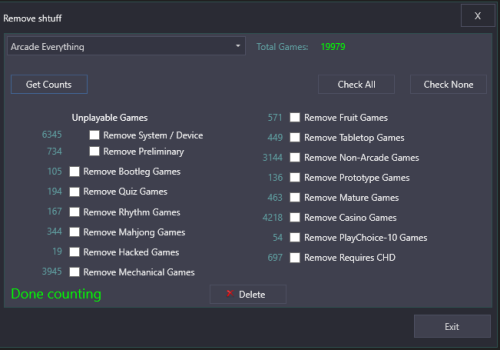 Yep that fixed it, good assumption! I do have an Arcade Platform but the MAME games are specifically under MAME platform nested under Arcade.
 -
These are the variables that I am aware of (no good place documenting so just picked up via change logs, etc): %romfilename% - Filename of the ROM WITHOUT extension %romextension% - Extension of the ROM file (ie, .rom) %romlocation_noquotes% - Path to the ROM without quotes %noromfile% - Replaced with empty string, suppresses rom file being added to end of the command line %romfile% - Rom name with extension Have you tried %romfilename% or %romfile% as this should work for what you are trying to do.
-
Thanks for the all the useful plugins. On beta 13.17 beta 4 I get the following error when launching the plugin. It still seems to work as intended after closing the error box but if close and relaunch will get same error.
-
Beta 3. Disabled platforms not working uniformly. I had 7 platforms all checked with do not auto import and it is importing anyway. It took time to start the first time as turned on disabled, changed the platform folders, and nothing happened for about 15 minutes (as expected). But after I left and came 20 minutes later there was the pop info that it had imported 1,000s of files and downloaded media. All of which were in those disabled platforms. One platform as example was Sinclair ZX which was pointing to my main ROM folder and Disable ROM Auto-Import checked. There were a few games from prior I had manually imported from the folder but it installed the entire directory. It did it again after I exited out, restored to prior XML settings and restarted. Again after about 15 minutes or so it started importing the same 7 platforms all of which were checked to disable. One theory is that if you are pointing to a folder (even with disabled checked) and there are some games already installed in that platform within that same folder it is ignoring the disabled box (but haven't fully tested that). I didn't have debug logs turned on but will try it sometime tomorrow and see.
-
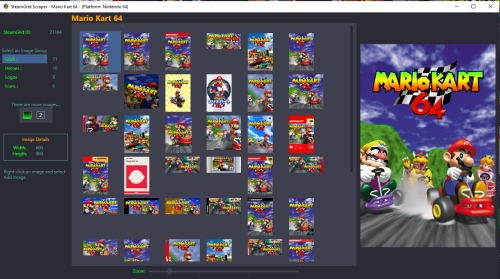 Thanks, that fixed on my end.
 -
First off thanks for the work on this plugin, very useful and saves time when using SteamgridDB. However I get a bug/error pop up with the following: Launchbox 13.5 beta 3 (happens on Beta 2 as well) StreamgridDB Scraper 1.2.4 I completely erased old plugin folder and reinstalled to be sure nothing with remnant older versions. If use Add Image toggle and then try to use the check box "See All Available Image Types" you get the following error:
-
Missing Games Checker Plugin
sundogak commented on AgentJohnnyP's file in Third-party Apps and Plugins
 Click on the funnel to bring additional window up.
 -
Missing Games Checker Plugin
sundogak commented on AgentJohnnyP's file in Third-party Apps and Plugins
People can always force a metadata update via the Tools, Download option menu to update their local version. It is done automatically in several cases (such as searching for game in edit view). Even the metadata you download lags the "live" DB as those are not immediately reflected in the download once approved. On top of that you have changes in process that are not shown in the live DB view or download. So ~24 to 48 hours is what I have seen from time a change submitted to time available in local DB (just my observation over years..approval queue length can drastically alter that time). There is nothing this tool can do to alter that, it is just more visible when using this useful tool. -
Is there is a list anywhere of what extensions auto import ignores?
-
Have no idea. I never let LB mess with my ROMs or move/copy so never use that feature. I only mentioned how you could fix the platform issue you described to adjust the rom folder path.
-
You named it Sega Megadrive and thus it picked that as platform exactly as you told LB. Platform and what you select for Scraper are completely independent. LB prioritizes what the platform name is for folder selection. Thus, you have two options: go to the edit Platform "Game" entry and browse to your Sega Genesis folder. Easiest but could be confusing down road. LB will look there for any roms for that platform. rename your Sega Genesis folder to Sega Megadrive. You will have to relink games but I believe with the new auto import feature on it will do that. If not you will have to reimport so path matches. You could also manually edit the Platform XML but make sure you have use LB backup feature first.
-
The auto import feature isn't working for files that have these extensions (this beta and 3.16): *.txt *.xml I tried on completely new LB install and cut and paste in a "ROM" file with same exact name and anything with above will not be seen by auto import. Variations of "*.t2t" work so suspect there was something added to ignore these extensions. As Emulators like TeknoParrot point to XMLs excluding these (if that was the intent) breaks importer for these type setups or where *.txt files are used as pointers. Less issue for txt files as could use another extension for text pointers. But not so much for XMLs as that is what TeknoParrot uses as the profile to run.
-
Exodos with Launchbox - customize Dosbox fork and MT32 emulation
sundogak replied to PorcoZio79's topic in Emulation
In their Discord eXo specifically discouraged changing to another DosBoX version this as they have tested the specific version of DosBoX with each game. -
Something doesn't make sense on your paths. The third party folder is part of Launchbox install. ExoDos files are within the Launchbox directory (see snip below for working setup). Your Third party folder is in a parent folder of "ExoDos". Other than the issue you are having it will potentially cause others both with LB and ExoDOS. You are also using an older version of LB is up at 13.16 so would install LB first then merge in EXO files (he has info on how to do).
-
Yeah, during the beta I had the text point method prior as well. I do recall I had to nuke the platform and emulator entries and restart (similar with PS3) but was assuming it was a beta thing. Glad you got it sorted.
-
Updating MAME sets (i.e., #1 above) is usually easiest if using tool like TorrentCheck. You go to Pleasuredome Git Hub, download the Torrent file for your set type (you have to start a temp Torrent as they use magnet links, then stop torrent). Take downloaded torrent file and drop into Torrentcheck, point TorrentCheck to your MAME set and run it. It will rename (if tell it to) files if checksum matches, double check valid files and leave them, delete non-valid ROMs no longer in set (will backup if tell it to). Then you can rejoin torrent pointing to the folder and will only download deltas for that set. Easier than messing with CLRMAME Pro and update packs (for me). If you are completely downloading a full non-merged set each time and nuking your folder with fully updated then could do as proposed (with no Torrentcheck stuff). However, if downloading an UPDATE only set (i.e., not full non-merged) and overwriting your existing set will work MOST times. What you will get eventually is rom files that are stragglers. The reason is MAME does rename things so even with a non-merged set you could have an older ROM name in folder which won't get removed along with the new name. It won't hurt anything as these are fully standalone zip game files, but longer term could get confusing. Although bandwidth is less issue these days a split set tends to have less delta changes. For example, if un-merged and one driver change could cascade to multiple standalone zip game files whereas with split and to degree merged will be less zips to update. I also use split for both software and arcade simply because can easily see the clone zip files and it is slightly smaller than non-merged to download. If bandwidth and HD storage not issue and not concerned that have a lot more zip files (as shows all clones) then un-merged can be easiest. Scan for new ROMs should work assuming you have pointed your MAME platform folder to your ROMs directory. You can test by deleting a game in LB or putting a "new" dummy rom in your MAME rom folder. If do a scan LB will pick up that game zip and re-add it. If you have auto import turned on then LB will see the new dummy zip and add it. So you could do initial full set import, make your customization, then only depend on scanning for new ROMs for updates vs using fullset MAME importer tool. As for, "Scan for Removed MAME Roms" feature that should be avoided regardless of set as LB will delete CHD games and a few "no zip" games. LB puts in dummy rom pointers in pathing of the game for some CHDs without a corresponding ROM zip but the ROM doesn't physically exist (speaking ROM not the CHD file itself). If you scan for removed ROMs, LB simply looks to "is ROM there are not" and will suggest to delete the game as there is no zip file in the ROMs directory (it is the CHD file). There are some other oddballs like "Pong" which has no direct ROM file which will also get deleted if use this scan/remove feature. Example: all these games exist/work in MAME and shouldn't be removed:
-
Yes, blank folder or LB will wind up doing what you saw (to me should be some logic to stop this if auto import on but at moment not the case). For Vita3K and PS3 RPCS3 if using auto import feature LB uses the Vita and PS3 emulators to determine pathing. Thus it is a "must" to have games installed properly in the emulators when you open them. If not in there then LB will not pick up. If you point the folders to the rom folders then LB imports all the other files in addition to what it sees via emulator. Where the empty folder is located is immaterial but here is mine: Here are the other setup screens: This is Metal Slug 3 path that the auto import feature automatically places. Notice it isn't pointing to eboot file (by design) like the "old" way prior to auto import method. The key for that is the switch " -r" which tells Vita to run any eboot file in the installed path (hence why above game only points to folder) This needs to be checked to have LB use Vita (and PS3 RPCS3 which is similar setup) The key here is that for most part you never need to run "Scan" anymore as the auto import will pick it up. You can and if setup correctly as above it shouldn't pick anything spurious in the folder paths. Sometimes the auto import isn't immediate but will eventually do its thing (force a scan usually triggers). Side note (for non-Vita, RPCS3 emulators): The pointing to empty folder trick also works for platforms you do not want LB to do its normal ROM auto import thing. For example, I have Visual Pinball and do not point the rom folder in LB path to the VP tables or it will auto import EVERYTHING and it is a mess. Hopefully they will improve this at some point but originally was reason I avoided auto import feature.







