
.png.d63b88dc3d5c6db8803dfbd996ce65fc.png)
JoeViking245
-
Posts
5591 -
Joined
-
Last visited
-
Days Won
41
Content Type
Profiles
Forums
Articles
Downloads
Gallery
Blogs
Everything posted by JoeViking245
-
There're are a couple of .ini files located in your MAME's root folder. But in an attempt to keep things tidy, the rest are stored in MAME's /ini/ subfolder. Anything in particular you're looking for? Or just ini files for MAME in general?
-
.thumb.png.c9faf450e4d2b690a819048b18173f61.png)
Treating NeoGeo games differently en-masse in MAME
JoeViking245 replied to vaderag's topic in Emulation
Select your NeoGeo Playlist (if you don't have one, create it [hint "Source=neogeo.cpp"]) so you can easily select all [only] your NeoGeo games. Download, install and use this plugin per the Setting Up: instructions. -
Treating NeoGeo games differently en-masse in MAME
JoeViking245 replied to vaderag's topic in Emulation
Start by testing it on one game (3 Count Bout). Edit the game and under Emulation, check Use Custom Command-Line Parameters, and put -keyboardprovider dinput -ctrlr neogeo Look at your MAMEs default commands and see if there's anything else you should add. Like "-rompath %romlocation%". (Because those won't get passed) -
Treating NeoGeo games differently en-masse in MAME
JoeViking245 replied to vaderag's topic in Emulation
I know pretty much nothing about LEDBlinky. Can't help with this one. -
Treating NeoGeo games differently en-masse in MAME
JoeViking245 replied to vaderag's topic in Emulation
That's a good sign. Correct. How MAME saves them per game (3countb.cfg) is different than how they're saved globally (default.cfg). That's why set them up in MAME under General Settings, then copied/renamed that file. That won't work because of the order-of-precedence of 'when' ini files are loaded. Well, it would if you deleted neogeo.ini. How about ini file(s)? ../MAME/ini/3countb.ini I tested both these games and both loaded neogeo.cfg (controller/keyboard configs) when launched from inside the MAME UI [mame.exe]. Also tested with a batch file and same (good) results. mame neogeo 3countb pause With "pause" in there you can see behind-the-scenes. And after looking closer at it myself, I think I found out what your issue may be... (My guess) You've changed some of your default input assignments under General Settings which got saved to default.cfg (in the /cfg/ folder). (After moving and renaming it to ../ctrlr/neogeo.cfg.) The fix.?.?... You have your 'custom' neogeo.cfg file in /ctrlr/ already. You have neogeo.ini set to load neogeo.cfg already. Move default.cfg from /cfg/ to /ctrlr/ (Move, don't copy) Edit mame.ini and set "ctrlr default" Save and close Start a NeoGeo game What my testing showed was, MAME will load [red underlined] neogeo.cfg (in /ctrlr/) and then load default.cfg (/cfg/ folder) [next line down]. The line after that is the neogeo.cfg file in /cfg/ that has nothing to do with controller settings. "What the heck" you say? Ya. Me too. But not so nicely. lol Oh, and if you didn't plan to make 'default' input changes, simply delete default.cfg in the /cfg/ folder. It will later create a "clean-slate" default.cfg. And if none of that helps or fixes the issue, I have one more sure-fire cure up my sleeve.
-
Treating NeoGeo games differently en-masse in MAME
JoeViking245 replied to vaderag's topic in Emulation
I was thinking more like open MAME (mame.exe), search for a NeoGeo game and start it from there. For the game you're testing this on, delete the ../MAME/cfg/rom_name.cfg file. i.e. Alpha Mission II (alpham2.zip) delete ../MAME/cfg/alpham2.cfg file. If that doesn't fix it.... In you mame.ini file, is writeconfig set to 0 (zero)? Is so, leave it that way. If not, change it to "0". Save and close. What game are you testing? Let's say Alpha Mission II (alpham2.zip). In your /ini/ folder, is there a matching ini file for that ROM (alpham2.ini)? If so, delete it. In your /cfg/ folder, is there a matching cfg file for that ROM (alpham2.ini)? If so, delete it.
-
Treating NeoGeo games differently en-masse in MAME
JoeViking245 replied to vaderag's topic in Emulation
Does it work if you start a NeoGeo game directly from MAME itself? -
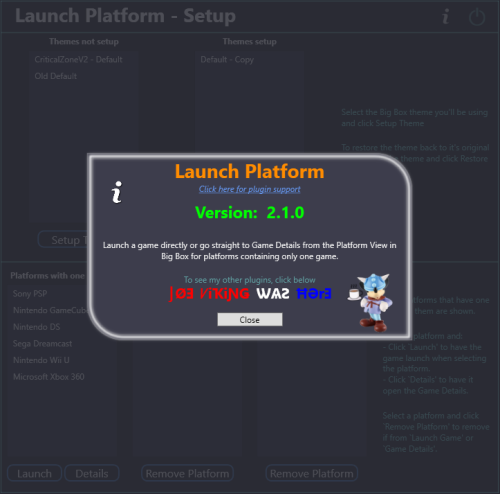 @Restrox Hmmm... well they all should show when you start the plugin. 😊 This was created almost 2 1/2 years, so I'm having to remember what the heck I did. lol One thing I did notice is that there're 2 possible files to download. The one you want is "Launch Platform 1.02.zip". (Not sure why I left the other one there.) Exit LaunchBox and remove the LaunchPlatform folder (under Plugins) and replace it with the 1.02 version. (Remember to Un-Block as necessary) Restart LaunchBox. When you click Tools, it will say Launch Platform Setup 1.01. Ignore that it says "1.01" and run it.
 -
I do. But it's for stand-alone MAME. You'll need gamecom.zip in your roms folder. Then of course the game ROMs (and their path added to the rompath in mame.ini). The command line is "gamecom -cart1". But also simply "gamecom" will work. The full command to run Sonic Jam would be mame.exe gamecom -cart1 sonicjam OR mame.exe gamecom sonicjam If you have other MAME softlists set up in RetroArch, you should be able to see how they're setup, and (sorta) copy that. I don't use RA for MAME at all what-so-ever. So can't help any further with that. (Back the stand-alone MAME) If you had LB setup your MAME emulator, I believe the default command line sets the rompath to the games ROM.zip (sonicjam.zip) folder. In that case, you'll need gamecom.zip to be placed in the same folder that your gamecom game ROMs are in. (Which is actually a bit easier than messing with mame.ini)
-
To do this, add a Custom Field ("My Custom Field" or whatever) to one of your games. You'll need to enter a Value ("True" or whatever) also. Otherwise, it won't save. Then save your changes. Now select all the games you want to add this to and click Edit. Choose the Custom Field: you added and enter a value. etc.
-
Can you share a screenshot of what's inside your../LaunchBox/Themes/ folder?
-
RetroAchievement Badges
JoeViking245 commented on JoeViking245's file in Third-party Apps and Plugins
 The easiest solution is to: once you've setup your Famicom platform and downloaded all your metadata and media for that platform, change the scrape-as to Nintendo Entertainment System. Once your platform is good-to-go, changing the scrape-as won't have an effect on anything other than allowing this plugin to work.
 -
RetroAchievement Badges
JoeViking245 commented on JoeViking245's file in Third-party Apps and Plugins
They're listed under NES. Do you have your Famicom platform set to scrape as "Nintendo Entertainment System"? -
1st thought is to change ~Esc:: to $Esc:: If that still don't work, verify that the exit script is even getting touched. After the $Esc:: line, add in something like "SoundBeep,1000,500". Add it several times if you'd like. Then when in the game, press ESC and see if you hear the beeps. If you press ALT+F4, it won't work.
-
Can you show me both your scripts? (the one that loads it and the one that [is supposed to] kill it) Can you also show screenshots of the 2 Additional Apps? Edit each Additional App and share those [edit] screens.
-
I think I remember for sure now why I stopped messing with it. And a sure reminder as to not go trying it again. lol You might have a little better luck with something like /MAME/plugins/autofire/init.lua
-
That might have been when I gave up. lol Time for a little deeper digging. It's "documented" in the luaengine.cpp file. mame/luaengine.cpp at master · mamedev/mame · GitHub In the commented section emu library and starting on line 603. Have fun.
-
Yes. It's launched in conjunction with the game starting and stays active until either the script closes itself (ExitApp) or the game exits (then it's forced closed). Scripting MAME via Lua — MAME Documentation 0.249 documentation (mamedev.org) MAME Lua Class Reference — MAME Documentation 0.249 documentation (mamedev.org) They're pretty cool and can do A LOT of things. I do pretty well with AHK, C# and batch files (which are actually lot more powerful than you can imagine). I can look at a Lua script and understand and follow through with what it's intending to do. But I'll be damned if I could write/create one from scratch. lol But it's been a couple years since I've looked at them. In the last year, MAME has updated their Lua scripting documentation. Namely in the Class Reference section. Though I haven't really looked at it. Maybe you'll have more patience than me.
-
Treating NeoGeo games differently en-masse in MAME
JoeViking245 replied to vaderag's topic in Emulation
There may be an easier way, but one way is (assuming standalone MAME), in your /MAME/cfg/ folder, make a backup of your default.cfg file. Open MAME and set the inputs as you want them for NeoGeo. Save and exit. Move the 'new' default.cfg file to /MAME/crtlr/ and rename it something like neogeo.cfg. go back to your /MAME/cfg/ folder restore the backup of your default.cfg file. in your /MAME/ini/ folder, create a [text] file and call it "neogeo.ini" in there, put "ctrlr neogeo" (or whatever you named the "something like neogeo.cfg." [minus ".cfg"]) Now whenever you load a game that has the Source as neogeo (MAME will know), it will load the controller settings in 'neogeo.cfg'. -
Good. 🙃 Kind of doubt it. But it may have been something in a MAME offshoot.?.?.. MAMEui, qmc2, or something funky like that. To limit save/load to a single slot, I can see having both pros and cons (compared to having up to 10). Depends on the end-user's needs/requirements. I do know that you can have a specific game or system automatically load a specific save state by creating an ini file. In the ini folder create a text file like mslugx.ini (for Metal Slug X) or neogeo.ini (for all NeoGeo games) and put in just 1 line. "state 1". Every time you load that game or a game using that source, save state 1 will load automatically. If you reassign the save state to Shift+P, I imagine if you hold the P a little longer, you'd end up sending Shift+PPPPPPPPPP. Ultimately saving it in the "P" slot. lol Compiling your own as both links talked about, would be a pain. Though not really difficult. But still a pain. I think it'd be a lot easier to just have an AHK script and put it in the Running Script section of your MAME emulator. Chances are that it won't work if you want to upload your high scores to the Community Leaderboard. To make it work, you need to have "-keyboardprovider dinput" in the command line (which is put there by default). This example will load the save state in slot 1 (if one exists) for a game when you press "A". SetKeyDelay, 0, 50 a:: { send {F7} sleep 100 send 1 } Yes, you will still see a popup for a split second. Because of how MAME is, it's not a popup "window" you can hide. You could also change the "a" to "$F7" to have F7 load slot 1 (vs it just bringing up the option menu). If you wanted to get real crazy, you could probably create a lua script plugin to do this and have it work directly in MAME. With this, you wouldn't have to compile-your-own MAME anytime you update. Or ever, for that matter. Here's something you might be able to modify. If you're so inclined. It's set to save and load to the "auto" slot [only]. http://forum.arcadecontrols.com/index.php/topic,151810.msg1623419.html#msg1623419
-
Having an AHK script to do that makes sense and is probably the only way. I don't think MAME has a setting-of-sorts for always using slot "1" (or whatever). Have you tried this during gameplay? Vs. pausing then 'rewinding'. May double check your key assignments in MAME. Honestly, I never paid attention that rewind was even a thing. I've used the Insert [key] for fast forwarding though.
-
Have you changed the default key(s) in MAME for save and load? When you say "go through a dialog", are you talking about accessing the save/load feature available in the pause menu (Pause Screen)? If you go through the pause screen, LB is setup to use MAME's default F7 (Load) and Shift+F7 (Save). But sounds like you may have had (at one point?) set up different keys in MAME itself to a single key [respectively]. Which, regardless of how it's setup in the pause menu, would still work for you directly in MAME. Just not via the pause menu. You may need (want?) to disable LB's pause menu. At least for MAME. I'm pretty sure that when you're in the pause screen, direct keystrokes are not sent to the emulator. If you want to disable it (at least do so for testing), edit your MAME emulator and in the Pause Screen section, un-check Enable Game Pause Screen.
-
What version is your MAME emulator? (example “0.249”) Can you provide Screenshots of the following sections: Go to Tools, Manage, Emulators, select the emulator you setup for MAME and provide a screenshot of Details Associated Platforms
-
"object reference not set to an instance of an object"
JoeViking245 replied to Joe35car's topic in Troubleshooting
(This is useful information as to what exactly triggers the popup.) So the popup appears when you go to launch a game? Not before? Which LB Theme are you using? If you switch to a different Theme, do you get the same error popup? Can you share a screenshot of the error window. Have you looked at any debugging logs? Make sure it's on (Tools, Options). Exit LB, then restart it (to create a fresh log file). As soon as the error pops up, click OK on it and then close LB. (Doing it this way will create a smaller log file.) Then look at the most recent (just created) log file. -
"object reference not set to an instance of an object"
JoeViking245 replied to Joe35car's topic in Troubleshooting
So LaunchBox loads? Looks normal? Then the popup shows with no other info? If you click Close on the popup, does LB then shutdown (close)? If it was a .NET Core issue, I believe it would say so. But there's more info here regarding that.
.thumb.png.c9faf450e4d2b690a819048b18173f61.png)





