
.png.d63b88dc3d5c6db8803dfbd996ce65fc.png)
JoeViking245
-
Posts
5606 -
Joined
-
Last visited
-
Days Won
41
Content Type
Profiles
Forums
Articles
Downloads
Gallery
Blogs
Everything posted by JoeViking245
-
.thumb.png.c9faf450e4d2b690a819048b18173f61.png)
Black Borders around 2d Art on Arcade Games
JoeViking245 replied to tcr333's topic in Troubleshooting
Your 1st screenshot is showing Box-Front images downloaded from EmuMovies. The 2nd one is showing Advertisement Flyer-Front images downloaded from LaunchBox Games Database. -
What's your monitor size? 1920x1080? It looks like it's not going to the bottom (and top?) of the screen. (Maybe that's how your monitor is, or you messed with the .lay file? Not sure exactly how that works.) If that were "fixed", you'd gain a little more real estate. Decreasing the size of the left/right sides will of course increase the width of the playfield. But will also distort (stretch) it's 256x224 (3:4) resolution. (I think) to do what you want, you'd need to find/create a bezel image with narrower side bars and adjust the lay file to match. What you may have seen is someone had a bezel for 7:8. Which would make it a little wider. When you go into the Tab menu - Video during gameplay, you can switch between Bezel (or 3:4) and 7:8 to see the width difference. Turn off Maintain Aspect Ratio and see how out-of-wack it can get.

-
Can you share a screenshot of what you're seeing?
-
BezelLauncher
JoeViking245 replied to JoeViking245's topic in Third-Party Applications and Plugins (Released)
Sincerely, thank you for reading the documentation! I'm going to guess: "many" = 109. Thanks. But that won't be necessary. This plugin "knows". -
BezelLauncher
JoeViking245 replied to JoeViking245's topic in Third-Party Applications and Plugins (Released)
To clarify, are you talking about the number of platforms? e.g. You have 191 and the plugin is saying 82. Any chance you have 109 platforms that use either MAME (or a derivative like MAMEUI), RetroArch or DOSBox? If so, the 3 emulators are blacklisted from the plugin. -
BezelLauncher
JoeViking245 replied to JoeViking245's topic in Third-Party Applications and Plugins (Released)
K. So that tells me it is working. Just slow, like molasses. When you enable the emulator, chances are you're going to want to click Test to check/set the window parameters at that time. My presumption is users will copy over their RA bezels, then enable them in BezelLauncher. Horse-cart. Chicken-egg. Logical-productive. I chose the coin toss.... Heads-tails. It is not. 🙃 You're right. At one point I had thought about doing that (this part I remember). Then "tails" prevailed and I didn't add it in (this part I forgot). I will for sure look at fixing the Save button not being visible after selecting disable. I'll also spend some time looking at the Refresh thing. Can you attach your BLSetup.xml file that registered 191 platforms? I should be able to use [just] that to test with. -
BezelLauncher
JoeViking245 replied to JoeViking245's topic in Third-Party Applications and Plugins (Released)
This has probably been like that since at least that last update, 9 months ago. I'll add it to my "to do - fix this" list. I wonder if on first run, the 'start the setup, then close it... then restart it, then Refresh' has something [in the coed] to do with that. You said it did work after that, though was inconsistent. Or just took an extremely long time.?.. I shouldn't take that long. Even on a potato. That said, a quick glance at that section of the code [written over 2 years ago] shows me I knew just enough to 'make' it work'. But was ignorant enough to not include more checks and balances. 😊 It does work (with fewer platforms???), but is some ugly-arse code. I'll look at possibly refactoring that part or (might end up being easier) just rewrite it. Question: When it hangs, if you wait [the unfortunate 6 - 10 minutes], will it always eventually complete? As in, it does actually work. It just takes a stupid-long time. This may be moot if I decide to do a complete rewrite of that section. Some day. But will give some guidence. On step 1 of Setting up, the folders are created. ("This will create the \Plugins\BezelLauncher\Bezels\platform_name\ subfolders") The intent is to have the folders there for you to place your bezel files into. Similar to how LB's Auto-Import feature creates folders under /Games/. The main purpose is to give the proper/correct folder names for you to place the bezels in, corresponding to where the plugin looks. The hope was to alleviate issues in folder naming conventions like: Sony Playstation 2 vs. Playstation 2 vs PS2. "In theory", when clicking Refresh All, it'll [also] create new folders for newly added platforms. It's "supposed to" also remove empty folders for platforms no longer existing. e.g. If a platform that had once existed in your collection and is no longer there, if it has a Bezel subfolder with files in it, it will not be deleted. If the folder is empty, it will be deleted. -
BezelLauncher
JoeViking245 replied to JoeViking245's topic in Third-Party Applications and Plugins (Released)
I'm not able to reproduce it hanging on Refresh All. If you zip up and attach your Logs folder (\LaunchBox\Plugins\BezelLauncher\Logs\) I'll see if I can find anything in there where the issue is occurring. One "fix" could/would/should be... with LB closed, delete (or rename) BLSetup.xml then start LaunchBox and go to Tools - BezelLauncher Setup. -
Glad to hear it worked! Yes. "Relatively" is relative. "Easy" is in the eye of the beholder. That said, the process seemingly is actually pretty straight forward. But it comes down to a cost/time benefit. The process to "close the Additional App" (that I can think of) actually "kills" the app. So, it's not very graceful. But it most cases it won't 'hurt' anything. Like killing an AHK script or DemulShooter. (See caveats below) That's a loaded question. For "you"? Yes, of course. For the developers to implement it? Right now, today, this minute? A resounding No. 1) You have the tools available to do what you want. Simple version: the script I just gave you. Less "simple": [You] taking a few extra steps and create an Additional App to close (kill?) the app After Game Exits. 2) Goes back to the time/cost benefit. The 'immediate' benefit is negated by item 1). However, to submit a Feature Request is free for everyone. Submit it. Share it. Enough people upvote it, the one-in-charge of time/cost management will happily tell their developer/programmer (who may mutter "they have the tools to deal with this already") to implement it. And wha la. Request option "B": Another [unavailable] feature option would be to have Running Scripts for games that don't use an emulator. In the games Emulation section, if the Use an Emulator box is un-checked, have a field for Running Scripts (similar to what's in Emulators, and how they function). Caveats to auto closing after game exits: The caveat to either of these is games that are ran via a launcher. Notably TP and Steam (maybe the other storefronts too?). The 'launcher' launches the actual game then closes itself. You told LB how to start the game, and that's what LB monitors for "game exiting". So with launchers, the "game" essentially starts and exits right away [as LB sees it]. Making this nearly all for naught. Use the tools already available because they're there, they do work and they're "relatively easy to implement".
-
This assumes the games exe file is "OR2006C2C.EXE" (adjust accordingly). If it's being ran through Steam or TP, that's a completely different story. Process,Wait,OR2006C2C.EXE WinWaitClose,ahk_exe OR2006C2C.EXE ExitApp 1::Enter ; Start button 5::Escape ; Coin button Wait for the games exe process to be running Now wait for the games exe process to close/exit While waiting: Hotkeys "1" and "5" will be active Actually, they'll be active as-soon-as the script is running. So don't get jumpy pressing the "5" key. Exit/close the script when the games exe process is no longer running
-
Cannot scrap Resident Evil 4 Remake from Steam correctly
JoeViking245 replied to 51mm5's topic in Troubleshooting
Click the red X next to LaunchBox DB ID For the Title, type in "resident evil 4 remake" It will show "Resident Evil 4 (Deluxe Edition)" select it Go to the Alternate Names section Select "Resident Evil 4: Remake" Click "Set Selected Name as Title" Click OK to save and close -
Can you share a link (or 2 or 3) to a game(s) on the Games Database that you're seeing this happen? This way the developers can try to reproduce it and possibly find a fix.
-
To clarify, you're talking about 2 different sites. Correct? The LaunchBox Forums (where we're at now) Users' icons (avatars). Which seem to be showing for you now. I know on some older posts, inserted images can sometimes appear blank. Clicking the "image" will open the actual image in another tab/window The LaunchBox Games Database ("the database/DB") https://gamesdb.launchbox-app.com/
-
LaunchBox does not have any available command-line parameters when starting it. But you should be able to deduce the parameters needed to launch a game by combining the full emulators application path the command-line parameters (if any) or overrides under Associated Platforms the full path to the ROM file (depending on checkboxes checked in the emulator settings)
-
It shouldn't import games already existing. Though I'm not sure if it overwrites the existing games or skips matches. I assume the latter. One sure way of finding out. Turn on the Backups feature. Exit LB (to ensure a backup is created). Start LB and re-import your new ROM set. If it screws things up, restore your backup and go to Plan B. ? Just because it updates doesn't mean you have to. My method is to keep my ROM set up to date then read whatsnew.txt to see if there actually are any "new" games. Then add the 0 to 5 new games. But also, my "curated" set in LB points to my full set folder. So any ROMs that get updated are a non-issue (as the game's ROM file [Launching section] points to the same filename).
-
Don't recall what the startup time for my cab with its antique i5 is, but about 19 seconds seems right. Here's an article about Troubleshooting LaunchBox & Big Box Performance that may (or may not) help give some insight.
-
Me too. Here's what I found in that section: <configuration name="Keyboard layout" tag="kbd:LAYOUT" mask="24"> <confsetting name="QWERTY/,УЕИШЩ" value="0"/> <confsetting name="QWERTY/ЯВЕРТЪ" value="24"/> <confsetting name="QWERTY/ЙЦУКЕН" value="8" default="yes"/> <confsetting name="Test?" value="16"/> </configuration>
-
My ignorant American mind would have never guessed that. Thanks for being "curios" and looking into it further AND most of all, figuring it out! (I'll add this to my notes)
-
Welp, I'm at a loss. Tried it here (LB 13.26) with MAME 0.285 and 0.286 with no error. Your MAME is from MAMEDev? (Or LB installed it for you. Same thing.) vs. something like MAMEUI or HBMAME Reinstall MAME? Try the importer again. File a bug report: (the top of the page) click Help & Support and select Report A Bug. If you're still morbidly curious... Run the importer, get the error, open the file in \LaunchBox\Metadata\Temp\ that's approx. 305MB (it won't be an xml file) using NP++, look again for the line number. Though this won't help with the issue at hand. But may show 'a something'.
-
Well, no. Because 1 is to 164, as 4292731 is to 4,292,895. Either way we go, nothing came to light. It's also possible that LB stripped some of the unused elements before parsing it, Thus changing the line numbers even further. Did you try rerunning the Import Wizard?
-
The error message looks like an xml parsing error. Since list the listxml result starts with a DOCTYPE declaration, go down from the line it says errored about 163 more lines. (to approx. line 4,292,894) "163" being about the length (# of lines) of the declaration. Also, you're probably looking for <machine name=. I suspect LaunchBox parses the xml into a Model which has the elements saved as capitalized words. (like shown in the error, Name) Or, retry the MAME Arcade Import Wizard again. It's possible when LaunchBox ran its own -listxml, something got malformed.
-
Depends on the error you received. If it was something like "can't from the ROM.." You have (at least) 2 options: Open LaunchBox Select the platform Select all games in that platform (select one and then press Ctrl+A) Go to Tools < File Management < Change ROMs Folder Path for Selected Games... Read and follow the Prompts With LaunchBox not running Edit the platforms file you changed the game's ROMs location e.g. E:\LaunchBox\Data\Platforms\Nintendo 64.xml Do a bulk Find & Replace Find: E:\LaunchBox\Games\ Replace with: C:\LaunchBox\Games\
- 1 reply
-
- 1
-

-
Where to put playlist images?
JoeViking245 replied to norwichred's topic in Playlists & Playlist Media
Nothing foolish about it. Just "keeping you on your toes". As of v13.21, the location to store playlist Clear Logos (and a few other specific image types) have moved. Can see more details about it here: https://feedback.launchbox.gg/help/articles/0459065-media-packs -
How Long To Beat (HLTB)
JoeViking245 commented on JoeViking245's file in Third-party Apps and Plugins
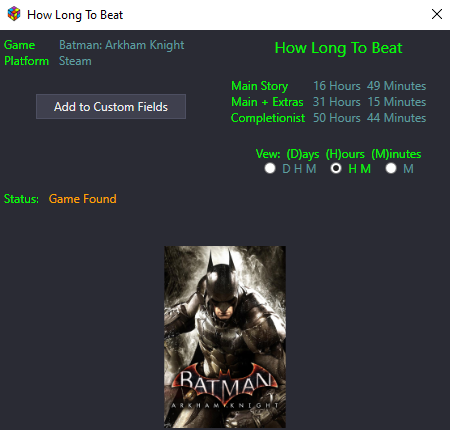 v2.3.6 released Fixed: Would sometimes crash when bulk adding Custom Fields Less Important to "you": Miscellaneous code clean-up and refactoring Fixed several spelling errors Logs are now only created if plugin is actually launched Changed image inside the Info window
 -
Just Do It™ Over the last 8+ years of playing with this, never had an issue. No VPN. Just MS Defender. No more. No less. That said, "stuff" happens. And maybe I've just been lucky (but don't think that's the case. ).
.thumb.png.c9faf450e4d2b690a819048b18173f61.png)



