

C-Beats
-
Posts
5275 -
Joined
-
Last visited
-
Days Won
18
Content Type
Profiles
Forums
Articles
Downloads
Gallery
Blogs
Everything posted by C-Beats
-

I have had several problems with Launchbox since yesterday.
C-Beats replied to Brocoli's topic in Troubleshooting
Just posting here so others with a similar issue can potentially find relief as well. User posted in Discord this was because of SSL/TLS options/filters in the user's antivirus program interfering with the processes. -
I moved this out of the beta thread since it isn't beta related. Anytime LB hard crashes without showing an error message first then the issue is a .NET runtime issue and should appear in Event Viewer in Windows. Open it up and look in the applications logs for error records. There will be two back to back error messages (at least one of them should say something about a .NET runtime error). One of the logs will just say the app crashed and tell you the exe file for the crash. The next log has the actual error and stack trace (will just function calls with line numbers at the end). That message is needed and will point to the cause of the issue. If you can find that post it up here and we can try to help you get the issue resolved.
-
This should be resolved with the changes to our installer that is planned to be rolled out next version. Glad you were able to get it sorted for now though.
-
When it's ready. Soon™
-
I'm not aware of any, but I'm not 100% positive. I do know we've been getting a lot of reports of their API having issues over the last few weeks so they may be making changes over there and it causing some potential connectivity/stability issues.
-
LaunchBox stuck downloading metadata?
C-Beats replied to Arcadio A. Sincero Jr.'s topic in Troubleshooting
Should resume from where it it's at if you close and reopen LaunchBox. If it doesn't just rerun the wizard. If you select the "do no replace" option it'll only download the media for the items that still need it -
The unexpected error is back again in the moderations
C-Beats replied to Arthurcoutinho600's topic in Troubleshooting
-
Removed the last message in an effort to stop you from doxxing yourself. All licensing inquiries and issues need to be resolved by emailing [email protected]. Give them as much information you can about the transaction and they'll be able to assist you.
-
I want the list to be smart enough to hide uninstalled games
C-Beats replied to 8d6FireDamage's topic in Features
There is a setting I believe is on by default regarding allowing each to have their own. If that is on go to the playlist in question and use the "Change Theme" and "Change View" (you'll likely need to set these) to change to what you want it to. If the setting is on that change will save and you should enter that theme/view combo again anytime you enter it. -
I want the list to be smart enough to hide uninstalled games
C-Beats replied to 8d6FireDamage's topic in Features
Not sure I understand your dilemma. You can certainly view a playlist in BB in whatever theme/view you want so I don't understand what you're running into. -
No one is "passing the buck". I get an application not working can be frustrating but you making false accusations isn't going to help your cause. I asked because I know my Intel/Nvidia set up has had issues with bad Direct X calls crashing the machine and drivers corrected it on that device. I was offering assistance on things you can verify that may help the situation (and has mine in the past) until you get any additional response/builds from any of the staff.
-
I want the list to be smart enough to hide uninstalled games
C-Beats replied to 8d6FireDamage's topic in Features
So make a auto-populate playlist that is only the installed games and use that instead of the raw platform. -
If you haven't already make sure you're on the latest update for your operating system and your video card drivers are up to date. I've heard of bad GPU interactions causing things like that to happen in the past.
-
This solution only helps if your image cache hasn't been built yet, or the theme in use doesn't use the image cache in the first place. LB/BB uses a cache system that loads your file then downscales it and saves it out to the cache folder, from then on the UI uses the cache image. Unless explicitly stated to do so the UI doesn't ever display the raw image in the UI (at least not for boxes). In Big Box you can force the image cache process to pre-populate your cache. This process does take a while especially in larger libraries so is typically something you let run over night.
-
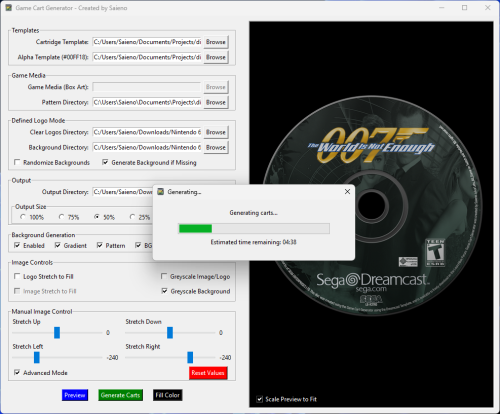 Would be fairly easy for an app to make a logo via WPF like we do and then save out the result. But best this would do is make them in a specific font and not quite like a real logo may look.
- 36 comments
-
- 2
-

-

-
- game media
- cart art
- (and 3 more)
-
Check out my current LaunchBox setup.
C-Beats replied to Orionsangel's topic in Collections and Builds
Always nice to find a kindred spirit regarding overly granular library organization! I don't have arcade done for my metadata project to really help ya out there but if you move into other platforms should make some of the work you've done a tad easier. -
Following may scratch the itch until you find someone
-
If the game has a Steam page then you use the title on said page. That page is added by the publisher and is the legal title for the game and should take precedence over the "has to match art" ruling.
-
If you're using LB you can just make a Marquee view that utilizes existing images as well (though the default one does this already)
-
That file is for the Games DB not your local library data. The image file is typically {Coerced Game Title}{Game Guid (optional, only if platform has multiple games with same name)}-##.{Extension}. The file is located in the folder that platform has set for that image type. If you're building a LB plugin you can just use the IGame.GetAllImagesWithDetails function to get all images associated to a game as well.
-
This is related to a change made by the Bezel Project. We used a file they had to determine which games were vertical vs horizontal and file the lay file appropriately. Last month they moved to a new file system to determine those things and removed the file we utilized in the process. Next beta release has a correction to this.
-
This is related to a bug we've found and will have corrected in the next beta release. Thanks for bringing it to our attention!
-
What is the ROM filename you are doing this for? For games with values in parens I believe we try to match the paren value in the filename and match based on that first which may explain why the match is appearing like that.
-
Thanks for the report screenshot issue is resolved internally and will be corrected in beta 2 We already respect your setting decision and updates don't update unless you've told us to. Review your options inside of LaunchBox and ensure you do have the auto-update turned off.
-
If you performed the steps as instructed you'd see the URL we give. It's listed on the page you create the custom URL in


