
dragon57
-
Posts
1,263 -
Joined
-
Last visited
-
Days Won
16
Content Type
Profiles
Forums
Articles
Downloads
Gallery
Blogs
Everything posted by dragon57
-
Should be possible. This assumes you have previously created a save state for the game you are going to execute. Put the code below in the 'Autohotkey Script' section of the Edit Emulator process for PCSX2. #NoEnv Sleep, 3000 SetKeyDelay, -1, 110 Send {F3} Return ; This section closes PCSX2 when pressing Escape $Esc:: { Process, Close, {{{StartupEXE}}} }
-
There is no built in way to do this. If you don't mind digging in and doing some non-standard hacks, you can create a ram disk that only houses the cache directory. This isn't for the feint of heart though. It is doable, and does work. This route would be unsupported. Are you using the original LaunchBox, or the new LaunchBox Next? Next has a new cache mechanism that works differently than the old, but if disk speed is your main issue, I don't think Next would change your results much. If you would like to pursue this avenue and need any help, let me know and I can write up something for you.
-
Thank you for all your work!
-

Launchbox.exe Deleted and Failed Update
dragon57 replied to Andrewnintendo's topic in Troubleshooting
Go to the Update folder under the main LaunchBox directory and run the newly downloaded setup program. When prompted, point to the existing installation directory. That should get you going. -
I just stumbled on this and wondered if anyone here had one. https://ledseq.com/product/game-frame/
-
First, let me say I don't know when this started, and I'm not sure this is an actual problem with recent builds, or not. Having said that, I noticed today when I audit any platform, I got an error pointing to an xml parsing problem. I finally tracked it down to one of the plugins I have installed. When I finally backed up and deleted all plugins, the error went away. I have a number of plugins installed and wondered if there was any quicker way to figure out which plugin is causing issues versus putting one at a time back in place and starting/stopping Launchbox a number of times. Is there a list of plugins that are known incompatible with the new build?
-
Here is one I use.

-
 You will need to edit the "WheelGamesView" files in the theme views directory. Comment out the 'fading wheel' sections.
 -
So glad you found the fix. That is what I get for trusting baaaaad applications. Thank you!
-
All the images are the same format (png), the same size (452x226) and created by the same app. If you want any of them for testing, let me know. There are no issues with the normal/old Launchbox.
-
Thanks for the new beta. Clear logo backgrounds do seem to work now, however the logos here seem to show very small, vs at normal size. See the attached pic. Edit: I just discovered some platforms show tiny clear logos, and some do not. I have yet to identify any rhyme or reason to it.
-
Version 1.0.0
611 downloads
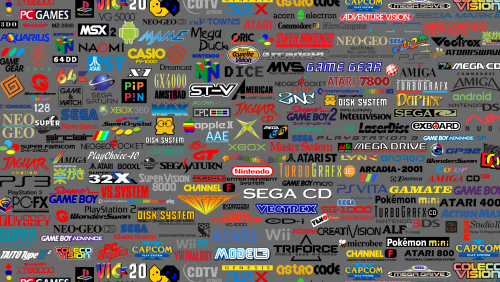
This wallpaper is a recreation of the background graphic found on the Hyperspin web site. The graphic was created from scratch using structured graphics for the best final effect. The archive includes both a 1080p and 4K resolution version of the file. -
Color Logos Wallpaper View File This wallpaper is a recreation of the background graphic found on the Hyperspin web site. The graphic was created from scratch using structured graphics for the best final effect. The archive includes both a 1080p and 4K resolution version of the file. Submitter dragon57 Submitted 06/12/2018 Category Platform Backgrounds
-
RBTray seems to be broken with the latest .Next, however Min2Tray seems to work fine. Get it here: https://junyx.breadfan.de/min2tray/
-
I just realized clear logos are not being displayed in Next when I click on a game image. I have double checked the background priorities choices in Options and Clear Logo is first in the list, then Fanart - Background. I have even unchecked Clear Logo, then gone back and reselected it with no change in behavior. Am I the only one who sees this? I have not noticed this in regular Launchbox.
-
OK, all. I have diagnosed/solved my strange scrolling issue. First, sorry for a false alarm. I should have known where to look after what I had been doing to this machine. I usually make a rule to not change more than one thing at a time, but I blame my medications for making my brain foggy. ? I ordered a Dreamcade Replay device from Kickstarter and was just informed they ship out soon. I wanted to make sure all my controllers work with Windows 10 since the Replay will come with Windows 10 as the OS. I have been testing all my controllers, calibrating them, etc. Even though the controllers were found to all work, what I have not experienced in the past was a calibration being forgotten when a controller was unplugged, then plugged back in. All the issues were caused by one controllers calibration settings being reset. What I don't understand is why it took some time in Launchbox for the issue to show up, and how a restart of Launchbox seemed to solve the problem for a bit before reappearing.
-
Sorry, I just saw this question. It moves pretty fast. It appears to move at the same speed as if you hold the up arrow key down and let the auto-repeat kick in. One thing I noticed, if I use the up arrow key to try and replicate the behavior, the arrow key makes the active bar scroll up, then when it hits the top of the list, it jumps up to the drop-down menu above the list. The 'ghostly' behavior doesn't continue past the platform list. It stops at the 'All' entry at the top of the Platform list.
-
I just updated to the latest beta, 16. All controllers are currently unplugged. I'll make sure nothing amiss is evidenced before I plug any back in. Also, after installing beta 16, this error just popped up after changing from one platform to another via clicking in the left panel. I can't replicate so far. It has only happened once. Object is currently in use elsewhere. App: LaunchBox Version: 8.3-beta-16 Type: System.InvalidOperationException Site: IntPtr GetHdc() Source: System.Drawing at System.Drawing.Graphics.GetHdc() at System.Drawing.BufferedGraphics.RenderInternal(HandleRef refTargetDC, BufferedGraphics buffer) at System.Drawing.BufferedGraphics.Render() at System.Windows.Forms.Control.WmPaint(Message& m) at System.Windows.Forms.Control.WndProc(Message& m) at System.Windows.Forms.NativeWindow.Callback(IntPtr hWnd, Int32 msg, IntPtr wparam, IntPtr lparam) Recent Log: 2:57:37 PM Music.Pause Start 2:57:37 PM Music.Prepare Start 2:57:37 PM Music.Kill Start 2:57:37 PM Music.Kill Finished 2:57:37 PM Music.NotifyTrackList Start 2:57:37 PM Music.NotifyTrackList Invoke 2:59:34 PM Music.Pause Start 2:59:34 PM Music.Prepare Start 2:59:34 PM Music.Kill Start 2:59:34 PM Music.Kill Finished 2:59:34 PM Music.NotifyTrackList Start 2:59:34 PM Music.NotifyTrackList Invoke 2:59:37 PM Music.Pause Start 2:59:37 PM Music.Prepare Start 2:59:37 PM Music.Kill Start 2:59:37 PM Music.Kill Finished 2:59:37 PM Music.NotifyTrackList Start 2:59:37 PM Music.NotifyTrackList Invoke 3:25:11 PM Music.Pause Start 3:25:11 PM Music.Prepare Start 3:25:11 PM Music.Kill Start 3:25:11 PM Music.Kill Finished 3:25:11 PM Music.NotifyTrackList Start 3:25:11 PM Music.NotifyTrackList Invoke 3:29:40 PM Music.Pause Start 3:29:40 PM Music.Prepare Start 3:29:40 PM Music.Kill Start 3:29:40 PM Music.Kill Finished 3:29:40 PM Music.NotifyTrackList Start 3:29:40 PM Music.NotifyTrackList Invoke 3:33:27 PM Music.Pause Start 3:33:27 PM Music.Prepare Start 3:33:27 PM Music.Kill Start 3:33:27 PM Music.Kill Finished 3:33:27 PM Music.NotifyTrackList Start 3:33:27 PM Music.NotifyTrackList Invoke 3:39:23 PM Music.Pause Start 3:39:23 PM Music.Prepare Start 3:39:23 PM Music.Kill Start 3:39:23 PM Music.Kill Finished 3:39:23 PM Music.NotifyTrackList Start 3:39:23 PM Music.NotifyTrackList Invoke 3:43:55 PM Music.Pause Start 3:43:55 PM Music.Prepare Start 3:43:55 PM Music.Kill Start 3:43:55 PM Music.Kill Finished 3:43:55 PM Music.NotifyTrackList Start 3:43:55 PM Music.NotifyTrackList Invoke 4:01:32 PM Exception
-
I have no controller apps on this machine. What is strange is when it does happen, if I alt-tab into a different app with a 'page' that could be scrolled the same way, nothing happens. If I alt-tab back into Launchbox, the scrolling starts immediately. I have to say I'm stumped at this point, however I am trying to isolate things.
-
It changes the selected item. It isn't just the scrollbar itself moving upward. I have unplugged all controllers and restarted Launchbox. I will see if this stops the behavior and report back any and all observations.
-
I just updated to the latest beta and am seeing some strange behavior in Launchbox. After the program has run for a bit, the gui acts like I am using the mouse wheel to initiate a scroll such that the Platform names list on the left scrolls to the top all by itself. If I restart Launchbox, all is ok for a while, then all of a sudden, the scrolling starts again. I don't see this in any other app.
-
@Dan, I have posted a new video for Handheld LCD games in my additions sections for both 16x9 and 4x3. I hope it works for you.
-
@Dan, I could probably do one similar to the one I did for Nintendo Game & Watch where I pick out 5 or 6 representative units out of the group. Let me investigate how hard/easy it will be to get the necessary graphic elements.
-
I was wondering about that. I have seen the name with the space and without it. I honestly have no idea what the official formatting is supposed to be. :)
-
No problem, here you go!






