

bundangdon
-
Posts
1,235 -
Joined
-
Last visited
-
Days Won
2
Content Type
Profiles
Forums
Articles
Downloads
Gallery
Blogs
Everything posted by bundangdon
-

Bezel Project not working.
bundangdon replied to Dr.Chepe's topic in Third-Party Applications and Plugins (Released)
That's kind of an odd situation, but I've had a similar thing happen to me as well I'd check to see if the cores you're using through Launchbox are the same ones you set up with the Bezel Project. For example, you may have "mesen" set up with the Bezel Project for NES games, but perhaps LaunchBox is launching the FCEumm or Nestopia core. I'd start by checking that first -
The LaunchBox team is Growing - Welcome Faeran
bundangdon replied to Jason Carr's topic in News and Updates
Welcome aboard! -
Just to add my 2 cents. Coming from my own experience in recent days, if you want to play the less demanding "A" titles, 2D games, and mostly indie stuff, you can get by playing Yuzu with a budget GFX card, but I'd have to say you'll need a pretty beefy processor (CPU) and a decent GFX card to play the more sophisticated 3D and "AAA" games. The same holds true for PS3 games as Neil mentioned. I have an older CPU (i7 4790s) and Nvdia 1070GTX, and while I'm running Super Mario Odyssey, it's playable but sluggish at best.
-
Can't get Launchbox to recognize CD-I .chd files
bundangdon replied to WraithTDK's topic in Troubleshooting
okay, it's basically a copy of the mame.ini file, but customized for only cdi games. so if you don't have it, just copy the mame.ini file and rename it to cdimono1.ini and then change the settings accordingly -
Can't get Launchbox to recognize CD-I .chd files
bundangdon replied to WraithTDK's topic in Troubleshooting
For some reason, this is one of the most tricky systems to get working with Mame, based on the number of posts I've seen here on the LaunchBox forums, and I'd have to agree with that, mostly because of Mame's slightly picky configurations for software games like this. First, make sure you have the correct bios file (named "cdimono1.zip" or "cdimono1.7z") and also make sure you have the cdimono1.ini the "ini" folder of mame with the correct directory of where your bios is located. For example, like this: # # CORE SEARCH PATH OPTIONS # homepath . rompath C:\launchbox\emulators\mame\bios hashpath hash samplepath samples artpath artwork ctrlrpath ctrlr I just tested this out, and it's now working for me. -
Game wont load. Mame says..Error unknown option: -keyboardprovider
bundangdon replied to mange181's topic in Troubleshooting
Yep, you have two choices: stick with the older mame and remove that "-keyboardprovider" from the default command line parameters, or update to the latest mame, but you'll probably have to find the latest set of mame roms. To answer your question, "newer is better" certainly does apply here, but I wouldn't be able to go into any specifics and if you're content with your current/original setup, then I'd stick with the older version of mame -
Game wont load. Mame says..Error unknown option: -keyboardprovider
bundangdon replied to mange181's topic in Troubleshooting
in launchbox, "tools" - "manage emulators" also, if you haven't changed your mame files in the past 5 years, you may want to update that as well since there's been a lot of changes since then -
Game wont load. Mame says..Error unknown option: -keyboardprovider
bundangdon replied to mange181's topic in Troubleshooting
Try replacing your mame default options with this instead, and see if it works -keyboardprovider dinput -skip_gameinfo -nowindow -
 Great work once again! It was truly an honor to help out while testing this theme in recent months and congratulations on putting out another excellent theme!
 -
That newly updated text filters view looks really nice! I'd give a little more room for the fanart and other artwork, with a little less room for the games list, but that's probably just me
-
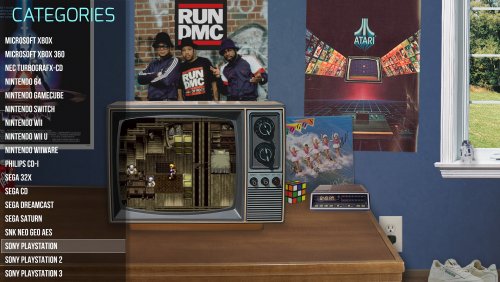 Note (to anyone out there who might be following this thread), I've recently updated this with a slimmed-down, working version. More updates to come, so stay tuned
 -
Yep, the 4.2 version works for me It's a nice use of the given space, without going overboard either. And great work too with these latest updates by the way!
-
Not sure, but this was a fork of the "Nostalgia" theme (by eatkinola), and I had the same crash-issue with that theme. I'll take a look at it once more tonight and check to see what happens with the latest official version of BigBox UPDATE: Just tried this theme now and I get hit with a barrage of errors, including this one: Could not load file or assembly 'System.Management, Version=4.0.0.0, Culture=neutral, PublicKeyToken=b03f5f7f11d50a3a'. The system cannot find the file specified. App: Big Box Version: 11.10 Type: System.IO.FileNotFoundException Site: Void .ctor() Source: Ao.Bigbox.Themer.v3_9_6 at Ao.Bigbox.Utils.Fu.EnvironmentInformer..ctor() at Ao.Bigbox.Utils.Fu.EnvironmentInformer.get_Instance() at Ao.Bigbox.ViewModels.EnvironmentInfoVM.UpdateEnvInfoProps(Boolean async) at System.Threading.Tasks.Task.<>c.<ThrowAsync>b__139_0(Object state) at System.Windows.Threading.ExceptionWrapper.InternalRealCall(Delegate callback, Object args, Int32 numArgs) at System.Windows.Threading.ExceptionWrapper.TryCatchWhen(Object source, Delegate callback, Object args, Int32 numArgs, Delegate catchHandler) Recent Log: 10:00:46 PM Exception
-
Yep, very sorry about that and I apologize for the very late response. Ever since Launchbox/BigBox changed the theme system with recent updates, this theme no longer works properly. I'm currently rebuilding this from the ground up and will upload a working version in the coming weeks.
-
I'm not sure if there's a proper tutorial out there just yet, but the theme creator is relatively easy to figure out. There's a theme included with the program called "Plain n Simple Community". I played around with that for a while, before diving into my own theme a little later.
-
The POC - A Nice View of the New Walls
bundangdon replied to faeran's topic in Big Box Custom Themes
If you look at an earlier post (scroll up), as I requested that same thing here, you can change that view to have fanart images or videos instead of the solid black background -
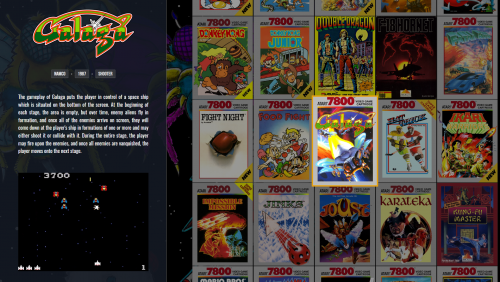 Working great now. Thanks again!
 -
@faeran just a quick and (hopefully) simple request: Is it possible you could add the ability to add platform artwork or videos to the platform menus? For example, be able to change this to this: (based on the image in the platform-fanart folder) By the way, sorry for this horrible photoshop mock-up. I threw that together in about 1 minute
-
What you should try doing is browse around the themes section in the downloads area here, take a look at the various themes available, and find one which includes platform artwork as a background. Coming from my own personal experience, I've discovered there are actually a lot that will allow you to do so, but you'll have to give each theme a try and see which one suits you best. Another one that comes to mind is the BigBox theme "Aeon MQ7" Update: Also, I just checked the "Default" theme which is included with BigBox and realized that it also allows you to use platform fanart in the background. Keep in mind, these are images and not videos being used in the background
-
It should look something like this, (in the appropriate folder for each system) as shown below. But you'll have to put your own image there, as I did with "nes.png" in this folder

-
You shouldn't need to do a re-install, as I don't think that would solve the problem. I think there's a step missing somewhere. Also, I am pretty certain that with RetroFresh, it uses videos not images for that particular view (wheels). Although you should see images (platform artwork) with the text-list view. By any chance, did you set this in BigBox options? (see below) If that still doesn't work, let me know.
-
You'll need to use a BigBox theme that allows you to use a platform image in the background. There are a lot out there to choose from, but I'd try using the "Retrofresh" theme and see how well that one suits you. Here you go RetroFresh - Big Box Custom Themes - LaunchBox Community Forums (launchbox-app.com)
-
No problem! Here's a pretty nice looking set of platform images: Platform Box Art Collages/Contact Sheets - Platform Backgrounds - LaunchBox Community Forums (launchbox-app.com) But I just use google to find images, like this one for the Nintendo NES:
-
Not completely sure what you're trying to do, but if you want a picture-background for each platform, you need to put the image (jpg or png) of your choice in the following folder (using the Nintendo NES as an example): C:\Launchbox\Images\Platforms\Nintendo Entertainment System\Fanart\nes.jpg Note: the image file name can be anything you want
-
Another great one! Thanks a lot for sharing this Faeran!






