
Mr. RetroLust
-
Posts
5,971 -
Joined
-
Last visited
-
Days Won
647
Content Type
Profiles
Forums
Articles
Downloads
Gallery
Blogs
Everything posted by Mr. RetroLust
-
Thanks man, thanks for explaining! I'll try it out tomorrow, evening here atm.
-
That could be it, I also use a second (marquee) monitor so maybe that could also be a factor? Will need to check if I have scale on in gpu settings.
-
Thanks man! I do use your script with esc unaltered but the emulator is also using esc to quit so maybe it turns the script back on again or something?
-
I turned off rawinput though and still encountered this but it could be the resolution maybe? I dont know. Be sure to add this to the start of the script btw as I got a dialog window about running the same script when starting another light gun game "#SingleInstance Force"
-
Thank you so very much @JoeViking245 you are amazing man! Works like a charm! The emulator hasn't been updated since 2014 or something so it's pretty old and limited. The widescreen hacks and lua scripts plus override files by @Warped Polygon are pretty much plug and play hence I finally took the step to add this platform. Great games! Thanks again man, with your talent you help a lot of people
-
I have a problem with light gun games on the Model 2 emulator, when I click the edges of the screen the emulator window loses focus and there is no way back to the game. So it got me thinking, a solution could be in AHK where the mouse gets restricted not being able to move about 10 to 20 margin of the edges of the screen. Don't know if this can be done with margin or padding or you need the exact dimensions of a 3840x2160 restricted area minus the 10 to 20 margin. I'm a real noob concerning this so please explain every step I have to make to make this work in LB, thanks so much if you will help
-

Neon Deluxe Arcade - Launchbox Theme
Mr. RetroLust commented on Mr. RetroLust's file in Custom Themes
 Thanks man, glad you like
 -
Neon Deluxe Arcade - Launchbox Theme
Mr. RetroLust commented on Mr. RetroLust's file in Custom Themes
If you download the latest version you can use the icons yep -
is the LB Game Database working properly ?
Mr. RetroLust replied to Elhora's topic in Website/Forum Support
Here it is: https://forums.launchbox-app.com/topic/71883-launchbox-games-database-updates-for-march-1st-2023/#comment-431812 -
is the LB Game Database working properly ?
Mr. RetroLust replied to Elhora's topic in Website/Forum Support
They are working on the database, theres a post about it but I cant find it atm -
Version 1.0.0
354 downloads
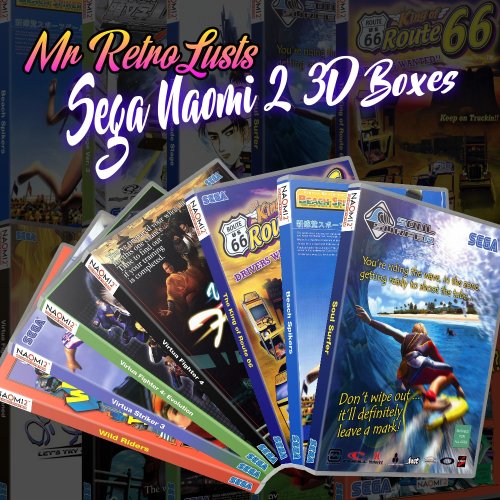
13 Sega Naomi 2 3D Boxes. This idea was inspired by the custom Sega Naomi 3D boxes made by the late @Robin55 https://forums.launchbox-app.com/files/file/1244-sega-naomi-3d-boxes-with-discs-151-gd-rom-set/ The filenames used are the current names in the Database so you might have to rename some files. The box is slightly transparent just like a real clear DVD case in which these games where packaged, though the original packaging didn't came with artwork inlays so I tried to create something which could look as if it was designed as console packaging. -
I hope someone can make this as well. For me it would be useful in dealing with large quantities of rom named image files which I'd like to upload to the database in the future, in this case marquees, renaming them to the games db title would be really helpful.
-
Update the theme to the newest version
-
In the view section under show/hide, not sure if I have the exact names correctly as im not at the pc atm
-
Neon Deluxe Arcade - 16:9 (Big Box Theme)
Mr. RetroLust commented on Mr. RetroLust's file in Custom Themes
 I guess you could change parameters but I wouldn't know where to look or what to change as I use CTC to make this theme.
 -
Version 1.0.0
552 downloads
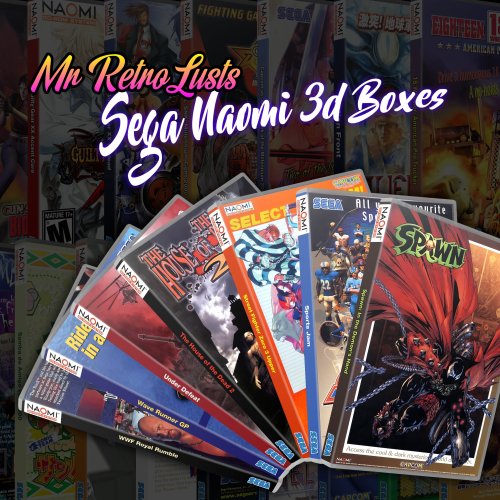
145 Sega Naomi 3D Boxes. This idea was inspired by the custom Sega Naomi 3D boxes made by the late @Robin55 https://forums.launchbox-app.com/files/file/1244-sega-naomi-3d-boxes-with-discs-151-gd-rom-set/ I also used flyers where possible, did some heavy searching to obtain the original flyers but sometimes they where just not available or too low of a quality so reconstructions where made or fan art was used/made. The filenames used are the current names in the Database so you might have to rename some files. The box is slightly transparent just like a real clear DVD case in which these games where packaged, though the original packaging didn't came with artwork inlays so I tried to create something which could look as if it was designed as console packaging. Naomi GD-ROM logo used is made by @Dan Patrick see: https://forums.launchbox-app.com/files/file/3402-v2-platform-logos-professionally-redrawn-official-versions-new-bigbox-defaults/ Enjoy! -
Atari Alpha One Arcade Marquee Re-Creation and New Clear Logo
Mr. RetroLust replied to flanx's topic in Game Media
Thanks man The resolution you've uploaded is perfect as I downscale all the marquees for this project to 3840 wide. -
Atari Alpha One Arcade Marquee Re-Creation and New Clear Logo
Mr. RetroLust replied to flanx's topic in Game Media
Awesome work man, thanks! I am running a project to collect all Mame marquees in 4K where possible, could I add this to the collection? -
Arcade & Diner: 5.1 Surround Ambience
Mr. RetroLust commented on Mr. RetroLust's file in Sound Packs
 The way I do it is just using a media player like mpc-hc or vlc etc. so you can adjust the volume slider accordingly to the volume of the game played.
 -
Huge Mame Marquee Collection including many in 4K resolution
Mr. RetroLust commented on Mr. RetroLust's file in Arcade
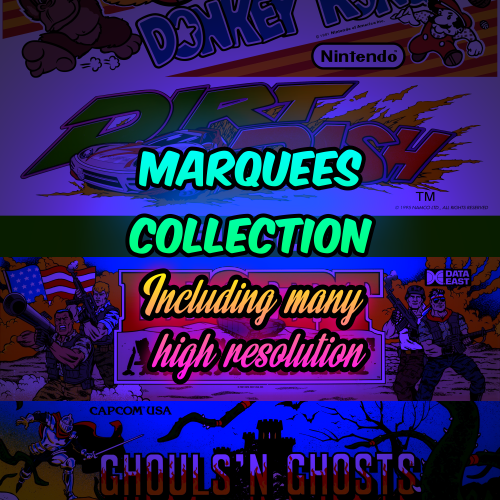 Thanks, many more to come! Thanks for the link, i'll go check it out
 -
Huge Mame Marquee Collection including many in 4K resolution
Mr. RetroLust commented on Mr. RetroLust's file in Arcade
What's New in Version 1.5 I got help from @mOa he kindly donated new and updated marquees and also pointed out some grahical glitches that where present in the collection, thanks bro! I was on a new quest to find or create marquees that where missing as a replacement for the generated marquees I uploaded previously as I wasn't pleased with them at all, they look really boring after a while. A lot of research went into this, the result is a ton of custom marquees I created but also found a few great custom marquees by others, rare Japanese marquees (Instruction flyers standing up), adjusted marquees, recreated marquees, new marquees and then some more marquees lol Also thanks to @ArsInvictus for some amazing quality marquees he uploaded. And thanks to anyone that uploaded artwork, logos and more to the LB database, without them I couldn't have created those custom marquees. Pack 1 of 2, second pack will be available in a month or so. Here's the content of Update 1.5, watch in 4K if you have the chance. -
Thanks, Only for retroarch yep.
-
 What's New in Version 4.2 - Added upgraded Special Criminal Investigation dedicated cabinet bezel
 -
Arcade & Diner: 5.1 Surround Ambience
Mr. RetroLust commented on Mr. RetroLust's file in Sound Packs
What's New in Version 1.3 - Added Arcade & Diner 5.1 Surround Ambience Mix2.mka - Added Galloping Ghost Arcade Ambience.mp3 -

Version 1.0.0
389 downloads
I decided to make another arcade ambience audio file composed from different sources on the internet, this time in the Japanese Arcades in legendary Akihabara, prepare for some crowded and noisy arcades lol The sound quality varies at some points but overall it gives a nice impression. You might also like the 5.1 surround mixes I made before: https://forums.launchbox-app.com/files/file/1715-arcade-diner-51-surround-ambience/ The way I use these audio files is just start the file with a media player before I open BB and then start some nice arcade games, it does add to the experience for me, although it could be wise to adjust the volume slider of your media player so you have the game you play set louder than the ambience unless you just love total sound chaos around you lol Have fun!- 2 reviews
-
- 11
-

-




