

Rincewind
-
Posts
989 -
Joined
-
Last visited
-
Days Won
5
Content Type
Profiles
Forums
Articles
Downloads
Gallery
Blogs
Everything posted by Rincewind
-
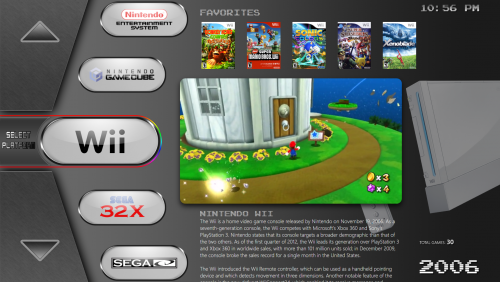 @Deathbringer sorry about that, looks like it's getting worse not better. I am struggling to get this to work on any other screen size than 1920x1080 I did manage to test on 1600x900 and that still looked ok. Really don't see why the total games is not showing up.
-
@Ripklawe @Deathbringer I think I have sorted the text being cut off, Only thing im struggling with is the Select Game / Platform gif not scaling
-
Yes the animated gif (selected platform / game) only ever scales correctly on 1920x1080 I wish there was away to make it scale
-
That is strange, is that on both your setups and can you see it when your viewing the categories?
-
Great work on this thanks
-
Last update for a while I think. Just added Categories & Playlist Total Games count hopefully it still works on a 4K monitor
-
It was designed for 1080 so it should be fine on that computer, but 1600x900 you will always get placement issues, all I can suggest is on that computer you will have to customise that view. I'll PM you a modified version to test but again I don't have a 1600x900 to test it myself. How did you get the white area on the right and bottom?
-
@Ripklawe @Deathbringer New version out with the align fix for 4K and also scanlines removed from all views. Can you let me know / take a screen grab to make sure all is ok, cheers
-
I use "Platform Wheel 1" for the platform list and for games list I use "Vertical Wheel 1" its best to assign a key to change views in the options then you can keep pressing it till you find one you want
-
Cool Cheers. Can you also check to see if the Community Star Ratings are showing for you too please Ref. the Game Count for the Playlists I'm not sure I will have to look into it and see if there is away
-
@Ripklawe Which of the files from above worked best as I will need to add the same code to the rest of the Platform views so the TOTAL GAMES will display better for them also. If its easier just attach the file to your reply Thanks.
-
@Deathbringer thanks glad you like it. The reason you can't see the font is because you need to install the font from the folder it will then use that font instead. As for the community star ratings that I can't understand, I wonder if it's a 4k monitor fault again
-
Unfortunately it's part of the whole background image so the only way to remove it will be to edit the original Photoshop file and then replace the graphic, I'll see if I can dig out the old file and make the change for you, won't be till tomorrow now tho
-
or this one PlatformWheel2FiltersView - NEW 2.zip
-
Ok lets see if this one works, sorry its a bit of trail and error as I cant test locally. >>>>new file PlatformWheel2FiltersView- NEW-1.zip here's how is should look
-
These look great @Nyny77
-
@Ripklawe I've put out the update with the TOTAL GAMES alignment fix, I don't have a 4K screen so if you could let me know if it's fixed it or not that would be great Oh! and you will have to use this PlatformWheel2FiltersView.zip now instead, ignore the last one. Cheers
-
@Ripklawe and @Deathbringer sorry I completely forgot to sort out the Total Games alignment, I will sort that now and get a new update out for it. As for the scanlines unzip this PlatformWheel2FiltersView.zip and copy it over the top of the old one inside the theme/views folder. If you need to manually edit it in the future just open the PlatformWheel2FiltersView with Notepad++ and in there you will see the following code section, just delete it and save the file. <!-- SCANLINE EFFECT --> <Rectangle Grid.Row="0" Grid.Column="0" Grid.ColumnSpan="25" Grid.RowSpan="18"> <Rectangle.Fill> <ImageBrush ImageSource="pack://siteoforigin:,,,/Themes/Rincewind/Images/Theme/Scanline.png" Viewport="0,0,15,5" ViewportUnits="Absolute" TileMode="Tile" Opacity="{Binding BackgroundFade}" /> </Rectangle.Fill> </Rectangle>
-
I haven't separated my Arcade rom set but there is a chance that the clear logos could be in a playlist folder a bit like...... C:\Users\......\LaunchBox\Themes\TRK Theme\Images\Playlists\Clear Logo or C:\Users\.......\LaunchBox\Images\Playlists\Capcom Classics\Clear Logo If not go into LaunchBox and right click the Capcom Classics platform and click Edit and take a look at where the Clear Logo is saved currently, then you can add the file system with your new Clear Logo to your theme and it will then show.
-
Hey Mike, So to understand how the clear logos and banners work you need to know the way the files work also where LaunchBox first adds a new systems Clear Logo and Banner so..... First the scraped Clearlogos and Banners etc. go to ----> C:\Users\........\LaunchBox\Images\Platforms\Arcade(or what ever platform)\Clear Logo. or Banners... and these will be the standard ones used in BigBox, So you shouldn't really change them here. Now there is a theme called Default and in there is a folder ----> C:\Users\.......\LaunchBox\Themes\Default\Images\Platforms\Clear Logo. or Banners... but inside the folders they are empty (apart from a ReadMe file), again you shouldn't really add them here as that will make them the new standard logos / banners. So in a newly downloaded theme or a copy of the default theme to make your own theme, you can add your new Clear Logos / Banners in there ----> C:\Users\......\LaunchBox\Themes\(your new theme name)\Images\Platforms\Clear Logo. or Banners.... Hope this makes sense I know its a long winded reply but I'm not sure where you have been adding your logos / banners so thought it best to explain first. So if you check your folders in that order you should be able to see which ones are getting used. ohh and Don't forget to Refresh the image cache everytime you want to use new Clear Logos.... Options---->Image Cache---->Refresh Platform Wheel Cache
-
Ok so is that the Default theme with platform videos? And if so did you manually change each platform clear logo?
-
Very good I like the arcade buttons at the bottom too
-
Can you put up a screenshot please, as it could be a theme you are using has them in there....
-
 Runs fast and looks great, do all boxes have a reverse side? @Izegod
-
@Klopjero HaHA @harryoke So funny, sometimes you miss the witty bits and you realise later.... and then laugh