

Retrofrogg
-
Posts
1392 -
Joined
-
Last visited
-
Days Won
8
Content Type
Profiles
Forums
Articles
Downloads
Gallery
Blogs
Everything posted by Retrofrogg
-

PS4, Xbox One, Nintendo Switch 3D Box templates
Retrofrogg replied to Cypher's topic in Platform Media
This one maybe? https://www.turbosquid.com/3d-models/3d-dvd-box-case-model/780529 -
c64 C64 Dreams (massive curated C64 collection)
Retrofrogg replied to Zombeaver's topic in Emulation
@Zombeaver - you may well have come across this already, but FYI; there is a collection on PD called "Ultimate_Tape_Archive_V1.0". This contains 473 C64 games which have been curated to include proper titles, year & publisher and to include game, cassette, inlay and inlay_back scans. You're probably aware of it but if not I thought it might help you with your project. -
Lol....that's a coincidence if there ever was one! As it happens I haven't played that game, but I believe that it is based on Umberto Eco's book The Name of the Rose which I have read though found a little hard going!
-
Mr. RetroLust's - Mame 4K - Lights Out - Realistic Bezels / Artwork
Retrofrogg replied to Mr. RetroLust's topic in Game Media
These look great! Will try them out tonight. What's the running total so far, and are you planning to do them all? -
Add my vote for this - would be keen to try it out.
-
Great, thanks! Let me know what you think about how to collaborate on the shared spreadsheet too.
-
PM'd. I should be able to make a list of the games. Do you use a particular romset for the CPC464? I think mine is a combination of sets that I found online.
-
 Thanks for these. I like them - clean and simple. In an already colourful interface, I found these better than the default badges as it was starting to look a little cluttered. These are nice and clean.
- 6 comments
-
- 1
-

-
- white
- minimalistic
- (and 1 more)
-
@CMOSS Appreciate the offer. I'm just learning Photoshop so you probably know it better than me. The procedure for making the 3D boxes is fairly simple when using the Photoshop template. My workflow for each game: 1. Get a scan of the game cover: - scan should be for the Amstrad CPC464 (or 664 6128 if those are the only ones available); scans for other similar platforms like the Spectrum or C64 are not used - the 464 was tape-based and so this is primarily a tape-based box art set; some games/artwork is only available as a disk version (all 3 units could also use a disk drive) and in those cases the disk version is used - the scan should include the front cover and spine art - this site appears to be the best all-round site for finding the art: https://cpcrulez.fr/ - it's French but you basically search for the game in the search box; this one is also quite good: https://www.cpc-power.com/ ; CPCWiki is good also - http://www.cpcwiki.eu/index.php/Main_Page - where multiple languages are available, English is preferred; if the game is from a different region then other languages can be used - NOTE: most scans are for the standard cassette size; some games used a kind of "wider" box, including those that had 2 cassettes; the disk boxes tended to be square; I have therefore used 3 Photoshop templates to address this and pick the appropriate one depending on the type of box 2. Separate the game cover into 2 files - the front cover and the spine (I create 2 copies and crop each in Photoshop) 3. Using the appropriate template already open in Photoshop, I double-click the "J-card cover" layer to open this in a separate tab in Photoshop; then, I drag the front cover onto this; a small bit of resizing may be required but it shouldn't be much if the correct box size template is used; you can then save and close that tab, and the 3D box will be updated with the new cover 4. Do the same as step 3 but for the spine 5. Once the box is ready, in Photoshop I select file/export/quick export as png - and save the 3D box to my desktop 6. I then rename the 3D box to the correct game name, and move it to my Launchbox 3D box directory I can share the 3 Photoshop templates with you. The main one is perfect dimensions; the other 2 I just stretched to approximate the other 2 box sizes. If you can see a better way of doing the other 2 box sizes let me know. I don't think my disk ones are that good, but there aren't many of them - most are cassette box cover scans. @goofers - I'm doing them one at a time at the moment, rather than batch.
-
@CMOSS - that would be great, if you are able. Do you have Photoshop? @goofers - I've done around 25-30 so far. I'm sorting and tidying up the collection also as I'm going along.
-
I've started creating real-looking 3D boxes for the Amstrad CPC464. There are a lot. If anyone wants to collab on this, that would be great The process uses the box scans (mainly found at cpcrulez) and a Photoshop template. Outcome looks like this: Update 20 April 2020: there are now 2 of us working on this project. I have compiled a master list of games which I will put online to allow us to collaborate on the same list. Looking for more people to join us to get as many of these done as possible, as quickly as possible. Current workflow for making these is listed in a post below. Update 14 August 2021: the first pack is now available in the downloads section:

-
 I like the look of this a lot. Some of the items are a bit too near the bottom of the screen though.
 -
c64 C64 Dreams (massive curated C64 collection)
Retrofrogg replied to Zombeaver's topic in Emulation
Happy to buy the template for you and supply some media if you're able to automate the process to make the 3D boxes. -
c64 C64 Dreams (massive curated C64 collection)
Retrofrogg replied to Zombeaver's topic in Emulation
Looking at that .psd - is there a way to swap the cover image in the cover image layer with a different one? -
c64 C64 Dreams (massive curated C64 collection)
Retrofrogg replied to Zombeaver's topic in Emulation
Just added v0.20. Thanks you and congratulations on this collection. -
c64 C64 Dreams (massive curated C64 collection)
Retrofrogg replied to Zombeaver's topic in Emulation
Yeah that makes sense. The boxes with jewel case do look good. I wonder if any work has already been done here. -
c64 C64 Dreams (massive curated C64 collection)
Retrofrogg replied to Zombeaver's topic in Emulation
@Z3R0B4NG those boxes look amazing. Did you get anywhere with this? I'm not sure about the area surrounding the box though. I don't think that would look good in a grid type view. Maybe something like this would look better: Even better would be a true 3D model, which you could rotate in Launchbox. I mentioned this top Jason and he seemed keen on the idea at the time - but I don't know how high up his priority list it is currently.
-
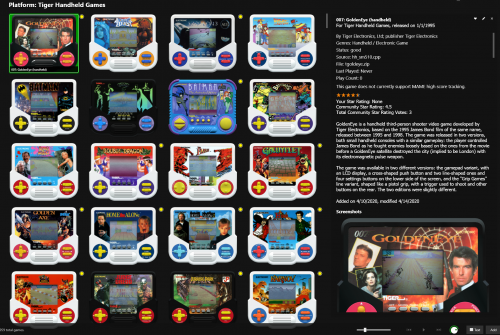
Tiger Handhelds artwork (units) View File Artwork pack for the Tiger Handheld platform. 42 unit images. I put them into the cart-front folder in Launchbox. Transparent and high qualitee. 02.05.24 - Street Fighter II & Pit Fighter added; should now be a complete set with MAME 0.265. Submitter Retrofrogg Submitted 04/14/2020 Category Tiger Electronics Handheld
-
Version 1.0.0
776 downloads
Artwork pack for the Tiger Handheld platform. 42 unit images. I put them into the cart-front folder in Launchbox. Transparent and high qualitee. 02.05.24 - Street Fighter II & Pit Fighter added; should now be a complete set with MAME 0.265.- 6 comments
-
- 15
-

-
-

-
- tiger handheld electronics
- tiger lcd games
- (and 4 more)
-
Yeah I know you didn't, just trying to track it down. Interesting to hear that they haven't made that one.
-
@wallmachine - awesome! gnw_mariocmt artwork seems to be missing (table top version of Cement Factory).
-
It would be useful, when viewing your collection on the Launchbox database (or indeed anyone's collection for that matter) to have game counts next to the platforms - like you get in Launchbox.
-
- 2
-
-
video set COLORFUL platform video set
Retrofrogg commented on viking's file in Platform Theme Videos
 Any chance of doing the Amstrad CPC?
 -
3d box pack Sega Saturn Japan 3D Box Pack - Authentic Set (1201)
Retrofrogg commented on Robin55's file in Sega Saturn
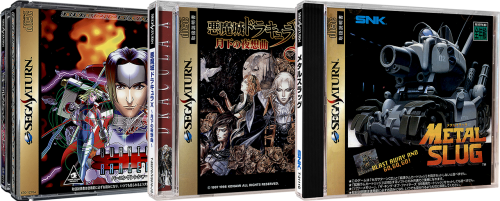 These look very good. Great work!
 -
Finished with the project - time to play? Have you looked at upgrading hardware specs?
- 95 replies
-
- 1
-
-
- games collection
- bigbox collection
- (and 1 more)


