.jpg.932a29489f52816d82e66af1828ff1aa.jpg)

fromlostdays
-
Posts
1,018 -
Joined
-
Last visited
Content Type
Profiles
Forums
Articles
Downloads
Gallery
Blogs
Everything posted by fromlostdays
-
That actually solved the issue for me! Thanks!
-
Can confirm a similar issue with Retroarch PPSSPP on Final Fantasy 1. When trying to access the in game save menu, the text is broken. Same Rom works fine on stand-alone PPSSPP. It's very strange, the game itself seems to work fine in RA, though I didn't go too far into it, but messing with the saves menu produces jumbled up text.
-
You should have no problem deleting a steam game. Either this is a bug, or it has something to do with your personal setup. I just tested deleting a steam game from my windows platform and restarting Launchbox and it works just as intended, so I don't think it's a bug. Are you using the latest version of launchbox? Do you have multiple installs of launchbox? Whats your launchbox directory structure?
-
I can't speak to the loading times on NAS, but I've heard other users say they use it with no problems. I have a launchbox setup with 60k games on an internal sata and it takes about 5 seconds to load. You should never download anyone else's builds. It makes is impossible to troubleshoot.
-
For your setup, you may also be be able to utilize "Favorites" to a similar (but not the same) end. The way Favorites works in Bigbox is that you select a game and make it a favorite, that game will then show up in the beginning of the system's game list (ignoring alphabetical). So them kids could favorite their favorite games and at the beginning of each system game list, they'll all show up, and everyone will be able to scroll through the family favorites.
-
You can already do this. If you select a game in Bigbox, there will be an option for "add to playlist" on the launch menu. Not only that, but you can create new playlists using just the controller. After you click add to playlist, you can then select "create new playlist" (or an existing one) and if the former Bigbox will bring up a virtual keyboard. It's pretty awesome.
-
Do you have the correct PS1 bios in the correct RA folder?
-

Can Launchbox work with the new XBOX wireless display app?
fromlostdays replied to Good_King_Applesauce's topic in Features
I don't think there is anything Launchbox could do on it's end to make this work, it would be on the App end. Having said that, you can launch Launchbox or Bigbox through steam, so I'd be surprised if it didn't work (I can confirm LB/BB work through Nvidia Gamestream, for instance). Controller support though is another matter. Would have to test. Edit: They really need to get a better marketing team. Why would you name this "Wireless Display App"?? CastBoX. There, can I have a job now Microsoft? -
I don't know about the second half of the question, but I have gotten that same error extracting archives more times than I can count. As long as the file comes out alright, it isn't a concern. It may have something to do with whatever program was used to zip it. If the file doesn't unzip properly (error or not) obviously you either got a bad archive or it didn't finish downloading completely.
-
This is an awesome plugin, but it's inadvertently making me go on a tangent haha. So I must play games SUPER slowly or something. Like I'm putting more than "Completionist" time in every game, and I am far from a Completionist. Took me over 100 hours to beat the Witcher 3, for instance, and I skipped a bunch of quests. Says 50. But that's a free roam game, so of course time will vary. But even more linear games like Bioshock, I'm at least doubling the reported time on like every game I play. This is true for me replaying old truly retro games like Super Mario World and ps1 titles too. Took me twice the time to beat the Resident Evil remake. For My Time at Portia, I already have more than triple the hours in that game and I'm not even finished the main quest. What's wrong with me? No wonder I barely ever beat games anymore. ?
-
How Long To Beat - Game Length Plugin
fromlostdays reviewed matiaspons's file in Third-party Apps and Plugins
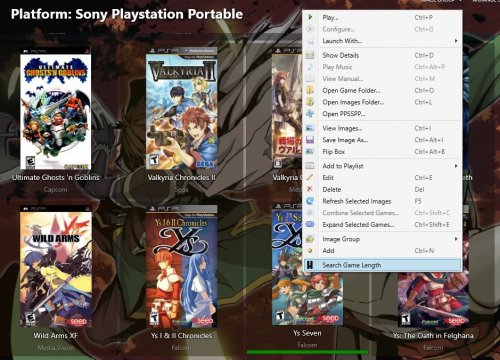 Works fine, and is a really awesome feature! Mass update would be awesome!
- 32 comments
-
- 1
-

-
- plugin
- game length
- (and 2 more)
-
I was noticing the same thing, I think. More than that, the hardware renderer for ps1 lets me ramp up to like 8x+, but it introduces some glitches to my favorite game. The software renderer, I can barely squeeze out 4x but it pretty much looks the same to me either way. It's a tad bit sharper at 8x, but at a certain point, that doesn't do much. Desktop resolution at 1080, but the TV is 4k. I'm just glad to confirm that I don't have to stress on pushing it passed 4x so much. Thanks!
-
Can you explain this a bit further, about diminishing returns? Is this true for all systems, ps1, ds etc?
-
You're always going to run into a game that hasn't had artwork done, yet. You will also run into entries for which the Art does exist but hasn't been uploaded to the Launchbox database yet. It's just a fact of life. Every stitch of this hobby from the emulators to the logos is community driven. But to answer your question, yes, you could google the missing art, or create your own, and further contribute to the community by uploading it to the LB database so the next person can download it on import.
-
Glad you got it sorted.
-
Also, in the same menu as the above screenshot, make sure you didn't set anything for "Enable Hotkey". If you set a controller button or keyboard key to this option, none of the other hotkeys will work unless that button is pressed. This would be my guess as to why you lost the functionality of the buttons. So for instance I set Enable Hotkey to left stick on my controller. The ESC button on the keyboard won't work unless I press the left stick on my controller.
-
Did you set up a controller hotkey button? Or just set the "enable hotkey" button to a key on the keyboard?
-
There is currently no way to compare your collection to what it in the Launchbox Database. However, you can compare you collection against official dats unrelated to launchbox using other software like Clrmamepro and I think romcenter.
-
I don't know how any of this stuff works and I appreciate you all tackling this! If I could make a suggestion, it would be awesome if this would call to a video folder named exactly like the rom first, nested in a directory named after the system. So for instance, if you launch Super Metroid: It looks in Startup Videos/Super Nintendo Entertainment System/Super Metroid/ In the absence of a game specific video, it would then look directly in the system folder: Startup Videos/Super Nintendo Entertainment System This would allow users to do both Game Specific Startup vids for particular games, while utilizing System Specific Vids for the rest. So you could have: Startup Videos/Super Nintendo Entertainment System/Super Metroid/gamevideo.mp4 Startup Videos/Super Nintendo Entertainment System/Systemvideo.mp4 Just a thought. Thanks!
-
Try Fatmatch, I think it will do exactly what you're looking for. Its the only program I know of that will let you name files based on a fuzzy match of the names of other files.
-
Currently, no, but it wouldn't be recommended. Launchbox keeps important information like region in xml files, but, for a lot of people, it's important to keep that information in the title of the rom. Also, rom naming reflects the people who dumped the rom, and not all of them are created equal. So the naming of a rom tells you a lot more about it than the title. There are, however, a host of other programs that will let you rename your roms any way you like. Clrmampro, Bulk Rename Utility, Don's Hyperspin Tools, and Fatmatch to name a few. One of the many great features in Launchbox though is that you don't have to go through the trouble of renaming, as Launchbox matches them to its database while leaving your rom title in tact. If you have a specific question about renaming a specific set, just ask here and we'll help you out.
-
Oh that's just the MAME nag screen. If you see that, the roms are working. You can download a "no nag" version of MAME right here on the launchbox website in the forums download section, if you don't want to see it. It has nothing to do with launchbox or how you launch the games. MAME devs are very meticulous and this box pops up all the time on a lot of games. Doesn't mean they are unplayable. Just click passed it. If you notice sound is missing in place where you know it was before, it might be the particular version of the rom you're launching. Starting over will not solve the nag screen. Again, the only thing you can do is download a version of mame that is compiled to suppress it. Look in the Third party Applications on the launchbox forums. There's a user there who makes versions of mame with this suppressed for every version of Mame that drops.
-
Let me give you some general advice about how to get the most flash in launchbox with the least amount of artwork downloaded. First, pick what you want your games to display per system. I say per system here, because not all art is created equal in this regard. Nintendo and Sega and popular systems typically have beautiful box art sets, even 3D box art sets, but the box art for MAME/Arcade is sized differently and generally doesn't look good (to me) displayed in Launchbox. So pick one per system. My experience is that the most consistent art is clear logos (which I use for mame instead of box art). Next, download Fan Art- Backgrounds. These will display as the background in launchbox when you select a game. Stuff like screenshots will display in the details panel if you select a game, but its something you can skip. Reconstructed anything you can basically skip. So we're talking one set of images to display per game, and the backgrounds. That would be maximum look with minimum download.
-
That's actually pretty nifty looking! To speak what I think is your general question, you could tell launchbox to only display box art for every system, or only clear logos or whatever you want. What's weird is that last screenshot looks identical to launchbox's options, only its called Image Group... In this way, if you just wanted to download box art, or 3D box art, you could set all your systems to just display that. However, there are hundreds of systems, and not all have boxart (some don't have any art). Things get a little more tricky if you ever want to use Bigbox though, as Art types are embedded in the themes there. Edit: Since I personally don't use launchbox (prefer bigbox) for anything but set up, I keep mine in "List View" and that's why you don't see any artwork displayed for the games.

-
It applies to free version. You can preview images here on the database itself: https://gamesdb.launchbox-app.com (but honestly, as said above, the descriptions are right there) I don't think that launchbox uses the same image for several categories, but honestly I don't understand this question. I can't think of an example of where it would, except that if you have a game in a system and put it into a playlist, the playlist entry will use the same images as the system entry. Lastly, if you originally meant to say that you shouldn't even get the option of the checkboxes on a per system basis, that wouldn't work because different systems use different type of artwork. Mame/Arcade uses fliers, Windows/Steam uses banners etc. Having the choice about what you download, every time, is optimal behavior.

