

kyzumi
-
Posts
31 -
Joined
-
Last visited
kyzumi's Achievements

8-Bit Processor (3/7)
9
Reputation
-
Help changing a few details on Game Details panel
kyzumi replied to kyzumi's topic in Custom Theme Tutorials
Ok. Let me show you what I did. I have to remove "PlatformReleaseDate" from GameDetailsView, right? I found this section. Is it correct?
-
Help changing a few details on Game Details panel
kyzumi replied to kyzumi's topic in Custom Theme Tutorials
Thank you for helping! I am trying to change things but it either doesn't do anything or I get an error. I am using lambda beta but the GameDetailsView.xaml is probably from LBPlex 2023. -
I would like to make some edits to Game Details panel but I am having a hard time editing the theme because I have no experience. I basically would like to increase the video size. remove the platform and date above the video and include a few details below the video. I made a very crude edit to show what I want. Is it possible? Can anyone point me to how can I do it? Thank you!
-
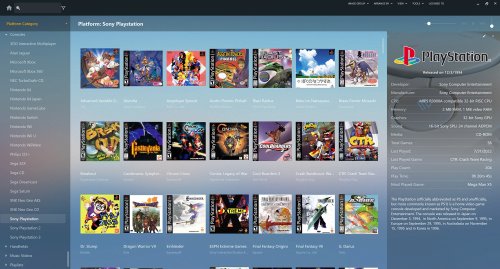 Thank you!
 -
Sega Hikaru Pre Configured Per-Game Controls & Images
kyzumi commented on Warped Polygon's file in Sega Hikaru
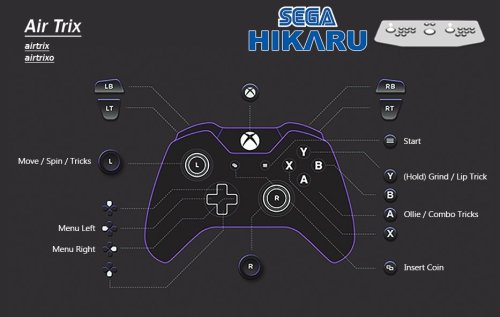 Thank you so much for your work!
 -
I managed to figure it out! It was in the configuration option. now my changes to hotkeys work fine
-
Thank you SO much for this project! I Love it! I am having one issue though: How do I access the retroarch menu after a game is loaded? none of my hotkeys respond (I even changed them before loading a core and still won't respond after game is loaded)
-
Automatically set correct DISPLAY in mame.ini at startup - Marquee setups
kyzumi replied to Hamburglin's topic in Emulation
Ok, I will try that. Could this be related to the default.cfg file being read only? I do that to prevent accidental input changes -
Automatically set correct DISPLAY in mame.ini at startup - Marquee setups
kyzumi replied to Hamburglin's topic in Emulation
there is a output.txt file but it's empty -
Automatically set correct DISPLAY in mame.ini at startup - Marquee setups
kyzumi replied to Hamburglin's topic in Emulation
I am getting an error message even though it appears to be working. Any idea how to fix it?
-
I just found out about this plugin and it is (was 😭) exactly what I needed! sad to see it is no longer working
-
Platform Box Art Collages/Contact Sheets
kyzumi commented on dragon57's file in Platform Backgrounds
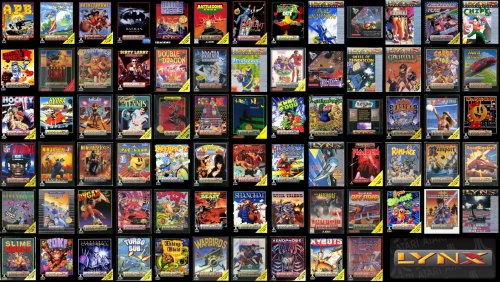 Thank you!
 -
Automatically set correct DISPLAY in mame.ini at startup - Marquee setups
kyzumi replied to Hamburglin's topic in Emulation
Thank you so much! I can't believe I found this! It was so annoying having to manually change the mame.ini everyday! (I have 3 monitors). Thank you! -
 Thank you so much for your work!




