

alnyden
-
Posts
344 -
Joined
-
Last visited
Content Type
Profiles
Forums
Articles
Downloads
Gallery
Blogs
Everything posted by alnyden
-
Now I'm getting error messages in other themes, such as this one in coverbox. All I did was insert some code into one of the views In City Hunter and install the randomizer plugin before all these theme errors started happening. I re-installed City Hunter and removed the plugin, but the errors have continued.

-
I was using City Hunter, but I re-installed it, and it didn't solve the problem. I've tried other themes as well including the default -- same issue. If you didn't change the code, maybe it does have something to do with the randomizer plugin from @Grila, however, he said that it shouldn't affect the options screen. Also, I have removed the plugin, and restored any changes to the theme. I updated to the latest beta this morn but that didn't fix it either. Any ideas? Thanks, R
-
Since I updated to the latest beta, I've been getting the following error message when I go to the options screen in Big Box. At first I thought it was related to installing the new random game plugin, however, I've put everything back as it was before and am still getting this error, regardless of what theme I'm using. Thanks!
-
BigBox - Select Random Game Feature fixed by "Wheel Spin"
alnyden replied to FreeSoftwareServers's topic in Features
I've tried changing the theme and I'm getting the error message regardless. This also occurred after I updated to the latest beta, so I'll mention it in the threads over there. Thanks guys. -
BigBox - Select Random Game Feature fixed by "Wheel Spin"
alnyden replied to FreeSoftwareServers's topic in Features
Thanks for making this plugin! I followed the directions and am having an issue. When I go to the options screen in Big Box, I get the error as seen in the attached picture. What's weird is I put everything back as it was before, deleted the plugin, and I'm still getting this error. Any ideas? Thanks again! R
-
Hey, apologies in advance if I'm missing something obvious here, but at some point in the last few betas, the startup videos stopped randomizing for me. Did anything change? Is there an option somewhere I can't find? Thanks! R
-
Thanks for the update, the changes seem really cool. Unfortunately I'm having some major performance issues with the new version. Sluggish scrolling, videos taking a long time to play, and crashes. Anyone else having problems? Also, didn't get a chance to check myself due to the crashes, but is the old "boring" text version still there? Thanks!
-
Looks amazing! Great work. Looking forward to using this. My only thought is it would work better for a playlist than platform with a lot of games since you can't see the list as you're scrolling.
-
It's possible but extremely difficult. I never got this method to work, but some have said it does. Read the thread below, it's tricky to setup and only works with the current release, and the mod has to be updated every time pinball arcade updates. http://pinballarcadefans.com/showthread.php/10199-DOWNLOAD-Pinball-Arcade-Free-Camera-Mod The other method that I did get to (mostly) work is through a rocketlauncher module. (If you're not using rocketlauncher then stop reading now). Here are some complicated instructions, some of which apply to hyperspin that you can ignore. This only works with pinball arcade version 1.50 or earlier. http://hyperspin-fe.com/forums/topic/10656-quick-tutorial-for-setting-up-pinball-arcade/ Then on page 13 of the thread someone released an update to the module that works with versions past 1.50. But you also need the instructions from the first page to get it to work. http://hyperspin-fe.com/forums/topic/10656-quick-tutorial-for-setting-up-pinball-arcade/?page=13 Warning, your head may explode reading this thread. I'm curious if anyone has found a better way to do this.
-
I would also love a vertical theme.
-
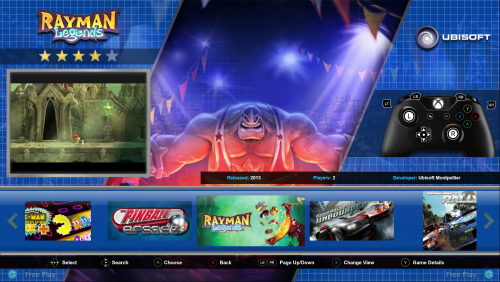 Got it, thanks for letting me know. Unfortunately that will mess up some other themes that use background videos. It actually looks pretty neat with a video in the middle, but the empty box isn't great of course.
 -
Great theme! I seem to have something wrong in my setup though. There's a video playing in the center of the view, but the box on the left is blank. What's supposed to be in the box, and why might it be blank? Thanks for any feedback! R
-
'view genres', 'view play mode' etc - can't change view in BigBox
alnyden replied to danpow's topic in Big Box Custom Themes
I think if you allowed other views for the Genres page, people would quickly create pics and vids for them. (And in fact many of them already exist). Once there is the option of different views, there will be more motivation to solve the problem of creating the artwork. -
Arcade and pinball in one w/rotate monitor
alnyden replied to mthompson239's topic in Collections and Builds
Personally I'd vote for Pinball Arcade. Every table is well designed and the playfield looks good in vertical orientation. (Only negative being it's not easy to launch specific tables directly from BigBox). Future Pinball is a lot more work to setup and I'm not sure it's worth the trouble. -
Good to know. In the meantime I'll avoid the game details. Thanks!
-
Another great theme! I am having an issue with the games details page. When you select a game it shows the games details list. However, if you wait a couple seconds, it goes away (box icon returns on top of it), and then the interface stops working -- you can't navigate games or games details list. (It seems like it's in the games detail but you can't see the options under the graphics). Hope this makes sense.
-
Any chance of adding Apple II to the Nostolgia platform list?
-
You don't have to edit the XML, just put the files in the correct folder (Images, Atari 2600, Advert Front) and make sure the name matches that of the game.
-
Not so fast everyone. He posted his artwork "to be used on retropie systems only." "Lastly, I don't know if or when I"ll return to the community (as a maker, I'm still around helping people)."
-
RetroHumanoid Cinematics & Refried Theme
alnyden replied to RetroHumanoid's topic in Big Box Custom Themes
@RetroHumanoid has the best collection of Rocketlauncher pause media (artwork, music, videos, magazines, etc.) anywhere, which motivated me to learn the difficult process of setting it up, and was well worth it. Thanks for sharing Retro, and glad to see you back at Launchbox. -
Is there an "Other Platforms" option in a game info screen?
alnyden replied to FlightRisk's topic in Features
@Jason Carr recently commented he did not think it could be implemented with accuracy (there was not sufficient info in the database), and therefore was not added to the last poll. -
You can use the audit function in LB and sort by one of the columns which show the # of art files per type.
-
If you hide games with missing media in Big Box, will they still show up in Launchbox? Thanks, great stuff!
-
Mr. RetroLust's new man/game cave
alnyden replied to Mr. RetroLust's topic in Collections and Builds
Agreed on the importance of the marquee screen! Mine was only $130 and totally worth it. -
Do the "Hide Games Missing Media" options apply to Big Box as well?
.png.5ddf71e17b39a8347f1c58bb37fff15d.png)
.png.600521cac9461a6f919d704eae229d94.png)
.png.0b389bfc7e99571a19e84ca0293e9b2a.png)

