

bundangdon
-
Posts
1,243 -
Joined
-
Last visited
-
Days Won
2
Content Type
Profiles
Forums
Articles
Downloads
Gallery
Blogs
Everything posted by bundangdon
-

Show Us Your LaunchBox! Celebrating 13 Years Together
bundangdon replied to AstroBob's topic in Community Corner
I tried a VPN like you suggested, but that didn't work unfortunately. Oh well -
Show Us Your LaunchBox! Celebrating 13 Years Together
bundangdon replied to AstroBob's topic in Community Corner
Really sorry to be a pest, @faeran I just watched the rebroadcast on YouTube which was quite entertaining but couldn't find/see/hear the contest entry code. I'm guessing that was somewhere on the Twitch website while it was being broadcasted?
-
Show Us Your LaunchBox! Celebrating 13 Years Together
bundangdon replied to AstroBob's topic in Community Corner
Maybe. I checked everywhere on the channel and this is pretty much all I can get. Originally from the U.S. but I live in Seoul now
-
Show Us Your LaunchBox! Celebrating 13 Years Together
bundangdon replied to AstroBob's topic in Community Corner
Thanks, but I think that's only if you're a paid subscriber. I went there now and it says "No videos found" -
Show Us Your LaunchBox! Celebrating 13 Years Together
bundangdon replied to AstroBob's topic in Community Corner
Okay, good to know that. Thanks for the update! -
Show Us Your LaunchBox! Celebrating 13 Years Together
bundangdon replied to AstroBob's topic in Community Corner
@AstroBob Just wondering, will any of the Twitch videos be re-broadcasted on Youtube? I really wish you guys would post the videos there because I live abroad and have pretty much a zero chance of watching them and finding out the contest entry codes after midnight here (due to the time difference) And by the way, I've been a very dedicated LaunchBox user since 2015 -
Thanks for all of the help and contributions over the years. Wish you all the best in your future endeavors and happy trails!
-
Just wondering, are you using the a5200 core in Retroarch? If so, that should load up Atari 5200 roms with less issues than the atari800 core. Otherwise, you may have an invalid bios file
-
From my experience, they're almost exactly the same in terms of size. I can imagine CHD support will happen in the future, but for now it's just nice to have everything in one file and it also makes it easier to import the games into frontends like Launchbox.
-
Yep, this was a very unexpected and surprisingly nice update
-
Just a nice little PSA for the emulation community out there. The RPC3 team has just rolled out a major update to RPCS3 that I never thought would happen,but actually did (happen) in their most recent alpha. Iso files are now loadable, and this not a photoshop mock-up or anything of that nature
-
Appreciate the prompt reply, but I don't use the auto import feature and don't plan on using it. I love a lot of the features that LB has but I found that particular feature more frustrating than helpful after trying it out for a few months. @Jason Carr @faeran Manually adding games for the PS Vita should definitely be addressed as it was a relatively simple process with previous versions of LaunchBox but now it simply isn't working.
-
Not sure what happened, but I once used this method several times before for PS Vita without any issues and now it doesn't work. My guess is that the new PSVita importing feature that was recently implemented has messed this up somehow. Can anyone help because every time I try to import multiple .txt files, it comes up empty, as shown in the screenshot below. I've also tried importing the game folders, the individual eboot.bin files and none of these methods worked either. Another update: Can confirm that this is an issue related with the latest versions of LaunchBox. I just tried an older version (13.18) and the importing method for PSVita games works fine, but there's basically no way to manually import PSVita games with the latest versions of the program
-
After trying it out and several other frontends over the past 10 - 20 years, I have to say NeoStation is an interesting project and it's definitely nice to have some friendly competition with other frontends like this one, but it's nowhere near what Launchbox/BigBox is or was. And I have a feeling that once it becomes more developed and adopts many of the same features that are used in Launchbox, it will likely become "increasingly heavy" too. As for the Android version of Launchbox, that's a completely different story as there are definitely better options available such as Daijisho, EmulationStation, Beacon, etc. Although, it's nice to have Launchbox as an available option, and I certainly hope that NeoStation will become a popular frontend of choice for Android in the near future as well.
-
Had the same issue here trying to run fullscreen but I downloaded the latest version from their Discord and it seems to be fixed now. Thanks a lot for the tip!
-
Classic PS1 Overlays for Duckstation
bundangdon commented on The_Ironclad_Lad's file in Platform Bezels/Overlays
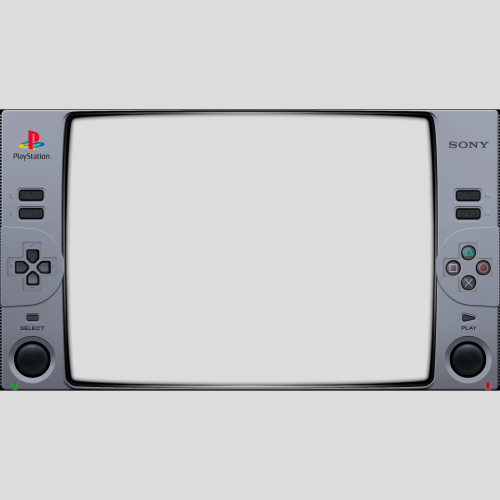 Works great! Thank you for sharing this
 -
This is an excellent addition in the latest beta, and something I've been wanting for quite a while! Thanks a lot for adding this feature in there
-
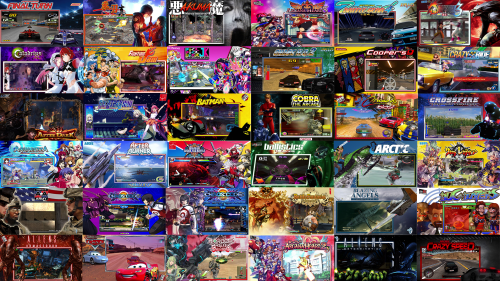 Nicely done! Looking forward to the Part 2 set
 -
Good news: I was able to find that theme stashed away in one of my backup drives. However, upon testing earlier today I found that it crashes and shuts BigBox down completely. It was originally from 2018 or 2019 and I can imagine a lot of the BigBox programming-code has changed since then, if not all of it. If you want though, I'll upload it here. You can take a look at the files and maybe fix it somehow if you know how to code with XAML, or another option is try rebuilding it with the images that are included in there with the Community Theme Creator (check the downloads section) Nostalgia.zip
- 420 replies
-
- 1
-

-
- nostalgic
- per-system theme
- (and 2 more)
-
Unfortunately, the person who originally created and uploaded this theme hasn't been here in quite a while. Also, I had this theme installed and I recall that it would no longer work after some of the recent updates made to BigBox. It would crash as soon as I started up BigBox, and would only work with much older versions of the program, and that happened around 2 to 3 years ago. However, I'll check and see if I still have this theme somewhere on my computer and will upload it here a little later.
- 420 replies
-
- 1
-

-
- nostalgic
- per-system theme
- (and 2 more)
-
Thanks a lot! Not sure if I can help out since I didn't make/write any of the code for this theme. I basically just did a lot of copying and pasting with some help from folks like @faeran and a few other very helpful people in the LB community. I really liked this theme and wanted to put the new features that had been added over the past 4-5 years in there, as the original LBPlex theme hadn't been updated in so long while also being given permission to share this modified version by the original coder @Grila. However, I looked at some of the code now in the file "GameDetailsView.xaml" (in the "Views" folder) and noticed that the font being used there is "Segoe UI" (check line 58) and the code for that particular location you mentioned is here: (line 207) <panel:OutlinedTextBlock Text="{Binding PlatformReleaseDate}" Fill="{Binding ForegroundBrush}" TextWrapping="Wrap" If anyone else with some coding knowledge can decipher that area, then maybe you might be able to find a way to change the font in that area of the xaml file.
-
 Sorry, my bad! I forgot about that particular version of Mame
 -
Look again in the downloads section. There's another version of this in the category marked "3rd Party Apps". It was recently updated with 0.280. You can find it here: Mame No-Nag Updated Monthly, Current Version: - Third-party Apps and Plugins - LaunchBox Community Forums
-
Yep, this is pretty much an accurate description of the bug I came across as well.
-
With the latest beta-update, LaunchBox is crashing whenever a video plays and then I navigate to anything else in the program, using the new FFMPEG video engine. Never had this issue happen before with VLC




