
neil9000
-
Posts
12649 -
Joined
-
Last visited
-
Days Won
38
Content Type
Profiles
Forums
Articles
Downloads
Gallery
Blogs
Everything posted by neil9000
-
Yeah when setup in Launchbox its actually Launchbox that passes the command lines to MAME, and does so whether you use the UI version or not. In fact this is basically all Launchbox does for all emulators it passes the rom to load to the emulator via command line. You use whatever you want to use though, best emulators are always very subjective and what works for one may not work for another. That's the beauty of Launchbox it doesn't care what emulator you use it will just pass the command lines to whatever you tell it to.
-
I see you are thinking about Star Trek Elite Force? I have that on disc but I couldn't get it to install, so id like to see that.
-
I personally use it due to having controller issues with Retroarch, I use Retroarch for as much as I can, but stick to standalone for MAME.
-

theme CriticalZone / CriticalZone - BlueBox
neil9000 commented on CriticalCid's file in Custom Themes
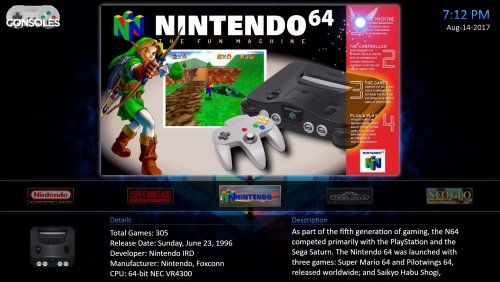 Yeah that view is hardcoded for box front, its very easy to edit the .xml file though as I have done myself to show 3D boxes. Just open "HorizontalWheel2GamesView" in the views folder find the line that says boxes and change it to "3D Boxes".
 -
The standard MAME has a UI also, I have never used command line for it I set everything I needed through the built in UI. This is the default UI in the standard MAME.

-
theme CriticalZone / CriticalZone - BlueBox
neil9000 commented on CriticalCid's file in Custom Themes
What this view? If so you may of accidently changed the image type as it can be changed per platform. I believe its I on the keyboard to cycle through image types. -
As for the touch screen you can use either mouse or right stick on the controller, those options are also in the quick menu.
-
go to View/Auto Play Videos and check the option.
-
 Yep in US and JAP versions.
 -
Its a cartridge for the snes that takes Game Boy games so you can play them on a TV. So yeah not really a system.
-
I suppose it depends where it is getting it from, if it is just initiating a download from the play store under your account, it's probably OK. I think Jason wanted to actually include it with Launchbox but that was a no no, I guess he could technically initiate the download as well, as he already links to the download page when you add Retroarch as a emulator, but i'm not sure how the Retroarch devs would take that to be honest.
-
Set more than one media folder for an item
neil9000 replied to Retrofrogg's topic in Troubleshooting
Yeah you can only specify one folder, I would just copy and paste what you want to the other folder as well. -
http://pluginapi.launchbox-app.com/html/4cf923f7-940c-5735-83de-04107a6ae0e6.htm
-
Yeah HDR will look like that if the content is not HDR, just set it to Auto and it should swap to HDR when viewing that content.
-
Yeah unfortunately that is a issue with a lot of themes, they are designed for 16:9 1080p displays and it is actually quite tricky to support multiple resolutions without actually re-coding the theme. This doesn't solve your issue if you specifically want to use Nostalgia as its a great theme but the one below is specifically designed for 4K screens.
-
Well if you have updated to 8.1 from older versions, then the installers should still be in Launchbox/Updates unless you manually deleted them. I always keep the last official and last couple of betas in there so its easy to roll back if something breaks.
-
Then you will have to send a email to [email protected] and explain why you want a older version, as it is advised you always use the most current version of the software. They may or may not help you, I honestly don't know.
-
lol, no probs, this is a direct quote from what I said in the previous thread where you were discussing this plugin, If you upload the file to our third party apps and plugins section of the downloads, a support forum thread will be automatically created, with a link directly to it from the file download page.
-
Yeah my guess there is a windows scaling issue, 300% is a massive offset. You can try right clicking the Bigbox .exe go to properties/compatibility and check the box to override high DPI scaling, scaling performed by the application. This may or may not work though.
-
@Jason Carr i see VLC 3.0.0 is out now, any thoughts of integrating it? https://www.videolan.org/vlc/releases/3.0.0.html
-
I wouldn't of thought it would be down to the emulator to be honest all its doing is receiving controller inputs. You could try some thing like what I link below, if you have a long USB extension you ideally want a "active repeater" built in as this should amplify the data and power over longer lengths, also if the hub doesn't plug into the mains I would suggest one that does, at the moment you are trying to send power and data over 10 foot to a single USB port, USB ports don't supply a huge amount of power and yours is having to travel 10 foot and then power 4 devices at the end of it. I have a 4 port USB hub that is not powered and I don't really use it as when I plug more than one thing into it, or add a USB hard drive it doesn't send enough power to power the drive, and that is without adding a extension to it. https://www.amazon.co.uk/UGREEN-Extension-Amplification-Keyboards-loudspeakers/dp/B00B2HP2UI/ref=pd_sim_23_4?_encoding=UTF8&refRID=SAJ0BTX20C5MAP5JX4WD&th=1
-
I would guess this issue is a combination of the hub and the extension cable. USB extensions of that length are usually pretty bad as data and power has to be transmitted down the cable, so the longer the cable the more degradation you will get. Also is the hub powered? if it just runs off of the usb power that will also cause issues especially with a 10 foot extension cable.
-
Windows has a built in screenshot tool, just hold the windows button on your keyboard and press print screen, they are saved in pictures/screenshots.
-
OK I have just done a completely new install of Launchbox and imported Sega CD, working just fine for me.
-
OK I am going to ask the same question that was asked in that thread, did you have Launchbox move your roms?

.png.932a1d1b955ee24a9c91ebafbce52e0e.png)


.png.125031fe525bd95f92b7f243c3ebc00b.png)
.png.ff5fe8d53d867c364ea2160aaa7278e9.png)
.png.3e97e4808f93d671da9e4046483412ba.png)